
ARCCAPTAIN XK-LY800H-Skeleton
ARCCAPTAIN Auto Darkening Welding Helmet Instruction Manual
Model: XK-LY800H-Skeleton
Product Overview
The ARCCAPTAIN Auto Darkening Welding Helmet is designed to provide superior eye protection and comfort for various welding, grinding, and cutting applications. It features advanced auto-darkening technology, a large true-color viewing area, and an integrated LED light for enhanced visibility in low-light conditions.
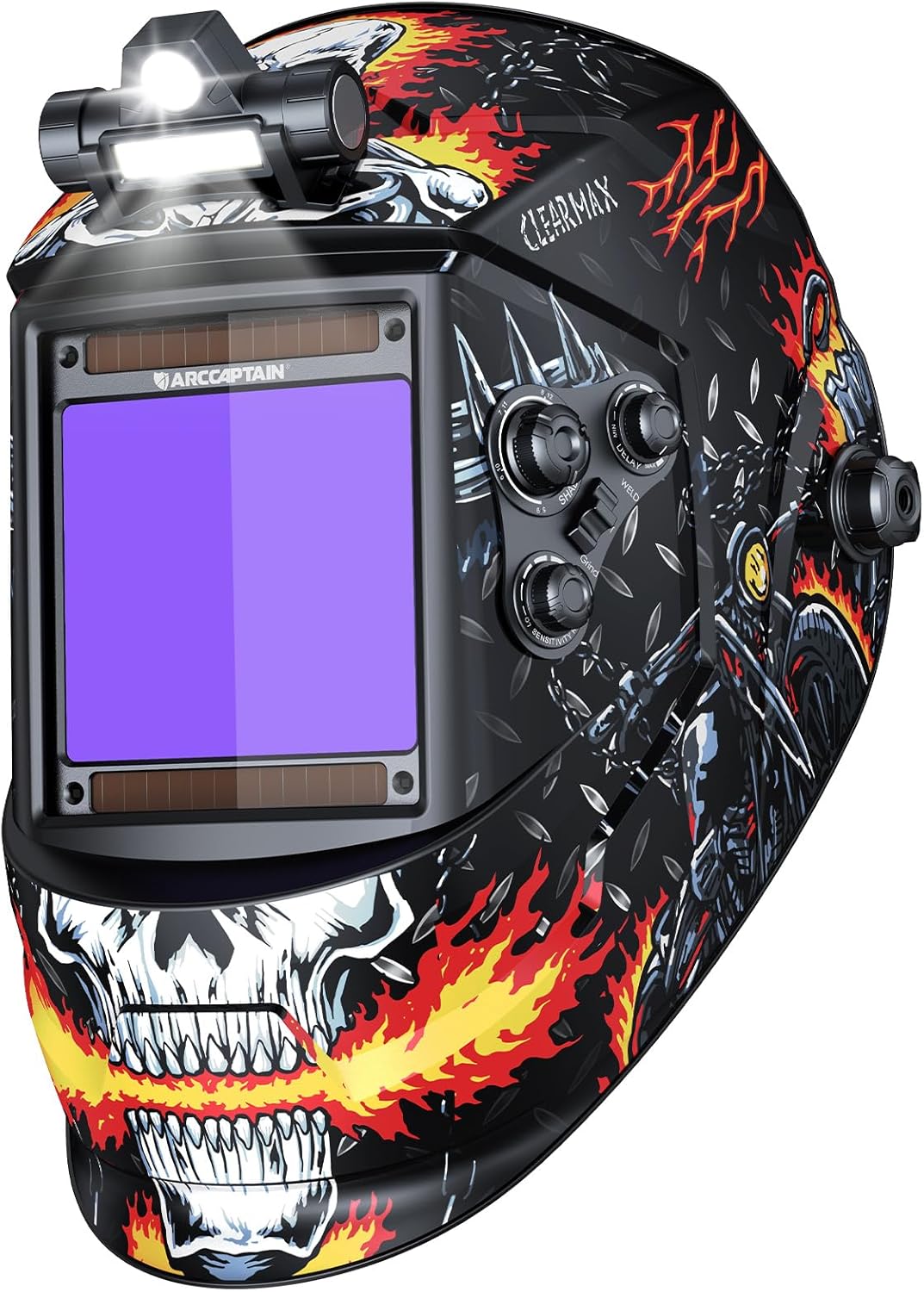
Figure 1: ARCCAPTAIN Auto Darkening Welding Helmet (XK-LY800H-Skeleton model).
Safety Information
Always read and understand all safety warnings and instructions before using this welding helmet. Failure to follow these instructions may result in serious personal injury.
- This helmet is designed for arc welding, MIG, TIG, and cutting applications. It is not suitable for laser welding or oxyacetylene welding/cutting.
- Always wear appropriate personal protective equipment (PPE) in addition to the welding helmet, including safety glasses, gloves, and protective clothing.
- Do not expose the helmet to extreme temperatures or moisture.
- Inspect the helmet and lens before each use for any damage. Replace damaged parts immediately.
- The auto-darkening filter (ADF) may not darken if the arc is too weak or if the sensors are obstructed. Always check the ADF function before welding.
- Do not modify the helmet or its components.
Package Contents
Verify that all items are present in the package:
- 1x ARCCAPTAIN Welding Helmet
- 1x USB-powered LED Welding Light (uninstalled)
- 3x Replacement Outer Lenses
- 1x Replaced Lithium Battery (CR2450)
- 1x User Manual (this document)
- 1x Random Cool Stickers (for personalization)
Setup and Assembly
1. Installing the LED Welding Light
The LED welding light comes uninstalled and can be easily attached to the top of the helmet. Use the provided adhesive or mounting mechanism to secure it firmly. Ensure the light is positioned to illuminate your workspace effectively.

Figure 2: The welding helmet with the USB-powered LED light installed. The light offers two brightness levels for up to 20 hours of lighting.
2. Charging the LED Welding Light
The LED light is rechargeable via a Micro-USB port. Locate the port, typically under a rubber cover near the power button, and connect it to a USB power source using the provided cable. A full charge takes approximately 3 hours.
3. Adjusting the Headgear
The helmet features an adjustable headgear designed for comfort and a secure fit. Adjust the following:
- Head Circumference: Use the knob at the back of the headgear to tighten or loosen the fit around your head.
- Angle Adjustment: Adjust the angle of the helmet relative to your face for optimal viewing and comfort. The helmet allows for 130° angle adjustment.
- Distance to Lens: Adjust the distance between your eyes and the auto-darkening lens for clear vision.
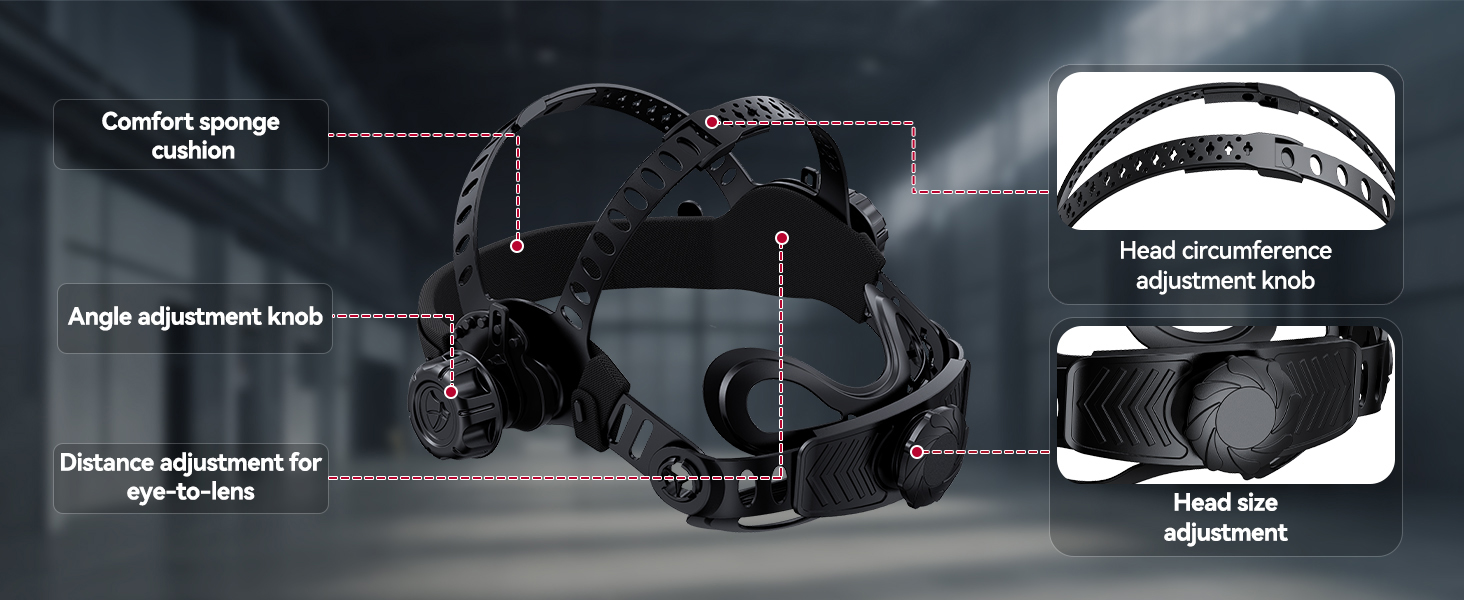
Figure 3: Detailed view of the adjustable headgear components, including comfort sponge cushion, head circumference adjustment knob, angle adjustment knob, and distance adjustment for eye-to-lens.
Operating Instructions
1. Auto-Darkening Filter (ADF) Features
The helmet is equipped with a 3.94" x 3.66" super large visible screen and 1/1/1/1 top optical clarity lenses with true color technology, providing an improved visual experience.

Figure 4: The helmet features a 3.94" x 3.66" viewing area with true color and auto-darkening capabilities.
It utilizes 4 smart arc sensors for fast darkening, switching from light to dark in 1/25000 seconds.

Figure 5: The auto-darkening filter features 4 smart arc sensors and upgraded solar panels for rapid response.
2. Control Knobs and Settings
The helmet features external controls for easy adjustment of shade, sensitivity, and delay without removing the helmet.
- Shade Control: Adjust the dark state level from 4/5-8/9-13.
- Grind Mode: DIN 4
- Cut Mode: DIN 5-9
- Weld Mode: DIN 9-13
- Sensitivity Control: Adjust the sensitivity to accommodate different lighting conditions and arc strengths (e.g., weak arc 20A vs. strong arc 200A).
- Delay Control: Adjust the time it takes for the lens to return from dark to light state (0.1 to 0.8 seconds) after welding.
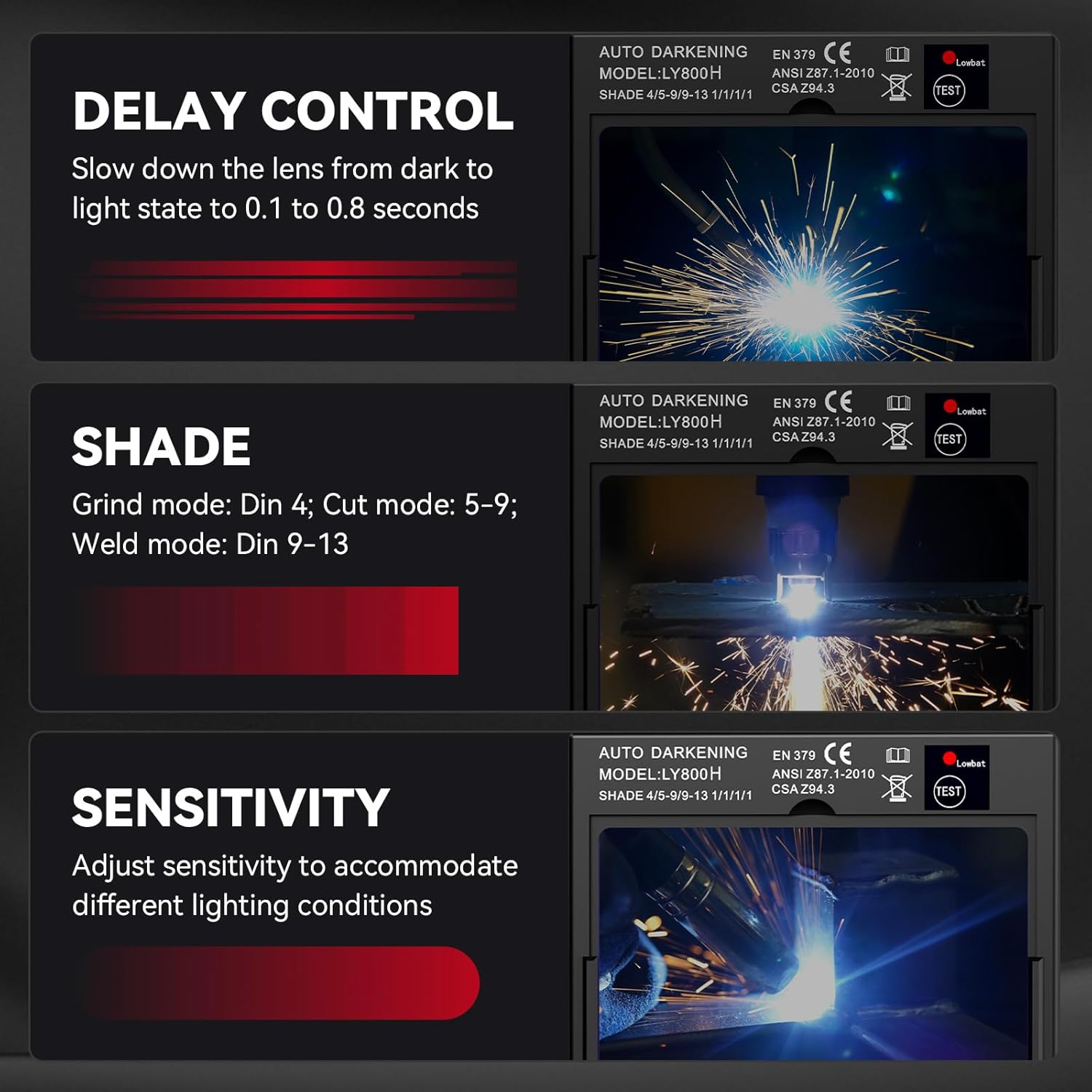
Figure 6: The helmet's control panel showing knobs for Shade, Delay, and Sensitivity, along with a switch for Weld/Cut/Grind modes.
3. Application Modes
This helmet is suitable for a wide range of applications:
- STICK Welding
- MIG Welding
- TIG Welding
- Cutting
- Grinding

Figure 7: The helmet is designed for various applications including STICK, MIG, TIG welding, and cutting.
4. Official Product Video
Video 1: An official product video from ARCCAPTAIN demonstrating the features of the welding helmet, including the LED light, auto-darkening function, and various adjustments.
Maintenance
1. Cleaning the Helmet
Clean the helmet regularly with a soft, damp cloth. Do not use abrasive cleaners or solvents, as they can damage the helmet's surface or the lens.
2. Replacing Lenses
The helmet comes with replacement outer lenses. Replace them if they become scratched, pitted, or otherwise damaged to maintain optical clarity and protection.

Figure 8: Illustration demonstrating the process of replacing the auto-darkening lens in the helmet.
3. Battery Replacement
The auto-darkening filter is powered by solar panels and a replaceable CR2450 lithium battery. If the auto-darkening function becomes unreliable, replace the battery. Ensure proper polarity when installing the new battery.

Figure 9: The helmet's power system, showing solar panels and the location of the replaceable CR2450 lithium battery.
Troubleshooting
| Problem | Possible Cause | Solution |
|---|---|---|
| Lens does not darken | Low battery; sensors obstructed; sensitivity too low; arc too weak. | Replace battery; clean sensors; increase sensitivity; ensure sufficient arc strength. |
| Lens flickers | Sensitivity too high; nearby light sources; unstable arc. | Decrease sensitivity; eliminate interfering light; ensure stable arc. |
| Poor visibility | Scratched/dirty lens; incorrect shade setting. | Clean or replace lens; adjust shade to appropriate level. |
| LED light not working | Battery drained; loose connection. | Recharge LED light; check connection to helmet. |
Specifications
- Viewing Size: 3.94” x 3.66”
- Optical Clarity: 1/1/1/1 (True Color View)
- Operating Temperature: 23°F~131°F (-5°C~+55°C)
- Switching Time: 1/25000s
- UV/IR Protection Level: DIN 16 (continuous and independent)
- Power Source: Solar Powered with CR2450 Lithium Metal Battery (included)
- Material: Polypropylene (PP)
- Item Weight: 8.1 ounces
- Model Number: XK-LY800H-Skeleton (DP-CozyCraft-Skeleton)
- Included Components: Welding helmet, LED light, 3x replacement lenses, 1x replaced lithium battery, stickers.

Figure 10: Key specifications of the ARCCAPTAIN welding helmet, including viewing size, optical clarity, and protection standards.
Warranty and Support
For warranty information, technical support, or replacement parts, please contact ARCCAPTAIN customer service. Refer to the product packaging or the official ARCCAPTAIN website for the most current contact details.
You can also visit the ARCCAPTAIN Store on Amazon for more product information and support resources.
Related documentsXK-LY800H-Skeleton


Ask a question about this manual
Ask about setup, troubleshooting, compatibility, parts, safety, or missing instructions. Manuals+ will review the question and use this page’s manual context to help answer it.