1. Product Overview
The aphqua 722 Wireless CarPlay Screen is a 7-inch waterproof touchscreen designed for motorcycles, offering seamless integration with Apple CarPlay and Android Auto. This device enhances your riding experience by providing access to navigation, calls, music, and voice assistants directly on your motorcycle's handlebar.

Image 1.1: The aphqua 722 Wireless CarPlay Screen mounted on a motorcycle, displaying the CarPlay interface with various app icons. A smartphone showing CarPlay and Android Auto logos, and a motorcycle are also depicted.
Key Features:
- Wireless Apple CarPlay and Android Auto integration for navigation, calls, music, and voice assistant (Siri/Google).
- Bluetooth Dual Mode 5.0 for connecting to Bluetooth earphones or motorcycle headsets.
- 7-inch 1024x600 ultra-high resolution IPS screen with 1000 rivet solar penetration technology for optimal visibility in sunlight.
- Intelligent light detection system for automatic brightness adjustment.
- IP67 waterproof and shock-resistant casing, suitable for all weather conditions (-20°C to 70°C).
- Equipped with a lock anti-theft attachment for easy removal.
- Supports 64GB TF card for local media playback.
- Customizable start screen.
2. What's in the Box
Before beginning installation, please verify that all components are present in the package:
- 1 x aphqua 722 Wireless CarPlay Screen
- 1 x Motorcycle Stand (U-shaped mounting kit)
- 1 x USB Power Cable
- 1 x Power Cable (for direct battery connection)
- 1 x Ring Holder and Connecting Rod
- 1 x User Manual
- 4 x Anti-Slip Silicone (12mm, 22mm, 25.4mm, 28mm)
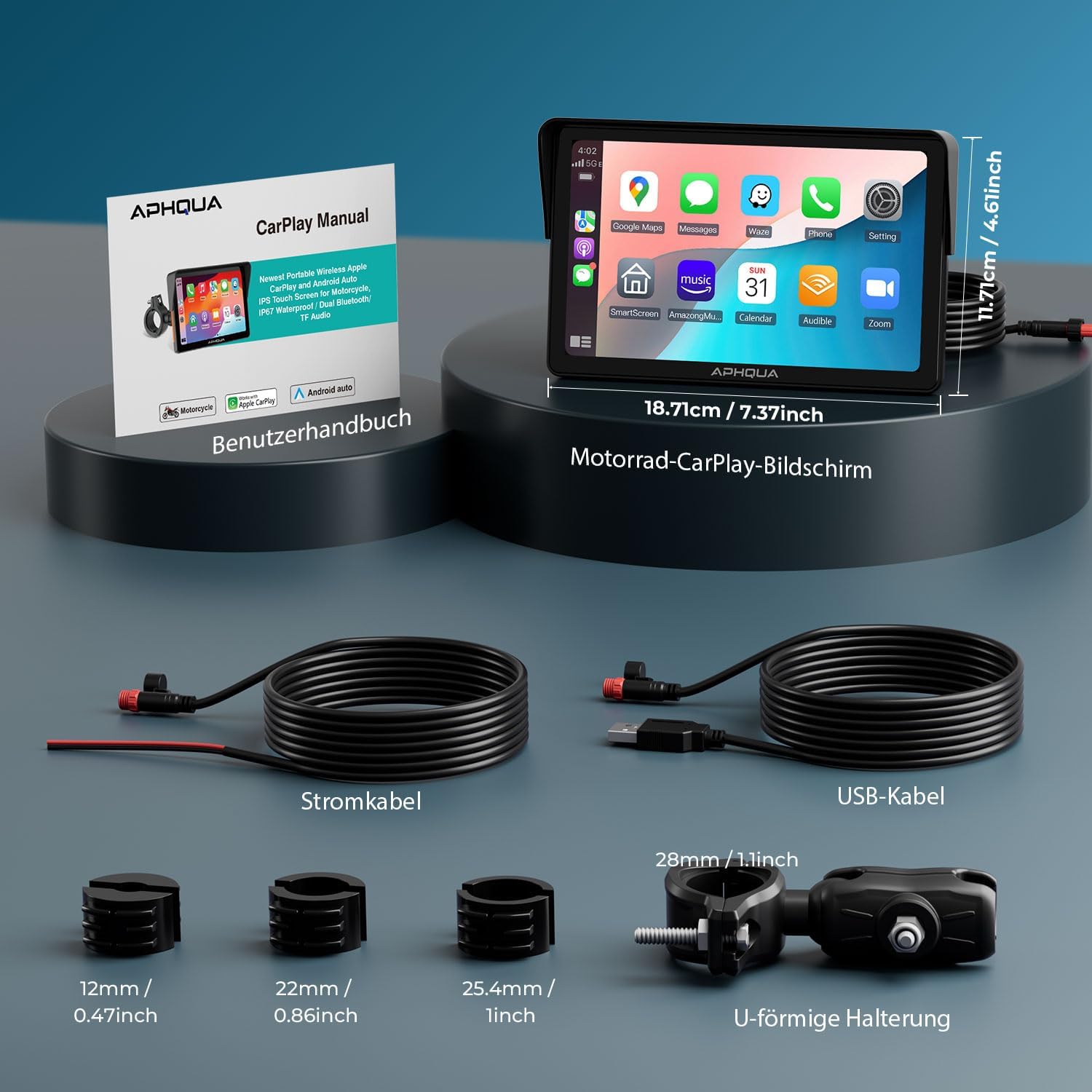
Image 2.1: Diagram showing the aphqua 722 screen with its dimensions (18.71cm / 7.37 inches width, 11.71cm / 4.61 inches height), and the included accessories: power cable, USB cable, 12mm, 22mm, 25.4mm, 28mm anti-slip silicones, and the U-shaped mounting bracket.
3. Setup and Installation
3.1 Mounting the Device
The aphqua 722 comes with a U-shaped mounting kit and a secure screw system designed for easy attachment to most motorcycle handlebars. Ensure the screen is securely fastened to prevent movement during riding.
3.2 Power Connection
There are two primary methods for powering the device:
- Direct Battery Connection: Connect the provided power cable directly to your motorcycle's ACC +12V and ground. This is the recommended method for stable power supply.
- USB Cable Connection: If your motorcycle has a USB port, you can use the USB cable. However, ensure the USB port provides a voltage and current of 5V, 2.5A or more. Insufficient voltage or current (e.g., below 5V, 2.5A) can lead to the CarPlay screen turning off unexpectedly.
After connecting the power, the device should power on automatically when the motorcycle is started.
4. Operating Instructions
4.1 Wireless CarPlay / Android Auto Connection
To use wireless CarPlay or Android Auto, connect your smartphone to the aphqua 722 via Bluetooth. Once connected, the system will automatically launch the respective interface.

Image 4.1: The aphqua 722 screen displaying the CarPlay interface while mounted on a motorcycle handlebar, illustrating wireless connectivity.
Compatibility Requirements:
- For Wireless CarPlay: iPhone 6 or newer, iOS 13 or higher, Siri activated.
- For Wireless Android Auto: Phone with 5GHz Wi-Fi support, Android 11 or later. VPN function on the mobile phone must be disabled. Google Maps, Google Play, and Google Voice must be updated to the latest version.

Image 4.2: A detailed graphic outlining the specific requirements for iPhone (iOS 13+, iPhone 6+) and Android phones (Android 11+, 5GHz Wi-Fi) to ensure wireless CarPlay and Android Auto compatibility.
4.2 Bluetooth Audio Output
The device supports Bluetooth Dual Mode 5.0, allowing you to connect your Bluetooth earphones or motorcycle headset directly to the aphqua 722 for audio output (BT Trans mode). Alternatively, in CarPlay/Android Auto mode, your smartphone can connect to your headset, and the audio will be routed through the screen.

Image 4.3: Illustration of the dual Bluetooth function, showing a rider with a Bluetooth helmet and earbuds, connecting to the aphqua 722 screen, which in turn connects to a smartphone running CarPlay/Android Auto.
4.3 Navigation, Voice Control, and Media
Utilize your preferred navigation apps like Apple Maps, Waze, or Google Maps directly on the screen. Voice commands via Siri or Google Assistant allow for hands-free operation. Play music from your smartphone or from a TF card inserted into the device.

Image 4.4: A four-panel image demonstrating the device's capabilities: GPS navigation with various map apps, voice control activation, Bluetooth call management, and music playback interface.
4.4 TF Card Support
Insert a TF card (up to 64GB) with downloaded videos or music to enjoy media directly on the CarPlay screen, enhancing your travel experience.

Image 4.5: Visual representation of the equalizer settings for audio customization and a display of various movie posters, indicating support for video playback from a 64GB TF card.
5. Maintenance and Care
The aphqua 722 is designed for durability in various conditions. Follow these guidelines for optimal performance and longevity:
- Waterproof Design: The device features an IP67 waterproof and shock-resistant casing, making it suitable for all weather conditions. While it is waterproof, avoid submerging the device for extended periods.
- Temperature Resistance: The screen is temperature resistant from -20°C to 70°C (-4°F to 158°F). Avoid exposing it to temperatures outside this range for prolonged periods.
- Cleaning: Use a soft, damp cloth to clean the screen and casing. Avoid abrasive cleaners or solvents that could damage the surface.
- Anti-Theft: Utilize the lock anti-theft attachment to secure the device when leaving your motorcycle unattended. The device can be easily removed for storage when not in use.

Image 5.1: Three panels illustrating the device's durability: top panel shows the screen in rain (IP67 waterproof), middle panel shows it in hot, sunny conditions (heat resistance), and bottom panel shows it in snowy, cold conditions (cold resistance).
6. Troubleshooting
If you encounter issues with your aphqua 722, please refer to the following common problems and solutions:
- Screen Turns Off Unexpectedly: This may be due to insufficient power supply. If using the USB cable, ensure your motorcycle's USB port provides at least 5V, 2.5A. It is recommended to connect the power cable directly to the motorcycle battery for stable power.
- App Incompatibility: Some third-party applications may not be compatible with Apple CarPlay or Android Auto. This is typically due to the app developers not having agreed with Apple or Google for integration. Use apps that are officially supported.
- Wireless Connection Issues: Ensure your smartphone meets the compatibility requirements (iPhone 6+/iOS 13+ for CarPlay; Android 11+/5GHz Wi-Fi for Android Auto). Verify that VPN is disabled on Android devices.
- Specific Phone Model Issues: The device is not fully compatible with some Samsung Note and S series, Huawei, and Xiaomi phones. Before purchasing, confirm your specific phone model supports wireless CarPlay or Android Auto.
- No Audio Output: Ensure your Bluetooth headset or motorcycle headphones are properly paired with either the aphqua 722 (in BT Trans mode) or your smartphone (in CarPlay/Android Auto mode). Check volume levels on both the device and your headset.
If problems persist after attempting these solutions, please contact customer support for further assistance.
7. Specifications
| Item Weight | 1.8 pounds |
| Product Dimensions | 7.37 x 4.61 x 0.79 inches |
| Model Number | 722 |
| Display Size | 7 Inches |
| Voice Command | Touchscreen |
| Brand | aphqua |
| Vehicle Service Type | Motorcycle |
| Special Feature | Bluetooth, GPS Navigation, Touchscreen, Track Guide, Water Resistant |
| Connectivity Technology | Bluetooth, Wi-Fi |
| Map Type | Street |
| Audio Output Mode | Bluetooth Headset/Headset |
| Mounting Type | Handlebar Mount |
8. Support
For any questions regarding the aphqua 722 Wireless CarPlay Screen, or if you require assistance with troubleshooting or operation, please do not hesitate to contact our customer service. We are committed to providing support and resolving any issues you may encounter.
If you have received a manual in a language other than English and require an English version, please contact customer service to receive the correct manual.


