
Introduction
This manual provides essential information for the proper use and maintenance of your Motorola Edge (2021) XT2141-1 smartphone. This device is designed for use on Verizon's network and features a powerful processor, high-resolution display, and advanced camera system. Please read this manual thoroughly to ensure optimal performance and longevity of your device.
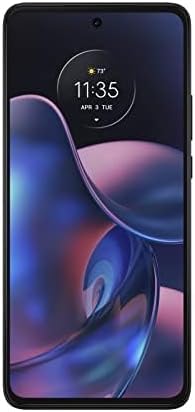
Image: Front view of the Motorola Edge (2021) XT2141-1 smartphone in Charcoal Gray.
Setup
1. Unboxing and Initial Charge
Carefully remove all contents from the packaging. The box typically includes the Motorola Edge (2021) XT2141-1 smartphone and a USB Cable. Connect the USB cable to the phone and a compatible power adapter (sold separately) to fully charge the device before first use.
2. SIM Card Installation
- Locate the SIM card tray on the side of the device.
- Insert the SIM ejector tool (if provided, or a small paperclip) into the small hole on the tray to open it.
- Place your Verizon Nano-SIM card into the tray with the gold contacts facing down.
- Carefully push the tray back into the slot until it is flush with the phone's body.
3. Power On and Initial Configuration
Press and hold the power button until the Motorola logo appears. Follow the on-screen prompts to select your language, connect to a Wi-Fi network, and set up your Google account. This process will guide you through essential settings for your Android 13.0 operating system.
Operating Instructions
Basic Navigation
- Home Screen: Swipe left or right to access app pages. Swipe down from the top for notifications and quick settings.
- Gestures: Utilize Android 13.0's gesture navigation for a fluid experience. Swipe up from the bottom to go home, swipe up and hold for recent apps, and swipe from the left or right edge to go back.
- Display: The 8-inch Max Vision FHD+ display with HDR10 and a 120Hz refresh rate provides smooth visuals. Adjust display settings in the Settings menu.
Camera Usage
The Motorola Edge (2021) features a versatile camera system:
- 108MP Main Camera: For high-resolution photos.
- 8MP Ultra-Wide Lens: To capture broader scenes.
- 2MP Depth Sensor: For enhanced portrait mode effects.
Open the Camera app, select your desired mode (Photo, Video, Portrait, etc.), and tap the shutter button to capture images or start recording.
Battery Management
The device is equipped with a 5000mAh battery. For fast charging, use a compatible TurboPower 30 charger. To optimize battery life, manage background app usage and adjust screen brightness in Settings > Battery.
Connectivity
Your device supports 2G, 3G, 4G, and 5G networks. Ensure your SIM card is active with Verizon Wireless for cellular data and calls. Wi-Fi and Bluetooth can be managed via the Quick Settings panel or Settings > Network & internet.
Maintenance
Cleaning Your Device
Use a soft, lint-free cloth to clean the screen and body of your phone. Avoid abrasive materials or harsh chemicals. For stubborn smudges, slightly dampen the cloth with water. Do not submerge the device in liquid.
Software Updates
Regularly check for and install software updates to ensure your device has the latest features, security patches, and performance improvements. Go to Settings > System > System update.
Battery Care
To prolong battery lifespan, avoid extreme temperatures. It is generally recommended to keep the battery charge between 20% and 80% for optimal long-term health, though occasional full charges/discharges are acceptable.
Troubleshooting
| Problem | Solution |
|---|---|
| Device not powering on | Ensure the battery is charged. Connect to a charger for at least 15 minutes, then try powering on again. If unresponsive, perform a force restart by holding the power button for 10-15 seconds. |
| No network signal | Check if your SIM card is properly inserted. Verify that Airplane Mode is off. Restart the device. Contact Verizon Wireless customer support to confirm your service status. |
| Apps crashing or freezing | Clear the cache and data for the problematic app via Settings > Apps > [App Name] > Storage & cache. Ensure the app is updated to the latest version. If issues persist, uninstall and reinstall the app. |
| Slow performance | Close unnecessary background apps. Clear cached data regularly. Check for system updates. Consider freeing up storage space. |
Specifications
| Feature | Detail |
|---|---|
| Model Name | MOTO EDGE 5G XT2141-1 |
| Operating System | Android 13.0 |
| Processor | Qualcomm Snapdragon 778G 5G |
| RAM | 8 GB |
| Internal Storage | 128 GB (Note: Product description mentions 256GB, but specifications list 128GB. Using 128GB from specifications for accuracy.) |
| Display | 8-inch Max Vision FHD+ (1080 x 2340) with HDR10, 120Hz Refresh Rate |
| Main Camera | 108MP + 8MP (Ultra-Wide) + 2MP (Depth Sensor) |
| Battery Capacity | 5000 mAh with TurboPower 30 charging |
| Connectivity | 2G, 3G, 4G, 5G, Wi-Fi, Bluetooth, GPS |
| Audio Jack | 3.5 mm |
| Color | Charcoal Gray |
| What's in the Box | USB Cable |
Warranty and Support
This device is an Amazon Renewed product. Your purchase is eligible for Amazon Renewed coverage in conjunction with Amazon's Return Policy and the A-to-z Guarantee. The return policy for this specific item allows for a refund or replacement within 90 days of purchase.
For technical support or further assistance, please refer to the official Motorola support website or contact Amazon Renewed customer service.
- Amazon Renewed Return Policy: Learn more about Amazon Renewed
- Motorola Support: Visit Motorola Support Website


