1. Introduction
Thank you for choosing the SUNGOOYUE L019 Desktop Phone. This manual provides detailed instructions for the proper setup, operation, and maintenance of your new telephone. Please read this manual thoroughly before using the device to ensure optimal performance and longevity.
The L019 is designed for both office and home environments, featuring DTMF dual system caller ID, adjustable LCD brightness, and convenient memory storage functions.
2. Package Contents
Please verify that all items listed below are included in your package:
- 1 x SUNGOOYUE L019 Telephone Unit
- 1 x Handset
- 1 x Handset Connection Cord (Coiled Cord)
- 1 x Telephone Line Cord
- 1 x User Manual (this document)
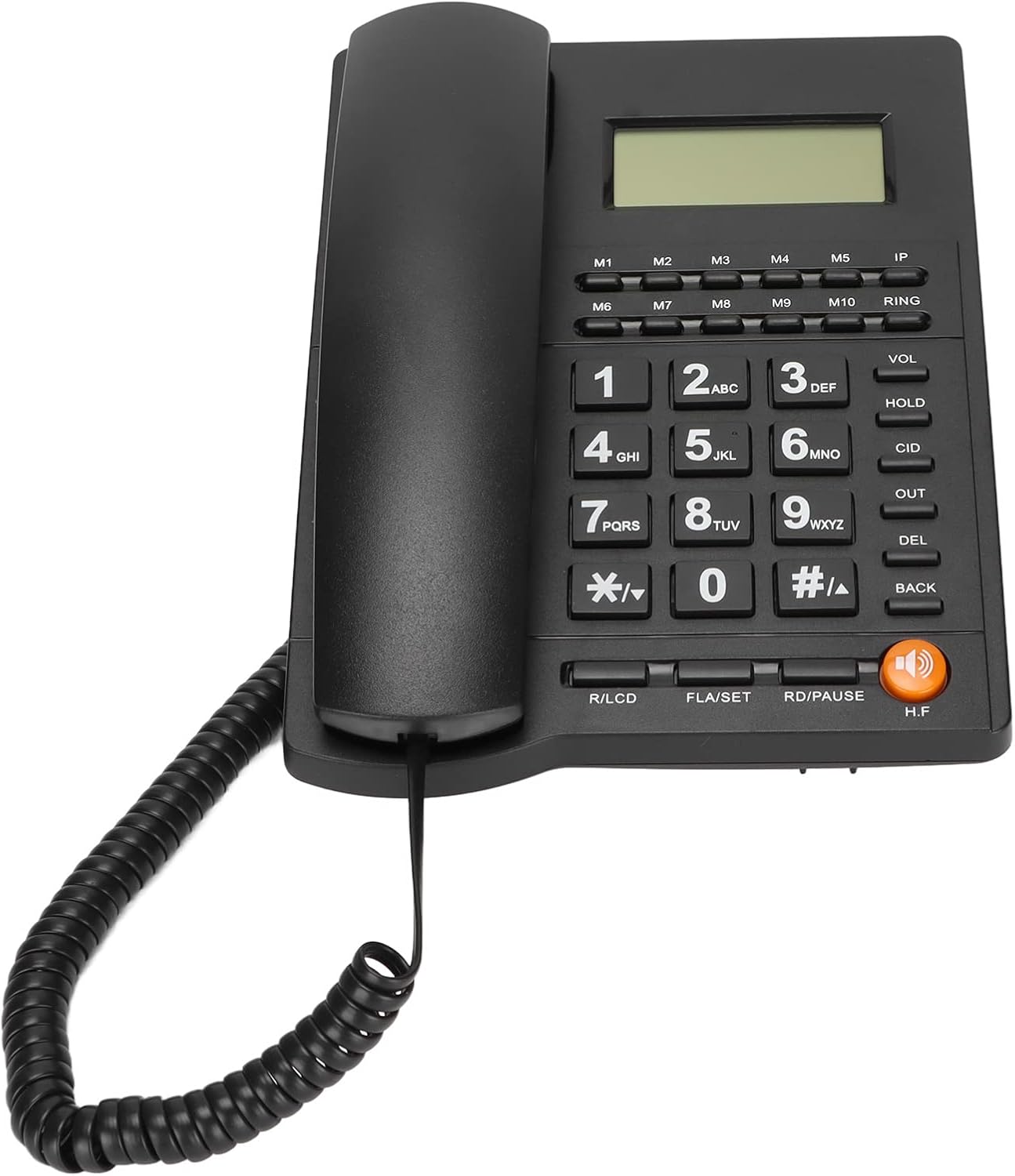
Image 2.1: Contents of the SUNGOOYUE L019 package, including the main phone unit, handset, coiled cord, and telephone line cord.
3. Setup Instructions
The SUNGOOYUE L019 Desktop Phone is designed for simple plug-and-play installation. Follow these steps to set up your phone:
- Connect the Handset: Plug one end of the coiled handset cord into the port on the side of the telephone unit and the other end into the handset.
- Connect the Telephone Line: Plug one end of the telephone line cord into the "LINE" port on the back of the telephone unit. Plug the other end into your wall telephone jack.
- Placement: Place the telephone unit on a stable, flat surface.
- Initial Power-Up: The phone will power on automatically once connected to the telephone line. The LCD screen should display the current date and time.

Image 3.1: The SUNGOOYUE L019 Desktop Phone, showing the main unit and connected handset, ready for use.
4. Key Features
The SUNGOOYUE L019 Desktop Phone offers a range of features designed for convenience and efficiency:
- DTMF Dual System Caller ID: Automatically identifies incoming caller IDs.
- Call Records: Stores up to 50 groups of incoming call numbers (8 digits) or 32 groups (16 digits), and 14 groups of outgoing numbers (8 digits) or 8 groups (16 digits) with call times.
- Real-time Display: Shows current date and week.
- Adjustable LCD Brightness: 5 levels of LCD brightness for optimal viewing.
- Do Not Disturb (DND): Customizable DND period from 1 to 99 hours.
- Ringtones: 16 common ringtones to choose from.
- Volume Control: Software-based adjustment for ring volume and hands-free volume.
- Alarm Function: 3 distinct alarm settings.
- IP Function: Supports IP dialing.
- Single Key Storage (M1-M10): 10 programmable memory keys for frequently dialed numbers.
- R Key Transfer: For call transfer functions (PABX systems).
- Customizable Flash Time: Selectable flash times (90, 95, 100, 120, 180, 300, 600, 1000ms).

Image 4.1: The phone's display and keypad, illustrating features like DTMF/FSK dual system, caller ID, adjustable LCD brightness, and IP function.
5. Operating Instructions
5.1 Basic Call Functions
- Making a Call: Lift the handset or press the H.F (Hands-Free) button. Dial the desired number.
- Answering a Call: When the phone rings, lift the handset or press the H.F button.
- Ending a Call: Place the handset back on the cradle or press the H.F button if in hands-free mode.
5.2 Caller ID
The phone automatically displays the caller's number (if available) on the LCD screen during an incoming call. You can review past incoming and outgoing calls using the OUT and CID buttons.
5.3 Adjusting LCD Brightness
The LCD brightness can be adjusted to one of 5 levels. Refer to the specific settings menu (usually accessed via a SET or FLA/SET button) for this adjustment.
5.4 Setting Ringtone and Volume
- Ringtone Selection: Choose from 16 common ringtones. Access the ringtone settings via the menu (e.g., FLA/SET button).
- Volume Adjustment: Ring volume and hands-free volume can be adjusted. Use the VOL button or navigate through the settings menu.
5.5 Using Memory Keys (M1-M10)
The phone features 10 single-key storage locations (M1 to M10) for quick dialing of frequently used numbers.
- To Store a Number:
- Press FLA/SET (or similar 'SET' button).
- Dial the phone number you wish to store.
- Press FLA/SET again.
- Press the desired memory key (M1 to M10). The number is now stored.
- To Dial a Stored Number:
- Lift the handset or press H.F.
- Press the desired memory key (M1 to M10). The stored number will be dialed automatically.
5.6 Do Not Disturb (DND)
Activate the Do Not Disturb function to silence incoming calls for a set period (1-99 hours). Consult the phone's menu settings for DND activation and duration configuration.
5.7 Alarm Function
The phone supports 3 distinct alarm settings. Access the alarm settings through the menu to set times and activate alarms.

Image 5.1: Detailed view of the phone's keypad, showing the M1-M10 memory keys, function buttons, and numerical pad.
6. Specifications
| Model | L019 (Item Model Number: SUNGOOYUE5r4gqg9azn) |
| Material | PVC |
| Color | Black |
| Caller ID System | DTMF Dual System (Automatic Identification) |
| Incoming Call Records | 50 groups (8 digits) or 32 groups (16 digits) |
| Outgoing Call Records | 14 groups (8 digits) or 8 groups (16 digits) |
| LCD Brightness | 5 adjustable levels |
| Do Not Disturb | 1-99 hours |
| Ringtones | 16 selectable options |
| Alarm Functions | 3 groups with different sounds |
| Memory Storage | 10 single-key storage (M1-M10) |
| Flash Time Options | 90, 95, 100, 120, 180, 300, 600, 1000ms |
| Package Dimensions | 8.66 x 8.66 x 2.76 inches |
| Item Weight | 1.22 pounds |
7. Troubleshooting
If you encounter issues with your SUNGOOYUE L019 Desktop Phone, please refer to the following common problems and solutions:
- No Dial Tone:
- Ensure the telephone line cord is securely connected to both the phone and the wall jack.
- Check if your telephone service is active.
- Try connecting another working phone to the same wall jack to rule out line issues.
- Caller ID Not Displaying:
- Verify that your telephone service provider offers Caller ID service.
- Ensure the phone is correctly connected.
- Some calls (e.g., blocked numbers) may not display Caller ID.
- Phone Does Not Ring:
- Check the ring volume settings and ensure it is not set to silent or minimum.
- Verify that the Do Not Disturb (DND) function is not active.
- Ensure the telephone line is properly connected and active.
- Cannot Store Numbers in Memory Keys:
- Follow the storage procedure carefully as outlined in Section 5.5.
- Ensure you are pressing the FLA/SET button correctly during the storage process.
8. Maintenance
To ensure the longevity and proper functioning of your SUNGOOYUE L019 Desktop Phone, follow these simple maintenance guidelines:
- Cleaning: Wipe the phone's surface with a soft, damp cloth. Do not use harsh chemicals, abrasive cleaners, or excessive moisture.
- Avoid Liquids: Keep the phone away from water and other liquids.
- Placement: Avoid placing the phone in direct sunlight, near heat sources, or in areas with high humidity.
- Handle with Care: Avoid dropping the phone or subjecting it to strong impacts.
9. Warranty and Support
Specific warranty information for the SUNGOOYUE L019 Desktop Phone is not provided within this manual. For details regarding warranty coverage, technical support, or service inquiries, please refer to the documentation included with your purchase or contact the seller/manufacturer directly.
You may also visit the SUNGOOYUE Store on Amazon for additional product information and support resources.
Related Documents - L019
 |
Troy-Bilt Snow Blower Registration, Parts, and Warranty Information Comprehensive guide to Troy-Bilt snow blower registration, replacement parts, accessories, and limited warranty details. Find contact information and service procedures for your Troy-Bilt snow blower. |
 |
Troy-Bilt Lawn Tractor Parts Manual and Diagrams Comprehensive illustrated parts list and diagrams for Troy-Bilt lawn tractors, detailing components for the frame, drive system, engine, deck, steering, electrical systems, and accessories. Includes part numbers and descriptions for maintenance and repair. |
 |
Ride Java Decaf Back Order Form - Canada | Sunrise Medical Order form for the Ride Java Decaf Back system and accessories from Sunrise Medical Canada. Includes product details, part numbers, and pricing for wheelchair back supports and related components. |
 |
Каталог электронного оборудования и инструментов Широкий ассортимент электронных измерительных приборов, блоков питания, осциллографов, микроскопов, паяльного оборудования, генераторов, мультиметров и других инструментов от ведущих производителей. |
 |
Октябрьская акция на лабораторное оборудование от Суперайс Каталог октябрьской распродажи лабораторного оборудования, включая блоки питания, осциллографы, микроскопы и другие измерительные приборы от ведущих производителей с выгодными скидками. |
 |
October Sale: Electronic Test Equipment and Instruments from Superice Explore the October promotional sale from Superice, featuring a comprehensive catalog of electronic test and measurement equipment, including laboratory power supplies, oscilloscopes, microscopes, signal generators, multimeters, and more from leading manufacturers like LANYI, MAISHENG, RIGOL, Saike, and others. |