
Lumos LHEUT-N0
Contents
Lumos Ultra E-Bike Smart Helmet User Manual
Model: LHEUT-N0 | Brand: Lumos
1. Introduction
Welcome to the Lumos Ultra E-Bike Smart Helmet user manual. This helmet is engineered to provide enhanced safety and visibility for e-bike, scooter, and bicycle riders. It integrates advanced lighting, turn signals, and MIPS technology to offer a secure and intelligent riding experience.
Please read this manual thoroughly before using your helmet to ensure proper setup, operation, and maintenance.
2. Important Safety Information
Your safety is paramount. Always wear your helmet correctly and ensure all features are functioning before each ride.
- Proper Fit: A helmet can only protect if it fits correctly. Ensure the helmet is snug, level, and does not obstruct vision. Refer to the 'Helmet Fit' section for detailed instructions.
- Certification: This helmet complies with U.S. CPSC Safety Standard for Bicycle Helmets for Persons Age 5 and Older and is NTA 8776 Certified, providing protection against impact at higher speeds, ideal for e-bike riders.
- MIPS Technology: Equipped with Multi-Directional Impact Protection System (MIPS), this helmet is designed to help reduce rotational forces to the head that can result from certain angled impacts.
- Visibility: The integrated LED lights and turn signals are designed to increase your visibility to others. However, they do not replace the need for standard bicycle lights or adherence to local traffic laws.
- Damage: Do not use a helmet that has been involved in an impact, even if there is no visible damage. The helmet's protective capabilities may be compromised.
- Modifications: Do not modify the helmet in any way, as this may compromise its safety features.

Image: The Lumos Ultra E-Bike Smart Helmet is NTA 8776 certified for enhanced protection at higher speeds, making it suitable for e-bike use.

Image: The helmet incorporates MIPS technology, a low-friction layer designed to reduce rotational motion to the head during certain angled impacts, thereby helping to prevent brain injuries.
3. Package Contents
Please verify that all items are present in your package:
- Lumos Ultra E-Bike Smart Helmet
- Lumos Remote (Wireless Handlebar Remote)
- User Manual (This Document)
- Charging Cable (USB-C)

Image: The complete Lumos Ultra E-Bike Smart Helmet package, including the helmet, remote, and a visual representation of the companion app.
4. Setup Guide
4.1. Helmet Fit
A properly fitted helmet is crucial for safety and comfort. The Lumos Ultra E-Bike Smart Helmet accommodates head sizes from 21.2" to 24" (54cm to 61cm).
- Measure Your Head: Use a flexible tape measure to find the circumference of your head. Place the tape approximately 1 inch (2.5 cm) above your eyebrows and ears.
- Adjust the Fit System: Use the adjustable dial fit system at the back of the helmet to achieve a snug and comfortable fit. The helmet should not move freely when you shake your head.
- Adjust Straps: Ensure the chin strap is centered under your chin and tightened so that the helmet is secure but not uncomfortably tight. The side straps should form a 'V' shape just below your ears.
- Check Stability: With the helmet on and straps fastened, try to move the helmet from side to side and front to back. It should feel secure and not shift significantly.

Image: A visual guide to measuring head circumference and ensuring a correct helmet fit for optimal safety and comfort.
4.2. Charging the Helmet
Before first use, fully charge your Lumos Ultra E-Bike Smart Helmet. Use the provided USB-C cable to connect the helmet to a power source (e.g., computer USB port or wall adapter).
- The charging port is located at the rear of the helmet.
- An indicator light will show charging status (e.g., red for charging, green for fully charged).
- A full charge typically takes approximately 2-3 hours.
4.3. Lumos App Connection
The Lumos app allows you to customize LED patterns, check battery life, and track rides. Download the 'Lumos' app from your device's app store.
- Ensure your helmet is charged and turned on.
- Enable Bluetooth on your smartphone.
- Open the Lumos app and follow the on-screen instructions to pair your helmet.
- Once connected, you can adjust light settings, brightness, and monitor battery levels.

Image: The Lumos app provides intuitive control over your helmet's lighting features and allows for personalized settings.
4.4. Remote Pairing
The wireless handlebar remote controls the helmet's turn signals. To pair the remote:
- Turn on your helmet.
- Press and hold the power button on the remote until the indicator light flashes.
- The remote should automatically pair with the helmet. A successful connection is indicated by a solid light on the remote.
- Mount the remote securely on your handlebar in an easily accessible position.

Image: The wireless remote allows for easy activation of the helmet's integrated turn signals, enhancing communication with other road users.
5. Operating Instructions
5.1. LED Lights
The helmet features integrated front and rear LED lights for increased visibility. You can cycle through different light modes using the power button on the helmet or via the Lumos app.
- Front Lights: White LEDs provide forward visibility.
- Rear Lights: Red LEDs enhance visibility from behind.
- Light Modes: Various modes are available, including steady, flashing, and pulsating patterns. Refer to the app for full customization options.
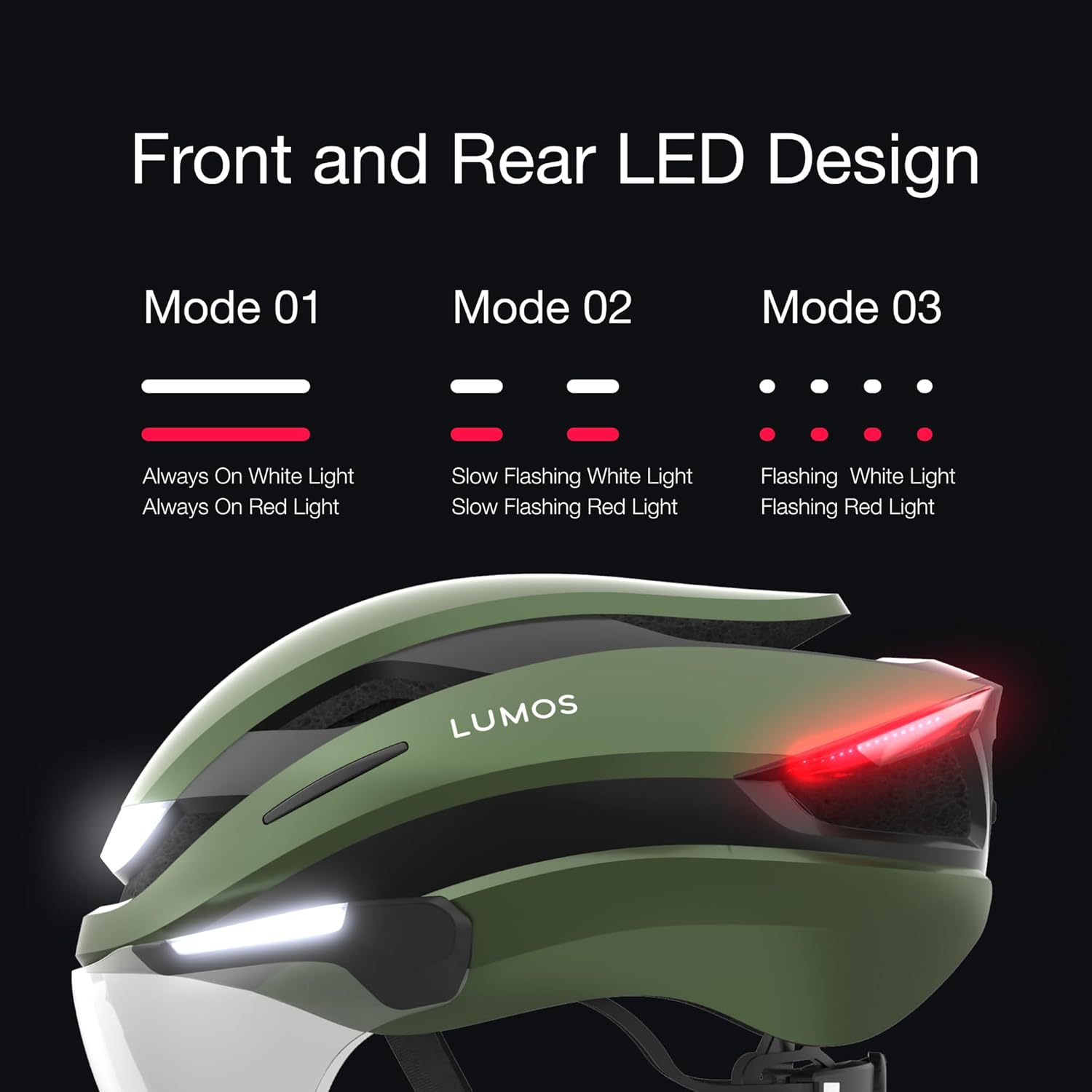
Image: The helmet offers multiple front and rear LED light modes to suit different riding conditions and preferences.
5.2. Turn Signals
Activate the integrated turn signals using the paired Lumos Remote.
- Press the left button on the remote to activate the left turn signal.
- Press the right button on the remote to activate the right turn signal.
- The signals will flash for a set duration or until you press the button again to cancel.
- An audible beep from the helmet confirms turn signal activation, reminding you that the signal is on.
5.3. Retractable Face Shield
The helmet features a retractable face shield for eye protection against wind, debris, and insects.
- To deploy the shield, gently pull it down from its stored position until it clicks into place.
- To retract the shield, push it upwards until it securely locks into the helmet shell.
6. Maintenance
6.1. Cleaning the Helmet
Regular cleaning helps maintain the helmet's appearance and functionality.
- Use a soft cloth, mild soap, and water to clean the outer shell and straps. Avoid harsh chemicals or abrasive materials.
- For the face shield, use a soft, lint-free cloth and water. If fogging occurs, an anti-fog spray can be applied.
- Allow the helmet to air dry completely before storage or next use.
6.2. Battery Care
To maximize battery lifespan:
- Charge the helmet regularly, even if not used frequently.
- Avoid fully discharging the battery for extended periods.
- Store the helmet in a cool, dry place away from extreme temperatures.
7. Troubleshooting
If you encounter issues with your Lumos Ultra E-Bike Smart Helmet, refer to the solutions below:
| Problem | Possible Cause | Solution |
|---|---|---|
| Helmet not turning on | Low battery; Power button not pressed correctly | Charge the helmet fully; Press and hold the power button for 2-3 seconds. |
| Lights not working | Low battery; Incorrect light mode selected; App connectivity issue | Charge the helmet; Cycle through light modes using the power button or app; Reconnect via the Lumos app. |
| Remote not controlling turn signals | Remote not paired; Remote battery low; Interference | Re-pair the remote (see Section 4.4); Charge or replace remote battery; Move away from strong signal interference. |
| App not connecting to helmet | Bluetooth off; Helmet off; App glitch | Ensure Bluetooth is enabled on your device; Turn helmet on; Restart the app and try pairing again. |
| Face shield fogs up | Temperature difference; Humidity | Apply an anti-fog spray to the shield; Ensure adequate ventilation. |
| Battery life shorter than expected | All LEDs on constantly; Frequent use of high-brightness modes | Adjust light modes to flashing or lower brightness settings for extended battery life. |
If the issue persists, please contact Lumos customer support.
8. Specifications
| Feature | Detail |
|---|---|
| Model Name | Ultra Ebike MIPS |
| Part Number | LHEUT-N0 |
| Color | Emerald Green |
| Size | M-L (21.2"-24" / 54cm-61cm) |
| Outer Material | Polycarbonate (PC) |
| Inner Material | Expanded Polystyrene |
| Special Feature | Rechargeable Bike Helmet, Integrated LED Lights, Turn Signals, Retractable Face Shield, MIPS |
| Certifications | U.S. CPSC Safety Standard for Bicycle Helmets for Persons Age 5 and Older, NTA 8776 Certified |
| Recommended Uses | Cycling (E-Bike, Scooter, Bicycle) |
| UPC | 810059474055 |
| Item Package Dimensions | 14.25 x 9.72 x 7.09 inches |
| Package Weight | 0.93 Kilograms |
9. Warranty and Support
9.1. Warranty Information
The Lumos Ultra E-Bike Smart Helmet comes with a 1 Year Warranty from the date of purchase. This warranty covers manufacturing defects and issues arising from normal use.
For warranty claims, please retain your proof of purchase.
9.2. Accident Replacement Policy
Lumos offers an Accident Replacement Policy. If your helmet is damaged in a road accident, you may be eligible for a 30% discount on a replacement helmet. To initiate a claim:
- Contact Lumos customer support.
- Provide details of the accident and required proofs of the damaged helmet.
- Receive a code to repurchase the helmet at a discounted rate.
Note: This policy applies to helmets sold directly by Lumos helmet.
9.3. Customer Support
For any questions, technical assistance, or support inquiries, please contact Lumos customer support:
- Email: support@lumoshelmet.co
- Website: Visit the official Lumos website for FAQs and additional resources.
You can also find the Lumos app on the Google Play Store and Apple App Store for the latest updates and features.
Documents and downloads
Ask a question about this manual
Ask about setup, troubleshooting, compatibility, parts, safety, or missing instructions. Manuals+ will review the question and use this page’s manual context to help answer it.