
1. Introduction
Thank you for choosing the Xiaomi Dust Mite Vacuum Cleaner 2. This handheld vacuum is specifically designed for effective removal of dust mites and allergens from various textile surfaces. Featuring a powerful 12000 Pa suction, a UV disinfectant lamp, and a 4-stage cyclonic filtration system, it ensures a deep and hygienic clean. The integrated 50°C hot air drying function helps minimize residual moisture, making it ideal for mattresses, pillows, and upholstery. Its lightweight design (1.6 kg) ensures ease of use for daily cleaning.
2. Safety Instructions
Please read all safety instructions carefully before using the appliance to prevent injury or damage.
- Do not use the vacuum cleaner on wet surfaces or to pick up liquids.
- Keep the appliance out of reach of children.
- Always unplug the vacuum cleaner from the power outlet before performing any cleaning or maintenance.
- Do not operate the vacuum cleaner if the power cord or plug is damaged.
- Ensure that the air vents are not blocked during operation to prevent overheating.
- Use only attachments and accessories recommended by the manufacturer.
- Do not expose the UV lamp directly to eyes or skin.
3. Product Components
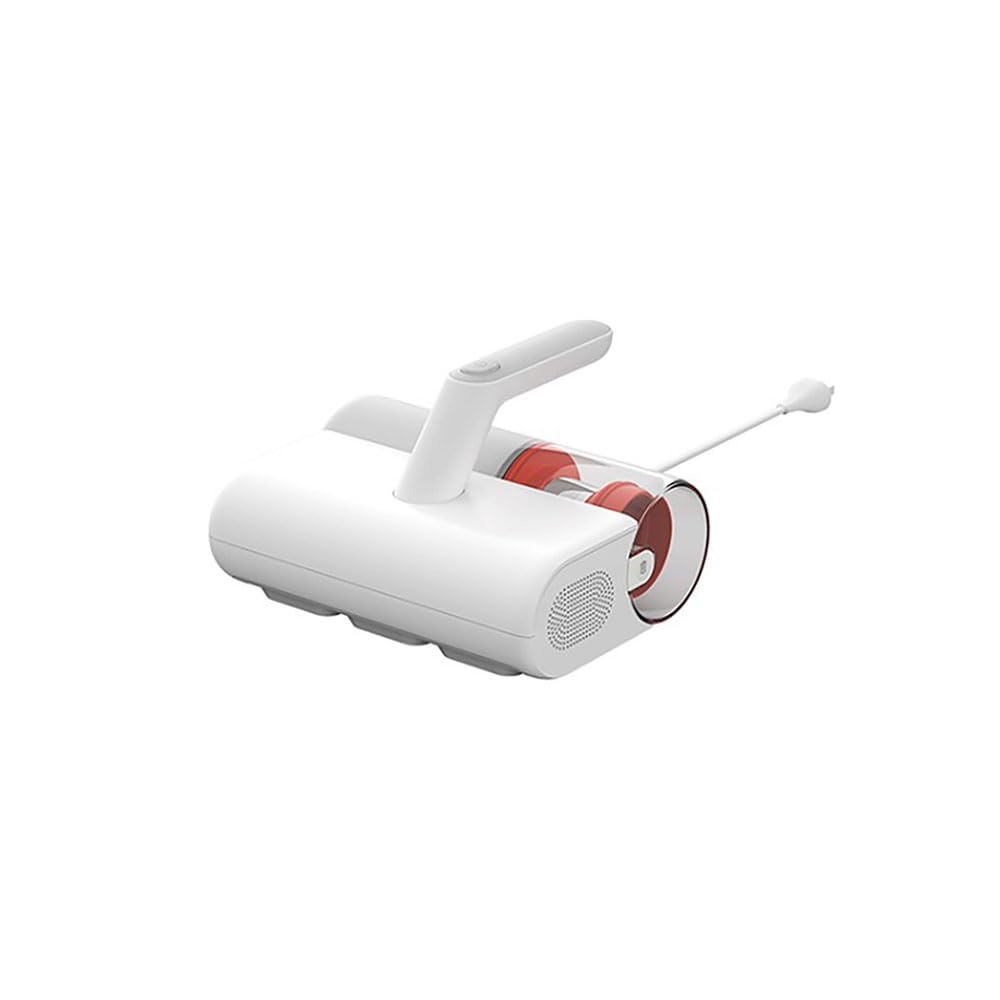
Familiarize yourself with the main parts of your Xiaomi Dust Mite Vacuum Cleaner 2:
- Main Unit: Contains the motor, handle, and control buttons.
- Dust Collection Bin: Transparent, bagless container for collected dust and debris.
- HEPA Filter: High-efficiency particulate air filter, located within the dustbin.
- UV-C Sterilization Lamp: Located on the underside, activates upon contact with a surface.
- Roller Brush: Rotating brush on the underside for agitating surfaces.
- Power Cord: For connecting the device to an electrical outlet.
4. Setup
Before first use, follow these steps:
- Unpack all components and remove any packaging materials.
- Ensure the dust collection bin and HEPA filter are correctly installed in the main unit. Refer to the markings for proper alignment.
- Connect the power cord securely to the vacuum cleaner and then to a suitable electrical outlet.
5. Operating Instructions
To use your Xiaomi Dust Mite Vacuum Cleaner 2:
- Plug the vacuum cleaner into a power outlet.
- Place the vacuum cleaner directly onto the surface you wish to clean (e.g., mattress, sofa, pillow).
- Press the power button located on the handle to turn on the device. The UV lamp will activate automatically when the vacuum is in contact with a surface.
- Move the vacuum cleaner slowly and steadily over the surface in overlapping strokes to ensure thorough cleaning. The hot air function will simultaneously help dry the surface.
- After cleaning, press the power button again to turn off the device.
- Unplug the vacuum cleaner from the power outlet.
This image shows the Xiaomi Dust Mite Vacuum Cleaner 2 being used to clean upholstery, demonstrating its handheld operation.
6. Maintenance
Regular maintenance ensures optimal performance and extends the lifespan of your vacuum cleaner.
6.1. Emptying the Dust Collection Bin
- Ensure the vacuum cleaner is unplugged.
- Locate the release button for the dustbin and detach it from the main unit.
- Open the dustbin and empty its contents into a waste bin.
- If necessary, wipe the inside of the dustbin with a damp cloth and allow it to air dry completely before reattaching.
6.2. Cleaning the HEPA Filter
- With the dustbin removed, carefully take out the HEPA filter.
- Gently tap the filter over a waste bin to remove loose dust and debris.
- For a deeper clean, rinse the HEPA filter under running water. Ensure the filter is completely dry before reinstalling it. Drying may take up to 24 hours.
6.3. Cleaning the UV-C Sterilization Lamp
- Ensure the vacuum cleaner is unplugged.
- Gently wipe the surface of the UV lamp with a clean, dry, soft cloth. Do not use liquids or abrasive cleaners.
6.4. Cleaning the Roller Brush
- Ensure the vacuum cleaner is unplugged.
- Periodically inspect the roller brush for tangled hair or debris.
- Carefully remove any obstructions using scissors or a brush.
7. Troubleshooting
If you encounter any issues, refer to the following common problems and solutions:
- No Power:
- Check if the power cord is securely plugged into both the vacuum cleaner and the wall outlet.
- Ensure the wall outlet is functional by testing it with another appliance.
- Low Suction:
- The dust collection bin may be full. Empty it.
- The HEPA filter may be clogged. Clean or replace it as per maintenance instructions.
- Check for any blockages in the suction nozzle or roller brush area.
- UV Lamp Not Working:
- Ensure the vacuum cleaner is powered on and in direct contact with the surface being cleaned. The UV lamp has a safety mechanism that prevents it from operating when not in contact with a surface.
- Check if the UV lamp area is clean and free from obstructions.
- Unusual Noise:
- Turn off and unplug the vacuum. Inspect the roller brush and suction path for any foreign objects that may be causing the noise.
If the problem persists after trying these solutions, please contact customer support.
8. Specifications
| Model Number | BHR8276EU |
| Brand | XIAOMI |
| Suction Power | 12000 Pa |
| Rated Power | 350 W |
| Dustbin Capacity | 0.3 Liters |
| Weight | 1.6 kg |
| Filter Type | HEPA Filter (Washable) |
| Special Features | UV-C Sterilization Lamp, Hot Air Drying (50°C), Bagless, Lightweight, Hypoallergenic |
| Power Source | Corded Electric |
| Voltage | 12 Volts |
9. Warranty and Support
Warranty: This product comes with a two-year warranty against manufacturing defects from the date of purchase. Please retain your proof of purchase for warranty claims.
Customer Support: For any questions, technical assistance, or warranty claims, please contact Xiaomi customer service through their official website or the contact information provided with your purchase documentation.


