
LairtPOW CM-80
Contents
LairtPOW 80A MPPT Solar Charge Controller User Manual
Model: CM-80
1. Introduction
This manual provides detailed instructions for the installation, operation, and maintenance of the LairtPOW 80A MPPT Solar Charge Controller. This device is designed to efficiently manage power flow from solar panels to various battery types, including LiFePO4, AGM, Sealed Gel, and Flooded Lithium batteries, across 12V, 24V, 36V, and 48V systems. Please read this manual thoroughly before installation and operation to ensure proper function and safety.
2. Safety Information
Observe the following safety precautions during installation and operation:
- Ensure all connections are secure and correct before applying power. Incorrect wiring can cause damage to the controller, battery, or solar panels.
- Always connect the battery to the controller first, then the solar panels, and finally the load. Disconnect in the reverse order.
- Install the controller in a well-ventilated area. Maintain at least 6 inches of clear space above and below the unit for adequate airflow to prevent overheating.
- This controller includes comprehensive protections: overvoltage, short circuit, reverse connection, reverse charging, over temperature, and TVS lightning protection. However, proper installation is crucial for these features to function effectively.
- The current limiting charging mode ensures the charging current does not exceed the rated level, protecting the battery.
- Do not attempt to disassemble or repair the controller yourself. Refer to qualified personnel for service.
3. Product Features
The LairtPOW 80A MPPT Solar Charge Controller offers advanced features for optimal solar power management:
- High Efficiency: Built-in Maximum Power Point Tracking (MPPT) algorithm ensures real-time tracking of solar panel peak power, achieving over 99.9% conversion efficiency and increasing overall system efficiency by more than 30% compared to traditional PWM controllers.
- Automatic System Voltage Recognition: Automatically detects and adapts to 12V, 24V, 36V, or 48V DC battery systems.
- Wide Solar Panel Compatibility: Supports solar panels with an open-circuit voltage range of 18V to 160V.
- Battery Versatility: Compatible with LiFePO4, AGM sealed gel, and flooded lithium batteries, allowing flexible battery selection.
- Smart APP Control: Remotely monitor and manage your solar system via WiFi/Bluetooth using a dedicated mobile application. Track charge status, energy production, and adjust settings.
- Advanced Cooling System: Features a pure aluminum heat sink and smart dual fan design for efficient heat dissipation, ensuring stable performance and extended lifespan.
- LCD Display: Provides clear operational status and allows for easy modification of settings and parameters directly on the unit.
- Large Cross-Section Wiring Port: Designed with widely-spaced wiring ports to improve insulation performance, enhance installation reliability, reduce voltage drop, and minimize power consumption.
- 4-Stage Intelligent Charging Protection: Implements Bulk charge, Absorption charge, Float charge, and Equalization charge stages to optimize battery health and extend battery life.

The LairtPOW 80A MPPT Solar Charge Controller automatically identifies 12V, 24V, 36V, and 48V systems and is compatible with Lead-acid, Lithium, Gel, and LiFePO4 batteries.

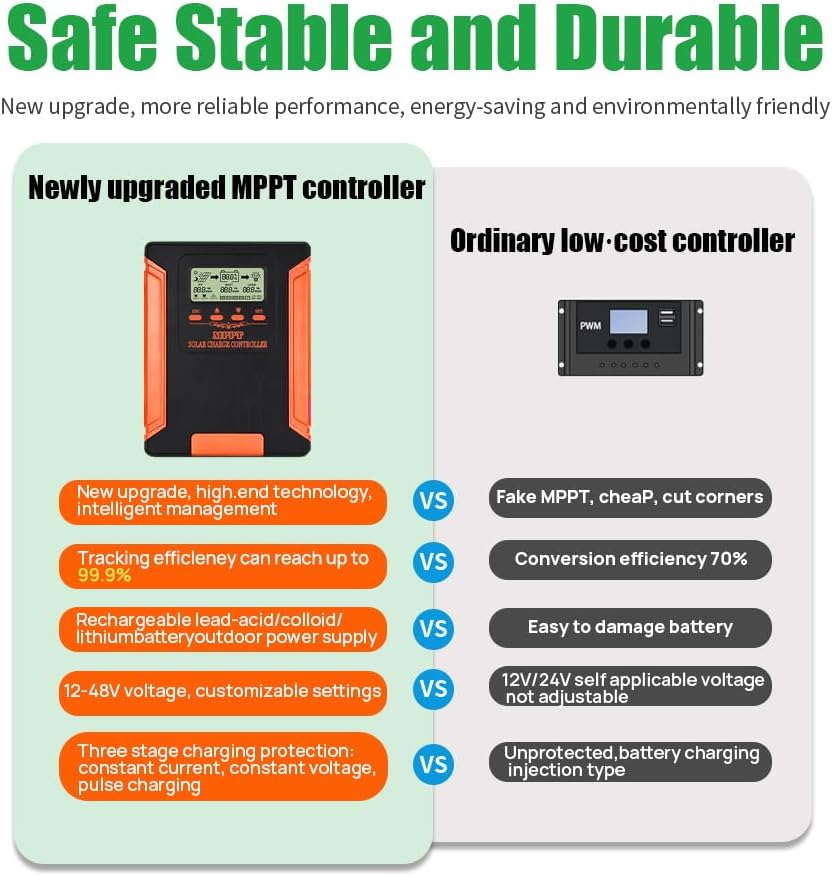
This image illustrates the advantages of the newly upgraded MPPT controller, highlighting its high tracking efficiency, compatibility with various battery types, and three-stage charging protection compared to ordinary controllers.

The graph demonstrates the MPPT controller's ability to track the peak power point of solar panels in real-time, unlike traditional controllers, leading to higher power generation efficiency.
An illustration of the advanced cooling system, featuring a pure aluminum heat sink and smart dual fan design for effective thermal management.

This diagram shows the 4-stage intelligent charging protection process: Bulk charge, Absorption charge, Float charge, and Equalization charge, designed to improve charging efficiency and extend battery life.

Icons depicting the multiple safety protections integrated into the controller, including overcharging, over-discharging, overload, reverse polarity, overpower, overtemperature, reverse current, and lightning protection.
4. Package Contents
Verify that your package contains the following items:
- LairtPOW 80A MPPT Solar Charge Controller (Model CM-80)
- User Manual
5. Installation
5.1 Mounting
Mount the controller vertically on a flat, non-flammable surface. Ensure there is adequate ventilation around the unit. A minimum of 6 inches (15 cm) of clear space above and below the controller is recommended to facilitate proper heat dissipation, especially in enclosed cabinets.
5.2 Wiring Diagram and Connection Order
Follow the connection order precisely to prevent damage to the controller or other components. Always connect the battery first, then the solar panels, and finally the DC load.
- Connect the Battery: Connect the positive and negative terminals of your battery bank to the corresponding battery terminals on the controller. Ensure correct polarity.
- Connect the Solar Panels: Connect the positive and negative leads from your solar panel array to the PV input terminals on the controller. Verify correct polarity.
- Connect the DC Load (Optional): If using a DC load directly from the controller, connect its positive and negative leads to the load terminals.
To disconnect the system, reverse the order: disconnect the load first, then the solar panels, and finally the battery.

This diagram illustrates the correct wiring connections for the solar charge controller, showing solar panels, a storage battery, and a DC load. It also indicates the maximum solar input power for 12V, 24V, 36V, and 48V systems, with a maximum PV input of 180 VDC.
6. Operating Instructions
6.1 LCD Display
The integrated LCD display provides real-time information about your solar system's status. It typically shows:
- PV (Photovoltaic) input voltage and current.
- Battery voltage and charging current, along with approximate state of charge.
- Load output status.
- System temperature.
6.2 Parameter Settings
To adjust system parameters, use the ESC and SET buttons on the controller:
- Press the "ESC" button until the desired value or parameter starts flashing.
- Use the "Up" or "Down" arrow buttons to adjust the value.
- Press the "SET" button to confirm and save the new setting.
It is crucial to set the correct battery type and charging voltages according to your battery manufacturer's specifications, especially for lithium batteries, to ensure optimal charging and battery longevity.
6.3 APP Control (WiFi/Bluetooth)
The controller supports remote monitoring and management via a smartphone application. This allows you to:
- View real-time system data.
- Track historical energy production.
- Adjust charging parameters.
- Receive alerts and notifications.
Refer to the specific instructions provided with the app for pairing and usage. Ensure your phone or tablet is within range for WiFi or Bluetooth connectivity.

This image shows how to connect your phone or tablet to the controller for remote monitoring and management via the dedicated application.

An overview of the Smart Solar Control feature, enabling users to monitor and manage their solar power system from a smartphone, including Bluetooth/WiFi connection, power generation tracking, hassle-free configuration, and instant solar insights.
7. Maintenance
To ensure the longevity and optimal performance of your LairtPOW MPPT Solar Charge Controller, follow these maintenance guidelines:
- Keep Ventilated: Regularly check that the controller's cooling fins and fans are free from dust and obstructions. Ensure the recommended 6-inch clearance is maintained for proper airflow.
- Inspect Connections: Periodically inspect all wiring connections for tightness and corrosion. Loose or corroded connections can lead to power loss or safety hazards.
- Clean the Unit: Gently clean the exterior of the controller with a dry, soft cloth. Do not use harsh chemicals or abrasive materials.
- Monitor Performance: Regularly check the LCD display and the mobile app for any unusual readings or error messages.
8. Troubleshooting
This section addresses common issues you might encounter:
- Display Readability: The LCD screen is not backlit, which may make it difficult to read in low-light conditions. Ensure adequate ambient lighting when checking the display.
- Wiring Terminal Issues: Ensure that the wiring terminals are securely tightened. Loose connections can lead to arcing or intermittent operation. Use an appropriately sized screwdriver for the terminals.
- Inaccurate Voltage Readings: Some users have reported slight discrepancies (e.g., 0.1-0.2V) in voltage readings compared to external multimeters. While the controller's internal algorithm is designed for efficiency, for precise measurements, always cross-reference with a calibrated external device.
- App Connectivity/Privacy: If experiencing issues with app connectivity, ensure Bluetooth/WiFi is enabled on your device and the controller. Be aware that some apps may request extensive permissions; review these permissions carefully before granting access.
- System Not Charging: Verify that solar panels are receiving sufficient sunlight, all connections are secure, and the battery type settings are correctly configured on the controller. Check for any error codes on the display.
9. Technical Specifications
| Specification | Value |
|---|---|
| Model Number | CM-80 |
| Rated Charging Current | 80A |
| Rated Load Current | 40A |
| System Voltage | 12V/24V/36V/48V Auto-Identification |
| Max. Solar Input Voltage | 160V PV |
| Max. Photovoltaic System Input Power (12V) | 960W |
| Max. Photovoltaic System Input Power (24V) | 1920W |
| Max. Photovoltaic System Input Power (36V) | 2880W |
| Max. Photovoltaic System Input Power (48V) | 3840W |
| Conversion Efficiency | ≥98% |
| MPPT Tracking Efficiency | >99% |
| Product Dimensions | 12.32"L x 8.86"W x 4.13"H (31.29cm L x 22.50cm W x 10.49cm H) |
| Item Weight | 6.64 pounds (3.01 kg) |
| Display Type | LCD |
| Operating Temperature | 50 Degrees Celsius (122 Fahrenheit) |
| Material | Aluminum, Copper, Metal, Plastic |
| Color | Orange |
| Manufacturer | Shenzhen Aoyang Technology Co., Ltd. |

This table provides a comparison of different LairtPOW MPPT Solar Charge Controller models, including their rated charging current, system voltage, maximum solar input voltage, maximum PV system input power, conversion efficiency, MPPT tracking efficiency, dimensions, and net weight.
10. Application Scope
The LairtPOW MPPT Solar Charge Controller is suitable for a wide range of solar power applications, including:
- Solar Street Lighting systems
- Residential Solar Roof installations
- Solar Sunshade power systems
- General Solar Power Systems
- Solar RV and marine applications
- Solar Billboard power supplies

This image displays the diverse applicable scope of the solar controller, showcasing its use in solar street lights, solar roofs, solar sunshades, solar power systems, solar RVs, and solar billboards.
11. Warranty and Support
For warranty information and technical support, please refer to the contact details provided by the seller or manufacturer, Shenzhen Aoyang Technology Co., Ltd. Protection plans may be available for purchase separately to extend coverage beyond the standard manufacturer's warranty.
Ask a question about this manual
Ask about setup, troubleshooting, compatibility, parts, safety, or missing instructions. Manuals+ will review the question and use this page’s manual context to help answer it.