Product Overview
The FRTEC TKL Wired Mechanical Keyboard, inspired by One Piece's Luffy, is designed for both gaming and office use. It features a compact TenKeyLess (TKL) layout, red LED backlighting, anti-ghosting technology, and a durable braided cable. This keyboard is compatible with a wide range of devices including PC, Mac, PS5, Switch, and Xbox Series X/S.

Image: FRTEC TKL Wired Mechanical Keyboard - One Piece Luffy Edition, showcasing its compact design and themed keycaps.
Package Contents
Upon unboxing your FRTEC TKL Mechanical Keyboard, ensure all the following items are present:
- FRTEC TKL Wired Mechanical Keyboard
- USB Cable
- User Manual
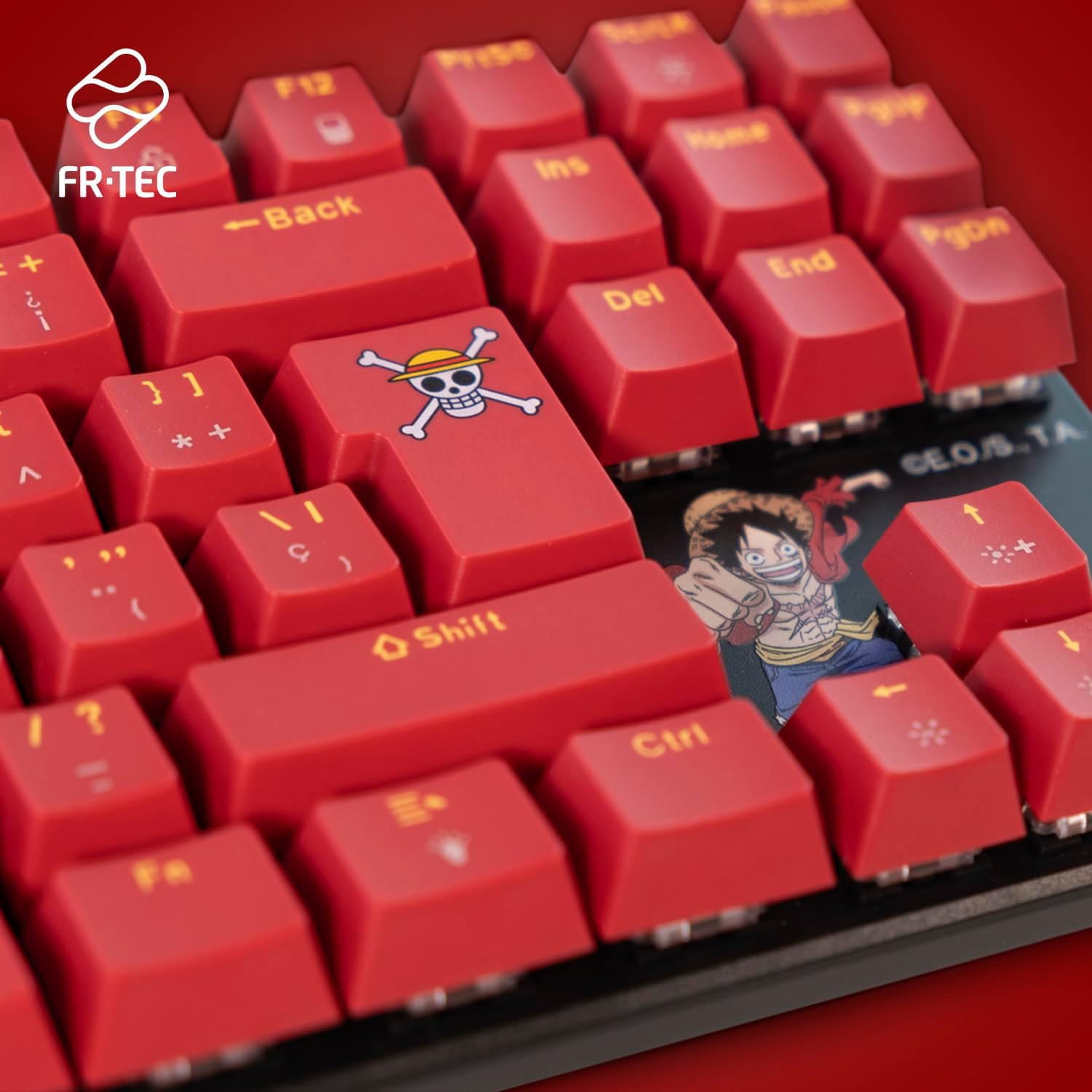
Image: The FRTEC TKL Wired Mechanical Keyboard with its USB cable and user manual.
Setup
Wired Connection
- Connect the provided USB cable to the USB-C port on the keyboard.
- Plug the other end of the USB cable into an available USB port on your PC, Mac, PS5, Switch, or Xbox Series X/S.
- The keyboard should be automatically recognized by your device.
Compatibility
The FRTEC TKL Wired Mechanical Keyboard is compatible with:
- PC
- Mac
- PS5
- Switch
- Xbox Series X/S
Operating Instructions
LED Red Backlighting
The keyboard features LED red backlighting with 9 different lighting modes. To cycle through these modes, refer to the keyboard's function key combinations (Fn key + specific keys) as detailed in the included quick start guide.
Anti-Ghosting Technology
This keyboard incorporates anti-ghosting technology to prevent key locks when pressing multiple keys simultaneously, ensuring accurate input during intense gaming sessions.
Braided Cable
The anti-tangling braided cable design enhances durability and prevents knots, providing a more reliable and long-lasting connection.
Maintenance
To ensure the longevity and optimal performance of your FRTEC TKL Mechanical Keyboard, follow these maintenance guidelines:
- Cleaning: Regularly clean the keycaps and keyboard surface with a soft, dry cloth. For deeper cleaning, use a keycap puller (if provided or purchased separately) to remove keycaps and clean underneath with compressed air or a small brush.
- Cable Care: Avoid sharp bends or excessive pulling on the braided USB cable to prevent internal damage.
- Storage: When not in use, store the keyboard in a clean, dry environment away from direct sunlight and extreme temperatures.
- Liquid Exposure: In case of liquid spills, immediately disconnect the keyboard from your device, turn it upside down to drain excess liquid, and allow it to dry completely before reconnecting.
Troubleshooting
If you encounter any issues with your FRTEC TKL Mechanical Keyboard, please try the following steps:
- Keyboard Not Responding: Ensure the USB cable is securely connected to both the keyboard and your device. Try connecting to a different USB port or a different device to rule out port-specific issues.
- Backlighting Issues: Cycle through the LED modes using the function key combinations. Check the brightness settings.
- Key Input Problems: If specific keys are not registering, ensure no debris is lodged beneath the keycap. If the issue persists, contact customer support.
For further assistance, refer to the detailed troubleshooting section in the full user manual or contact FRTEC customer support.
Specifications
| Feature | Detail |
|---|---|
| Brand | FRTEC |
| Model Name | PC Gaming One Piece |
| Item Model Number | One Piece Keyboard |
| Connectivity Technology | USB (Wired) |
| Keyboard Description | Gaming, TenKeyLess (TKL) |
| Recommended Uses | Gaming |
| Compatible Devices | PC, Mac, PS5, Switch, Xbox Series X/S |
| Color | Red |
| Material | Plastic |
| Item Weight | 1.54 pounds |
| Included Components | USB Cable |
| Special Feature | TKL, LED Red Backlighting, Anti-Ghosting, Braided Cable, Official One Piece License |
Warranty and Support
FRTEC products are manufactured to high-quality standards. For information regarding warranty coverage, technical support, or service inquiries, please refer to the warranty card included in your product packaging or visit the official FRTEC website. Keep your proof of purchase for any warranty claims.
Additional Resources
Product Videos
Womier SK80 PRO 75% Keyboard Overview
Text Description: This video provides an overview of the Womier SK80 PRO 75% Wireless Mechanical Keyboard, highlighting its features and design. Note: This video is for a related product and may not perfectly represent the FRTEC One Piece keyboard's specific features.
Redragon K719 PRO Wireless Gasket Gaming Keyboard Anime Version
Text Description: This video showcases the Redragon K719 PRO Wireless Gasket Gaming Keyboard, an anime-themed mechanical keyboard. Note: This video is for a related product and may not perfectly represent the FRTEC One Piece keyboard's specific features.
Mercury K1 Pro CyberFlare 75% Gaming Keyboard Introduction
Text Description: This video introduces the Mercury K1 Pro CyberFlare 75% Gaming Keyboard, highlighting its design and features. Note: This video is for a related product and may not perfectly represent the FRTEC One Piece keyboard's specific features.
Womier SK80 PRO 75% Wireless Gaming Keyboard Features
Text Description: This video demonstrates the features of the Womier SK80 PRO 75% Wireless Gaming Keyboard. Note: This video is for a related product and may not perfectly represent the FRTEC One Piece keyboard's specific features.
Cyberpunk-themed Keyboard Design Showcase
Text Description: This video highlights the futuristic cyberpunk design elements of a gaming keyboard. Note: This video is for a related product and may not perfectly represent the FRTEC One Piece keyboard's specific features.


