
ECONTROLLY 100015716
Instruction Manual for ECONTROLLY 100015716 Replacement Sound Bar Remote Control
Model: 100015716
Introduction
This manual provides essential information for the proper use and maintenance of your ECONTROLLY 100015716 Replacement Sound Bar Remote Control. This infrared remote control is designed for compatibility with the Onn 100015716 36" 2.1 Channel Soundbar Speaker System. Please read this manual thoroughly before operating the device.
Safety Information
- Do not expose the remote control to direct sunlight, heat sources, or extreme temperatures.
- Avoid dropping the remote control or subjecting it to strong impacts.
- Do not immerse the remote control in water or any other liquids.
- Keep out of reach of children.
- Use only AAA ALKALINE batteries. Do not use rechargeable batteries.
- Dispose of used batteries properly according to local regulations.
Product Overview
The ECONTROLLY 100015716 remote control is a direct replacement, pre-programmed for immediate use with compatible Onn soundbar models. It features a standard layout for easy navigation and control of your sound system.

Image: Front view of the ECONTROLLY 100015716 replacement remote control, showing all buttons clearly. The remote is black with white button labels.
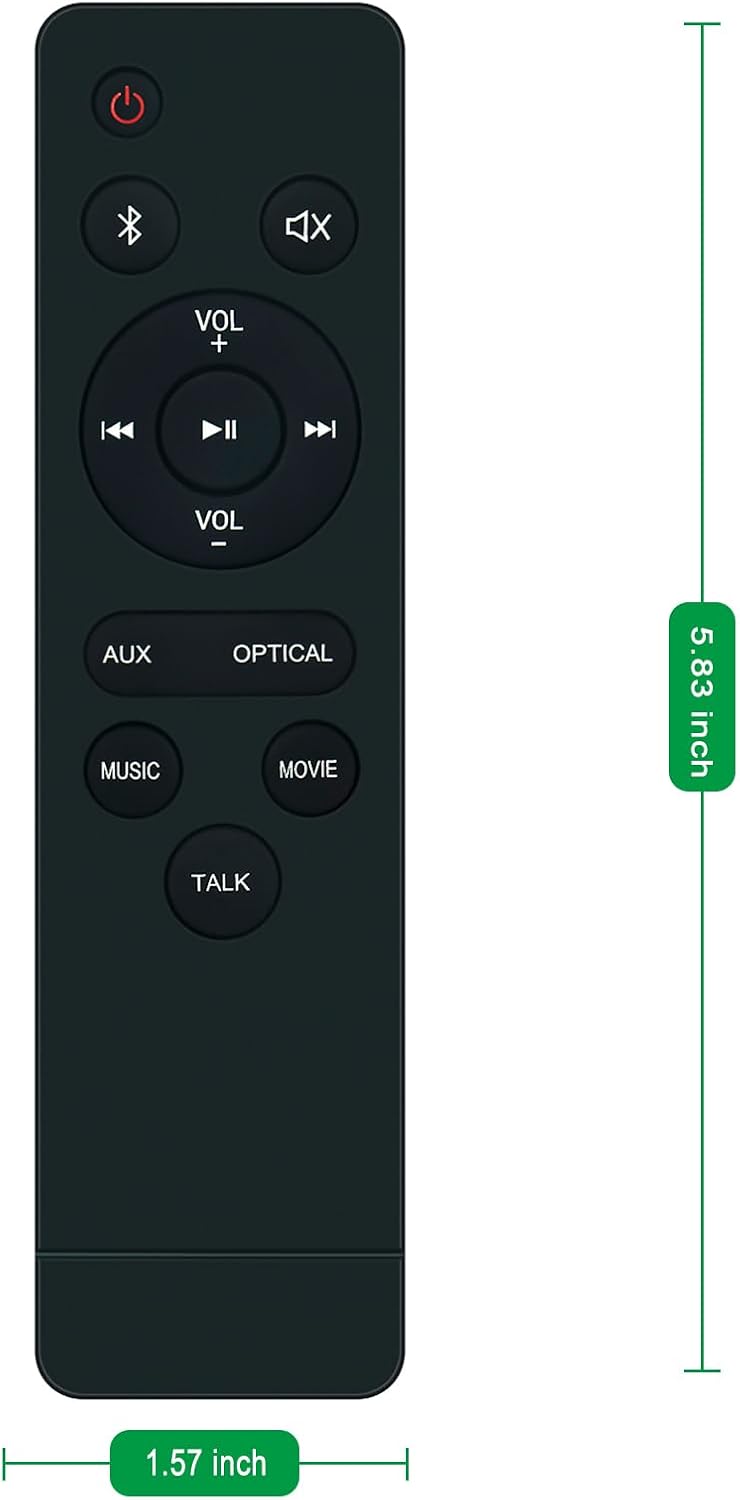
Image: The ECONTROLLY 100015716 remote control with overlaid dimensions, indicating a length of 5.83 inches and a width of 1.57 inches.
Button Functions:
- Power Button (⏻): Turns the soundbar on or off.
- Bluetooth Button (☋): Activates Bluetooth pairing mode or switches to Bluetooth input.
- Mute Button (🔇): Mutes or unmutes the soundbar audio.
- Volume Up/Down (VOL+/VOL-): Adjusts the soundbar's volume level.
- Play/Pause (⏸): Plays or pauses media playback.
- Previous Track (⏮): Skips to the previous track.
- Next Track (⏭): Skips to the next track.
- AUX Button: Switches the soundbar input to Auxiliary mode.
- OPTICAL Button: Switches the soundbar input to Optical mode.
- MUSIC Button: Activates Music sound mode.
- MOVIE Button: Activates Movie sound mode.
- TALK Button: Activates Talk sound mode, enhancing dialogue clarity.
Setup
Battery Installation:
- Locate the battery compartment on the back of the remote control.
- Slide open the battery cover.
- Insert two (2) AAA ALKALINE batteries, ensuring the positive (+) and negative (-) terminals align correctly with the markings inside the compartment.
- Close the battery cover securely.
Note: Batteries are not included with the remote control.
Operating Instructions
This remote control is pre-programmed and does not require any additional setup or programming for compatible Onn soundbar models. Simply install the batteries and point the remote control towards the soundbar's infrared receiver.

Image: A person's hand holding the remote control, pointing it towards an Onn soundbar and television setup, demonstrating typical usage.
Basic Operation:
- Power On/Off: Press the ⏻ button to turn the soundbar on or off.
- Volume Control: Use the VOL+ and VOL- buttons to increase or decrease the volume.
- Mute: Press the 🔇 button to temporarily silence the sound. Press again to restore sound.
- Input Selection: Use the AUX or OPTICAL buttons to switch between different audio input sources.
- Sound Modes: Press MUSIC, MOVIE, or TALK buttons to select the desired audio preset.
Maintenance
- Cleaning: Wipe the remote control with a soft, dry cloth. Do not use abrasive cleaners or solvents.
- Battery Replacement: Replace batteries when the remote control's response becomes sluggish or stops working. Always replace both batteries at the same time.
- Storage: If the remote control will not be used for an extended period, remove the batteries to prevent leakage.
Troubleshooting
| Problem | Possible Cause | Solution |
|---|---|---|
| Remote control not working. | Dead or incorrectly inserted batteries. | Replace batteries with new AAA ALKALINE batteries, ensuring correct polarity. |
| Remote control range is poor. | Low batteries; Obstruction between remote and soundbar; Remote not pointed at soundbar. | Replace batteries. Remove any obstructions. Ensure remote is pointed directly at the soundbar's IR receiver. |
| Specific buttons not responding. | Button malfunction; Soundbar not in correct mode. | Check if other buttons work. Ensure the soundbar is powered on and in the correct input mode for the button's function. |
Specifications
- Model: 100015716
- Compatibility: Onn 100015716 36" 2.1 Channel Soundbar Speaker System
- Type: Infrared Remote Control
- Power Source: 2 x AAA ALKALINE Batteries (not included)
- Color: Black
- Product Dimensions: 3.94 x 1.57 x 0.59 inches (approximately)
- Item Weight: 1.76 ounces (approximately)
- Special Feature: Pre Programmed
- Manufacturer: Shengxingwang Factory
- Country of Origin: China
Warranty and Support
This product is a replacement remote control. For specific warranty information, please refer to the original purchase documentation or contact the seller directly. For technical support or inquiries, please reach out to the ECONTROLLY customer service via the platform where the product was purchased.
Please note that damage caused by improper use, battery leakage, or unauthorized modifications is not covered.
Ask a question about this manual
Ask about setup, troubleshooting, compatibility, parts, safety, or missing instructions. Manuals+ will review the question and use this page’s manual context to help answer it.