
1. Introduction
This manual provides essential information for the safe and efficient operation, assembly, and maintenance of your HiKeep Coco-b Electric Bike. Please read this manual thoroughly before your first ride and retain it for future reference. Your HiKeep Coco-b Electric Bike is designed for adult riders seeking a versatile and convenient electric bicycle experience.
2. Safety Information
Your safety is paramount. Always wear a helmet and appropriate safety gear when riding. Adhere to all local traffic laws and regulations. Regular maintenance checks are crucial for safe operation.
UL2849 Certification
The electrical system of this electric bike is UL2849 certified, ensuring protection against electrical hazards and reliable power delivery. This certification confirms adherence to stringent safety standards for electric bicycles.
Battery Safety
The 48V 15.6AH detachable battery features Intelligent Protection (BMS) and is IP54 waterproof. Always ensure the battery is securely locked in place before riding. Do not expose the battery to extreme temperatures or puncture it. Use only the provided charger.
3. Package Contents
Upon unpacking, please verify that all components are present and undamaged. The package typically includes:
- HiKeep Coco-b Electric Bike (90% pre-assembled)
- 48V 15.6AH Detachable Battery
- Battery Charger
- Front Shopping Basket
- Tool Kit for assembly
- User Manual

Image 3.1: The HiKeep Coco-b Electric Bike shown with its main components and accessories, including the detachable battery, front basket, and LCD display.
4. Setup and Assembly
Your HiKeep Coco-b Electric Bike arrives 90% pre-assembled. The included tool kit will assist with the final steps.
Folding and Unfolding
The bike features a triple folding design for portability and space-saving storage. To unfold, release the frame and handlebar latches, extend the frame and handlebar, and secure all locking mechanisms. Ensure all parts are firmly locked before riding.
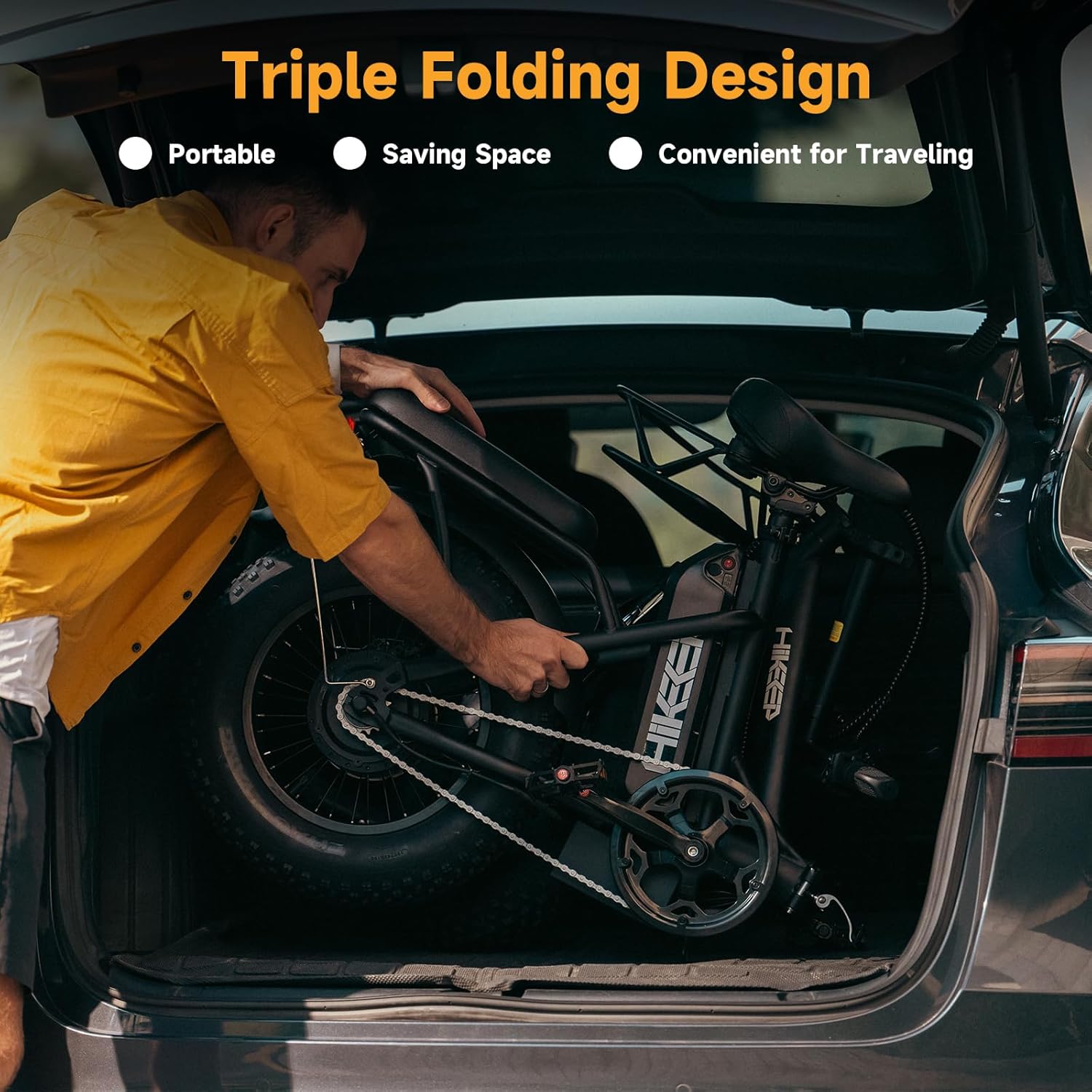
Image 4.1: A man demonstrating the folding design of the HiKeep Coco-b Electric Bike by placing it into a car trunk, highlighting its portability.
Adjusting Seat and Handlebar
For optimal comfort and control, adjust the seat and handlebar height to suit your riding posture. Loosen the quick-release levers, set to the desired height, and firmly secure the levers.

Image 4.2: A visual representation of the adjustable seat and handlebar features on the HiKeep Coco-b Electric Bike, allowing riders to customize their fit.
Video: HiKeep Ebike Overview
Video 4.1: This video provides an overview of the HiKeep Coco-b Electric Bike, demonstrating its folding mechanism, riding capabilities, and key features in various environments.
5. Operating Instructions
Powering On/Off and LCD Display
To power on the bike, press and hold the power button on the Smart LCD Display. The display shows speed, battery level, assist level, and mileage. Use the '+' and '-' buttons to adjust pedal assist levels.
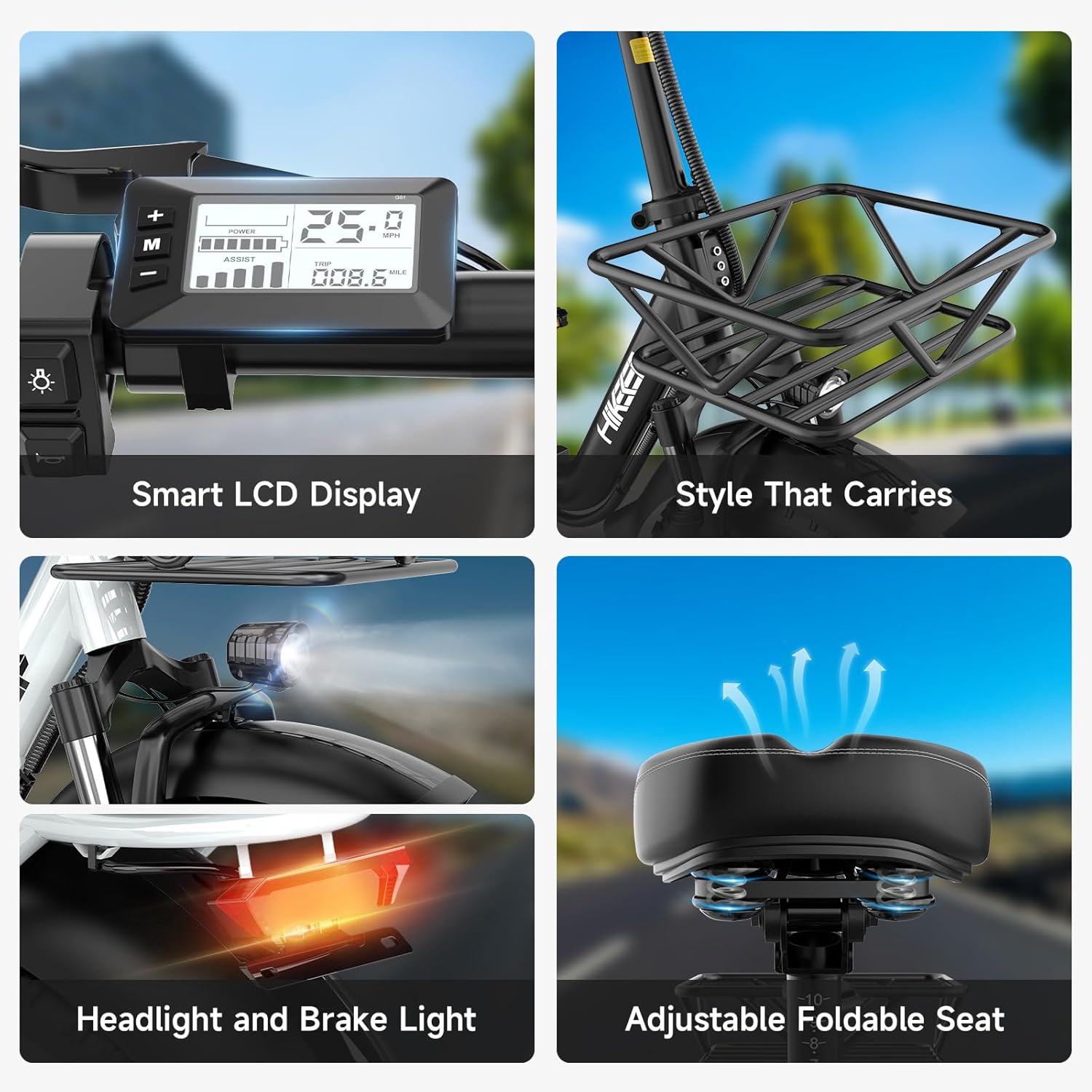
Image 5.1: A detailed view of the Smart LCD Display, showing its interface and controls, alongside other features like the front basket and lighting.
Riding Modes
The HiKeep Coco-b Electric Bike offers 4 riding modes:
- Pedal Assist Mode: The motor provides assistance as you pedal.
- Electric Mode: Use the throttle for full electric power without pedaling.
- Normal Bike Mode: Ride without any electric assistance.
- Walk Mode: Provides low-speed assistance for walking the bike.

Image 5.2: A HiKeep Coco-b Electric Bike in use, illustrating its versatility with multiple riding modes and key features.
Motor and Speed
Equipped with a 750W (Peak 1500W) brushless motor, the bike can reach speeds up to 25 MPH. The motor provides strong climbing capabilities, handling inclines up to 30 degrees.

Image 5.3: An illustration detailing the 750W peak motor, its climbing angle capability, top speed, and the 7-speed Shimano derailleur system.
Battery and Charging
The 48V 15.6AH removable battery offers a range of up to 60 miles on a single charge. Charging time is approximately 4-6 hours. The battery can be charged while installed on the bike or removed.

Image 5.4: A visual breakdown of the battery's specifications, including its voltage, capacity, estimated mileage, charging duration, and safety certifications.
Brakes and Tires
The bike is equipped with front and rear 160mm dual disc brakes for reliable stopping power. The 16x4.0 inch fat tires provide superior stability and traction across various terrains, including sand, snow, and city streets, complemented by dual suspension for a comfortable ride.

Image 5.5: A detailed view of the bike's spring suspension system and robust 16x4.0 inch all-terrain tires, designed for diverse riding conditions.
6. Maintenance
Regular maintenance ensures the longevity and safe operation of your electric bike.
- Tire Pressure: Check tire pressure before each ride.
- Brakes: Inspect brake pads and cables regularly. Adjust as needed.
- Chain: Keep the chain clean and lubricated.
- Battery: Store the battery in a cool, dry place and charge it periodically if not in use.
- Fasteners: Periodically check all bolts and fasteners for tightness.
- Cleaning: Clean the bike with a damp cloth. Avoid high-pressure washing directly on electrical components.
7. Troubleshooting
If you encounter issues, refer to the following common troubleshooting tips:
- Bike not powering on: Check if the battery is fully charged and properly seated. Ensure the power button is pressed correctly.
- Motor not assisting: Verify the pedal assist level on the LCD display. Check for any error codes.
- Reduced range: This can be due to low tire pressure, riding uphill frequently, heavy loads, or cold weather.
- Brakes squealing: This may indicate dirty brake pads or rotors, or that the pads need to be replaced.
For persistent issues, please contact customer support.
8. Specifications
Detailed specifications for the HiKeep Coco-b Electric Bike:
| Feature | Specification |
|---|---|
| Bike Type | Electric Bike |
| Age Range | Adult |
| Brand | HiKeep |
| Number of Speeds (Assist Levels) | 5 |
| Color | Black |
| Wheel Size | 16 Inches |
| Frame Material | Aluminum |
| Suspension Type | Dual |
| Special Feature | Rechargeable, Folding Design |
| Style | Coco-b |
| Wheel Material | Aluminum |
| Lithium Battery Energy Content | 48V 15.6AH (approx. 748.8 Watt Hours) |
| Seat Material Type | Polyvinyl Chloride (PVC) |
| Assembly Required | Yes (90% pre-assembled) |
| Bicycle Gear Shifter Type | Twist Grip |
| Bicycle Drivetrain Type | Motor-Driven Single-Speed |
| Electric Assist Type | Pedelec |
| Frame Size | K6-L |
| Frame Type | Folding |
| Item Dimensions (LxWxH) | 63 x 46 x 22 inches |
| Item Weight | 63 Pounds |
| Max Capacity | 330 LBS |
| Recommended Height | 5'6" - 6'3" |

Image 8.1: A comprehensive diagram illustrating the physical dimensions, recommended rider height, maximum load capacity, and total weight of the electric bike.
9. Warranty and Support
Your HiKeep Coco-b Electric Bike comes with a limited warranty. For specific warranty details, please refer to the warranty card included with your product or contact customer support.
Customer Support
For any questions, technical assistance, or warranty claims, please contact our customer support team:
- Email: service.us@hikeepebike.com
- Response Time: 24-Hour Rapid Response