
1. Product Overview
The ATOTO 12.3-inch S8 PN Car Stereo is designed to upgrade the infotainment system in compatible Mercedes-Benz C-Class W204 vehicles from 2011-2014, specifically those equipped with NTG 4.5/4.7 systems. This unit integrates advanced features while preserving the original vehicle functionalities.

Image 1.1: The ATOTO 12.3-inch S8 PN Car Stereo displaying its user interface with various applications.
Key Features:
- Original System Compatibility: Designed to integrate seamlessly with Mercedes-Benz C-Class W204 (2011-2014) NTG 4.5/4.7 systems, retaining all original vehicle functions and controls.
- AI DriveChat: An AI co-pilot feature for voice-assisted tasks and information retrieval while driving.
- High-Performance Touchscreen: Features a 12.3-inch HD 1920x720p IPS screen, powered by an efficient 12nm SoC and ARM Cortex Octa-Core processor.
- Wireless Connectivity: Supports Wireless CarPlay, Android Auto, and Mirror Link for smartphone integration.
- Multiple Internet Options: Offers 4G LTE, Wi-Fi, USB tethering, and Bluetooth tethering for internet access.
- Dual Bluetooth: BT1 for calls, streaming, and screen lock; BT2 for pairing with third-party Bluetooth devices and hotspot.
- GPS Tracking: Includes TrackHU, ATOTO's GPS tracking application with real-time tracking, track playback, and geofence alerts.
- Digital Sound Processor (DSP): Provides cinematic audio experience with DTS functionality and a 32-band Equalizer for sound customization.
2. Installation and Setup
Proper installation is crucial for optimal performance. It is recommended to have this unit installed by a qualified professional. Refer to the detailed wiring diagram and packing list provided.
2.1 Packing List
Verify all components are present before beginning installation.
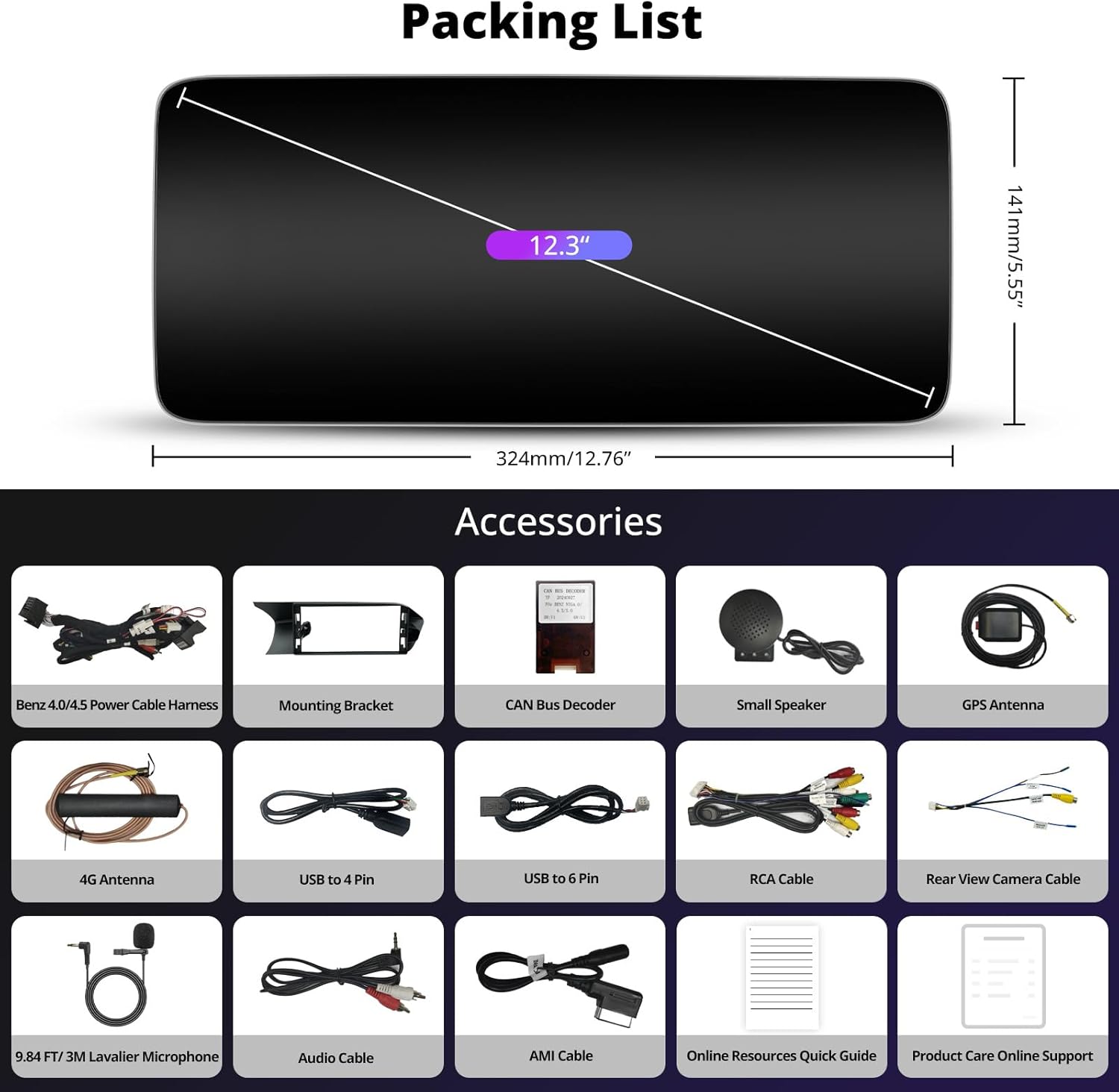
Image 2.1: Contents of the ATOTO S8 PN package, including the main unit and various cables and accessories.
2.2 Wiring Diagram
Follow the wiring diagram carefully to ensure correct connections to your vehicle's electrical system and original components.

Image 2.2: Comprehensive wiring diagram for the ATOTO S8 PN unit.
2.3 NTG System Identification
Before installation, verify the NTG version of your car's original system to ensure compatibility. This unit is designed for NTG 4.5/4.7 systems.

Image 2.3: Guide for identifying your Mercedes-Benz COMAND NTG system version.
2.4 Initial Configuration
After physical installation, perform initial software setup for optimal display and functionality.
- Screen Resolution Setup: Access settings to select the appropriate screen resolution based on your vehicle's original iDrive system.
- Camera Setup: If a backup camera is installed, configure it through the settings menu. Locate the 'Local Reverse Switch' option to activate the rearview camera.
- Sound Setup: Enter the original COMAND system and select the 'Audio' option to ensure sound output is correctly routed, typically via AUX.

Image 2.4: Steps for configuring screen resolution, camera, and sound settings.
3. Operating Instructions
3.1 Switching Between Systems
The unit allows seamless switching between the Android system and your vehicle's original COMAND system. Tap the "NTG Mode" icon on the Android interface to switch to the original system.

Image 3.1: Switching between Android and original COMAND systems, and theme selection.
3.2 Wireless Connectivity (CarPlay, Android Auto, Mirror Link)
Enjoy wireless integration with your smartphone for navigation, music, and communication. Ensure your phone's Bluetooth and Wi-Fi are enabled for connection.
- Wireless CarPlay: Connect your iPhone wirelessly for a familiar interface.
- Wireless Android Auto: Connect your Android phone wirelessly for optimized in-car experience.
- Mirror Link: Mirror your phone's screen to the stereo display. Note that not all applications are compatible with Mirror Link.

Image 3.2: Wireless CarPlay, Android Auto, and Mirror Link functionality.
3.3 AI DriveChat
Utilize the AI DriveChat feature for voice commands and information. Simply ask questions or request assistance to enhance your driving experience while keeping your focus on the road.

Image 3.3: AI DriveChat, your intelligent co-pilot.
3.4 Internet Options
The S8 PN offers multiple ways to connect to the internet, providing online services without relying solely on your smartphone's hotspot.
- 4G LTE: Insert a Nano SIM card for independent internet access.
- Wi-Fi: Connect to available Wi-Fi networks.
- USB Tethering: Use a USB connection to share your phone's internet.
- Bluetooth Tethering: Share your phone's internet via Bluetooth.

Image 3.4: Available internet connectivity options.
3.5 Dual Bluetooth Functionality
The unit features two independent Bluetooth modules for enhanced functionality.
- Bluetooth 1 (BT1): Dedicated for hands-free calls, audio streaming, and automatic screen lock/unlock based on proximity.
- Bluetooth 2 (BT2): Used for pairing with third-party Bluetooth devices (e.g., gamepads, OBD2 scanners) and for Bluetooth tethering.

Image 3.5: Dual Bluetooth capabilities for multitasking.
3.6 DSP Audio Customization
The built-in Digital Sound Processor (DSP) allows for extensive audio customization. Access the DSP settings to adjust the 32-band equalizer, time correction, bass enhancement, and other audio parameters to achieve your preferred sound profile.

Image 3.6: DSP interface for tailored audio output.
3.7 Split Screen Functionality
Manage multiple applications simultaneously using the split-screen feature. This allows you to view navigation and media playback, or any two compatible apps, side-by-side without switching between them.

Image 3.7: Split screen functionality for multitasking.
3.8 GPS Tracking (TrackHU)
The TrackHU application provides real-time GPS tracking for your vehicle. Features include a 5-second refresh rate, OsmAnd's 4-satellite positioning, track playback with speed control, detailed reports, instant online/offline status, and geofence alerts.

Image 3.8: TrackHU GPS tracking application features.
4. Maintenance
To ensure the longevity and optimal performance of your ATOTO S8 PN car stereo, follow these general maintenance guidelines:
- Cleaning: Use a soft, dry cloth to clean the screen and exterior surfaces. Avoid abrasive cleaners or solvents that could damage the display or finish.
- Software Updates: Regularly check for and install firmware updates via FindApps to ensure the system has the latest features and performance improvements.
- Environmental Conditions: Avoid exposing the unit to extreme temperatures, direct sunlight for prolonged periods, or excessive moisture.
- Cable Connections: Periodically check all cable connections to ensure they are secure and free from damage.
5. Troubleshooting
If you encounter issues with your ATOTO S8 PN car stereo, refer to the following common troubleshooting steps. For more complex problems, contact customer support.
5.1 No Audio Output
- Check AUX/AMI Connection: Ensure the audio output is correctly selected to AUX or AMI in the original COMAND system settings (refer to Section 2.4).
- Volume Levels: Verify that the volume on both the ATOTO unit and the original car stereo system is turned up and not muted.
- Wiring: Recheck the audio wiring connections as per the installation diagram (Image 2.2).
5.2 Original Factory Buttons Not Responding
- CAN Bus Decoder: Ensure the CAN Bus Decoder is correctly installed and connected. This component is essential for retaining original vehicle functions.
- System Mode: Confirm you are in the correct system mode. Some original buttons may only function when the unit is switched to the original COMAND system (NTG Mode).
- Wiring: Verify all wiring related to the original system integration is secure.
5.3 Unit Not Powering On
- Power Connections: Check the main power cable harness for secure connections to the vehicle's power supply.
- Vehicle Ignition: Ensure the vehicle's ignition is on, as the unit typically powers on with the car.
- Fuses: Inspect relevant fuses in your vehicle's fuse box for any blown fuses.
6. Specifications
| Feature | Detail |
|---|---|
| Model Number | S8 PN |
| Screen Size | 12.3 inches |
| Screen Resolution | 1920x720p IPS |
| Processor | ARM Cortex Octa-Core (12nm SoC) |
| Storage | 4GB RAM + 64GB ROM |
| Operating System | Android |
| Connectivity | Wireless, Bluetooth, Auxiliary, 4G LTE, Wi-Fi |
| Special Features | Android Auto, Apple CarPlay, Screen Mirroring, Built-In Bluetooth, Built-In Wi-Fi, GPS Navigation, Hands-Free Calling, Touchscreen, DSP, AI DriveChat, 4G LTE, Dual Bluetooth, Voice Control |
| Compatible Devices | Smartphone |
| Audio Output Mode | Stereo, Surround (5.1) |
| Video Encoding | H.264, H.265/HEVC |
| Item Weight | 5.85 pounds |
| Package Dimensions | 14.88 x 9.49 x 7.13 inches |
7. Warranty and Support
ATOTO is committed to providing comprehensive support for its products.

Image 7.1: Overview of ATOTO product support and care.
- Product Care: A 12-month warranty is included from the date of purchase. An additional 6 months of product care can be obtained by contacting ATOTO.
- Customer Support: The customer care team is available around the clock on workdays. Contact details are typically found in the product packaging or through online resources.
- Online Manual: A detailed online manual in various languages is available. Refer to the quick guide in the box for access instructions (e.g., QR code).
- Firmware Updates: ATOTO regularly releases system firmware updates. Users can access these updates via FindApps to ensure optimal performance and new features.