Introduction
Thank you for purchasing the Dyurwa Portable Bluetooth Speaker. This manual provides essential information for setting up, operating, and maintaining your speaker. Please read it thoroughly before use to ensure optimal performance and longevity of your device.
What's in the Box
- Dyurwa Portable Bluetooth Speaker (Model S5)
- USB Charging Cable
- Quick Start Guide
Product Overview
The Dyurwa S5 Portable Bluetooth Speaker is designed for rich audio experience with deep bass and vibrant LED lighting. Its compact size makes it ideal for portability.
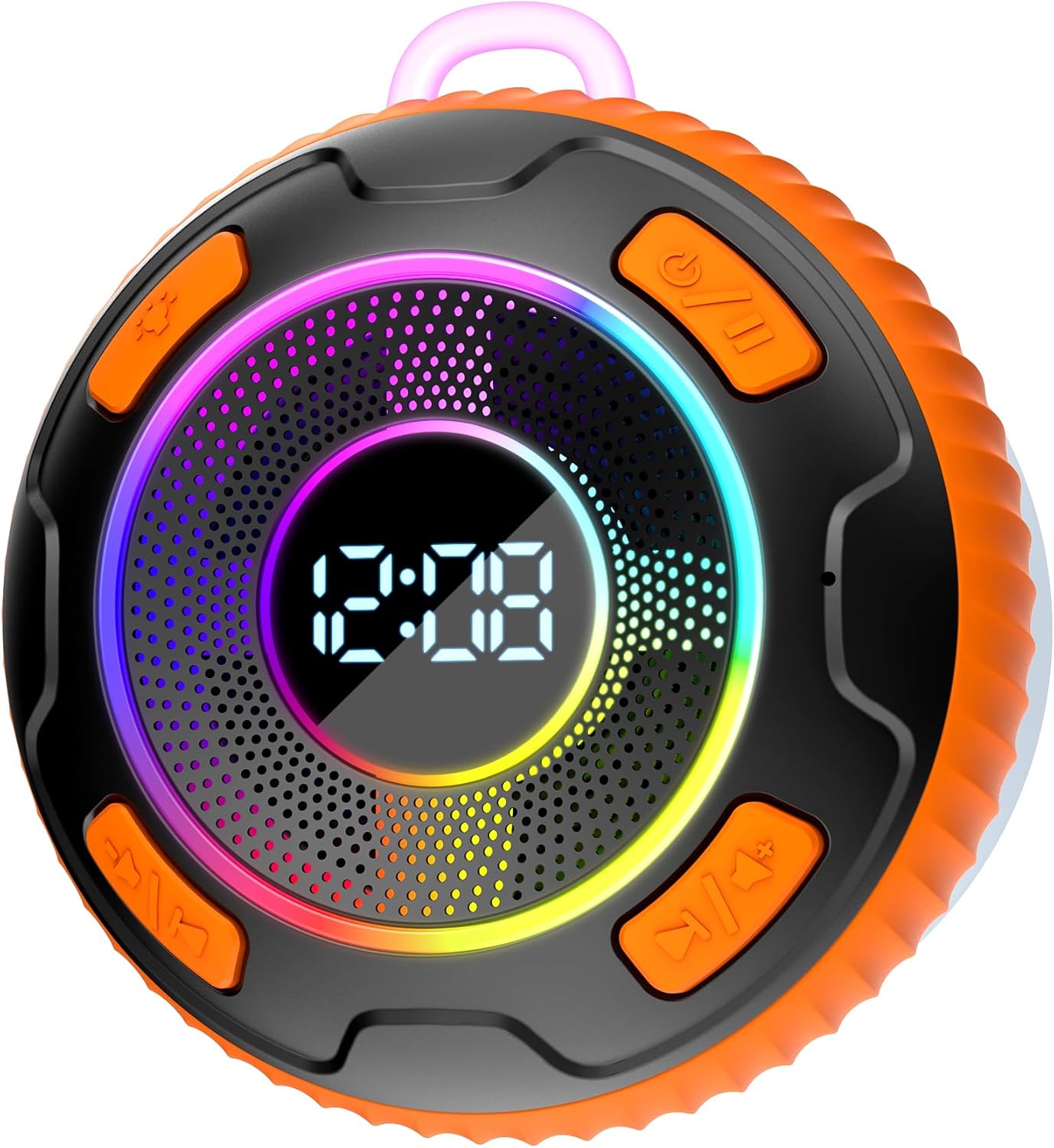
Figure 1: Front view of the Dyurwa S5 Portable Bluetooth Speaker, highlighting the speaker grille, digital clock display, and touch control buttons.
Controls and Indicators
- Power Button: On/Off and Play/Pause.
- Volume Up/Next Track Button: Increase volume, long press for next track.
- Volume Down/Previous Track Button: Decrease volume, long press for previous track.
- Mode Button: Switch between Bluetooth and other modes (if applicable).
- LED Light Button: Change LED light patterns or turn off lights.
- Digital Display: Shows time and other status indicators.
Setup
1. Charging the Speaker
Before first use, fully charge the speaker. Connect the supplied USB charging cable to the speaker's charging port and the other end to a USB power adapter (not included) or a computer's USB port. The charging indicator will show the charging status and turn off when fully charged.
2. Powering On/Off
Press and hold the Power Button for 3 seconds to turn the speaker on or off. A sound prompt will indicate the power status.
3. Bluetooth Pairing
- Ensure the speaker is powered on and in Bluetooth pairing mode (indicated by a flashing Bluetooth icon on the display or a specific sound).
- On your device (smartphone, tablet, laptop), enable Bluetooth.
- Search for available Bluetooth devices and select "Dyurwa S5" from the list.
- Once connected, the speaker will provide an audible confirmation, and the Bluetooth icon on the display will become solid.
Note: The speaker will automatically attempt to reconnect to the last paired device when powered on.
Operating Instructions
Audio Playback
- Play/Pause: Short press the Power Button.
- Volume Up: Short press the Volume Up/Next Track Button.
- Volume Down: Short press the Volume Down/Previous Track Button.
- Next Track: Long press the Volume Up/Next Track Button.
- Previous Track: Long press the Volume Down/Previous Track Button.
LED Lighting
Press the LED Light Button to cycle through different light modes or to turn the lights off. The speaker features multiple vibrant color patterns.
Clock Display
The digital display shows the current time. Refer to the Quick Start Guide for instructions on setting the time, if applicable.
Maintenance
- Clean the speaker with a soft, dry cloth. Do not use abrasive cleaners or solvents.
- Keep the speaker away from extreme temperatures, direct sunlight, and humidity.
- This speaker is not waterproof. Avoid exposing it to water or liquids.
- Store the speaker in a cool, dry place when not in use for extended periods.
Troubleshooting
| Problem | Solution |
|---|---|
| Speaker does not turn on. | Ensure the speaker is fully charged. Press and hold the Power Button for 3 seconds. |
| Cannot pair with Bluetooth device. |
|
| No sound or low volume. |
|
| Sound distortion. |
|
Specifications
| Model Name: | S5 |
| Brand: | Dyurwa |
| Speaker Type: | Surround Sound |
| Connectivity Technology: | Bluetooth |
| Wireless Communication Technology: | Bluetooth |
| Compatible Devices: | Laptop, MP3 Player, Tablet, Smartphone |
| Audio Output Mode: | Stereo, Surround |
| Speaker Maximum Output Power: | 20 Watts |
| Control Method: | Touch |
| Power Source: | Battery Powered (3 Lithium Polymer batteries included) |
| Product Dimensions: | 1.3"D x 0.49"W x 0.5"H |
| Item Weight: | 0.353 ounces |
| Color: | bright orange |
| Is Waterproof: | No |
Warranty and Support
The Dyurwa Portable Bluetooth Speaker comes with a Limited Warranty. Please refer to the Quick Start Guide or contact Dyurwa customer support for detailed warranty information and assistance.
For further support, please visit the official Dyurwa website or contact their customer service team.


