
sainlogic SC088black
Sainlogic Weather Station User Manual
Model: SC088black
Introduction
This manual provides detailed instructions for the setup, operation, and maintenance of your Sainlogic Wireless Indoor Outdoor Weather Station. This device offers comprehensive real-time weather monitoring, including temperature, humidity, wind speed and direction, rainfall, and air pressure, along with weather forecasting and moon phase display. Please read this manual thoroughly before use to ensure optimal performance and longevity of your weather station.

Product Components
Your Sainlogic Weather Station package includes the following main components:
- Display Console: The indoor unit with an LCD screen for displaying weather data.
- 7-in-1 Outdoor Sensor: A multi-functional sensor for collecting outdoor weather data.
- Mounting Pole and Hardware: For installing the outdoor sensor.
- Power Adapter: For the display console.
- User Manual: This document.

Outdoor Sensor Details
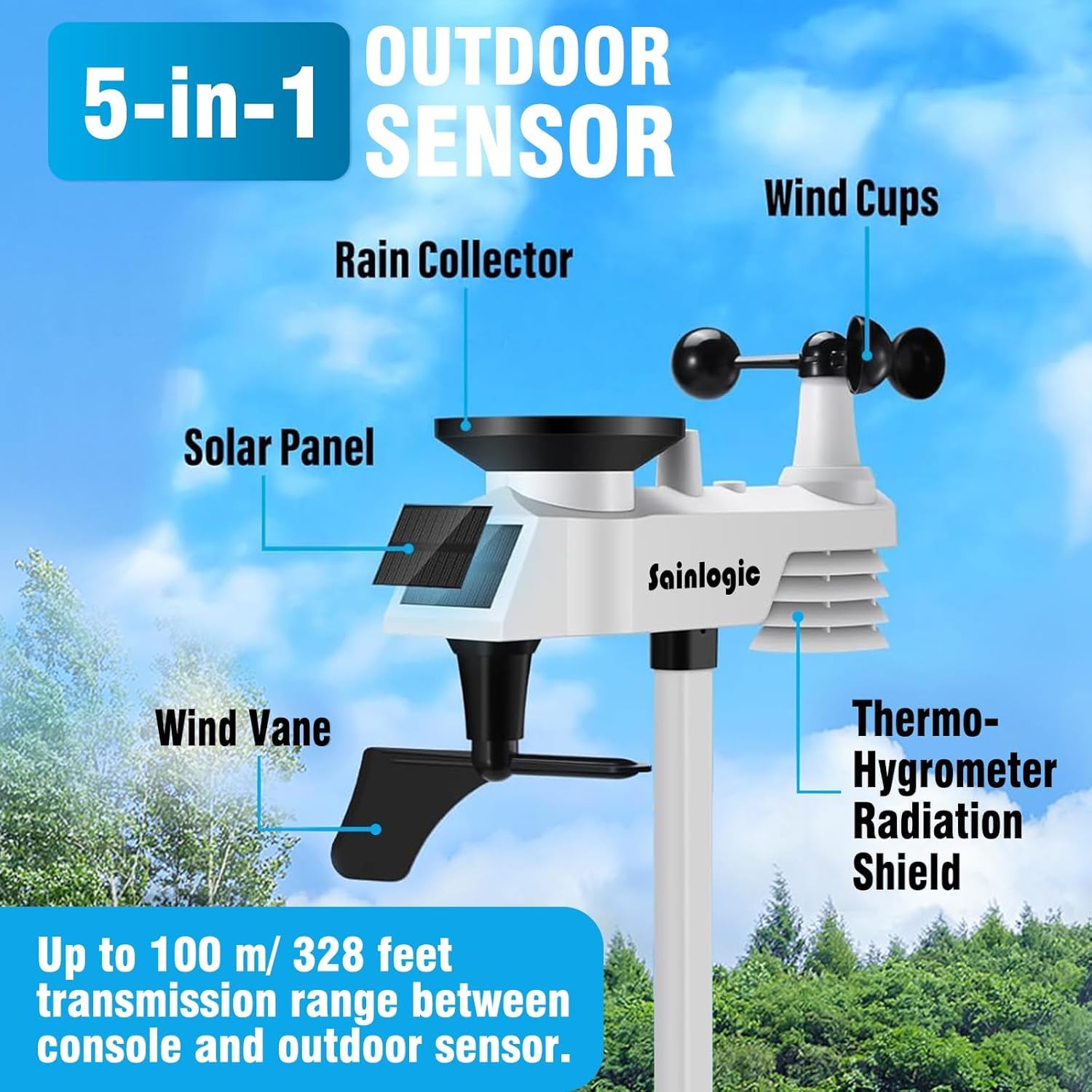
The 7-in-1 outdoor sensor integrates multiple measurement tools:
- Rain Gauge (Rain Collector)
- Wind Cups (Anemometer)
- Wind Vane
- Solar Panel
- Thermo-Hygrometer (Temperature and Humidity Sensor)
- Radiation Shield
- Antenna
Setup
1. Powering the Display Console
- Connect the provided power adapter to the display console and plug it into a standard electrical outlet.
- For backup power, install 3 AAA batteries (not included) into the battery compartment on the back of the console. Ensure correct polarity.
2. Installing the Outdoor Sensor
The outdoor sensor requires careful placement for accurate readings.
- Location: Choose an open area, free from obstructions like buildings, trees, or vehicles, that could interfere with wind, rain, or sunlight. The sensor has a transmission range of up to 328 feet (100 meters) to the display console.
- Mounting: Use the included mounting pole and bracket. Ensure the sensor is level for accurate rain collection and wind direction. The wind vane should point North.
- Batteries: Install batteries (not included) into the outdoor sensor as per the instructions in the sensor's specific manual (if provided separately).

3. Sensor Synchronization
Once both units are powered, the display console will automatically attempt to connect with the outdoor sensor. This may take a few minutes. Ensure both units are within range and free from major interference.
Operating Instructions
Display Console Overview
The 7.56 x 5.9-inch LCD screen displays various weather parameters. Key areas include:
- Indoor/Outdoor Temperature and Humidity
- Wind Direction and Speed (Gust and Average)
- Pressure and Rainfall
- Weather Tendency Indicator
- Date, Time, and Moon Phase


Adjusting Display Brightness
The LCD screen features adjustable backlighting for clear readability in various light conditions. Use the "SNOOZE/LIGHT" button to cycle through brightness levels (100%, 80%, 60%).

Weather Forecasting
The weather station provides a forecast based on changes in barometric pressure. The display will show one of four illustrations: Sunny, Cloudy, Rainy, or Sunset.

Alarm Functions
The weather station supports multiple alarm modes for various weather parameters, allowing you to set alerts for specific conditions.
- Time (Alarm 1 and Alarm 2)
- Wind Gust
- Wind Average
- Outdoor Temperature (High/Low)
- Outdoor Humidity (High/Low)
- Outdoor Feels Like Temperature (High/Low)
- Outdoor Dew Point (High/Low)
- 24 Hour Rainfall
- Absolute Pressure (High/Low)
- Relative Pressure (High/Low)
- Indoor Temperature (High/Low)
- Indoor Humidity (High/Low)
Refer to the detailed user guide (PDF) for specific instructions on setting each alarm.
Maintenance
Regular maintenance ensures the accuracy and longevity of your weather station.
- Cleaning: Periodically clean the outdoor sensor, especially the rain gauge and wind cups, to remove debris that may affect readings. Use a soft, damp cloth. Do not use abrasive cleaners.
- Battery Replacement: Replace batteries in both the display console and outdoor sensor when the low battery indicator appears on the display. Use high-quality alkaline or lithium batteries.
- Sensor Placement Check: Annually check the outdoor sensor's mounting to ensure it remains level and securely fastened, especially after strong winds or storms.
Troubleshooting
If you encounter issues with your weather station, try the following steps:
| Problem | Possible Cause | Solution |
|---|---|---|
| No outdoor data displayed. | Sensor not synchronized or out of range. Low batteries in outdoor sensor. | Ensure outdoor sensor batteries are fresh. Bring sensor closer to console to re-establish connection. Reset both units if necessary. |
| Inaccurate rain readings. | Rain gauge blocked by debris. Sensor not level. | Clean the rain collector. Ensure the outdoor sensor is mounted perfectly level. |
| Inaccurate wind readings. | Wind cups or vane obstructed. Sensor not in an open area. | Clear any obstructions around the wind cups and vane. Relocate the sensor to a more open area if possible. |
| Display console not turning on. | Power adapter issue. No or dead backup batteries. | Check power adapter connection. Ensure power outlet is functional. Install fresh AAA batteries. |
For further assistance, please refer to the full user guide or contact Sainlogic customer support.
Specifications
| Feature | Detail |
|---|---|
| Model Number | SC088black |
| Product Dimensions | 0.98 x 7.3 x 5.9 inches (Display Console) |
| Weight | 4.56 Pounds |
| Outdoor Temperature Range | -40°C to +60°C (-40°F to +140°F) |
| Indoor Temperature Range | 0°C to +60°C (32°F to +140°F) |
| Temperature Accuracy | ±1°C |
| Humidity Range | 10% to 99% RH (1% resolution) |
| Humidity Accuracy | ±5% |
| Wind Speed Range | Up to 112 mph (50 m/s) |
| Rainfall Range | 0-9999mm |
| Barometric Pressure Range | 300-1100 hPa |
| Barometric Accuracy | ±3 hPa |
| Transmission Range | Up to 328 feet (100 meters) in open air |
| Power Source (Console) | Power Adapter (included), 3 x AAA batteries (not included) |
| Power Source (Sensor) | Batteries (not included) |
| Material | Acrylonitrile Butadiene Styrene (ABS) |
Warranty and Support
For detailed warranty information, please refer to the official Sainlogic website or the documentation included with your purchase.
For additional support, including a more comprehensive user guide, please visit the following link:Sainlogic Weather Station User Guide (PDF)
You can also visit the official Sainlogic store on Amazon for more products and support:Sainlogic Amazon Store
Ask a question about this manual
Ask about setup, troubleshooting, compatibility, parts, safety, or missing instructions. Manuals+ will review the question and use this page’s manual context to help answer it.