
1. Overview
The NINSI Smart Lighter NS019 is a versatile butane lighter designed with multiple ignition methods and convenient features. It offers four distinct ways to ignite the soft flame, including voice control, airflow sensing, gravity sensing, and knocking. The lighter is refillable with butane and features a Type-C charging port for its intelligent plasma arc ignition system. A unique gear turntable is integrated for interactive use.
Key Features:
- Four Ignition Methods: Voice control, airflow sensing, gravity sensing, and knocking.
- Gear Turntable: 360° rotatable design for interactive use.
- USB & Type-C Charging: Convenient and fast charging.
- Refillable & Adjustable: Butane fill port and flame size adjustment valve with a visible gas window.
- Intelligent Plasma Arc Ignition: Safe and quick ignition without a switch.
2. Safety Information
- Keep out of reach of children.
- Do not expose to temperatures above 122°F (50°C).
- Never puncture or incinerate the lighter.
- Ensure the flame is extinguished after each use.
- Use only high-quality butane fuel for refilling.
- Avoid direct contact with skin or clothing when igniting.
- Do not attempt to disassemble or modify the lighter.
- Lighter does not contain gas upon delivery; add butane before use.
3. Product Diagram

Image: NINSI Smart Lighter NS019 showing key components and dimensions.
The image above illustrates the key components of the NINSI Smart Lighter NS019. It highlights the visible fuel tanks, the Type-C charging port, the bottom inflation port for butane refilling, and the flame size control valve. The overall dimensions are 2.4"L x 1.6"W x 0.8"Th, and it weighs 3.36 ounces, constructed from zinc alloy.
4. Setup
4.1 Refilling Butane
The lighter is shipped without butane fuel. Please ensure you use high-quality butane for refilling. The bottom of the lighter features a dedicated butane fill port.
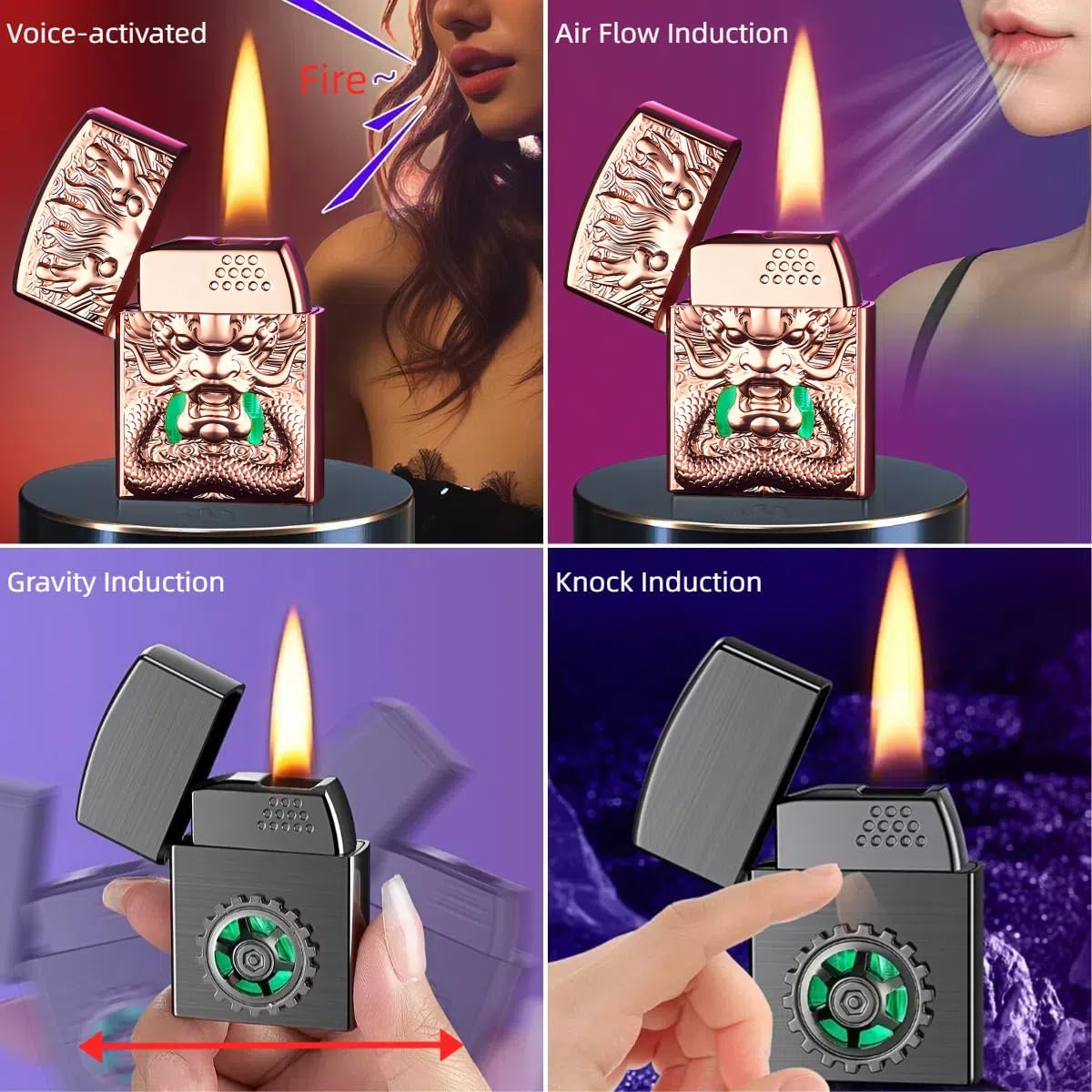
Image: Demonstrating butane refilling and Type-C charging for the NINSI Smart Lighter NS019.
To refill:
- Invert the lighter and firmly press the butane canister nozzle into the lighter's fill port.
- Hold for approximately 5-10 seconds until the fuel tank is full.
- Wait a few minutes after refilling before attempting to ignite to allow the gas to stabilize.
4.2 Charging
The lighter is equipped with a Type-C fast charging port. Use the provided Type-C cable to charge the device.
- Connect the Type-C cable to the lighter's charging port.
- Connect the other end to a USB power source (e.g., notebook, car charger, power bank, wall adapter).
- The green LED light on the visible gas window will indicate charging status.
4.3 Adjusting Flame Size
The flame size can be adjusted using the valve located at the bottom of the lighter.
Video: Demonstration of butane refilling and flame adjustment for a similar butane lighter. The flame adjuster is located at the bottom of the lighter.
- Use a small screwdriver to turn the flame adjustment valve.
- Turn clockwise for a weaker flame, and counter-clockwise for a stronger flame.
- A flame size of 1/2 to 3/4 inch generally works best.
5. Operating Instructions
The NINSI Smart Lighter NS019 offers four distinct ignition methods once the lid is opened and the intelligent plasma arc ignition is active.
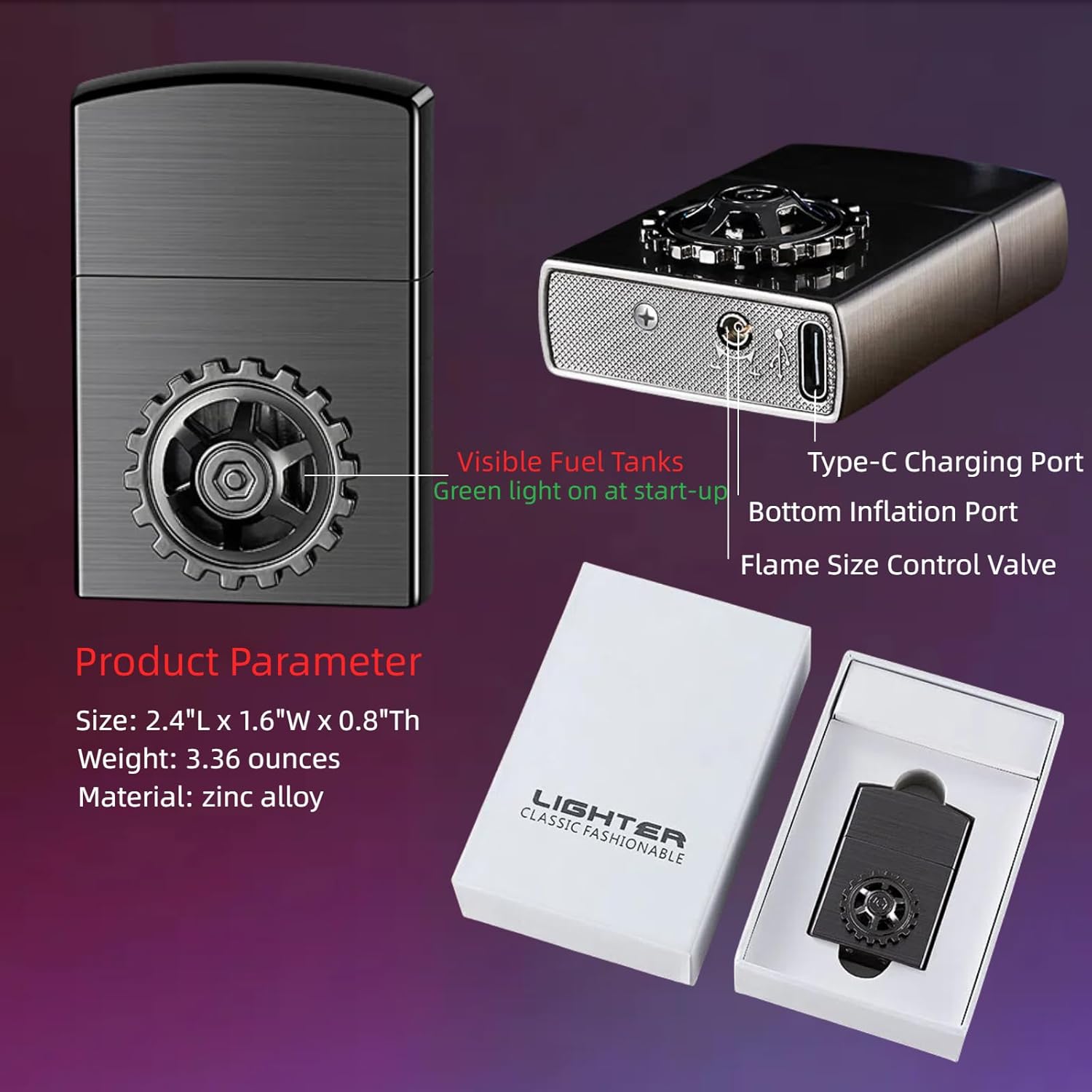
Image: Visual representation of the four ignition methods: Voice-activated, Air Flow Induction, Gravity Induction, and Knock Induction.
5.1 Ignition Methods
Video: Official demonstration of the four smart ignition modes of the NINSI Smart Lighter.
- Voice Control: Speak a command (e.g., "Fire") to ignite the flame.
- Airflow Sensing: Blow gently towards the ignition point to activate the flame.
- Gravity Sensing: Shake the lighter to trigger ignition.
- Knocking Ignition: Gently tap the lighter to ignite the flame.
5.2 Gear Turntable
The integrated gear turntable can be rotated 360° for relaxation or as a fidget toy.

Image: The NINSI Smart Lighter NS019 highlighting the 360° rotatable gear turntable.
6. Maintenance
6.1 Cleaning
To maintain optimal performance and appearance, regularly clean the lighter.
- Use a soft, dry cloth to wipe the exterior of the lighter.
- Ensure no debris obstructs the ignition points or the butane fill port.
- Avoid using harsh chemicals or abrasive materials that could damage the finish.
7. Troubleshooting
7.1 Lighter Fails to Ignite After Refilling
- Insufficient Butane: Ensure the lighter is fully refilled. Sometimes, air pockets can form during refilling; try refilling again after purging any residual air.
- Gas Stabilization: After refilling, wait 2-3 minutes for the butane gas to stabilize before attempting ignition.
- Flame Adjustment: If the flame is set too low, it may not ignite. Adjust the flame size control valve at the bottom of the lighter to a medium setting (1/2 to 3/4 inch). If the flame is too strong, it might blow itself out; reduce the flame size.
7.2 Butane Leaks During Refilling
- Canister Nozzle Mismatch: Ensure the butane canister nozzle is correctly aligned and fits snugly into the lighter's fill port. Some canisters come with various adapters; try a different one if available.
- Pressure Build-up: If the lighter is already partially full or has residual air, it might resist further filling. Briefly press the fill port with a small tool to release any pressure before attempting to refill.
8. Specifications
| Attribute | Detail |
|---|---|
| Brand | NINSI |
| Model Number | NS019 |
| Color | Brushed Black |
| Material | Zinc Alloy |
| Product Dimensions | 2.4"L x 1.6"W x 0.8"Th |
| Item Weight | 3.36 ounces |
| Fuel Type | Butane |
| Batteries | 1 Lithium Ion battery required (included) |