
1. Introduction
Thank you for choosing the NINSI Smart Lighter NS019. This device combines modern technology with traditional lighter functionality, offering multiple ignition methods and a refillable butane design. Please read this manual thoroughly before use to ensure safe and optimal operation.
2. Safety Information
WARNING: Keep out of reach of children. This product contains flammable butane gas and a lithium-ion battery. Improper use can result in fire, injury, or property damage.
- Do not expose to temperatures above 50°C (122°F) or direct sunlight for extended periods.
- Do not puncture or incinerate the lighter.
- Ensure the flame is extinguished before closing the lid or storing.
- Use only high-quality butane fuel for refilling.
- Do not attempt to disassemble or modify the lighter.
- Avoid contact with skin when the lighter is active, as components can become hot.
- Do not use near flammable materials or in explosive atmospheres.
3. Package Contents
- NINSI Smart Lighter NS019
- USB Type-C Charging Cable
- User Manual
4. Product Overview
The NINSI Smart Lighter NS019 features a durable zinc alloy construction and offers four distinct ignition methods for convenience. It includes a visible fuel window, a flame size adjustment valve, and a unique gear turntable for tactile interaction.
Key Features:
- Four Ignition Methods: Voice control, airflow sensing, gravity sensing, and knocking induction.
- Gear Turntable: A 360° rotatable gear for tactile engagement.
- USB & Type-C Charging: Convenient and fast charging.
- Refillable Butane: Easy to refill with a visible gas window and adjustable flame.
Component Identification:
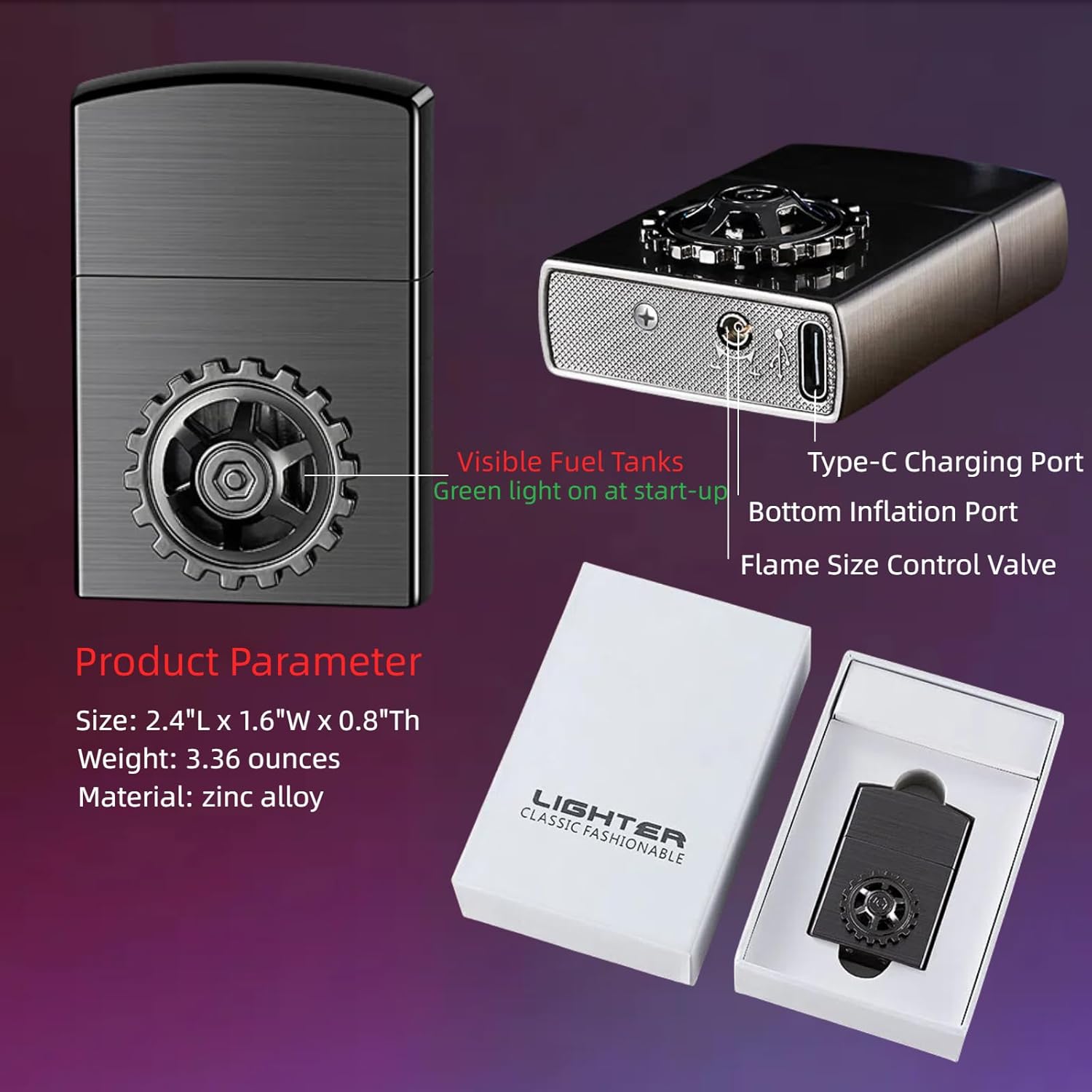
Image Description: This image displays the NINSI Smart Lighter NS019, highlighting its key components. Labels point to the visible fuel tank, Type-C charging port, bottom inflation port, and flame size control valve. Product dimensions (2.4"L x 1.6"W x 0.8"Th) and weight (3.36 ounces) are also shown.
5. Setup
5.1 Charging the Lighter
The lighter is equipped with a built-in lithium-ion battery that powers the smart ignition features. Before first use, or when the battery indicator is low, charge the device.
- Locate the Type-C charging port on the side of the lighter.
- Connect the provided USB Type-C cable to the lighter and a compatible USB power source (e.g., computer, wall adapter, power bank).
- The LED indicator lights will illuminate to show charging progress. Once all lights are solid, the lighter is fully charged.

Image Description: This image shows the NINSI Smart Lighter NS019 being charged. The lighter is connected to a power bank using its Type-C charging port, illustrating the fast charging capability.
5.2 Refilling Butane Fuel
The lighter is shipped without fuel for safety reasons. You must refill it with butane before use.
- Ensure the lighter is completely cool before refilling.
- Hold the lighter upside down.
- Insert the nozzle of a high-quality butane fuel can into the bottom inflation port.
- Press firmly for 5-10 seconds. Repeat 2-3 times, allowing a few seconds between presses.
- Observe the visible gas window to monitor the fuel level. Do not overfill.
- Wait a few minutes after refilling for the gas to stabilize before attempting to ignite.

Image Description: This image illustrates the process of refilling the NINSI Smart Lighter NS019 with butane gas. A butane can is shown inverted, with its nozzle inserted into the lighter's bottom inflation port.
6. Operating Instructions
The NINSI Smart Lighter NS019 offers four distinct methods for ignition, in addition to a tactile gear turntable feature.
6.1 Ignition Methods
To activate any smart ignition method, first open the lighter's lid. The internal plasma arc ignition system will then be ready.
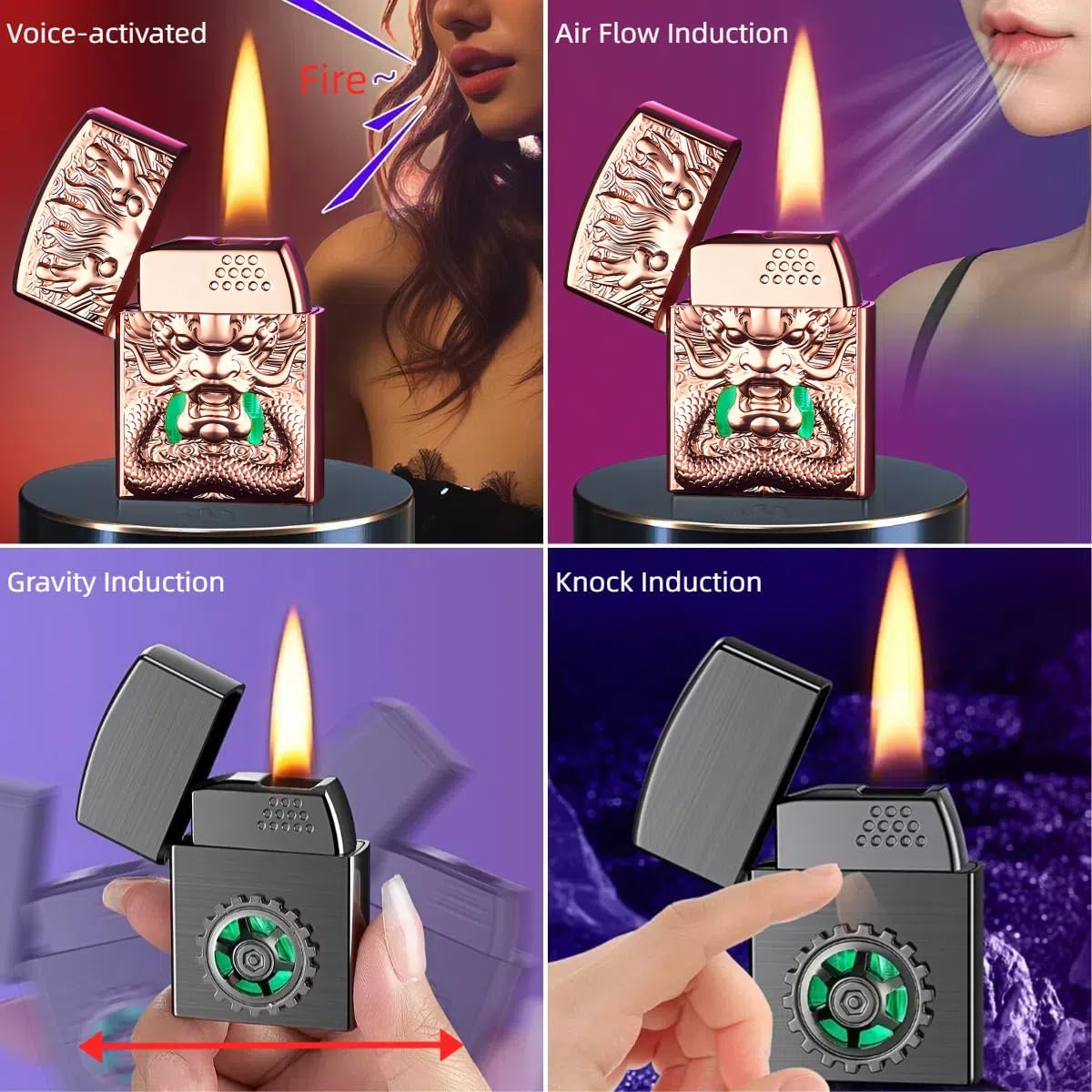
Image Description: This composite image demonstrates the four smart ignition methods of the NINSI Smart Lighter NS019. Each panel shows a different method: voice activation, blowing on the sensor (airflow induction), shaking the lighter (gravity induction), and tapping the lighter (knock induction), all resulting in a flame.
- Voice Control: Open the lid and speak a command (e.g., "Ignite" or "Fire") to activate the flame.
- Airflow Sensing: Open the lid and gently blow towards the ignition area to activate the flame.
- Gravity Sensing: Open the lid and gently shake the lighter to activate the flame.
- Knocking Induction: Open the lid and gently tap the lighter to activate the flame.
Video Demonstration:
Video Description: This video demonstrates the four creative smart ignition modes of the NINSI Smart Lighter NS019. It shows the lighter being ignited by voice command, knocking, blowing, and shaking, highlighting its versatile functionality.
6.2 Flame Adjustment
The flame size can be adjusted using the valve located at the bottom of the lighter. Use a small screwdriver or similar tool to carefully turn the valve to increase or decrease the flame height.
6.3 Gear Turntable Function
The integrated gear turntable is designed for tactile interaction and relaxation. It can be rotated 360°.

Image Description: This image features the NINSI Smart Lighter NS019 with its lid open and flame active. The prominent gear turntable on the front of the lighter is highlighted, emphasizing its 360-degree rotation capability for user interaction.
Video Demonstration:
Video Description: This video showcases the voice-activated and spinner features of the NINSI Smart Lighter. It demonstrates the lighter being charged, the spinner's lighting effects, and the voice-activated, knock, blow, and shake ignition methods.
7. Maintenance
7.1 Cleaning
- Wipe the exterior of the lighter with a soft, dry cloth.
- Do not use abrasive cleaners or solvents.
- Keep the ignition area free from debris.
7.2 Storage
- Store the lighter in a cool, dry place, away from direct sunlight and heat sources.
- Ensure the lighter is empty of fuel if storing for extended periods.
8. Troubleshooting
| Problem | Possible Cause | Solution |
|---|---|---|
| Lighter does not ignite. | No butane fuel. | Refill with butane fuel (see Section 5.2). |
| Low battery. | Charge the lighter (see Section 5.1). | |
| Lid not fully open. | Ensure the lid is fully open to activate the smart ignition. | |
| Butane leaks during refilling. | Improper nozzle fit or angle. | Ensure the butane can nozzle is correctly aligned and pressed firmly into the fill port. Use a butane can with appropriate nozzle adapters if necessary. |
| Flame is too high/low. | Flame adjustment valve setting. | Adjust the flame size control valve at the bottom of the lighter. |
| Smart ignition methods are unresponsive. | Low battery or sensor obstruction. | Charge the lighter. Ensure sensors are clean and unobstructed. |
9. Specifications
- Brand: NINSI
- Model: NS019
- Color: Ice Coloured
- Material: Zinc Alloy
- Dimensions: 2.4"L x 1.6"W x 0.8"Th
- Item Weight: 3.36 ounces (0.21 Pounds)
- Fuel Type: Butane
- Battery: 1 Lithium Ion battery (included)
- Charging Port: Type-C
10. Warranty and Support
For warranty information or technical support, please refer to the documentation included with your purchase or contact NINSI customer service directly. Keep your purchase receipt for warranty claims.