
1. Introduction
This manual provides essential information for the safe and effective operation, setup, and maintenance of your Makute Inverter Welding Machine 300 Amp. Please read this manual thoroughly before using the machine to ensure proper function and to prevent injury or damage.

Figure 1: Front view of the Makute Inverter Welding Machine 300 Amp, showing the digital display and current adjustment knob.
2. Safety Instructions
Always prioritize safety when operating welding equipment. Failure to follow these instructions can result in serious injury or death.
- Electric Shock: Welding current can cause fatal electric shock. Ensure proper grounding. Do not touch live electrical parts. Wear dry welding gloves and protective clothing.
- Fumes and Gases: Welding produces fumes and gases that can be hazardous to health. Work in a well-ventilated area. Use an exhaust fan or fume extractor if necessary.
- Arc Rays: Arc rays can burn eyes and skin. Wear a welding helmet with appropriate shade filter. Protect exposed skin with flame-resistant clothing.
- Fire and Explosion: Welding sparks and hot metal can cause fires. Keep flammable materials away from the welding area. Have a fire extinguisher readily available.
- Burns: Hot metal and slag can cause severe burns. Wear protective gloves and clothing.
- Pacemakers: Magnetic fields from high currents can affect pacemakers. Consult a physician before operating welding equipment if you have a pacemaker.
- Maintenance: Disconnect power before performing any maintenance or service.
3. Package Contents
Upon unpacking, verify that all items are present and undamaged:
- Makute Inverter Welding Machine 300 Amp
- Earth Clamp with Cable
- Electrode Holder with Cable
- Power Cord (attached)
- User Manual
4. Product Features
The Makute Inverter Welding Machine 300 Amp is designed for industrial use, offering reliable performance with the following key features:
- Inverter Technology: Provides stable arc and efficient power consumption.
- High Output Current: Up to 300 Amps for various welding tasks.
- Lightweight Design: Facilitates portability and ease of handling.
- Wired Power Source: Ensures continuous operation without battery limitations.
- Compact Dimensions: Designed for space efficiency.

Figure 2: Side view of the welding machine, highlighting its compact design and Makute branding.
5. Setup
Follow these steps to set up your welding machine:
- Placement: Place the welding machine on a stable, level surface in a well-ventilated area, away from flammable materials.
- Power Connection: Ensure the machine's power switch is in the OFF position. Connect the power cord to a suitable electrical outlet (AC-220V as indicated on the unit). Verify the power supply matches the machine's requirements.
- Earth Clamp Connection: Connect the earth clamp cable to the negative (-) terminal on the front panel of the welding machine. Securely attach the earth clamp to the workpiece or a clean, bare metal part of the welding table.
- Electrode Holder Connection: Connect the electrode holder cable to the positive (+) terminal on the front panel. Insert the appropriate welding electrode into the electrode holder.
- Gas Connection (if applicable): If your welding process requires shielding gas (e.g., TIG welding, though this is an MMA machine, the rear image shows a "GAS" port), connect the gas hose from your gas cylinder to the gas inlet on the rear of the machine. Ensure all connections are tight to prevent leaks.

Figure 3: Rear view of the welding machine, illustrating the power switch, power cable, and a potential gas connection port.
6. Operating Instructions
Once the machine is set up and safety precautions are in place, you can begin welding:
- Power On: Flip the power switch on the rear of the machine to the ON position. The digital display on the front panel should illuminate.
- Current Adjustment: Use the current adjustment knob on the front panel to set the desired welding current (Amps). Refer to your electrode manufacturer's recommendations for appropriate current settings.
- Prepare Workpiece: Ensure the workpiece is clean and free of rust, paint, or grease.
- Start Welding: With your welding helmet on and protective gear in place, strike an arc by gently touching the electrode to the workpiece and quickly lifting it slightly to establish the arc. Maintain a consistent arc length and travel speed.
- Monitor Performance: Observe the weld pool and adjust current as needed for optimal penetration and bead appearance.
- Power Off: After welding, turn the machine off using the power switch. Allow the machine to cool down before storing.
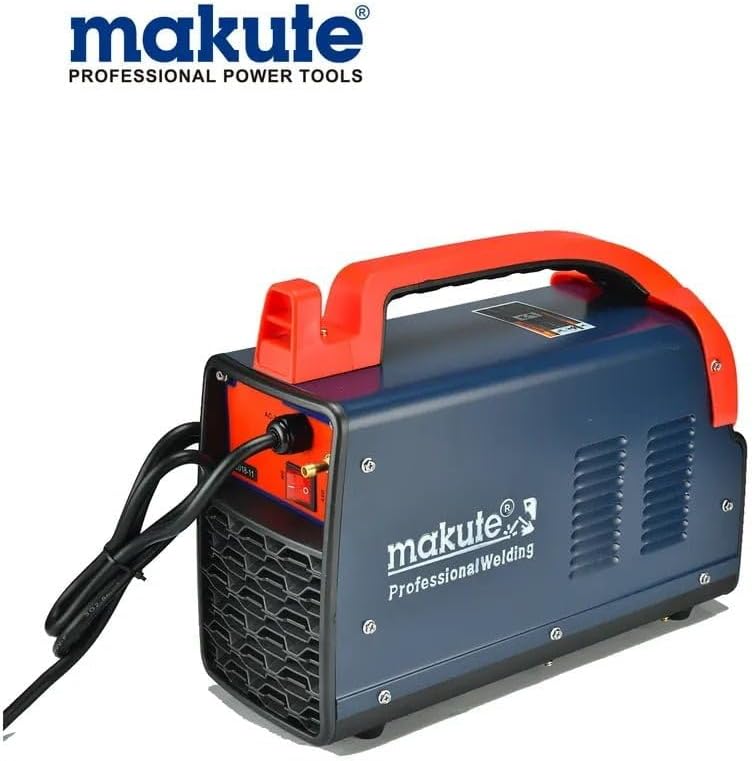
Figure 4: Angled rear view, providing a clearer look at the power input and rear controls.
7. Maintenance
Regular maintenance ensures the longevity and safe operation of your welding machine.
- Cleaning: Periodically clean the machine's exterior with a dry, soft cloth. Use compressed air to blow out dust and debris from the ventilation openings. Ensure the machine is disconnected from power before cleaning.
- Cable Inspection: Regularly inspect all cables (power, earth, electrode) for cuts, fraying, or damaged insulation. Replace damaged cables immediately.
- Terminal Connections: Check that all terminal connections are tight and free from corrosion.
- Storage: Store the machine in a dry, clean environment, away from excessive dust and moisture.
8. Troubleshooting
This section addresses common issues you might encounter:
| Problem | Possible Cause | Solution |
|---|---|---|
| Machine does not power on | No power supply; Power switch off; Faulty power cord | Check power outlet and circuit breaker; Ensure power switch is ON; Inspect and replace power cord if damaged. |
| No welding arc | Poor earth connection; Incorrect current setting; Wet or faulty electrode; Loose cable connections | Ensure earth clamp is on clean metal; Adjust current; Use dry electrodes; Check all cable connections. |
| Weak or unstable arc | Low current setting; Long arc length; Incorrect electrode type | Increase current; Maintain short arc length; Use appropriate electrode for material and current. |
| Overheating indicator active | Exceeded duty cycle; Blocked ventilation | Allow machine to cool down; Ensure ventilation openings are clear. |
9. Specifications
| Feature | Detail |
|---|---|
| Brand | Makute |
| Model | 300 Amp Inverter Welding Machine |
| Power Source Type | Wired Electric (AC-220V, as typically indicated on such units) |
| Output Current | Up to 300 Amps |
| Special Features | Lightweight |
| Specific Uses | Industrial Use |
| Item Weight | 4.94 Kilograms |
| Package Dimensions | 40.2 x 27.4 x 25.2 cm |
10. Warranty and Support
For warranty information and technical support, please refer to the documentation provided at the time of purchase or contact your retailer. Keep your purchase receipt as proof of purchase for any warranty claims.
For further assistance, you may also visit the official Makute website or contact their customer service department.