
Introduction
This manual provides instructions for the Effireli RM-C1247 universal TV remote control. This remote is designed for immediate use with compatible television models without requiring any programming or setup. Simply insert batteries and begin operation.
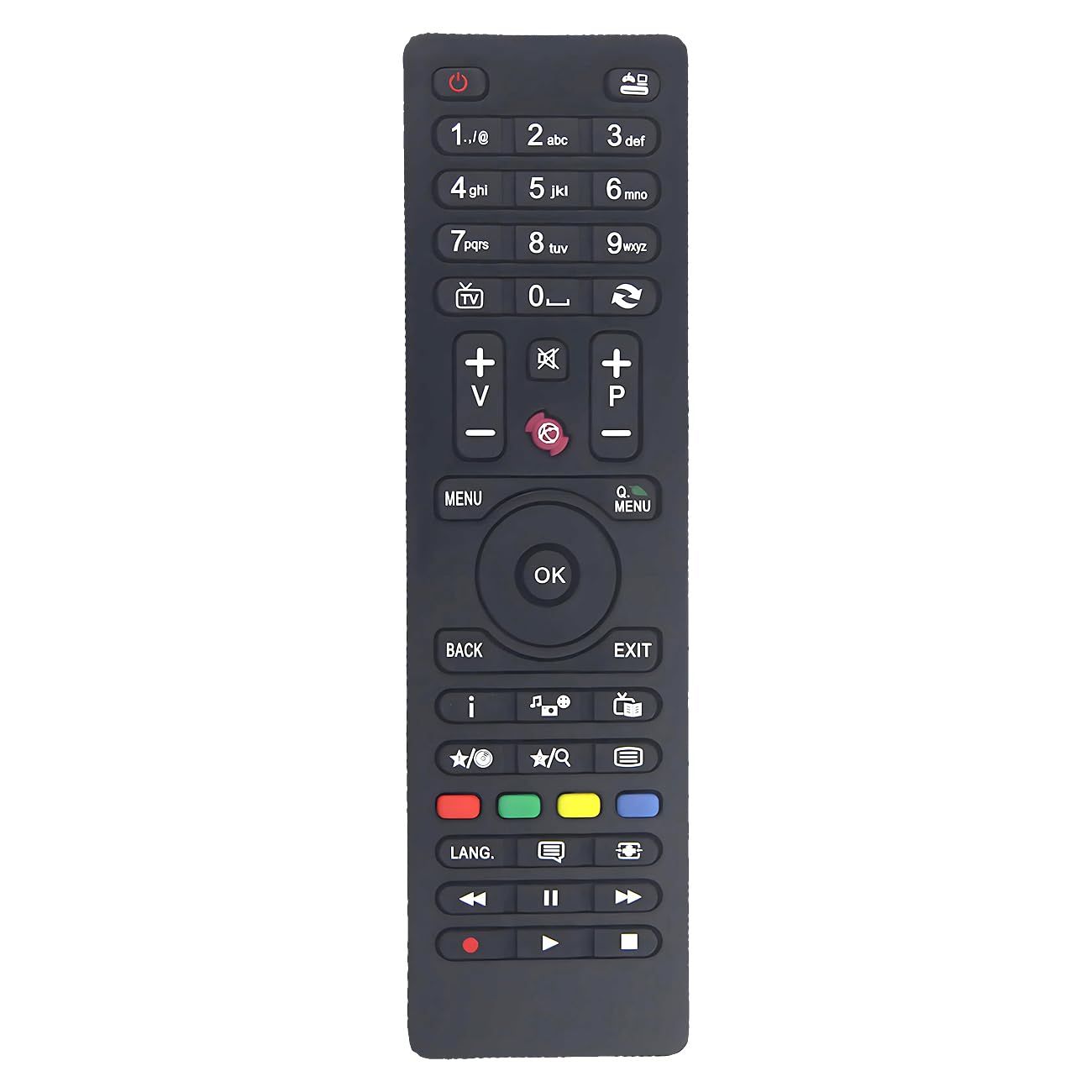
Image of the Effireli RM-C1247 universal TV remote control, showing its standard button layout.
Compatible Models
The Effireli RM-C1247 remote control is compatible with a wide range of TV models from various brands, including JVC, Polaroid, Vestel, Finlux, Telefunken, JMB, and Digihome. A partial list of compatible models includes:
- D43F278N3CW, D32H289N3C, D40F278Q3CW, TE48275S20F1T10D, D49F283N3C, L20H277A3, L65F249Q3CW, XF22A100-W, TE24275B30CXBW, XH24A100-GRAU, A49F535A, A55F535A, TE40282S25TXH, TE49282S25T2K, TE22272B30CXGW, XF50A100, TE20270B30CXBW, TE40282S25T2H, L22F272K4V, D40F287M3CW, TFL20CTS12V01B, LT-32HG62U, LT-32V250WE, LT-32V450, LT28HD48U, LT32HG52U, LT32HG62U, LT32V450, L50F185Q3C, D40F185M3, L22F275E2, TE24275-B30C10E, TE40283N25F1C10D, TE32287B301C10D, TE24283B30C10E, D43F278A3CW, TE20265B30C30E, L28H182M3
- TE22272B30FC30E, TE24275B30C30E, 32DH5015, TE32265B301C30D, TFL19180HD15W2, TFL32DHD15BA, TFK32D279HD16, D40F287M3, TE32265B311C30D, TE40282B34C2H, TE40282N25F1C10D, L40F185M3, D39F185M3, D39F275N3, TE32287B30CXD, XF39A300, XH24A100DW, TE32278B30CXD, TE39275N25CXH, D40F278N3CW, D32H283X3C, TE32265B301C10D, TE32287B35TXD, XF32B301-W, XF40A100, TE32265B30CXDW, XF32B100, D32H281R3, XH24A101D-W, XH32A101-W, XF32A101-W, XF32A201D-W, LT32V250WE, T32EX1320SAT, L28H272I3, TFK39D276FHD, TFK65L243FHD, L22F945B3, L22F185B3D, L42F242N3C
- T40EX1340SAT, L24H125M3, D40F185N3C, L24H125M3W, D39F185Q3C, L32H160Q3, L32F185F3C, T32EX1440SAT, L22F185B3, L42F242B3C, TE20265B30C10E-LED, TE32EUB35TXD, XF22A101-W, XH20A101D-W, XH20A101-W, L32F242B3C, TE39182N25FC10UDLED, L22F185D3, T32EX1450SAT, D39F182N2, T40EX1450SAT, L55F243M3C, TFLS425090FHDB/2, TFL50D14FHDB/2, L24F185D3, D42F167B3, D48F272N3C, TE28275B30C10E, L24H189B2
- L65F243M3C, D40F127R3C, TE19180B30C10E, T50EX1450SAT, L65F243A3C, L22F130M3D, D50F275N3C, L19H135A3, L23H277D3, D32F182N3C, L55F243N3CV1, TE22275B31FT10E, TE40275N26F1T10D, D42F275E3, T49EX1570SAT, L19H130X3D, D40F275I3C, D32F197E3C, D49F283E3C, L20H270C3, TE65240G26F4T10ES43NET, T49FX284DLP, L22F275B3
Note: If your specific TV model number is not listed above, or if your original remote control has a significantly different appearance, please contact the manufacturer or seller to confirm compatibility before use.
Setup
1. Battery Installation
- Locate the battery compartment on the back of the remote control.
- Slide open the battery compartment cover.
- Insert two AAA batteries (not included), ensuring the correct polarity (+ and -) as indicated inside the compartment.
- Close the battery compartment cover securely.
2. Initial Use
No programming or setup is required for this remote control. Once batteries are installed, it is ready for immediate use with compatible TV models. Simply point the remote control towards your television and press the desired function button.
Operating Instructions
The Effireli RM-C1247 remote control functions identically to your original TV remote for compatible models. Common functions include:
- Power Button: Turns the TV on or off.
- Number Buttons (0-9): For direct channel selection.
- Channel Up/Down: Navigates through channels.
- Volume Up/Down: Adjusts the television volume.
- Mute Button: Silences the TV audio.
- Input/Source Button: Selects input sources (HDMI, AV, etc.).
- Menu Button: Accesses the TV's main menu.
- Navigation Buttons (Up, Down, Left, Right, OK): For navigating menus and confirming selections.
For specific advanced functions, refer to your television's original user manual.
Maintenance
Battery Replacement
Replace batteries when the remote control becomes unresponsive or its range decreases. Always replace both batteries at the same time with new AAA batteries. Do not mix old and new batteries, or different types of batteries.
Cleaning
To clean the remote control, wipe it with a soft, dry cloth. Do not use liquid cleaners, abrasive pads, or chemical solvents, as these may damage the remote's surface or internal components.
Troubleshooting
- Remote not responding:
- Check if the batteries are inserted correctly with the correct polarity.
- Replace old batteries with new ones.
- Ensure there are no obstructions between the remote control and the TV's infrared sensor.
- Make sure you are within the effective operating range and pointing the remote directly at the TV.
- Certain buttons not working:
- This remote is a replacement and may not support all advanced functions of every original TV remote. Verify compatibility for specific functions.
- Clean the remote control as described in the Maintenance section to ensure no debris is interfering with button contacts.
- TV responds intermittently:
- Batteries may be low; replace them.
- Ensure a clear line of sight to the TV's IR receiver.
If troubleshooting steps do not resolve the issue, please refer to the Warranty and Support section for further assistance.
Specifications
| Brand | Effireli |
| Model Number | YK-RM-C1247 |
| Compatible Devices | Television |
| Special Features | No Programming Required |
| Number of Items | 1 |
| Batteries Required | Yes (2 x AAA, not included) |
| Connector Type | Infrared |
| Product Dimensions | 16 x 3.1 x 1.6 cm |
| Item Weight | 79 g |
Warranty and Support
Warranty Information
This product includes a 30-day money-back guarantee. Additionally, a 12-month warranty covers manufacturing defects from the date of purchase. Returns and exchanges are accepted within the warranty period for eligible issues.
Customer Support
For technical assistance, warranty claims, or to confirm compatibility for your specific TV model, please contact the seller, Remote Realm, directly through the platform where the purchase was made. Provide your order details and the product model number (YK-RM-C1247) for efficient support.
Seller: Remote Realm