
1. Introduction
This manual provides essential information for the safe and effective use of your Redcamp Full Body Zero Gravity Massage Chair, Model 1806. Please read all instructions carefully before operating the chair and retain this manual for future reference.
Safety Information
Handle with care during use. Keep the chair away from water and other liquids to prevent damage. Always follow the instructions provided in this manual for safe operation.
2. Product Overview
The Redcamp Model 1806 massage chair is designed to provide a comprehensive massage experience with various features.
Key Features
- Full body massage with 8 fixed nodes and 12 automatic programs.
- Zero gravity recline function with three positions.
- Waist and leg heating for enhanced comfort.
- Full body airbag massage system.
- Integrated Bluetooth music playback.
- LED remote control for easy operation.
- Foot rollers for foot massage.
- Automatic body scanning to adjust massage points.
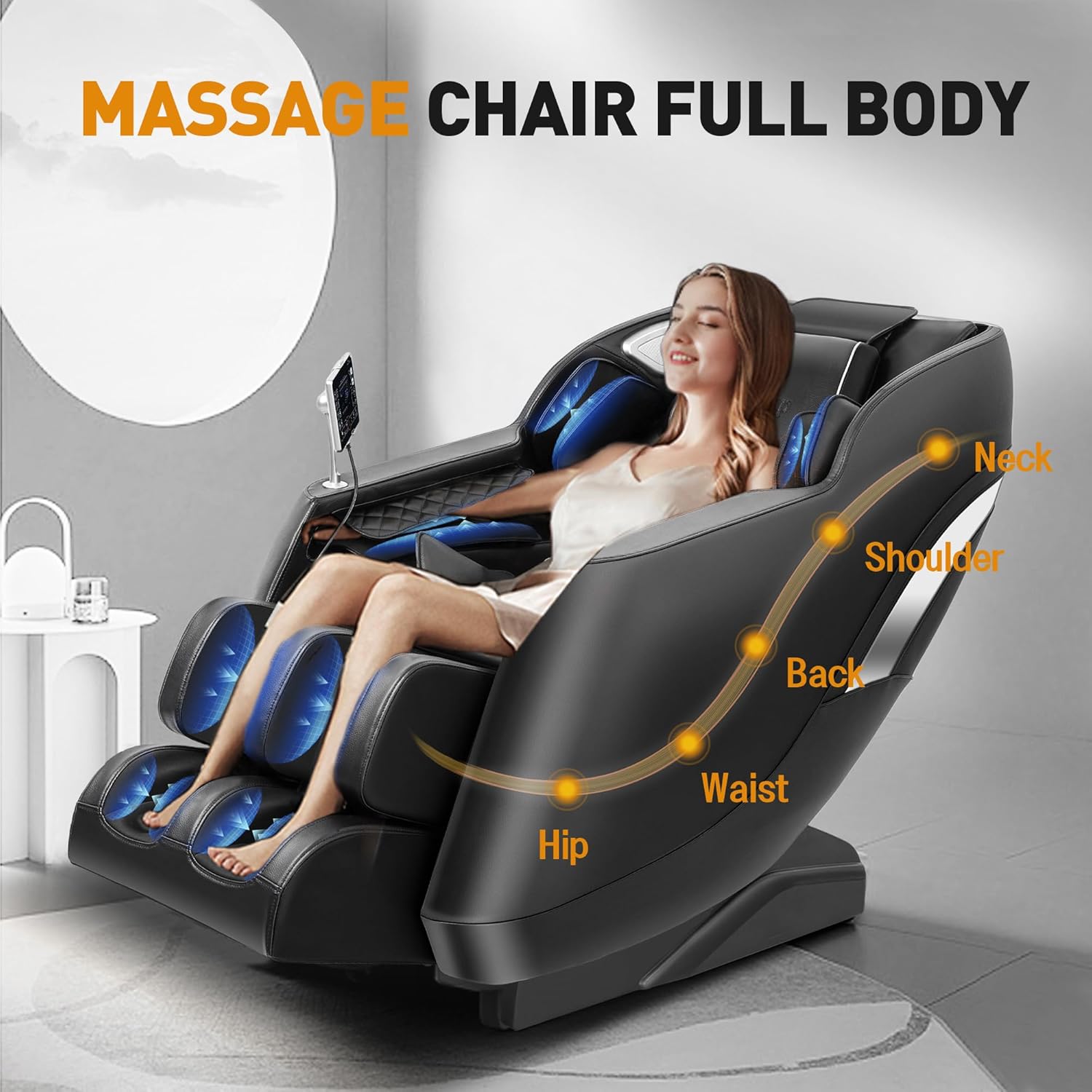
This image displays the Redcamp Full Body Massage Chair in use, illustrating the targeted massage zones including the neck, shoulders, back, waist, and hips.

This graphic details the various massage technologies integrated into the chair, such as 8 airbags, 8 massage rollers, zero gravity recline, foot rollers, waist and leg heating, and the control interface.
3. Setup
Unpacking and Placement
The Redcamp Model 1806 massage chair arrives fully assembled, requiring no installation. Simply remove it from the packaging.
Place the chair on a flat, stable surface. Ensure there is adequate space around the chair for reclining and to prevent obstruction. Keep the chair away from direct sunlight, heat sources, and moisture.

This image illustrates the chair's packaging, noting that it comes fully assembled and requires a minimum door width of 30 inches for delivery. It also provides the chair's overall dimensions.
4. Operating Instructions
Power On/Off
Connect the power cord to a suitable electrical outlet. Use the power button on the control panel to turn the chair on or off.
Control Panel
The chair is operated via an intuitive LED touch screen remote control. This panel allows you to select massage programs, adjust intensity, activate zero gravity, and set massage duration.

This image shows the intuitive LCD touch screen remote control, allowing users to select massage programs, adjust intensity, activate zero gravity, and set massage duration.
Automatic Programs
Select from 12 pre-programmed automatic massage modes designed for various needs. These programs combine different massage techniques and intensities.
Manual Massage Modes
Customize your massage by selecting from 8 distinct massage techniques. Adjust the massage speed and air-pressure levels to your preference using the control panel.
Zero Gravity Function
Activate the zero gravity recline feature to elevate your legs above your heart, distributing your body weight evenly and reducing pressure on your spine. There are three zero gravity positions: Initial, Comfort, and Deep.

This image demonstrates the three stages of the zero gravity recline feature, designed to reduce spinal pressure and enhance relaxation.
Heating Function
The chair includes heating elements in the waist and calf areas. Activate this function via the control panel for soothing warmth.
Airbag Massage
Airbags located throughout the chair inflate and deflate to provide compression massage to various body parts.
Foot Rollers
The footrest features triple foot rollers that provide a rolling massage to the soles of your feet.
Bluetooth Music
Connect your Bluetooth-enabled device to the chair to play music through the integrated speakers. Refer to your device's Bluetooth pairing instructions.

This image highlights the integrated Bluetooth music system, allowing users to enjoy audio during their massage, complemented by intelligent voice broadcasting.
This video provides a visual guide to operating the Redcamp massage chair, including starting a massage program and utilizing the zero-gravity recline.
5. Maintenance
Care and Cleaning
To maintain your massage chair, gently wipe it with a soft, damp towel during daily use. Avoid using harsh chemicals or abrasive cleaners, as these can damage the faux leather material. Ensure the chair is unplugged before cleaning.
6. Troubleshooting
If you encounter any issues with your massage chair, please refer to the following general advice:
- No Power: Ensure the power cord is securely plugged into both the chair and the electrical outlet. Check if the outlet is functional.
- Massage Not Starting: Verify that the chair is powered on and an automatic program or manual mode has been selected on the control panel.
- Unusual Noises: If you hear unusual noises, turn off the chair immediately and contact customer support.
- Remote Control Not Responding: Check if the remote control is properly connected or if its battery needs replacement (if applicable).
For persistent issues or technical assistance, please contact Redcamp customer support.
7. Product Specifications
| Specification | Detail |
|---|---|
| Brand | Redcamp |
| Model Name | 1806 |
| Color | Black |
| Material | Faux Leather, Foam (Fill) |
| Product Dimensions (D x W x H) | 46.46"D x 28.93"W x 41.73"H |
| Item Weight | 143.3 Pounds |
| Reclining Position Count | 3 (Zero Gravity) |
| Assembly Required | No |
| UPC | 747783559508 |
8. Warranty and Customer Support
Redcamp is committed to product quality and customer satisfaction. Each chair undergoes inspection for durability.
For specific warranty details, please refer to the documentation included with your purchase or contact Redcamp customer support. Our 24/7 support team is available to assist with any usage questions or after-sales care.


