
Introduction
This manual provides instructions for the Effireli replacement remote control designed for various Gree Air Conditioner models. This remote control is ready to use without any programming or setup. Simply insert batteries and begin operation.
Product Overview
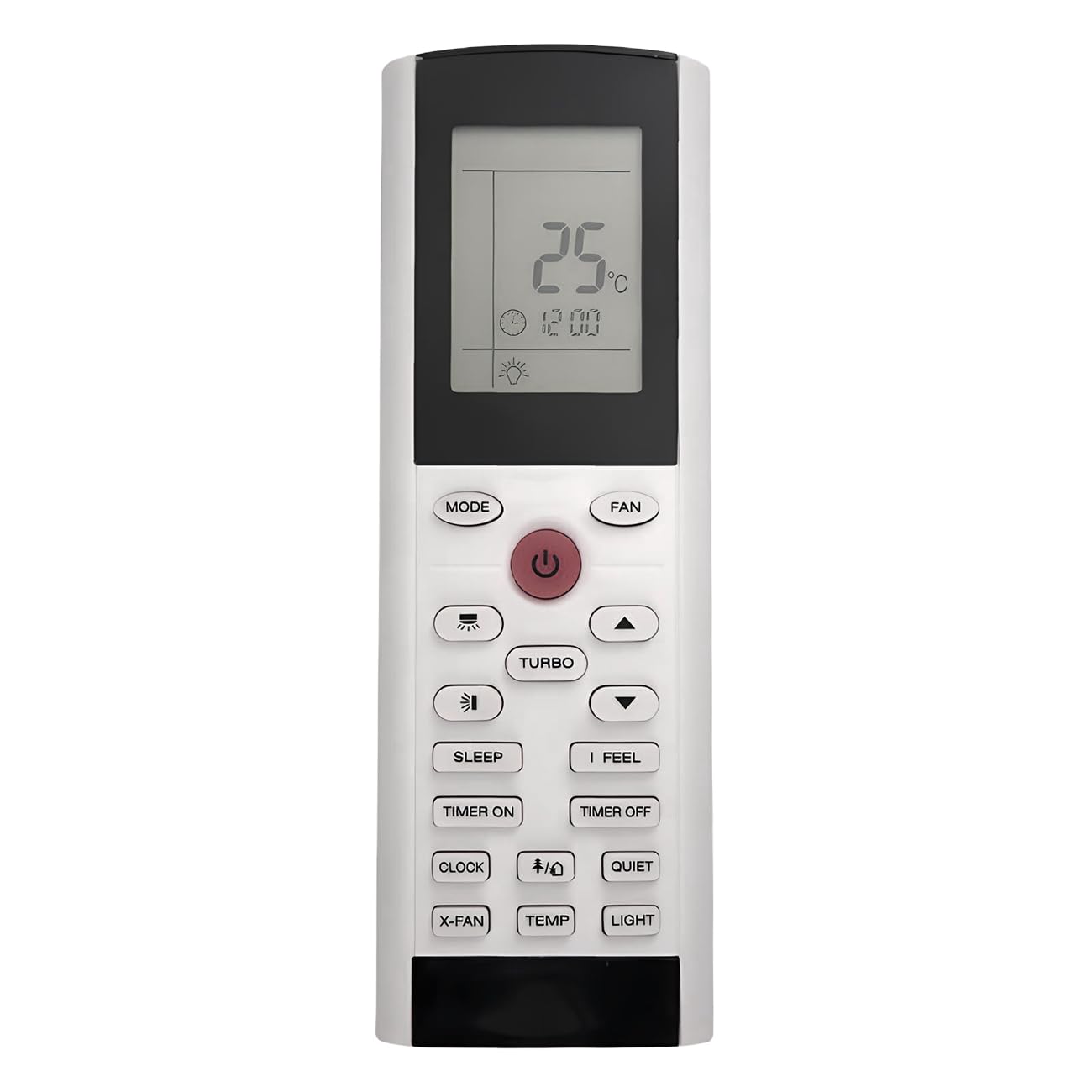
Image: Front view of the remote control. The display shows "25°C" and "12:00". Buttons include MODE, FAN, Power, Turbo, Sleep, I Feel, Timer On, Timer Off, Clock, Quiet, X-Fan, Temp, and Light.
The Effireli replacement remote control features a clear LCD display and ergonomically placed buttons for easy access to all essential air conditioner functions. It is designed to replicate the functionality of the original Gree remote controls for models YAC1FB, YAC1FB6, YAC1FB9, YACIFB, and YACIFBI.
Key Features:
- No Programming Required: Ready to use out of the box.
- Direct Replacement: Functions identically to the original remote.
- Clear LCD Display: Shows current temperature, mode, and time settings.
- Comprehensive Controls: Access to all standard air conditioner functions.
Battery Installation

Image: Back view of the remote control. A label indicates "YACIFB", "Battery type: AAA 1.5X2", and a warning about battery disposal.
- Locate the battery compartment on the back of the remote control.
- Slide the battery cover downwards or press the latch and lift to open.
- Insert two (2) AAA 1.5V batteries, ensuring the positive (+) and negative (-) terminals match the markings inside the compartment.
- Replace the battery cover by sliding it back into position until it clicks securely.
WARNING: DO NOT DISPOSE OF BATTERIES IN FIRE. BATTERIES MAY EXPLODE OR LEAK. Dispose of used batteries according to local regulations.
Basic Operation
Once batteries are installed, the remote is ready for use. Point the remote control directly at the air conditioner unit's receiver.
- Power Button (⏻): Press to turn the air conditioner unit ON or OFF.
- MODE Button: Press repeatedly to cycle through available operating modes (e.g., Auto, Cool, Dry, Fan, Heat). The current mode will be displayed on the remote's screen.
- Temperature Adjustment Buttons (▲ / ▼): Press the Up arrow (▲) to increase the set temperature or the Down arrow (▼) to decrease it.
- FAN Button: Press to adjust the fan speed (e.g., Auto, Low, Medium, High).
Advanced Functions
- TURBO Button: Activates the fastest fan speed and cooling/heating capacity for rapid temperature change.
- SLEEP Button: Engages a quiet, energy-saving mode that gradually adjusts the temperature during sleep.
- I FEEL Button: Activates a sensor in the remote control to measure the temperature at its location, providing more precise comfort.
- TIMER ON Button: Sets a timer for the air conditioner to turn on automatically.
- TIMER OFF Button: Sets a timer for the air conditioner to turn off automatically.
- CLOCK Button: Used to set the current time on the remote's display.
- QUIET Button: Reduces fan speed and compressor noise for quieter operation.
- X-FAN Button: Activates the X-Fan function, which runs the fan for a short period after shutdown to dry the indoor coil and prevent mold growth.
- TEMP Button: Cycles through display options for temperature (e.g., indoor, outdoor, set temperature).
- LIGHT Button: Controls the display light on the air conditioner unit.
Troubleshooting
- Remote not responding:
- Check if batteries are inserted correctly with correct polarity.
- Replace old batteries with new AAA 1.5V batteries.
- Ensure there are no obstructions between the remote and the air conditioner's receiver.
- Verify the remote is pointed directly at the air conditioner unit.
- Air conditioner not turning on/off:
- Confirm the air conditioner unit is plugged in and receiving power.
- Test the remote from a closer distance to rule out range issues.
- Display is dim or blank:
- Replace batteries.
Specifications
| Model Number | YK-YACIFB |
| Compatible Models | YAC1FB, YAC1FB6, YAC1FB9, YACIFB, YACIFBI |
| Battery Type | 2 x AAA 1.5V (not included) |
| Product Dimensions | 6.3 x 2.17 x 0.87 inches |
| Item Weight | 3 ounces |
| Special Feature | No Programming Required |
Warranty and Support
This Effireli remote control comes with a 30-day money-back guarantee and a 12-month warranty covering manufacturing defects. Returns and exchanges are accepted within the warranty period.
If your specific air conditioner model number is not listed as compatible, or if your original remote control appears significantly different, please contact the seller directly to confirm compatibility before use.
For any questions or support, please refer to your purchase platform or contact Effireli customer service.