
1. Important Safety Instructions
Please read all instructions carefully before using the Taevno Vt93 Vibration Plate. Retain this manual for future reference.
- Consult a physician before starting any new exercise program, especially if you have pre-existing medical conditions.
- Use the machine on a flat, stable surface. Ensure adequate space around the unit.
- Do not use if you are pregnant, have a pacemaker, or have recently undergone surgery.
- Keep children and pets away from the machine during operation.
- Maximum user weight capacity is 450 lbs (204 kg). Do not exceed this limit.
- Always ensure the power cord is securely plugged in and not damaged.
- Unplug the machine when not in use or before cleaning.
- Do not insert any objects into the machine's openings.
2. Product Overview
The Taevno Vt93 is a 3D Dual Motor Vibration Plate designed for comprehensive fitness. It offers various vibration modes and speed settings to suit different exercise needs.
Key Features:
- Advanced 3D Dual-Motor System: Provides Vibration, Oscillation, and 3D motion.
- 199 Adjustable Speed Levels: Precise intensity control for both motors in Manual modes.
- 7 Pre-set Auto Programs (P1-P7): For varied and effortless training sessions.
- Smart APP & Triple Control: Manage settings via dedicated APP, remote control, or LED touch panel.
- Built-in Bluetooth Speakers: For an immersive workout experience.
- High Capacity: Supports up to 450 lbs (204 kg).
- Stable Design: Oversized non-slip suction cups for stability.
- Compact Storage: Ultra-slim profile (53.6D x 33.8W x 11.4H cm).
- Whisper-Quiet Motor: Ensures low-noise operation.

Figure 2.1: Overview of the Taevno Vt93 Vibration Plate and its control interfaces.

Figure 2.2: Illustration of the dual-motor system, highlighting Vibration and Oscillation modes.
3. Package Contents
Ensure all items are present and undamaged upon unpacking:
- Taevno Vt93 Vibration Plate (x1)
- Remote Control (x1)
- Power Cord (x1)
- Resistance Bands (x2)
- User Manual (x1)

Figure 3.1: All components included in the Taevno Vt93 package.
4. Setup
- Placement: Place the vibration plate on a firm, level surface. Ensure there is enough clear space around the unit for safe operation. The non-slip suction cups on the base will help secure the unit.
- Power Connection: Connect the power cord to the machine's power input and then to a suitable electrical outlet.
- Resistance Bands (Optional): Attach the resistance bands to the designated attachment points on the sides of the vibration plate if you plan to use them for upper body exercises.
5. Operating Instructions
5.1 Powering On/Off
- To power on, press the main power switch located on the side of the unit. The LED display will illuminate.
- To power off, press the main power switch again.
5.2 Control Options
The Taevno Vt93 can be controlled via the remote control, the LED touch panel on the unit, or the dedicated smartphone APP.
- Remote Control: Allows for convenient adjustment of speed, mode, and program selection from a distance.
- LED Touch Panel: Provides direct control over all functions on the machine's surface.
- Smartphone APP: Download the dedicated APP to access professional training videos, track progress, and control the machine via Bluetooth.
5.3 Vibration Modes and Speed
The machine features an advanced 3D dual-motor system offering three primary motion types:
- Vibration Mode: Up and down motion.
- Oscillation Mode: Side-to-side motion, often preferred for gentler workouts or by seniors.
- 3D Motion: Combines both vibration and oscillation for a multi-directional experience.
In Manual modes, each motor offers 199 adjustable speed levels. Adjust speed using the '+' and '-' buttons on the remote or touch panel.

Figure 5.1: Speed level guide for the dual motors.
5.4 Automatic Programs (P1-P7)
The Taevno Vt93 includes 7 pre-set automatic programs (P1-P7) that vary vibration intensity and mode over time. Select a program using the 'P' button on the remote or touch panel.
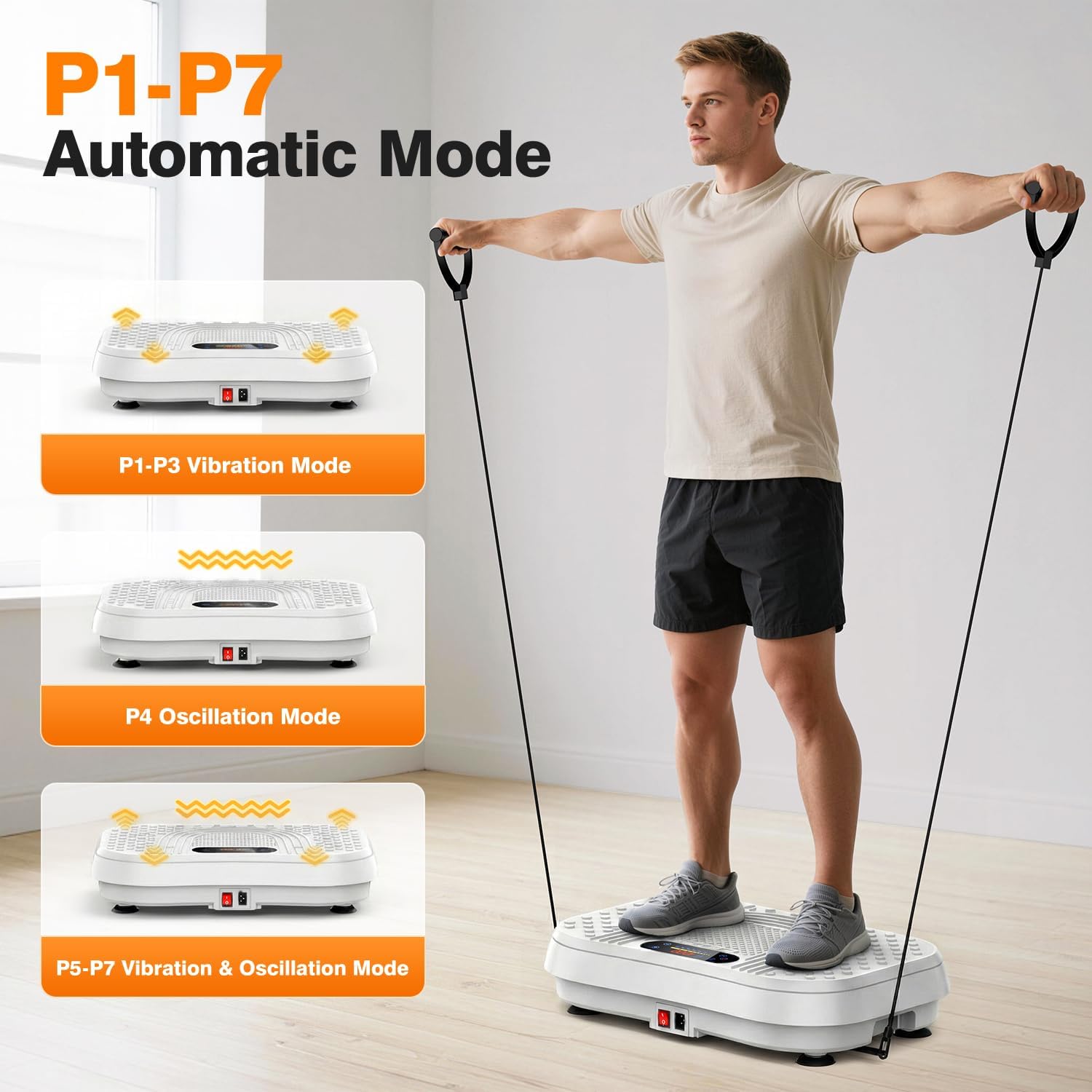
Figure 5.2: Automatic program types (P1-P7).
5.5 Bluetooth Music
Pair your smartphone or other Bluetooth-enabled device with the vibration plate to play music through its built-in speakers. Refer to your device's Bluetooth pairing instructions.

Figure 5.3: Bluetooth music integration for enhanced workouts.
5.6 Exercise Poses and Benefits
The vibration plate can be used for various exercises to target different muscle groups and achieve different fitness goals. The APP provides guided training videos.

Figure 5.4: Examples of exercises that can be performed on the vibration plate.
The gentle Oscillation mode (M2) is particularly suitable for seniors and office workers for physical therapy and muscle relief.

Figure 5.5: Benefits for exercise and physical therapy, especially for seniors.
6. Maintenance
- Cleaning: Wipe the surface of the machine with a soft, damp cloth. Do not use abrasive cleaners or solvents.
- Storage: Store the machine in a cool, dry place away from direct sunlight. Its ultra-slim design allows for storage under a bed or sofa.
- Inspection: Regularly check the power cord and all components for any signs of wear or damage.
7. Troubleshooting
| Problem | Possible Cause | Solution |
|---|---|---|
| Machine does not power on. | Power cord not connected; Main switch off; Power outlet issue. | Ensure power cord is securely plugged in. Turn on the main power switch. Test the outlet with another device. |
| Remote control not working. | Batteries low/dead; Remote not aimed correctly; Interference. | Replace remote batteries. Point remote directly at the machine's receiver. Remove any obstructions. |
| Bluetooth not connecting. | Bluetooth not enabled on device; Machine not in pairing mode; Device too far. | Ensure Bluetooth is on your device. Check machine's display for pairing indicator. Move device closer to the machine. |
| Unusual noise during operation. | Loose components; Machine not on a level surface. | Stop use immediately. Check for loose parts. Ensure machine is on a flat, stable surface. Contact customer support if noise persists. |
8. Specifications
| Feature | Detail |
|---|---|
| Model Number | Vt93 |
| Brand | Taevno |
| Product Dimensions (D x W x H) | 53.6 x 33.8 x 11.4 cm (21.2" x 13.4" x 4.6") |
| Item Weight | 6.67 kg (14.7 lbs) |
| Maximum Weight Recommendation | 450 lbs (204 kg) |
| Motor Horsepower | 200 Watts |
| Maximum Speed | 199 rps |
| Number of Programs | 7 (Automatic Modes P1-P7) |
| Controls Type | APP Control, Remote Control, LED Touch Panel |
| Display | LED |
| Power Source | Corded Electric |
| Material | Metal, Plastic |
9. Warranty & Support
Taevno offers a lifetime after-sales service for this vibration plate. This includes a three-month return service. For any questions or assistance regarding your vibrating plate, please contact us through Amazon messages or email.