
Introduction
Thank you for choosing the SZELAM 16.7" Atomic Digital Wall Clock. This clock is designed to provide accurate time, date, indoor temperature, and humidity readings. Featuring automatic time synchronization via WWVB radio broadcast and a large, easy-to-read display, it is suitable for various indoor environments. This manual provides detailed instructions for setup, operation, and maintenance to ensure optimal performance.
Package Contents
Upon unpacking, please ensure all items listed below are present and in good condition:
- 1 x SZELAM 16.7" Atomic Digital Wall Clock
- 1 x User Manual
- Installation Package (Nails and Wall Plugs)

Image: The SZELAM 16.7" Atomic Digital Wall Clock, user manual, and installation hardware.
Product Features
- Atomic Time Synchronization: Automatically synchronizes with WWVB radio broadcast for precise timekeeping.
- Large Display: 16.7-inch screen with large numbers for easy readability from a distance.
- Multifunctional Display: Shows time (12/24 hour format), date, day of week, indoor temperature (°C/°F), and humidity.
- Automatic DST: Automatically adjusts for Daylight Saving Time.
- Battery Operated: Requires 3 x AA batteries (not included), offering flexible placement without wires.
- Low Battery Indicator: Alerts when battery replacement is needed.
- Versatile Placement: Designed for both wall mounting and tabletop use with a fold-out stand.

Image: The SZELAM Atomic Digital Wall Clock showcasing its large display and multiple data points.
Setup
1. Battery Installation
The clock requires 3 x AA batteries (not included) for operation. Ensure correct polarity when inserting the batteries.
- Locate the battery compartment on the back of the clock.
- Open the battery compartment cover.
- Insert 3 new AA batteries, matching the + and - terminals as indicated.
- Close the battery compartment cover securely.
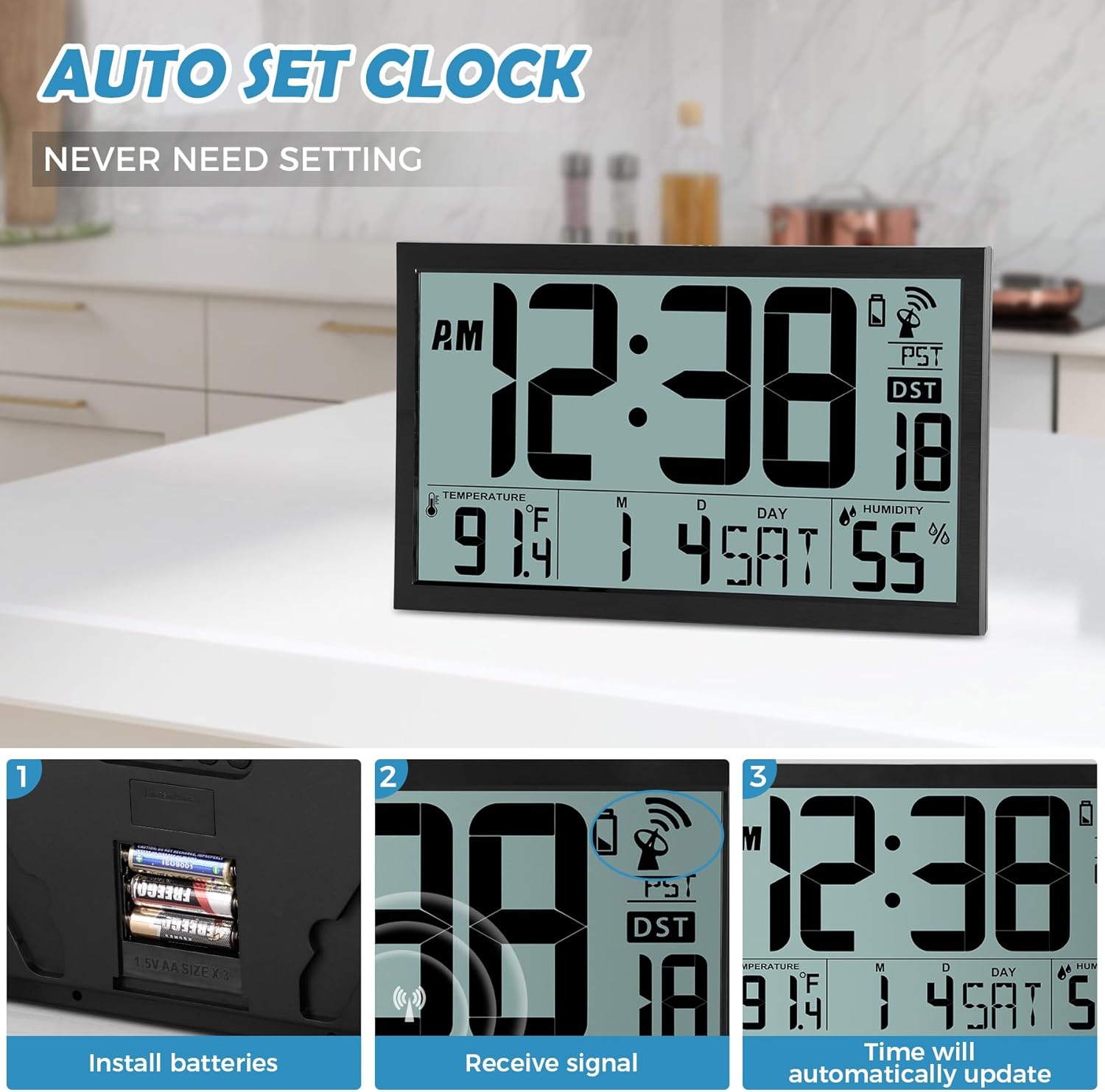
Image: Battery installation process, showing the battery compartment and inserted AA batteries.
2. Mounting Options
The clock offers two convenient placement methods:
- Wall Mount: Use the two keyhole slots on the back of the clock. Drill two holes in your wall, insert the provided wall plugs, and then screw in the nails, leaving a small portion exposed for the clock to hang.
- Tabletop Placement: Utilize the integrated fold-out stand on the back of the clock to place it on any flat surface.
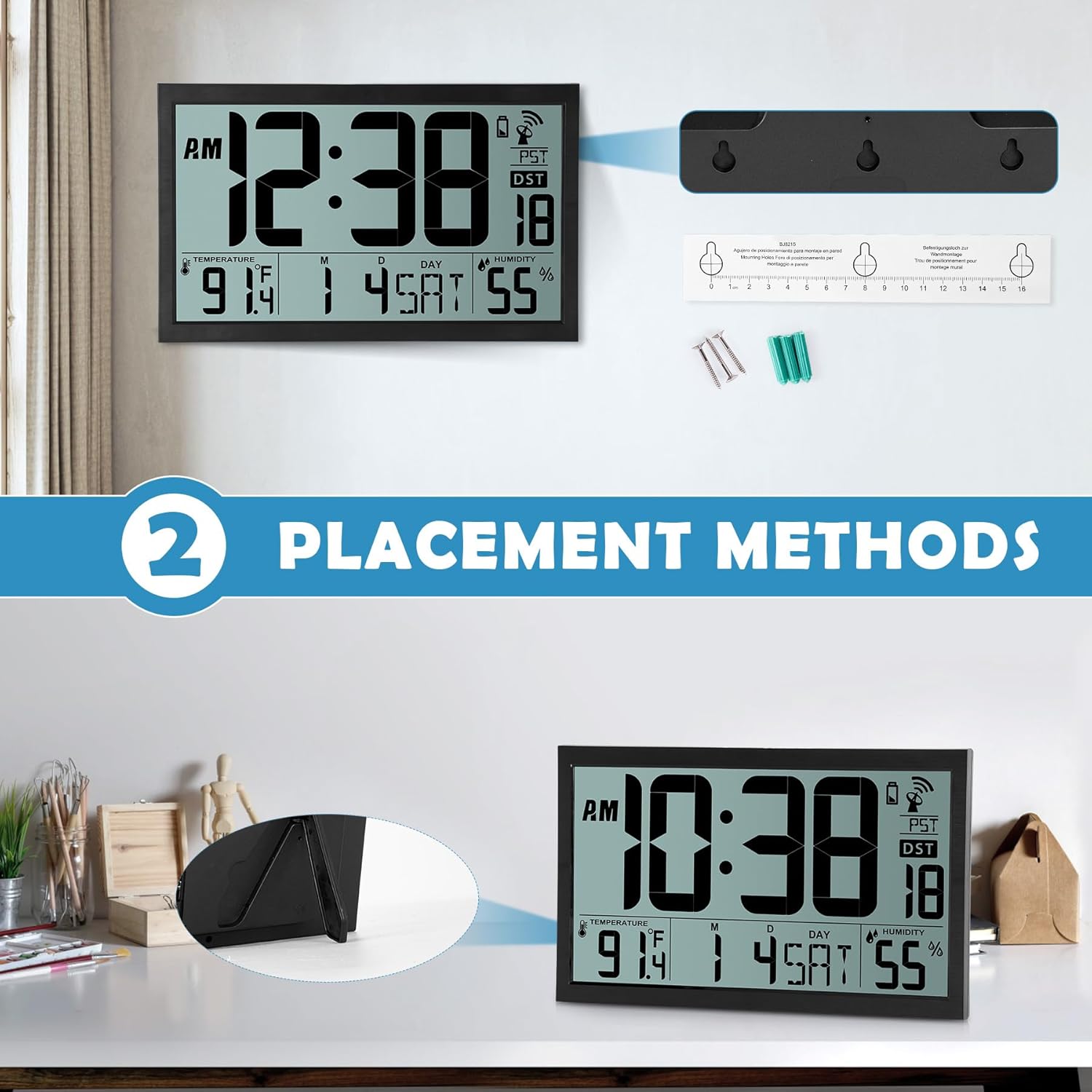
Image: Visual representation of the two placement methods: wall-mounted and tabletop.
Operating Instructions
1. Automatic Time Synchronization (Atomic Clock)
After battery installation, the clock will automatically attempt to receive the WWVB radio signal. This process can take up to 7 minutes. Once synchronized, the clock will automatically set the correct time and date and update itself every midnight. The time is always accurate to the second.
The clock supports four time zones: EST, PST, MST, CST. You can cycle through these time zones using the 'WAVE' button on the back of the clock.

Image: The clock receiving an atomic signal, with a map illustrating time zones.
2. Manual Time and Date Setting
If automatic synchronization is not desired or unavailable, you can manually set the time and date:
- Press the 'TIME' button on the back of the clock.
- Use the 'UP' and 'DOWN' buttons to adjust the year, then press 'TIME' to confirm.
- Repeat this process for month, date, hour, and minute.
- Once all settings are confirmed, the clock will display the manually set time.
3. Alarm Setting
To set the alarm:
- Press the 'SET' button (alarm icon) on the back of the clock.
- Use the 'UP' and 'DOWN' buttons to adjust the alarm hour, then press 'SET' to confirm.
- Use the 'UP' and 'DOWN' buttons to adjust the alarm minute, then press 'SET' to confirm.
- To activate or deactivate the alarm, press the 'ON/OFF' button (alarm icon). An alarm icon will appear on the display when activated.
4. Temperature and Humidity Display
The clock displays indoor temperature in either Celsius (°C) or Fahrenheit (°F) and humidity in percentage (%). You can switch between °C and °F using a dedicated button or by cycling through display modes if available (refer to specific button labels on your device).
5. Daylight Saving Time (DST)
The clock features an automatic changeover from standard time to Daylight Saving Time and vice-versa. The 'AUTO DST' indicator will be visible on the display when this feature is active.
Video: A detailed demonstration of unboxing, battery installation, and setting the time, date, and alarm on the SZELAM Atomic Digital Wall Clock.
Maintenance
- Cleaning: Wipe the clock's surface with a soft, dry cloth. Avoid using abrasive cleaners or solvents.
- Battery Replacement: Replace batteries when the low battery indicator appears on the display to ensure continuous and accurate operation.
- Environment: Place the clock in a dry environment, away from direct sunlight, extreme temperatures, and strong electromagnetic fields to prevent damage and ensure optimal signal reception.
Troubleshooting
| Problem | Possible Cause | Solution |
|---|---|---|
| Clock not displaying time/date | No batteries or incorrect battery polarity. | Insert 3 x AA batteries with correct polarity. |
| Time/Date is incorrect | Atomic signal not received or weak signal. | Place the clock near a window or in an open area. Allow up to 24 hours for signal reception. Manually set time if necessary. |
| Alarm not sounding | Alarm is not activated or set incorrectly. | Ensure the alarm is turned 'ON' (alarm icon visible) and the alarm time is set correctly. |
| Temperature/Humidity readings seem inaccurate | Clock placed near heat/cold sources or in a high humidity area. | Relocate the clock to a stable indoor environment, away from direct sunlight, vents, or excessive moisture. |
Specifications
| Feature | Detail |
|---|---|
| Brand | SZELAM |
| Model Number | BJ8215 |
| Display Type | Digital |
| Screen Size | 16.7 inches |
| Product Dimensions | 14.3"W x 9"H |
| Power Source | Battery Powered (3 x AA batteries required, not included) |
| Mounting Type | Wall Mount, Tabletop |
| Special Features | Atomic Time, Calendar Display, Humidity Display, Large Display, Battery Indicator, Alarm Clock, Auto DST |
| Material Type | Plastic |
| Item Weight | 1.67 Kilograms |
Warranty and Support
For warranty information or technical support, please refer to the contact details provided with your purchase or visit the official SZELAM website. Keep your purchase receipt as proof of purchase for any warranty claims.