
1. Introduction
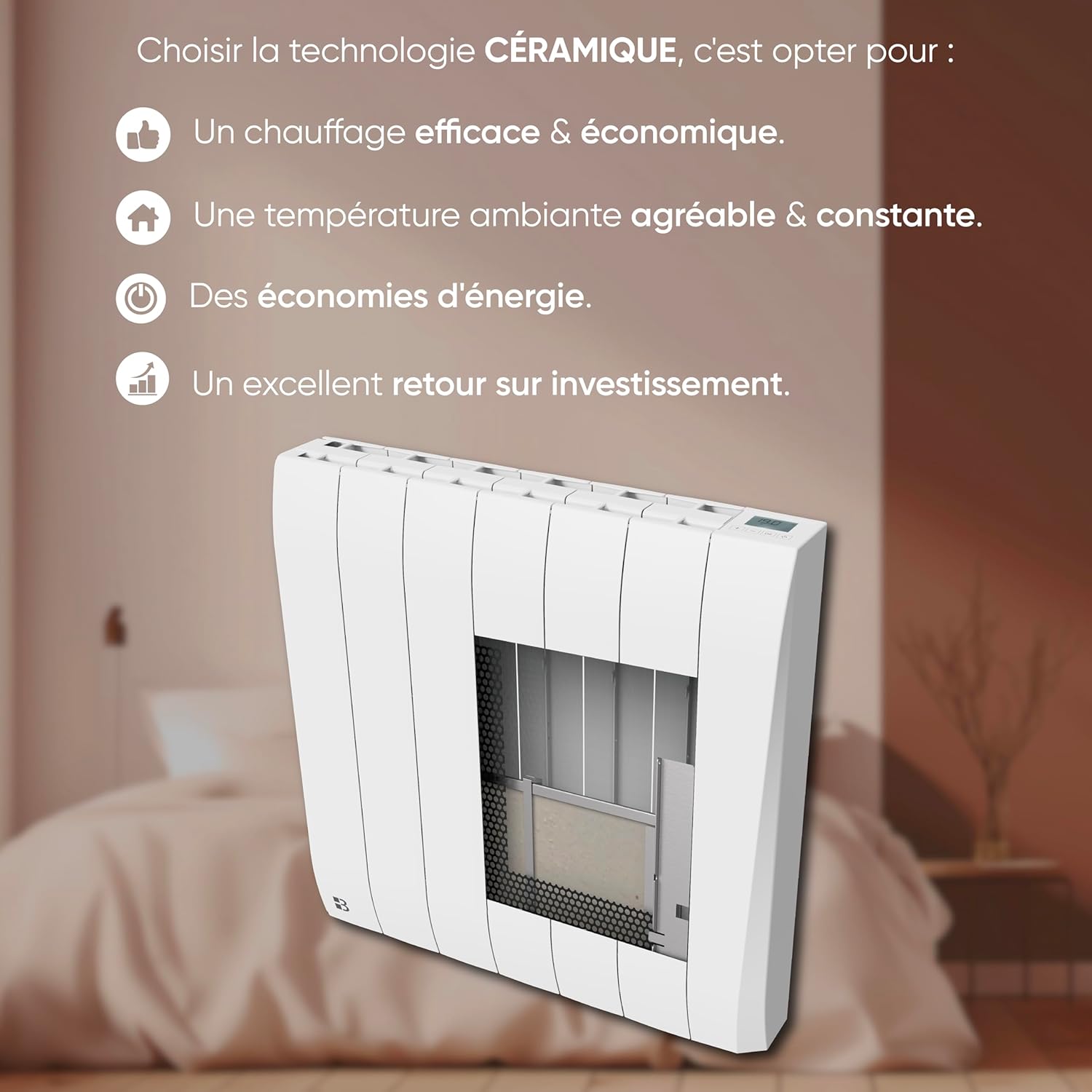
The Bestherm TIKEI electric radiator is designed to provide efficient and comfortable heating for your living space. Featuring a ceramic and aluminum heating core, it ensures optimal heat distribution and sustained warmth. This dry inertia technology offers consistent heat and contributes to energy savings. The radiator includes customizable weekly programs and various operating modes to adapt to your heating needs.

Key Features:
- Ceramic and Aluminum Heating Core: Provides rapid temperature rise and prolonged heat diffusion, even after the unit is turned off.
- Dry Inertia Technology: Retains heat longer, reducing electricity consumption while maintaining optimal comfort.
- Intuitive Programming: Offers 7 customizable weekly programs and 6 pilot wire modes to adapt heating to your lifestyle.
- Precise Electronic Control: Features an electronic thermostat, LCD screen, touch buttons, and integrated safety functions (overheat protection, frost protection, child lock).
2. Safety Instructions
Please read all safety instructions carefully before installing and operating the radiator. Failure to follow these instructions may result in electric shock, fire, or personal injury.
- Electrical Safety: Ensure the power supply voltage matches the radiator's specifications (230 Volts). Do not operate the radiator with a damaged cord or plug. Do not immerse the radiator in water or other liquids.
- Placement: Install the radiator on a stable, flat surface or securely mount it to a wall. Maintain a safe distance from flammable materials, curtains, and furniture. Do not cover the radiator.
- Children and Pets: Keep children and pets away from the radiator, especially when it is operating, as surfaces can become hot. Use the child lock feature to prevent accidental changes to settings.
- Overheat Protection: The radiator is equipped with overheat protection. If it overheats, it will automatically shut off. If this occurs, unplug the unit and allow it to cool before attempting to restart.
- Maintenance: Always unplug the radiator before cleaning or performing any maintenance.
- Intended Use: This appliance is for indoor use only. Do not use it in bathrooms, laundry areas, or similar wet locations.
3. Package Contents
Verify that all components are present and undamaged upon opening the package. If any items are missing or damaged, contact your retailer.
- Bestherm TIKEI Electric Radiator (Model HT20-24GE)
- Wall Mounting Kit
- User Manual
4. Installation
The Bestherm TIKEI radiator is designed for wall mounting. Ensure the wall is capable of supporting the radiator's weight (approximately 12.9 kg) and that there is adequate space for proper air circulation.
Wall Mounting Steps:
- Choose Location: Select a suitable wall location, away from windows or doors that could cause drafts, and ensuring sufficient clearance from furniture and curtains.
- Mark Drilling Points: Use the provided wall mounting bracket as a template to mark the drilling points on the wall. Ensure the points are level.
- Drill Holes: Drill holes at the marked points using an appropriate drill bit for your wall type.
- Insert Wall Plugs: Insert the wall plugs into the drilled holes.
- Attach Bracket: Securely fasten the wall mounting bracket to the wall using the screws provided.
- Mount Radiator: Carefully lift the radiator and hook it onto the wall mounting bracket. Ensure it is securely seated.
- Connect Power: Plug the radiator into a grounded electrical outlet.
For detailed installation tutorials, including visual guides, please refer to the official Bestherm YouTube channel. A link is provided in the Support section of this manual.

5. Operating Instructions
The Bestherm TIKEI radiator features an electronic control panel with an LCD display and touch buttons for easy temperature adjustment and mode selection.
Control Panel Overview:

Operating Modes:
The radiator offers four primary operating modes:
- Comfort Mode: Maintains the set temperature for optimal comfort.
- Economic Mode: Operates at a slightly reduced temperature compared to Comfort mode to save energy.
- Anti-freeze Mode: Maintains a minimum temperature (e.g., 7°C) to prevent freezing in unoccupied spaces.
- Standby Mode: The radiator is off but remains connected to power, ready for activation.
Pilot Wire Modes (if applicable):
If your electrical installation includes a pilot wire, you can select from six additional modes:
- Comfort
- Comfort -1°C
- Comfort -2°C
- Eco
- Frost Protection (Hors gel)
- Off (Veille)
Programming:
The radiator allows for customizable weekly programming with 7 free daily programs. Use the control panel to set desired temperatures for different times of the day and days of the week.
- Setting Time and Day: Access the settings menu to set the current time and day.
- Creating Programs: Select a day and define temperature settings for specific time slots. You can create up to 7 distinct daily programs.
- Activating Programs: Choose which program to activate for each day of the week.
Child Lock:
To prevent accidental changes to settings, activate the child lock feature through the control panel menu. Refer to the on-screen instructions for activation and deactivation.
6. Maintenance
Regular maintenance ensures optimal performance and longevity of your radiator.
- Cleaning: Before cleaning, always unplug the radiator and allow it to cool completely. Wipe the exterior surfaces with a soft, damp cloth. Do not use abrasive cleaners, solvents, or harsh chemicals, as these can damage the finish.
- Dust Removal: Periodically remove dust from the air vents using a soft brush or vacuum cleaner attachment to ensure proper airflow and efficiency.
- Storage: If storing the radiator for an extended period, ensure it is clean and dry. Store it in a cool, dry place, preferably in its original packaging.
7. Troubleshooting
If you encounter issues with your radiator, refer to the following common troubleshooting steps:
| Problem | Possible Cause | Solution |
|---|---|---|
| Radiator does not turn on | No power supply; Power switch off; Overheat protection activated | Check power outlet and plug; Ensure power switch is on; Unplug and allow to cool for 30 minutes before restarting |
| Radiator not heating sufficiently | Temperature setting too low; Incorrect mode selected; Room too large for radiator capacity | Increase temperature setting; Select Comfort mode; Ensure radiator matches room size (19 m² coverage) |
| Display shows an error code | Internal fault | Unplug the radiator for 5 minutes, then plug it back in. If the error persists, contact customer support. |
| Child lock is active, cannot change settings | Child lock engaged | Refer to the operating instructions to deactivate the child lock. |
8. Specifications
Technical details for the Bestherm TIKEI 2000W Electric Radiator (Model HT20-24GE).
| Feature | Detail |
|---|---|
| Brand | Bestherm |
| Model Number | HT20-24GE |
| Power Output | 2000W |
| Voltage | 230 Volts |
| Color | White |
| Dimensions (L x W x H) | 10 x 74 x 58 cm |
| Weight | 12.9 Kilograms |
| Heating Core Material | Ceramic and Aluminum |
| Mounting Type | Wall Mount |
| Thermal Coverage | Up to 19 m² |
| Special Features | Digital display, Energy efficiency, Overheat protection, Programmable thermostat, Child lock |
| Power Source | Electric Cable |
| Indoor/Outdoor Use | Indoor |
9. Warranty and Support
For warranty information, please refer to the terms and conditions provided at the time of purchase or contact your retailer. Information regarding the availability of spare parts is not provided in the product specifications.
Customer Support:
For additional assistance, installation tutorials, and programming guides, please visit the official Bestherm YouTube channel:

You may also contact your retailer or the manufacturer directly for further support.
