
1. Introduction
This manual provides essential information for the installation and operation of the LiftMaster K1D6761-1CC Logic Control Replacement Board. This board is designed for use with various commercial swing and slide gate operators manufactured after 2016. It is a genuine LiftMaster replacement part, also known as K1D9088-1CC.
The K1D6761-1CC board is backwards compatible with older second-generation units. However, its installation requires adherence to current safety standards, specifically the integration of UL325 Monitored Entrapment Protection Systems.
2. Safety Information and UL325 Compliance
Important Safety Notice: Installation and service of gate operators and their components should only be performed by qualified and experienced technicians. Improper installation or maintenance can lead to serious injury or death.
The K1D6761-1CC logic board requires compliance with the UL325 safety standard. For all installations, especially when replacing boards in older units, the following are MANDATORY:
- UL325 Monitored Entrapment Protection System: This system must be installed and fully functional.
- Monitored Photoelectric Sensors or Edge Sensors: These sensors are required on the OPEN entrapment zone.
Failure to add the OPEN Monitored Entrapment Zone Protection will cause the unit to not function properly and poses a significant safety risk. Ensure all safety devices are correctly installed and tested before operating the gate.
3. Setup and Installation
This section outlines the general steps for replacing the logic control board. Refer to your specific gate operator's full manual for detailed wiring diagrams and model-specific instructions.
- Power Disconnection: Before beginning any work, ensure the main power to the gate operator is completely disconnected at the circuit breaker. Verify with a voltmeter.
- Access the Control Box: Open the gate operator's control box to expose the existing logic board.
- Document Connections: Carefully photograph or diagram all existing wiring connections to the old board. Label wires if necessary to ensure correct re-connection.
- Remove Old Board: Disconnect all wires and mounting hardware securing the old logic board. Remove the old board.
- Install New Board: Mount the K1D6761-1CC replacement board in the control box using the appropriate hardware.
- Reconnect Wiring: Reconnect all wires to the new board according to your documentation. Pay close attention to the power, motor, and accessory connections.
- Install/Verify Safety Devices: Ensure that all required UL325 monitored entrapment protection devices (e.g., photoelectric sensors, edge sensors) are correctly installed and wired to the designated terminals on the new board, especially for the OPEN entrapment zone.
- Power Up and Test: Restore power to the gate operator. Follow the gate operator's manual for initial setup, limit learning, and testing of all functions and safety devices.
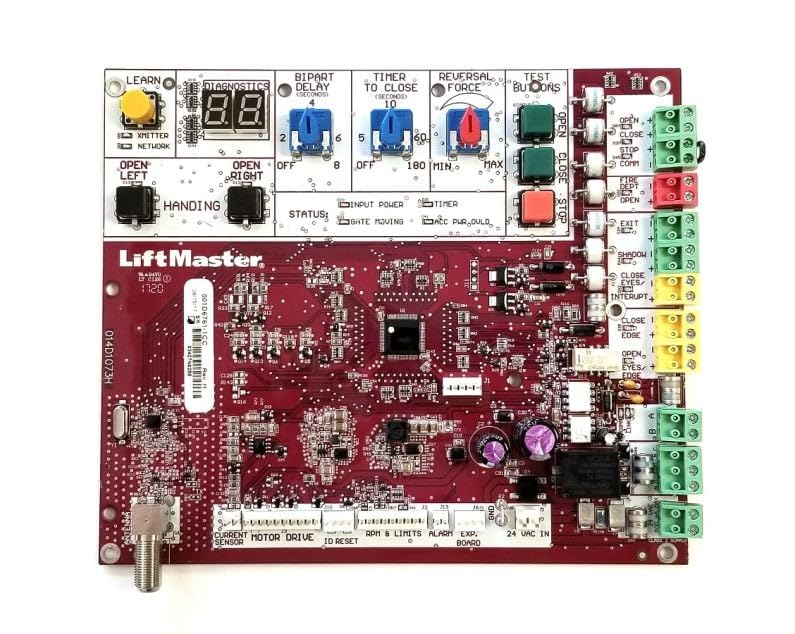
Image: The LiftMaster K1D6761-1CC Logic Control Replacement Board, shown with its antenna, mounting plate, and various small components including fasteners and wire ties.
4. Operating Instructions
Once the K1D6761-1CC Logic Control Replacement Board is correctly installed and all safety devices are verified, the gate operator will function according to its original design specifications. The logic board processes commands from remote controls, keypads, and safety sensors to control the gate's movement.
- Gate Movement: The board controls the opening and closing cycles of the gate.
- Safety Reversal: In the event of an obstruction detected by safety sensors, the board will initiate a reversal of the gate's direction.
- Accessory Integration: The board integrates with various accessories such as remote controls, keypads, and loop detectors.
Refer to your specific gate operator's user manual for detailed operating procedures, programming of accessories, and adjustment of settings.
5. Maintenance
The K1D6761-1CC logic board itself requires no routine maintenance. However, regular maintenance of the overall gate operator system is crucial for longevity and safe operation.
- Regular Inspections: Periodically inspect all wiring connections for signs of wear or corrosion.
- Safety Device Checks: Regularly test all safety sensors (photoelectric, edge sensors) to ensure they are functioning correctly and providing proper entrapment protection.
- Environmental Protection: Ensure the control box remains sealed and protected from moisture, dust, and insects.
Consult your gate operator's maintenance schedule for comprehensive system care.
6. Troubleshooting
If the gate operator does not function correctly after installing the K1D6761-1CC logic board, consider the following common issues:
- Unit Does Not Function: This is often due to the absence or incorrect installation of the MANDATORY UL325 Monitored Entrapment Protection System and Monitored Photoelectric/Edge Sensors on the OPEN entrapment zone. Verify these safety devices are correctly installed and wired.
- Incorrect Wiring: Double-check all wiring connections against your documentation or the gate operator's manual. Loose or incorrect connections can prevent proper operation.
- Power Issues: Confirm that the gate operator is receiving adequate power and that circuit breakers are not tripped.
- Accessory Malfunction: If the gate responds to manual commands but not remotes or keypads, check the programming and functionality of these accessories.
For persistent issues, refer to the comprehensive troubleshooting guide in your gate operator's main manual or contact technical support.
7. Specifications
| Model Number | K1D6761-1CC |
| Also Known As | K1D9088-1CC |
| Compatibility | Commercial Swing and Slide Gate Operators manufactured after 2016. Backwards compatible with older second-generation units. |
| Compatible Models | SL585U, SL585UL, SL595U, SL595UL, SL3000U, SL3000UL |
| Product Dimensions | 6 x 6 x 1 inches |
| Item Weight | 2 pounds |
| Manufacturer | LiftMaster |
8. Warranty Information
For specific warranty details regarding the LiftMaster K1D6761-1CC Logic Control Replacement Board, please refer to the warranty documentation provided with your purchase or contact LiftMaster directly. Warranty terms typically cover manufacturing defects under normal use conditions.
9. Support
If you require further assistance with the installation, operation, or troubleshooting of your LiftMaster K1D6761-1CC Logic Control Replacement Board, please contact LiftMaster customer support or the authorized dealer from whom you purchased the product. Have your product model number and any relevant purchase information ready when contacting support.


