
1. Introduction
This manual provides detailed instructions for the VILCORN Z03 Wireless Gaming Controller. This versatile gamepad is designed for multi-platform compatibility, offering an enhanced gaming experience across various devices including PC, iOS, Android, Nintendo Switch, Steam Deck, PlayStation 3, and PlayStation 4. Please read this manual carefully before use to ensure proper operation and to maximize your gaming performance.
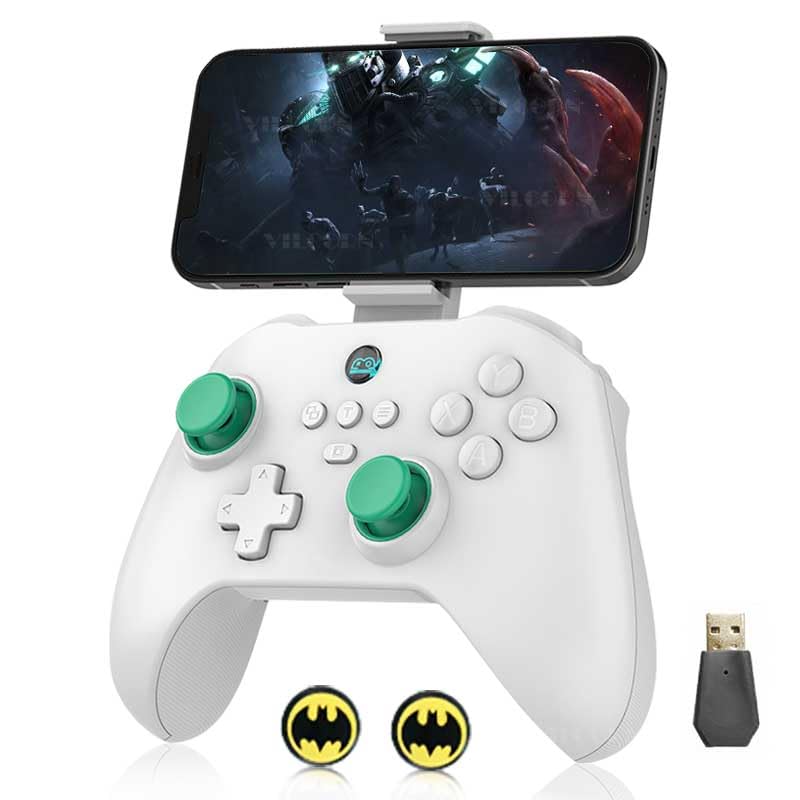
Image: The VILCORN Z03 Wireless Gaming Controller in white, with a smartphone attached to its integrated holder, demonstrating its use for mobile gaming. A USB dongle and two small circular accessories are also visible.
2. Product Features
- Multi-Platform Compatibility: Supports direct connection to iPhone/iPad/Macbook, Android Phone/Tablet, PC, Switch/Switch Lite/Switch OLED, PS3/PS4, and Steam Deck.
- 2-In-1 Hall Linear Trigger & Micro Triggers: Equipped with two types of changeable triggers for precise control. Micro triggers offer instant response for shooting games, while Hall linear triggers provide smooth, drift-free control ideal for racing games.
- ABXY Key Value Interchange Setting: Allows users to remap ABXY button positions to match preferred layouts, such as the Nintendo Switch gamepad key order. Supports direct-attached Shootingplus and GamepadSpace handle mapping.
- Enhanced Game Atmosphere: Features dual haptic feedback motors with 4-level vibration intensity adjustment and sensitive 6-axis gyroscopic sensors for immersive gameplay. Vibration and 6-axis gyro are supported on PC, PS3, PS4, and NS-Switch.
- Long Battery Life: Built-in 500 mAh rechargeable battery provides over 10 hours of gameplay on a full charge.
- Mobile Phone Holder: Features a stretchable expansion slot capable of gripping devices with a width of 53mm to 96mm.
- Macro Programming Keys: Includes two extension macro programming keys (M1 and M2) for one-click custom actions.
Detailed Feature Overview:
Hall Joystick with POM Ring
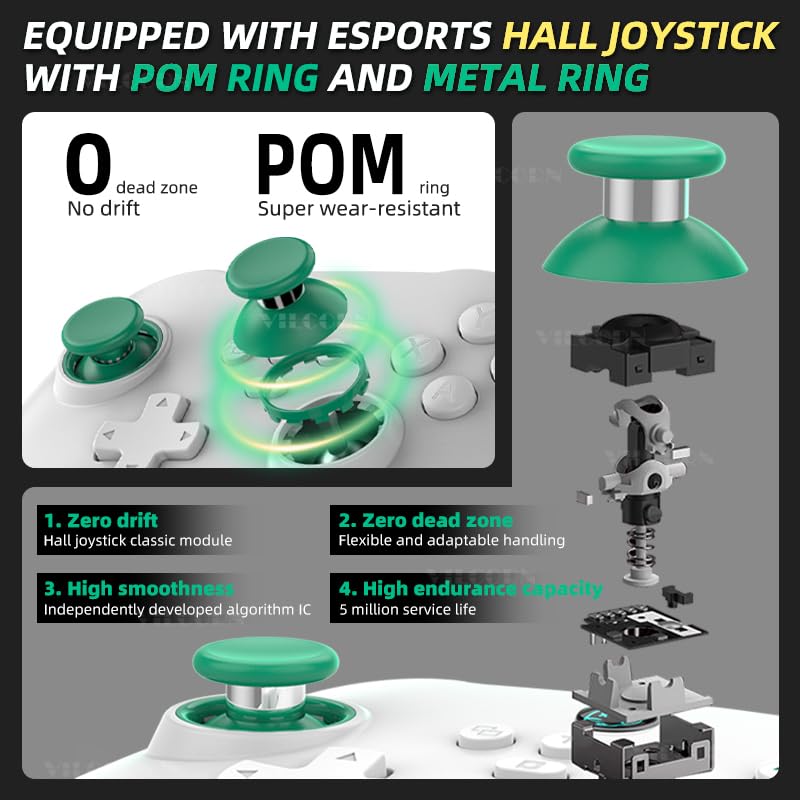
Image: This diagram details the Hall joystick, emphasizing its zero drift, zero dead zone, high smoothness, and durable POM ring for super wear-resistance, ensuring precise and long-lasting performance.
High Precision Six-Axis Somatosensory & HD Dual Vibration Motor
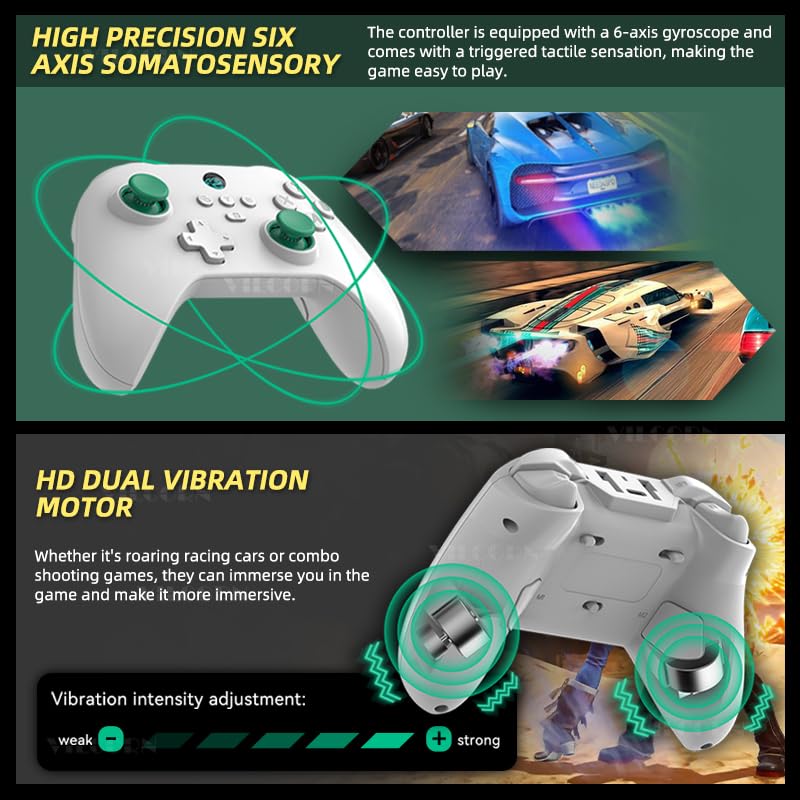
Image: This visual highlights the controller's 6-axis gyroscope for precise motion control and its HD dual vibration motors, which provide tactile feedback. An intensity slider indicates adjustable vibration levels from weak to strong.
Double Cut Trigger Key: Micro Trigger + Hall Trigger Switching
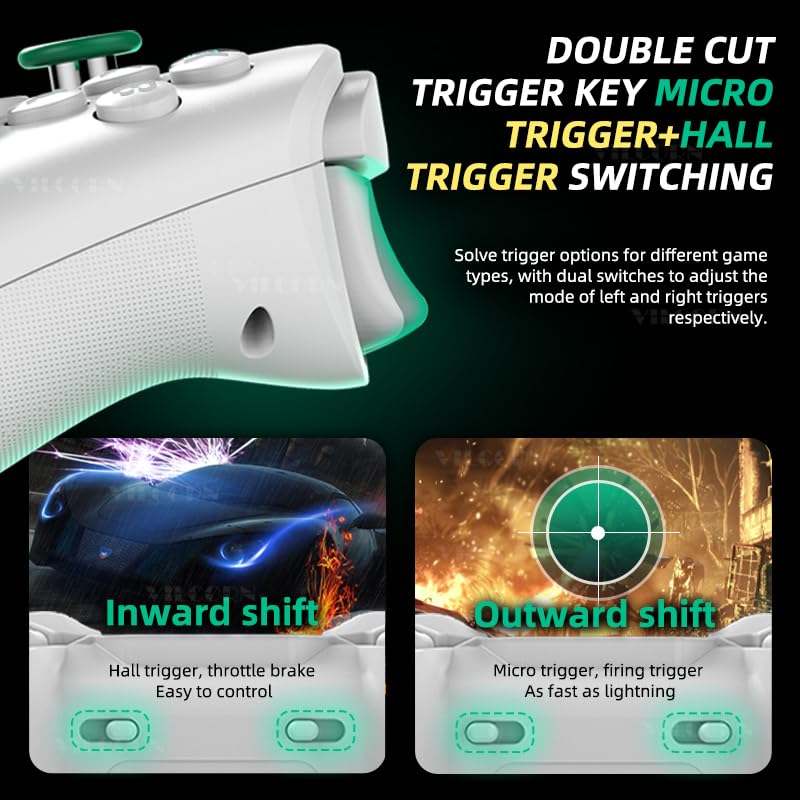
Image: This diagram demonstrates the dual trigger system, allowing users to switch between Hall triggers for smooth, linear control (like throttle brakes in racing games) and Micro triggers for instant, rapid response (like firing in shooting games).
Third Gear Adaptation Mode: One-Click Switch Joystick Linear Algorithm

Image: This graphic illustrates the three preset joystick modes: Racing mode for precise vehicle control, Normal mode for general gameplay, and FPS (Gunfight) mode for optimized aiming and shooting, allowing one-click switching between linear algorithms.
Mobile Phone Holder Expansion Slot
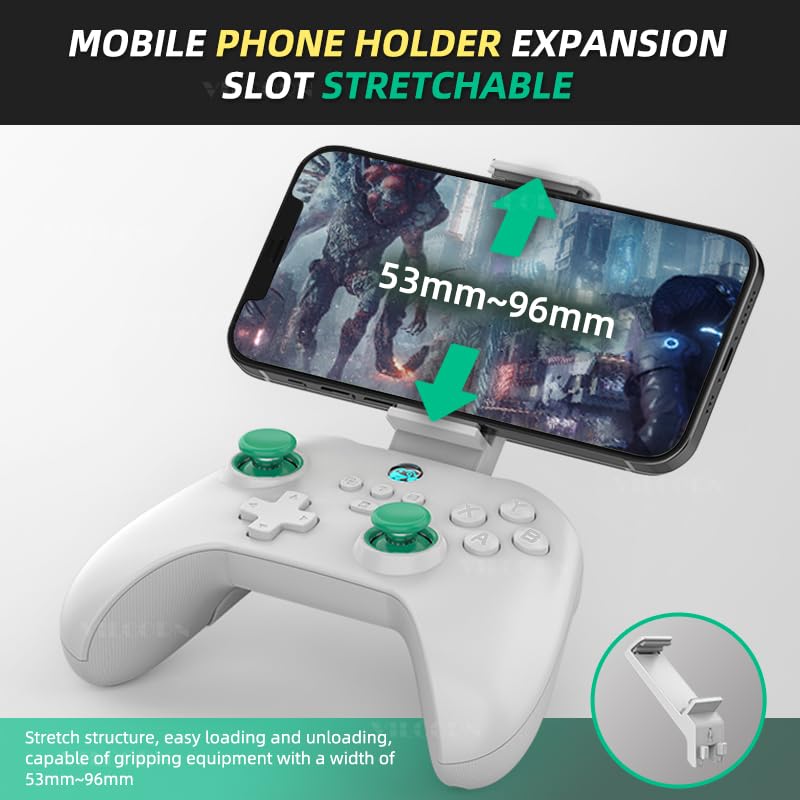
Image: This image demonstrates the controller's stretchable mobile phone holder, designed for easy loading and unloading, capable of securely gripping devices with widths ranging from 53mm to 96mm.
2 Extension Macro Programming Keys (M1 and M2)
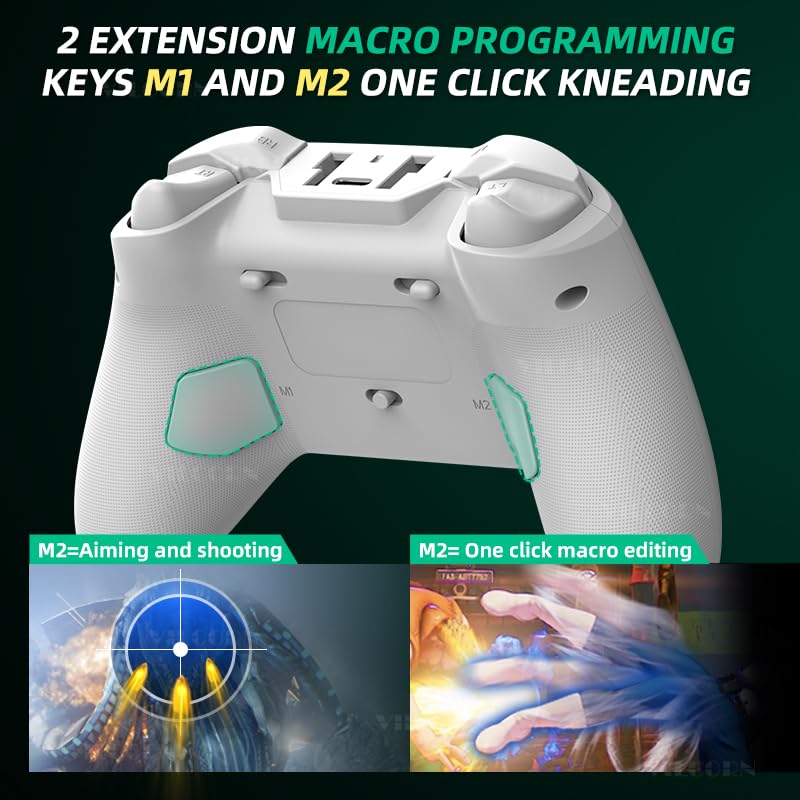
Image: This image points out the M1 and M2 extension macro programming keys located on the back of the controller, illustrating their utility for assigning complex actions, such as combined aiming and shooting or custom one-click macro editing.
3. Setup and Connection
The VILCORN Z03 controller offers multiple connection methods to ensure compatibility with your devices. Please follow the instructions below for your specific platform.
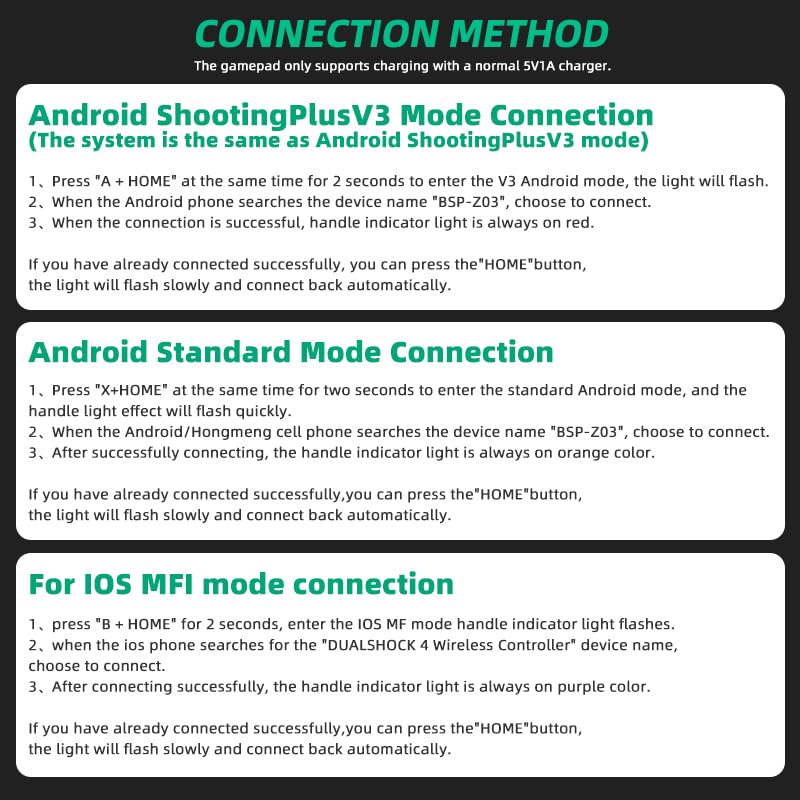
Image: This diagram outlines the steps for connecting the controller via Android ShootingPlus V3 Mode, Android Standard Mode, and iOS MFI Mode, including button combinations and indicator light behaviors.
3.1 Android ShootingPlus V3 Mode Connection
This mode is suitable for Android devices using the ShootingPlus V3 system.
- Press the A + HOME buttons simultaneously for 2 seconds to enter V3 Android mode. The indicator light will flash.
- On your Android phone/tablet, search for the device name "BSP-Z03" and select it to connect.
- Once the connection is successful, the handle indicator light will remain solid red.
- If you have previously connected successfully, you can simply press the HOME button, and the light will flash slowly before automatically reconnecting.
3.2 Android Standard Mode Connection
This mode is for standard Android connections.
- Press the X + HOME buttons simultaneously for 2 seconds to enter standard Android mode. The handle effect light will flash quickly.
- When your Android/Hongmeng cell phone searches for the device name "BSP-Z03", choose to connect.
- After successfully connecting, the handle indicator light will remain solid orange.
- If you have previously connected successfully, you can simply press the HOME button, and the light will flash slowly before automatically reconnecting.
3.3 iOS MFI Mode Connection
This mode is for iOS devices supporting MFI (Made For iPhone/iPad) controllers.
- Press the B + HOME buttons for 2 seconds. The iOS MFI mode handle indicator light will flash.
- When your iOS phone searches for the "DUALSHOCK 4 Wireless Controller" device name, choose to connect.
- After successfully connecting, the handle indicator light will remain solid purple.
- If you have previously connected successfully, you can simply press the HOME button, and the light will flash slowly before automatically reconnecting.
Note: The gamepad only supports charging with a normal 5V1A charger.
4. Operating Instructions
4.1 Trigger Switching (Micro Trigger / Hall Linear Trigger)
The controller features a unique dual-trigger system. Use the physical switches located near the triggers to select the desired mode:
- Micro Trigger Mode: Provides instant, short-travel actuation, ideal for rapid firing in FPS games.
- Hall Linear Trigger Mode: Offers smooth, precise, and progressive input, perfect for throttle control in racing games or other applications requiring fine input.
4.2 Joystick Linear Algorithm Modes
The controller has three preset joystick modes to optimize performance for different game genres. These modes adjust the joystick's linear algorithm for sensitivity and response.
- Racing Mode: Optimized for precise control in racing simulations.
- Normal Mode: Standard response suitable for most game types.
- FPS (Gunfight) Mode: Enhanced sensitivity and precision for first-person shooter games.
Note: The three gear modes are factory preset and debugged for optimal performance.
4.3 Macro Programming (M1/M2 Keys)
The M1 and M2 keys on the back of the controller can be programmed for custom actions, allowing for complex commands with a single press. Refer to the specific software or in-game settings for detailed macro programming instructions.
- M1 Key: Typically used for left-side actions or custom macros.
- M2 Key: Typically used for right-side actions, such as aiming and shooting combinations, or one-click macro editing.
4.4 Vibration Intensity Adjustment
The dual haptic feedback motors provide immersive vibration. On supported platforms (PC, PS3, PS4, NS-Switch), you can adjust the vibration intensity to your preference. Consult your device's system settings or specific game options for vibration control.
4.5 ABXY Key Value Interchange Setting
The controller supports remapping of the ABXY buttons. If you prefer the button layout of a Nintendo Switch gamepad, you can change the ABXY order through the controller's settings or compatible mapping applications like Shootingplus and GamepadSpace.
5. Maintenance
To ensure the longevity and optimal performance of your VILCORN Z03 Wireless Gaming Controller, follow these maintenance guidelines:
- Cleaning: Use a soft, dry cloth to clean the controller. For stubborn dirt, slightly dampen the cloth with water or a mild cleaning solution. Avoid harsh chemicals or abrasive materials.
- Storage: Store the controller in a cool, dry place away from direct sunlight, extreme temperatures, and humidity.
- Battery Care: Do not expose the battery to high temperatures or attempt to disassemble it. Charge the controller regularly, even if not in use, to maintain battery health.
- Avoid Drops: Protect the controller from physical shocks and drops, which can damage internal components.
6. Troubleshooting
If you encounter issues with your VILCORN Z03 Wireless Gaming Controller, please refer to the following common troubleshooting steps:
- Controller Not Connecting:
- Ensure the controller is fully charged.
- Verify you are using the correct button combination for your device's connection mode (Android ShootingPlus V3, Android Standard, iOS MFI).
- Make sure Bluetooth is enabled on your device and that it is discoverable.
- Try forgetting the device in your device's Bluetooth settings and re-pairing.
- Restart both the controller and your device.
- Input Lag or Disconnections:
- Ensure there are no strong wireless interferences nearby (e.g., Wi-Fi routers, other Bluetooth devices).
- Move closer to your device to reduce distance-related issues.
- Check for any firmware updates for the controller (if available from the manufacturer's website).
- Buttons or Joysticks Not Responding:
- Ensure the controller is properly connected.
- Test the controller on another device or game to isolate the issue.
- Perform a factory reset if possible (refer to manufacturer's website for specific instructions if not in manual).
- Vibration Not Working:
- Confirm that the platform you are using (PC, PS3, PS4, NS-Switch) supports vibration.
- Check in-game settings and system settings to ensure vibration is enabled and intensity is not set to zero.
If these steps do not resolve your issue, please contact VILCORN customer support for further assistance.
7. Specifications
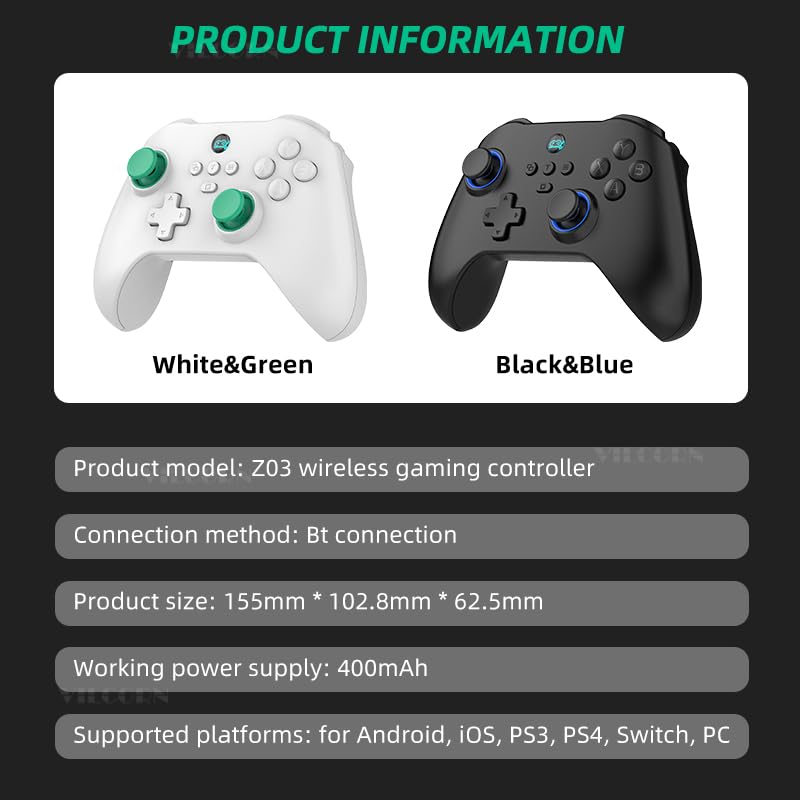
Image: This image provides key product information including model, connection method, dimensions, power supply, and supported platforms.
| Feature | Specification |
|---|---|
| Product Model | Z03 Wireless Gaming Controller |
| Connection Method | 2.4G USB, Bluetooth (BT connection), Wired |
| Product Size (L*W*H) | 155mm * 102.8mm * 62.5mm |
| Working Power Supply | 500mAh (Internal Rechargeable Battery) |
| Supported Platforms | Android, iOS, PS3, PS4, Switch, PC, Steam Deck |
| Manufacturer | Shenzhen Jiajue Technology Co., Ltd |
| Release Date | September 20, 2024 |
8. Warranty and Support
VILCORN products are manufactured with high standards of quality and craftsmanship. For information regarding warranty coverage, technical support, or service inquiries, please refer to the warranty card included with your product or visit the official VILCORN website.
Please retain your proof of purchase for any warranty claims.
