
Greadio CD Player Boombox Combo
Greadio Rechargeable CD Player Boombox Combo User Manual
Model: CD-W16 & CD-X2A (Combo)
Introduction
This user manual provides detailed instructions for the operation and maintenance of your Greadio Rechargeable CD Player Boombox Combo. This versatile audio system combines a CD player, cassette player, FM radio, Bluetooth connectivity, and multiple input options to deliver a comprehensive audio experience. Please read this manual thoroughly before using the product to ensure proper function and longevity.
Key Features
- 9-in-1 Playback Options: Supports CD, CD-R, CD-RW, MP3, WMA, Cassette Tape, Recording (from CD/AUX/USB/Bluetooth/Radio to tape), AUX input, FM Radio, Bluetooth 5.1, USB drive, and TF card playback.
- Rechargeable Battery: Built-in 5000mAh lithium-ion battery provides extended playback time (BT-8H, FM-8H, CD-5H, TF-5H, USB-5H) for portable use.
- Dual Power Modes: Operates via AC power cable for indoor use or 6 x C size batteries for outdoor portability.
- Bluetooth 5.1: Features both Bluetooth Transmitter and Receiver capabilities, allowing connection to mobile devices and streaming audio to wireless headphones/speakers.
- FM Radio: Auto-search function with storage for up to 20 stations (FM: 87.5-108MHZ).
- Stereo Sound: Equipped with dual 3W speakers for clear and immersive audio.
- Remote Control: Convenient operation from a distance.
Product Overview

Image: The Greadio CD Player Boombox Combo, showing both the black CD-W16 unit and the white CD-X2A unit, along with their respective remote controls.

Image: Close-up of the black CD-W16 unit, highlighting its features with icons: CD Player, Bluetooth 5.1, 5000mAh Battery, Cassette Player, FM Radio, USB Driver, TF Input, AUX, Sleep Timer, and Earphones Jack.

Image: The black CD-W16 unit connected to a power outlet via a Type-C cable, emphasizing its 5000mAh built-in lithium battery and long-lasting endurance for various playback modes.

Image: The black CD-W16 unit illustrating its 2-in-1 Bluetooth capabilities: transmitting audio to wireless headphones/speakers and receiving audio from a phone, tablet, or computer.

Image: A user holding the remote control, with the black CD-W16 unit in the foreground, demonstrating compatibility with various CD formats (CD, CD-R, CD-RW, WMA, MP3) and playback modes like single cycle, repeat all, random play, play in order, and A-B repeat.

Image: The black CD-W16 unit with a cassette tape being inserted, highlighting its magnetic tape playback and recording capabilities. Note: Voice recording is not supported in TAPE mode.

Image: The black CD-W16 unit illustrating its stereo surround enhancement with various playback modes: single cycle, repeat all, random play, play in order, and A-B repeat, along with sound equalization options like Flat, Rock, Pop, Jazz, and Class.

Image: The white CD-X2A unit with its antenna extended, demonstrating its AM/FM radio function, allowing users to listen to broadcasts in real-time.
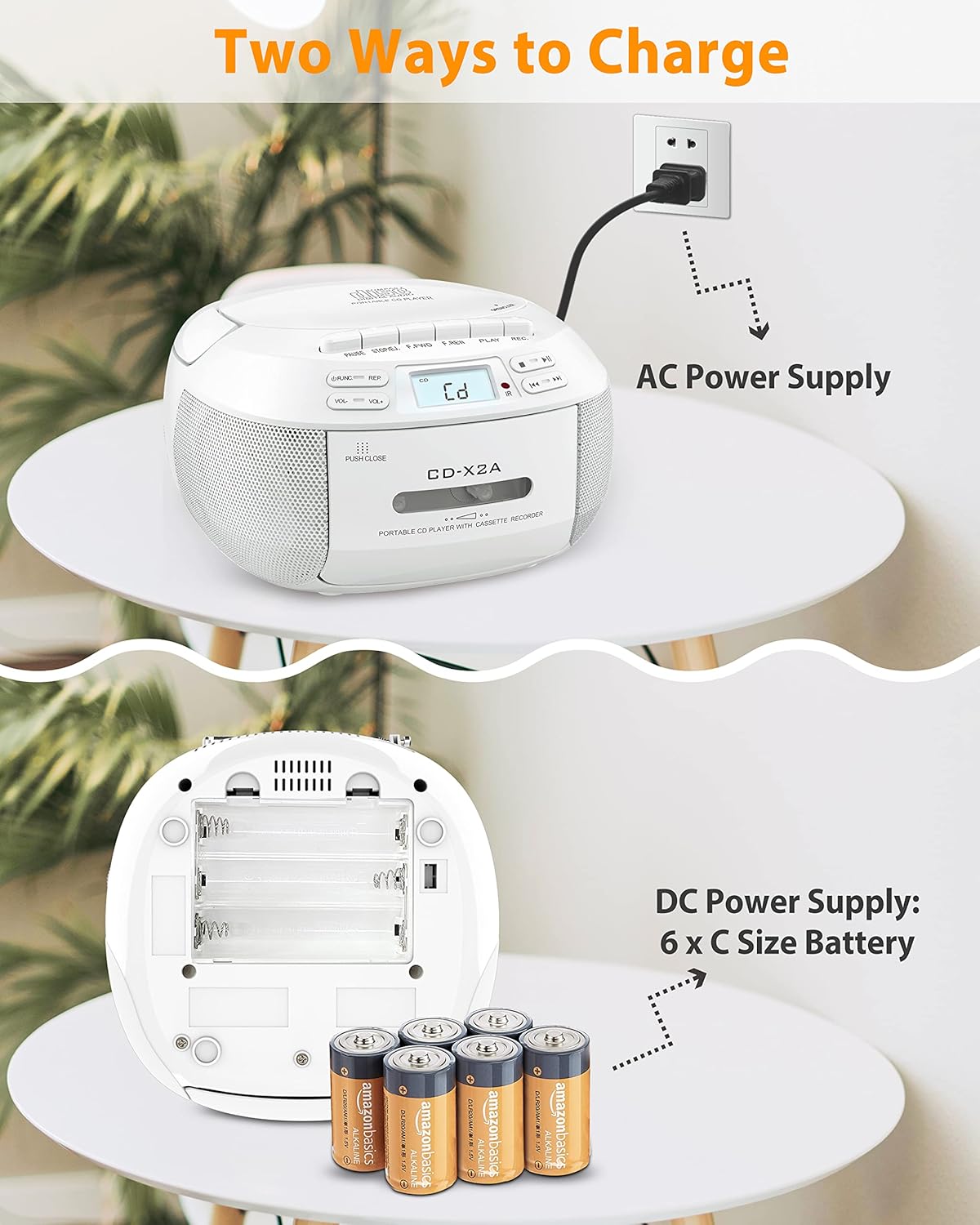
Image: The white CD-X2A unit illustrating its two power options: AC power supply via a wall outlet and DC power supply using 6 x C size batteries inserted into the battery compartment.
Setup
1. Powering the Unit
Your Greadio Boombox Combo can be powered in two ways:
- AC Power: Connect the provided AC power cable to the AC input jack on the unit and plug the other end into a standard wall outlet.
- DC Battery Power: For portable use, open the battery compartment on the bottom of the unit and insert 6 x 'C' size batteries (not included), ensuring correct polarity (+/-).
2. Initial Charge (for Rechargeable Unit - CD-W16)
The CD-W16 unit features a built-in rechargeable lithium-ion battery. Before first use, it is recommended to fully charge the unit using the provided Type-C charging cable. Connect the Type-C cable to the unit's charging port and the other end to a compatible USB power adapter (not included).
3. Antenna Adjustment (for FM Radio)
For optimal FM radio reception, extend the telescopic antenna fully and adjust its position for the clearest signal.
Operating Instructions
1. Basic Controls
- Power Button: Press to turn the unit ON or OFF.
- Volume Control: Rotate the volume knob or use the +/- buttons on the remote to adjust the sound level.
- Mode Button: Press to cycle through different playback modes: CD, Tape, FM Radio, Bluetooth, AUX, USB, TF.
2. CD Playback
- Open the CD compartment cover.
- Place a CD (CD, CD-R, CD-RW, MP3, WMA format) onto the spindle with the label side facing up.
- Close the CD compartment cover firmly.
- Press the Mode button until "CD" is displayed.
- Press the Play/Pause button to start playback.
- Use the Skip/Search buttons (<< / >>) to navigate between tracks.
- Use the Program (PROG) button to create a custom playback sequence.
3. Cassette Tape Playback & Recording
- Open the cassette compartment door.
- Insert a cassette tape.
- Close the cassette compartment door.
- Press the Mode button until "TAPE" is displayed.
- Press the Play button to start playback.
- Recording: To record from CD, AUX, USB, Bluetooth, or FM Radio, ensure a blank tape is inserted. Select the desired source mode, then press the Record (REC) button on the unit. Press Stop to end recording. Note: Voice recording is not supported.
4. FM Radio Operation
- Press the Mode button until "FM" is displayed.
- Extend the telescopic antenna for best reception.
- Press the Scan button (or Auto-Scan on remote) to automatically search and store available stations.
- Use the Tune +/- buttons to manually tune to a specific frequency or navigate stored stations.
5. Bluetooth Connectivity
Bluetooth Receiver Mode (Connect to Phone/Tablet)
- Press the Mode button until "BT" or "Bluetooth" is displayed. The unit will enter pairing mode, indicated by a flashing Bluetooth icon or "PAIR".
- On your mobile device, enable Bluetooth and search for "Greadio Boombox" (or similar name).
- Select the unit from the list to pair. Once connected, a confirmation tone will sound, and the Bluetooth indicator will become solid.
- You can now play audio from your device through the boombox.
Bluetooth Transmitter Mode (Connect to Headphones/Speakers - CD-W16 only)
- Ensure the CD-W16 unit is in a playback mode (CD, USB, TF, AUX).
- Activate pairing mode on your Bluetooth headphones or speaker.
- On the CD-W16 unit, press and hold the Bluetooth button (or refer to specific instructions for Bluetooth transmission activation). The unit will search for nearby Bluetooth receiving devices.
- Once connected, audio from the boombox will stream to your external Bluetooth device.
6. USB/TF Card Playback
- Insert a USB flash drive or TF (Micro SD) card into the respective slot.
- Press the Mode button until "USB" or "TF" is displayed.
- The unit will automatically begin playing compatible audio files (MP3/WMA).
- Use the Skip/Search buttons to navigate tracks.
7. AUX Input
- Connect an external audio device (e.g., smartphone, MP3 player) to the AUX-in jack using a 3.5mm audio cable (not included).
- Press the Mode button until "AUX" is displayed.
- Play audio from your connected device.
Maintenance
- Cleaning: Use a soft, dry cloth to clean the exterior of the unit. Do not use abrasive cleaners or solvents. For the CD lens, use a specialized CD lens cleaner.
- Storage: When not in use for extended periods, remove batteries (if applicable) and store the unit in a cool, dry place away from direct sunlight and extreme temperatures.
- CD/Cassette Care: Handle CDs by the edges to avoid fingerprints and scratches. Store cassettes in their cases to prevent dust accumulation and tape damage.
- Battery Care: If using rechargeable batteries, ensure they are fully charged before long storage. For non-rechargeable batteries, replace them when power is low to prevent leakage.
Troubleshooting
| Problem | Possible Cause | Solution |
|---|---|---|
| No power | AC cable not connected; Batteries depleted or incorrectly inserted. | Ensure AC cable is securely plugged in. Replace or correctly insert batteries. Charge the rechargeable unit. |
| CD not playing / Skipping | CD dirty or scratched; CD inserted incorrectly; CD compartment not closed; Unsupported CD format. | Clean CD with a soft cloth. Reinsert CD correctly. Ensure compartment is fully closed. Use supported CD formats (CD, CD-R, CD-RW, MP3, WMA). |
| Cassette tape not playing / Poor sound | Tape damaged; Tape head dirty; Tape inserted incorrectly. | Try a different tape. Clean the tape head with a cotton swab and rubbing alcohol. Reinsert tape correctly. |
| Poor FM radio reception | Antenna not extended; Weak signal; Interference. | Fully extend and adjust the telescopic antenna. Try moving the unit to a different location. |
| Bluetooth not connecting | Unit not in pairing mode; Device Bluetooth off; Too far from unit; Already connected to another device. | Ensure unit is in Bluetooth pairing mode. Turn Bluetooth ON on your device. Keep devices within 26 ft (8m). Disconnect from other devices. |
| USB/TF card not recognized | Card/drive inserted incorrectly; Unsupported file format; Corrupted files. | Reinsert the USB drive/TF card. Ensure files are MP3/WMA format. Try a different drive/card. |
Specifications
- Power Source: AC 100-240V ~ 50/60Hz or 6 x 'C' size batteries (DC 9V)
- Rechargeable Battery (CD-W16): Built-in 5000mAh Lithium-ion
- CD Compatibility: CD, CD-R, CD-RW, MP3, WMA
- Bluetooth Version: 5.1 (Receiver & Transmitter for CD-W16)
- Bluetooth Range: Up to 26 ft (8 meters)
- FM Frequency Range: 87.5 - 108 MHz
- Speaker Output: 2 x 3W Stereo Speakers
- Inputs: AUX-in (3.5mm), USB, TF Card
- Outputs: Headphone Jack (3.5mm)
- Recording Function: Record from CD/AUX/USB/Bluetooth/Radio to Cassette Tape (Voice recording not supported)
Warranty and Support
Greadio products are designed and manufactured to the highest quality standards. For warranty information and technical support, please refer to the warranty card included with your product or visit the official Greadio website. Please retain your proof of purchase for warranty claims.
For further assistance, you may contact Greadio customer service through the contact information provided on their official website or through your purchase platform.
Ask a question about this manual
Ask about setup, troubleshooting, compatibility, parts, safety, or missing instructions. Manuals+ will review the question and use this page’s manual context to help answer it.