
AINAVI 13.3" 2G+32G (1*pc) Android 10
AINAVI 13.3" Android Car Tablet TV User Manual
Model: 13.3" 2G+32G (1*pc) Android 10
Brand: AINAVI
Introduction
This manual provides comprehensive instructions for the installation, operation, and maintenance of your AINAVI 13.3" Android Car Tablet TV. Designed for rear-seat entertainment, this device offers a rich multimedia experience with its Android 10 operating system, high-definition touchscreen, and versatile connectivity options. Please read this manual thoroughly before use to ensure proper functionality and longevity of your product.

Figure 1: AINAVI 13.3" Android Car Tablet TV main display.
What's in the Box
Verify that all items listed below are included in your package:
- 13.3inch Headrest Monitor (1 pc)
- Universal Mounting Bracket (1 pc)
- 12V DC Adapter (1 pc) - for home use
- Cigarette Lighter Power Cable (1 pc) - for car use
- HDMI Cable (1 pc)
- User Manual (1 pc)
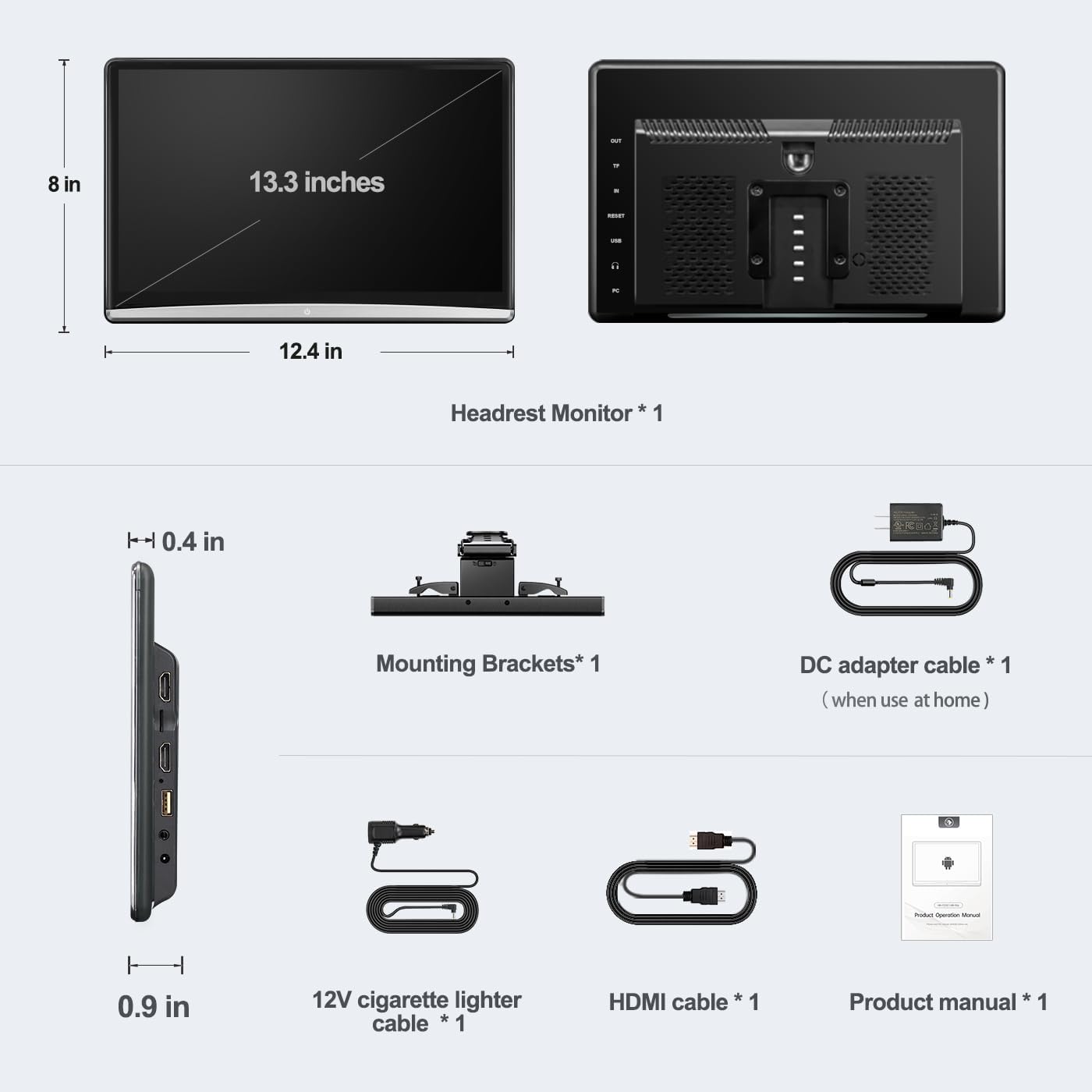
Figure 2: Package contents and device dimensions.
Setup
Installation
The AINAVI 13.3" Android Car Tablet TV comes with a universal mounting bracket compatible with over 95% of cars, provided the headrest bracket is round stainless steel.
- Attach the universal mounting bracket to the headrest poles. Ensure the bracket is securely fastened by tightening the knob.
- Slide the monitor onto the mounted bracket until it clicks into place.
- Connect the appropriate power cable (cigarette lighter cable for car use or DC adapter for home use) to the DC 12V power port on the device.

Figure 3: Headrest compatibility and universal mount.
Initial Power On
Once powered, the device will boot up, displaying the Android logo. Allow a few moments for the system to fully load before interacting with the touchscreen.
Video 1: Demonstrates the installation process and initial boot-up of the AINAVI 13.3" Android Headrest Video Player, showing how to attach the mounting bracket and slide the monitor into place, followed by connecting the power cable and the device powering on.
Operating Instructions
User Interface and App Access
The device runs on Android 10, providing a familiar and intuitive interface. You can download and install various applications from the Google Play Store or APKPure, including popular streaming services and social tools.
- Access apps like YouTube, Netflix, Disney+, Facebook, WhatsApp, Twitter, LinkedIn, and Skype.
- The device features multiple UI themes that can be customized.

Figure 4: Key features including Android 10, memory, WiFi, LED lights, and phone mirroring.
Media Playback
The monitor supports playback of 4K files and is compatible with various media formats including MP4, MPG, AVI, MKV, MOV, 3GP, MP3, MAV, FLAC, AAC, OGG, and OGA.
- USB/SD Card Playback: Insert a USB flash drive or SD card into the respective ports to access and play your stored music, videos, and photos.
- Streaming: Connect to 5G/2.4 GHz WiFi or phone hotspots to stream content from online platforms.
Wireless Phone Connectivity (Screen Mirroring)
The device supports iOS AirPlay and Android Miracast for screen mirroring. This allows you to display content from your smartphone directly onto the monitor.
- Navigate to the "Phone Link" option on the device's main interface.
- Select your phone's operating system (Android or iOS).
- Follow the on-screen instructions to connect your phone. Ensure both the monitor and your phone are connected to the same WiFi network for optimal performance.
FM Transmission
Utilize the built-in FM transmitter to send audio from the monitor to your car's speakers. This allows for a more immersive audio experience without needing external speakers for the monitor.
Colorful LED Lights
The monitor features 7 colorful LED light options at the bottom. You can set them to switch automatically or manually select your preferred color to match your car's interior or mood.

Figure 5: Usage scenarios in car and home.
Connectivity and Ports
The AINAVI 13.3" Android Car Tablet TV is equipped with multiple ports for versatile connectivity:
- HDMI Input: Connect external devices such as gaming consoles (Xbox, PS4, PS5), TV boxes, Fire TV Sticks, PCs, or projectors to use the monitor as a display.
- HDMI Output: Connect two monitors to play the same content simultaneously.
- USB Port: For connecting USB flash drives for media playback.
- SD Card Port: For connecting SD cards for media playback.
- Headphone Port (Audio Out): For connecting wired headphones.
- DC 12V Power Port: For connecting the power adapters.
- Reset Hole: A small hole for resetting the device if needed.
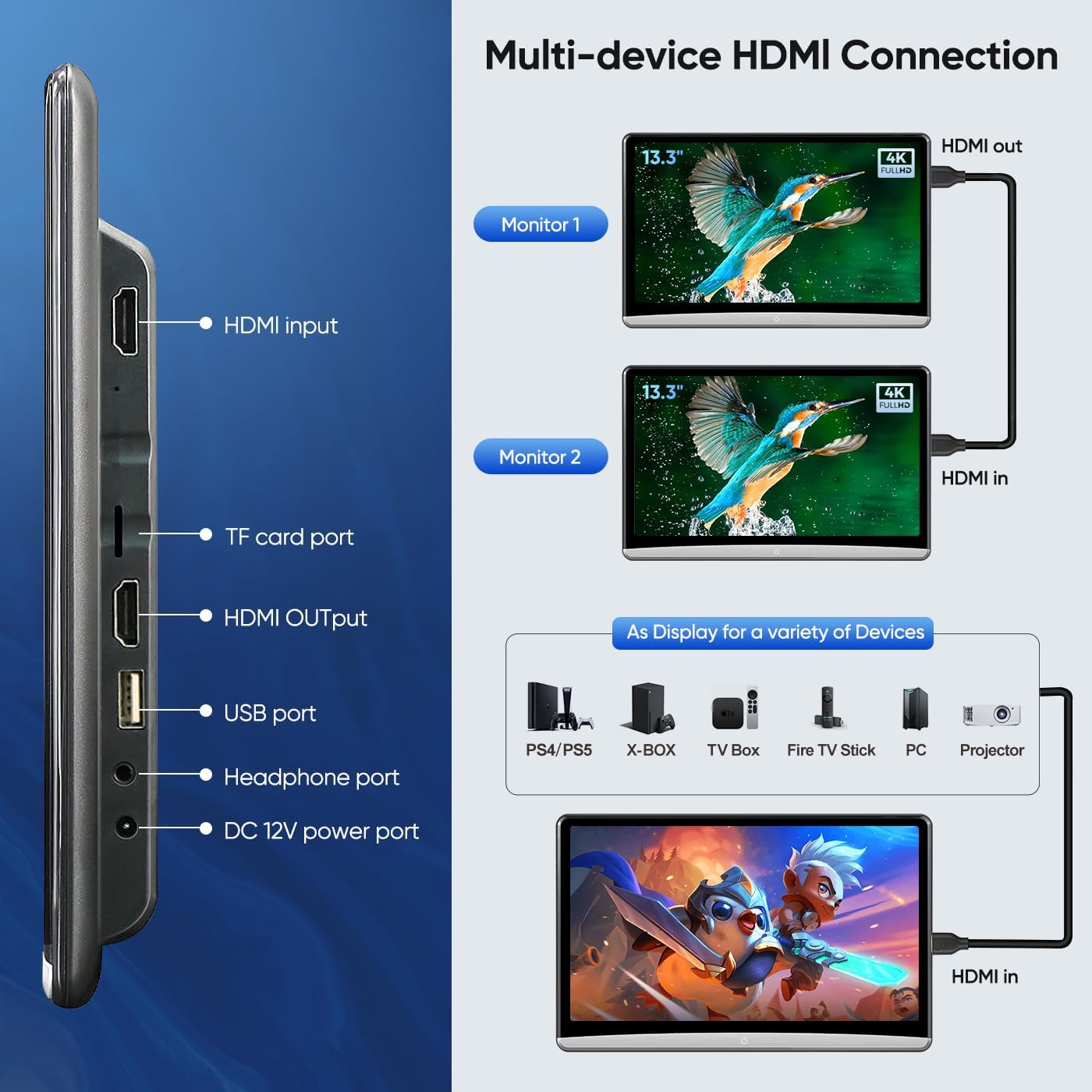
Figure 6: Multi-device HDMI connection and port overview.
Specifications
| Feature | Detail |
|---|---|
| Screen Size | 13.3 Inches |
| Resolution | 1920 x 1080 (4K file playback supported) |
| Operating System | Android 10 |
| RAM | 2GB |
| ROM | 32GB |
| WiFi Connectivity | 5G/2.4 GHz |
| Phone Mirroring | iOS AirPlay, Android Miracast |
| Power Supply | DC adapter (home), Car charger (12V car), Car fuse box ACC power (optional) |
| Item Weight | 4.91 pounds |
| Dimensions | 13.74 x 10.16 x 4.45 inches (Package) |
Maintenance
To ensure the longevity and optimal performance of your AINAVI Car Tablet TV, follow these maintenance guidelines:
- Cleaning: Use a soft, lint-free cloth to clean the screen and exterior. For stubborn smudges, slightly dampen the cloth with water or a screen-safe cleaner. Avoid abrasive materials or harsh chemicals.
- Storage: When not in use for extended periods, store the device in a cool, dry place away from direct sunlight and extreme temperatures.
- Software Updates: The device supports OTA (Over-The-Air) system updates. Regularly check for and install updates to ensure you have the latest features and security patches.
- Cable Management: Ensure all cables are properly routed and not pinched or strained to prevent damage.
Troubleshooting
If you encounter issues with your AINAVI Car Tablet TV, refer to the following common problems and solutions:
| Problem | Possible Cause / Solution |
|---|---|
| Device restarts frequently or when car door closes. | This can occur if the device is powered directly from a source that cuts off power when the car is turned off or doors are opened/closed. Ensure a stable power connection. Consider using the car fuse box ACC power option (if available and professionally installed) for consistent power. |
| No power / Device won't turn on. |
|
| Screen mirroring not working. |
|
| No sound or low sound from speakers. |
|
| Cannot connect to WiFi. |
|
For further assistance, please refer to the "Support" section.
Warranty and Support
Your AINAVI 13.3" Android Car Tablet TV is backed by a manufacturer's warranty. For specific warranty terms and conditions, please refer to the warranty card included in your product packaging or contact the seller directly.
Technical Support
For installation assistance, technical support, or any product-related inquiries, please contact the seller, HomeCar, through the Amazon platform. You can typically find their contact information on the product page or in your order history.

Figure 7: How to reach HomeCar for support.
Ask a question about this manual
Ask about setup, troubleshooting, compatibility, parts, safety, or missing instructions. Manuals+ will review the question and use this page’s manual context to help answer it.