
1. Introduction
The LOXJIE D60 is a high-performance HiFi balanced headphone amplifier and decoder designed to deliver exceptional audio quality. It features a fully balanced headphone amplifier circuit, advanced DAC chip technology, and multiple input/output options to cater to diverse audio setups. This manual provides detailed instructions for the proper setup, operation, and maintenance of your D60 unit.
Video Description: This video provides a visual overview of the LOXJIE D60, showcasing its design, various input/output interfaces, and highlighting its balanced headphone amplifier circuit. It demonstrates the product's aesthetic and connectivity options.
2. Package Contents
Please check the package carefully to ensure all items are present and in good condition.
- 1 × LOXJIE D60 Unit
- 1 × Remote Control
- 1 × Bluetooth Antenna
- 1 × Power Cable
- 1 × USB Cable

Image Description: A visual representation of the LOXJIE D60 unit alongside its accessories, including the remote control, power cable, Bluetooth antenna, USB cable, a manual icon, and a repair card icon.
3. Product Overview
Familiarize yourself with the various components and connectors of the LOXJIE D60.
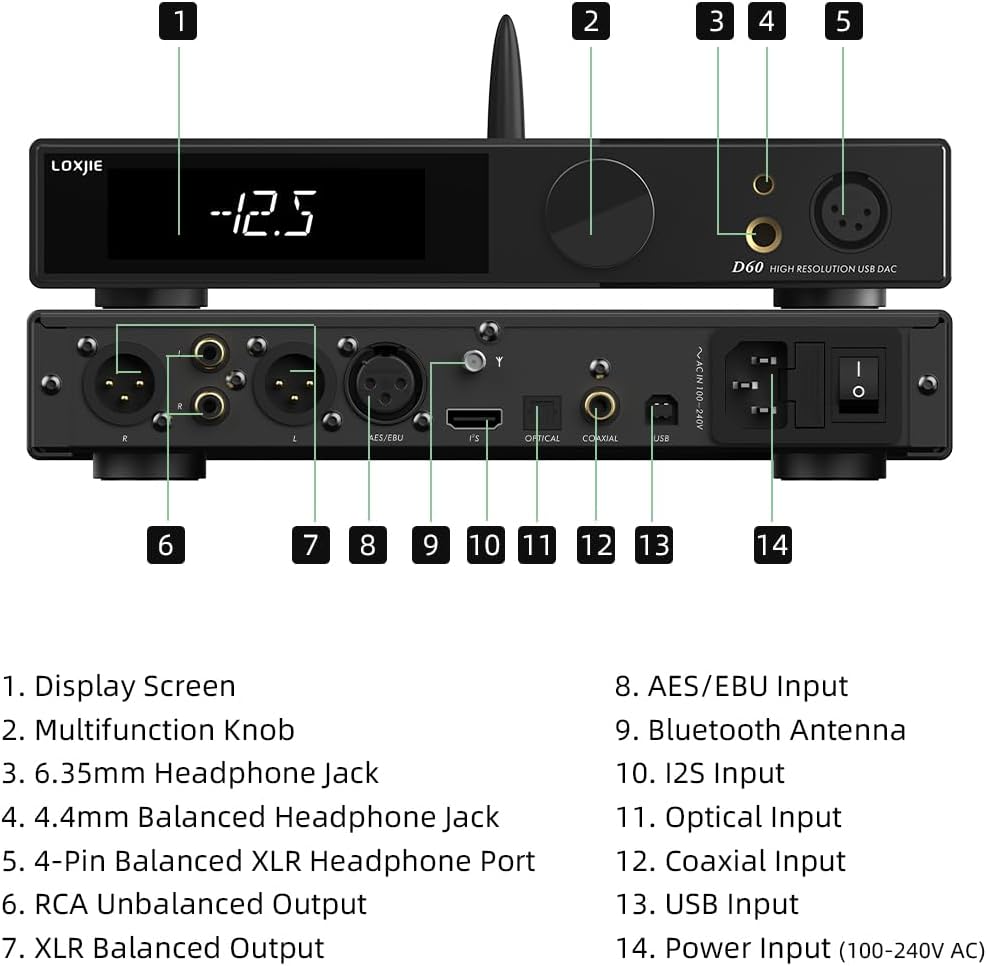
Image Description: A detailed diagram illustrating the front and rear panels of the LOXJIE D60. Each port and control is numbered and corresponds to a legend for identification.
Front Panel
- Display Screen: Shows current settings, input, sample rate, volume, and filter information.
- Multifunction Knob: Used for volume control, menu navigation, and selection.
- 6.35mm Headphone Jack: Standard unbalanced headphone output.
- 4.4mm Balanced Headphone Jack: Balanced headphone output.
- 4-Pin Balanced XLR Headphone Port: Professional balanced headphone output.
Rear Panel
- RCA Unbalanced Output: Analog audio output for connecting to other audio equipment.
- XLR Balanced Output: Professional balanced analog audio output.
- AES/EBU Input: Digital audio input.
- Bluetooth Antenna: Connector for the included Bluetooth antenna.
- I2S Input: High-resolution digital audio input.
- Optical Input: Digital optical audio input.
- Coaxial Input: Digital coaxial audio input.
- USB Input: USB audio input for connecting to a computer or other digital source.
- Power Input (100-240V AC): AC power connector and main power switch.

Image Description: A clear view of the rear panel of the LOXJIE D60, highlighting the various input and output connections including XLR, RCA, AES/EBU, I2S, Optical, Coaxial, USB, and the power input with switch.
4. Setup
Follow these steps to set up your LOXJIE D60 for optimal performance.
4.1 Power Connection
- Connect the provided power cable to the D60's power input (14) and then to a suitable AC power outlet (100-240V).
- Ensure the power switch is in the OFF position before connecting.
4.2 Bluetooth Antenna Installation
- Screw the included Bluetooth antenna onto the Bluetooth antenna connector (9) on the rear panel. Ensure it is securely tightened for stable signal reception.

Image Description: The rear panel of the LOXJIE D60, showing the Bluetooth antenna securely screwed into its designated port, along with other input/output connections.
4.3 Audio Source Connection
Connect your audio sources to the appropriate input ports on the rear panel:
- USB Input (13): For connecting to a computer or other USB audio host.
- Optical Input (11): For connecting devices with optical digital output.
- Coaxial Input (12): For connecting devices with coaxial digital output.
- AES/EBU Input (8): For professional digital audio connections.
- I2S Input (10): For high-fidelity digital audio transmission from compatible sources. The D60 supports multiple I2S interface modes (Normal/Reversed) which can be selected in the settings to match your source.

Image Description: A graphic detailing the 'Normal' and 'Reversed' pin configurations for the I2S input, allowing users to select the mode that suits their signal source. The image also shows the D60 unit with its remote control, highlighting its functionality.
4.4 Headphone Connection
Connect your headphones to one of the following outputs on the front panel:
- 6.35mm Headphone Jack (3): For standard unbalanced headphones.
- 4.4mm Balanced Headphone Jack (4): For balanced headphones with a 4.4mm connector.
- 4-Pin Balanced XLR Headphone Port (5): For balanced headphones with a 4-pin XLR connector.
5. Operating Instructions
This section details how to operate your LOXJIE D60.
5.1 Powering On/Off
- After all connections are made, flip the power switch on the rear panel (14) to the ON position. The display screen (1) will illuminate.
- To power off, flip the power switch to the OFF position.
5.2 Basic Controls (Multifunction Knob & Remote Control)
The D60 can be controlled using the multifunction knob (2) on the front panel or the included remote control.
- Volume Control: Rotate the multifunction knob to adjust the volume. On the remote, use the Volume +/- buttons.
- Input Selection: Press the multifunction knob to cycle through inputs, or use the 'Input Select' button on the remote.
- Menu Navigation: Press and hold the multifunction knob to enter the menu. Rotate to navigate and press to select. The remote control offers dedicated buttons for menu navigation and selection.

Image Description: A close-up of the LOXJIE D60's front panel, displaying information such as the active input (INT:OPT), sample rate (768 kHz), current volume (-30.5 dB), and selected filter (FILTER:FL3).
5.3 Filter Selection
The D60 features 7 digital filters for PCM and DSD signals, allowing you to fine-tune the sound characteristics. Access these options through the menu using the multifunction knob or remote control.
- Navigate to the 'Filter' setting in the menu.
- Select from the available PCM and DSD filter options to suit your preference.

Image Description: A graph illustrating the frequency response characteristics of various digital filters (e.g., Minimum Phase, Linear Fast, Linear Slow, Low Dispersion) available on the LOXJIE D60, demonstrating their effect on the audio signal's transient response.
5.4 Bluetooth Pairing
- Select 'Bluetooth' as the input source on the D60.
- On your mobile device or computer, search for available Bluetooth devices and select 'LOXJIE D60'.
- Once paired, audio will stream wirelessly to the D60. The D60 supports LDAC 24bit/96kHz, APTX/HD, SBC, and AAC codecs.
5.5 MQA Decoding
The LOXJIE D60 supports MQA hard decoding and MQA-CD playback. When playing MQA content, the display will indicate the MQA status.
6. Maintenance
Proper maintenance ensures the longevity and performance of your D60.
- Cleaning: Use a soft, dry cloth to clean the exterior of the unit. Avoid using abrasive cleaners or solvents.
- Ventilation: Ensure the unit has adequate ventilation. Do not block the ventilation holes.
- Environment: Keep the D60 away from direct sunlight, heat sources, and excessive moisture.
- Power Off: Always power off the unit before disconnecting cables or moving it.
7. Troubleshooting
If you encounter issues with your LOXJIE D60, refer to the following common problems and solutions.
| Problem | Possible Cause | Solution |
|---|---|---|
| No power | Power cable not connected; Power switch off | Ensure power cable is securely connected; Turn power switch ON. |
| No sound output | Incorrect input selected; Headphones not connected; Volume too low; Mute activated | Select correct input; Connect headphones securely; Increase volume; Check if mute is active. |
| Bluetooth connection unstable | Antenna loose; Interference; Device too far | Ensure Bluetooth antenna is tight; Reduce interference sources; Move device closer to D60. |
| Remote control not working | Batteries depleted; Obstruction; Out of range | Replace batteries; Remove obstructions; Ensure line of sight to D60. |
8. Specifications
Detailed technical specifications for the LOXJIE D60.
| Feature | Detail |
|---|---|
| Model Number | LOXJIE-D60 |
| DAC Chip | ES9039MSPRO |
| USB Processor | XMOS XU-316 (3rd Generation) |
| PCM Support | Up to 32bit/768kHz |
| DSD Support | Up to DSD512 (USB), DoP64 (Coaxial, Optical, AES/EBU) |
| MQA Support | Built-in MQA hard decoding, MQA-CD |
| Headphone Outputs | 6.35mm, 4.4mm Balanced, 4-Pin XLR Balanced |
| Headphone Output Power | 6W x 2 (16 Ω), 3W x 2 (32 Ω) |
| Bluetooth Codecs | LDAC (24bit/96kHz), APTX/HD, SBC, AAC |
| Digital Filters | 7 (for PCM and DSD) |
| Package Dimensions | 14.06 x 9.8 x 3.15 inches |
| Item Weight | 3.08 pounds |
| Date First Available | September 20, 2024 |

Image Description: A compilation of four graphs presenting the measured performance data of the LOXJIE D60, specifically showing Balanced Line Out THD+N, Balanced Line Output Dynamic Range, Balanced Headphone Output (32Ω load), and Balanced Line Output SNR, indicating high fidelity audio characteristics.
9. Warranty and Support
The LOXJIE D60 comes with a one-year warranty period from the date of purchase. This warranty covers manufacturing defects and ensures the product functions as intended under normal use.
For any issues encountered during product use, technical assistance, or warranty claims, please contact LOXJIE customer support through the retailer where the product was purchased or visit the official LOXJIE website for support contact information. Please have your purchase receipt and product model number (D60) ready when contacting support.
