
TAMCO B0DHKZ98DP
TAMCO Kids Electric Ride-On Car User Manual
Model: B0DHKZ98DP
Introduction
This manual provides essential information for the safe operation, assembly, maintenance, and troubleshooting of your TAMCO Kids Electric Ride-On Car. Please read this manual thoroughly before initial use and retain it for future reference. This product is designed to provide an enjoyable and safe riding experience for children aged 3 to 6 years.
Safety Information
WARNING: CHOKING HAZARD - SMALL PARTS. Not for children under 3 years old.
Always ensure children are supervised during operation. Use only on flat, dry surfaces away from traffic. Ensure the seat belt is fastened securely before operation. The remote control has priority over manual operation for enhanced safety.
What's in the Box
- Car Body (1 pcs)
- Wheels (4 pcs)
- Seat (1 pcs)
- Remote Control (1 pcs)
- Charger (1 pcs)
Setup and Assembly
Before first use, some assembly is required. Please follow these general steps:
- Attach the four wheels to the car body. Ensure they are securely fastened.
- Install the seat into the designated area on the car body.
- Connect the battery terminals as instructed in the separate quick start guide (if provided).
- Ensure all connections are firm and secure before operation.

Image: Fully assembled TAMCO Kids Electric Ride-On Car, showcasing its white and orange design with large wheels and a roll bar.
Operating Instructions
Driving Modes
Your ride-on car offers two primary driving modes:
1. Child Control
Children can operate the car independently using the steering wheel and foot pedal. The foot pedal acts as the accelerator. Release the pedal to brake.
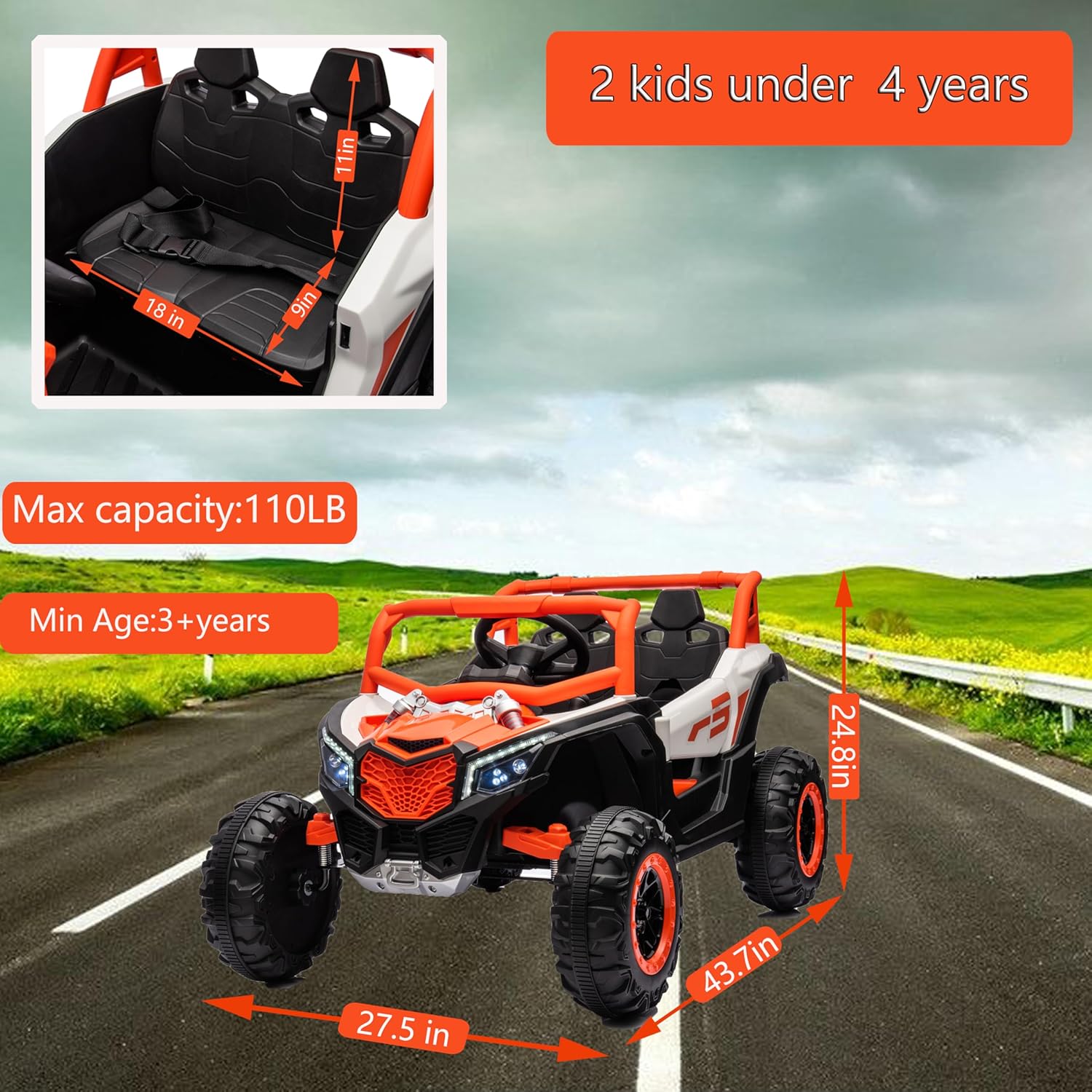
Image: A young child seated in the ride-on car, demonstrating the use of the steering wheel and foot pedal for manual control.
2. Parental Remote Control
For younger children or for safety, parents can control the car using the included remote control. The remote control has priority over manual operation. It requires 2 x AAA batteries (not included).

Image: A diagram illustrating the parental remote control with labels for forward, back, left, right, speed, brake, and code matching functions.
Additional Features
- Multi-function Music Board: The car is equipped with a music player that includes built-in music, wired phone connection, and wireless phone connection capabilities.
- Simulation Dashboard: Provides an immersive driving experience with a realistic dashboard display.
- LED Lights: Functional LED headlights enhance visibility and realism.
- Swing Function: Allows the car to gently rock, providing an additional layer of entertainment.

Image: A detailed view of the car's interior, highlighting the multi-function music board with various controls and the simulation dashboard.

Image: A close-up shot of the front of the ride-on car, showing the bright, illuminated LED headlights.
Charging the Battery
The ride-on car is powered by a rechargeable battery. Use only the provided charger adapter.
- Locate the charging port on the vehicle.
- Plug the charger into a standard wall outlet, then connect it to the charging port.
- The charging time is approximately 8-12 hours for a full charge. Do not overcharge.
- Disconnect the charger once charging is complete.
Maintenance
- Regularly inspect the car for any loose parts, damaged wires, or worn components.
- Clean the car with a damp cloth. Do not use abrasive cleaners or immerse in water.
- Store the car in a dry, cool place away from direct sunlight when not in use.
- Charge the battery at least once a month, even if not in use, to prolong battery life.
Troubleshooting
| Problem | Possible Cause | Solution |
|---|---|---|
| Car does not move | Low battery; Loose battery connection; Overload protection activated | Charge battery; Check battery terminals; Reduce load, restart car |
| Remote control not working | Batteries dead/incorrectly inserted; Not paired with car | Replace batteries, check polarity; Refer to remote pairing instructions |
| Lights/Music not working | Loose wiring; Component malfunction | Check connections; Contact customer support |
Specifications
| Feature | Detail |
|---|---|
| Product Dimensions | 43.7 x 27.5 x 24.8 inches |
| Item Weight | 33.9 pounds |
| Recommended Age | 36 months - 6 years |
| Battery Type | 1 Nonstandard Battery (included) |
| Manufacturer | TAMCO |
| Max Capacity | 110 LB |

Image: The ride-on car with overlaid measurements indicating its length (43.7 in), width (27.5 in), and height (24.8 in).
Warranty and Support
For warranty information or technical support, please refer to the product packaging or contact TAMCO customer service directly. Keep your purchase receipt as proof of purchase.
Ask a question about this manual
Ask about setup, troubleshooting, compatibility, parts, safety, or missing instructions. Manuals+ will review the question and use this page’s manual context to help answer it.