1. Introduction
The ZGCINE DT-BLK22 D-Tap to DMW-BLK22 Dummy Battery Cable is designed to provide continuous power to your Panasonic GH5, GH5S, G9, LUMIX S5, and LUMIX S5 II cameras from D-Tap power sources. This cable is an ideal solution for extended shooting sessions, time-lapse photography, live streaming, and other scenarios requiring a long-lasting and stable power supply.

Image 1: ZGCINE DT-BLK22 D-Tap to DMW-BLK22 Dummy Battery Cable and included cleaning cloth.
2. Key Features
- Compatibility: Specifically designed as a replacement battery for Panasonic GH5, GH5S, G9, LUMIX S5, and LUMIX S5 II Cameras.
- D-Tap Power Input: Allows powering your camera from D-Tap devices such as V-mount batteries, battery grips, or other power sources with D-Tap output.
- Input/Output Specifications: Supports D-Tap input of 12-17V and provides a stable output of 8.4V/3A to the camera.
- Extended Operation: Provides an ideal solution for long-lasting camera power supply requests, suitable for time-lapse photography, starry sky photography, wedding videography, sports events videography, and online live streaming.
- Multiple Safety Protection: Features a built-in protection system to prevent overcurrent, overvoltage, and short circuits, ensuring safe operation.
3. Package Contents
- 1 x ZGCINE DT-BLK22 D-Tap to DMW-BLK22 Dummy Battery Cable
- 1 x Cleaning Cloth
4. Setup Instructions
- Prepare Power Source: Ensure your D-Tap power source (e.g., V-mount battery, battery plate, or battery grip) is charged and provides an output voltage between 12V and 17V.
- Insert Dummy Battery: Carefully insert the DMW-BLK22 dummy battery end into your Panasonic camera's battery compartment. Ensure it is fully seated and oriented correctly.
- Route Cable: Guide the cable through the designated cable exit slot on your camera's battery door, if available.
- Close Battery Door: Attempt to close the camera's battery door. Note: Due to the design of some camera models (e.g., LUMIX S5II, S5IIX, GH5II), the battery door may not close completely or may require careful routing. Refer to the Troubleshooting section for more details.
- Connect D-Tap: Connect the D-Tap connector end of the cable to the D-Tap output port on your power source. Ensure a secure connection.
- Power On: Once all connections are secure, power on your D-Tap power source and then your camera.

Image 2: Close-up view of the D-Tap connector and the dummy battery connector.
5. Operating Instructions
Once the ZGCINE DT-BLK22 dummy battery cable is correctly installed and connected to a compatible D-Tap power source, your camera will receive continuous power. Operate your camera as usual. The cable is designed for stable power delivery, allowing for extended recording times and uninterrupted shooting.
- Ensure the D-Tap power source remains active throughout your shooting session.
- Monitor your camera's battery indicator, if applicable, to confirm power is being supplied.
- When finished, power off your camera first, then disconnect the D-Tap cable from the power source, and finally remove the dummy battery from the camera.
6. Care and Maintenance
- Cleaning: Use the provided cleaning cloth or a soft, dry cloth to wipe the cable and connectors. Do not use liquid cleaners or solvents.
- Storage: Store the cable in a cool, dry place away from direct sunlight and extreme temperatures.
- Handling: Avoid bending the cable sharply or applying excessive force to the connectors, as this can damage internal wiring.
- Protection: Keep the cable away from water, moisture, and corrosive substances.
7. Troubleshooting
Issue: Camera battery door does not close or cable does not fit properly.
Symptom: When inserting the dummy battery and routing the cable, the camera's battery door cannot be fully closed, or the cable appears to be in the wrong position for the camera's cable cutout.
Applicable Models: This issue has been reported by some users for Panasonic LUMIX S5II, S5IIX, and GH5II cameras.
Resolution: This appears to be a design limitation for certain camera models where the cable's thickness or exit point does not perfectly align with the camera's battery door cutout. While the dummy battery may still power the camera, the battery door might remain slightly ajar. If a fully sealed battery compartment is critical for your shooting environment (e.g., weather sealing), this product may not be suitable for those specific camera models. Consider alternative rigging solutions that do not rely on a fully closed battery door, or consult with ZGCINE support for potential workarounds.
Issue: Camera does not power on or loses power.
Symptom: The camera does not turn on after connecting the dummy battery and D-Tap source, or it powers off unexpectedly.
Possible Causes & Solutions:
- Incorrect D-Tap Voltage: Ensure your D-Tap power source provides an output voltage within the specified range of 12V to 17V. Voltages outside this range may prevent the cable from functioning or trigger safety protections.
- Loose Connection: Check that both the dummy battery is fully inserted into the camera and the D-Tap connector is securely plugged into the power source. A loose connection can interrupt power.
- Power Source Issue: Verify that your D-Tap power source is charged and functioning correctly. Test it with another compatible device if possible.
- Overcurrent/Overvoltage Protection: The cable has built-in safety protections. If an overcurrent or overvoltage condition is detected, the cable may temporarily cease power delivery. Disconnect and reconnect the cable to reset, and ensure your power source is stable.
- Cable Damage: Inspect the cable for any visible signs of damage, such as cuts, kinks, or bent pins on the connectors. If damaged, discontinue use and replace the cable.
8. Specifications
| Feature | Detail |
|---|
| Model | DT-BLK22 |
| Input Voltage | D-Tap 12-17V |
| Output Voltage | 8.4V / 3A |
| Cable Length | 60cm (approximately 23.6 inches) |
| Compatibility | Panasonic GH5, GH5S, G9, LUMIX S5, LUMIX S5 II |
| Safety Features | Overcurrent, Overvoltage, Short Circuit Protection |
| Item Weight | 2.08 ounces |
| Package Dimensions | 5.5 x 2.75 x 1.18 inches |
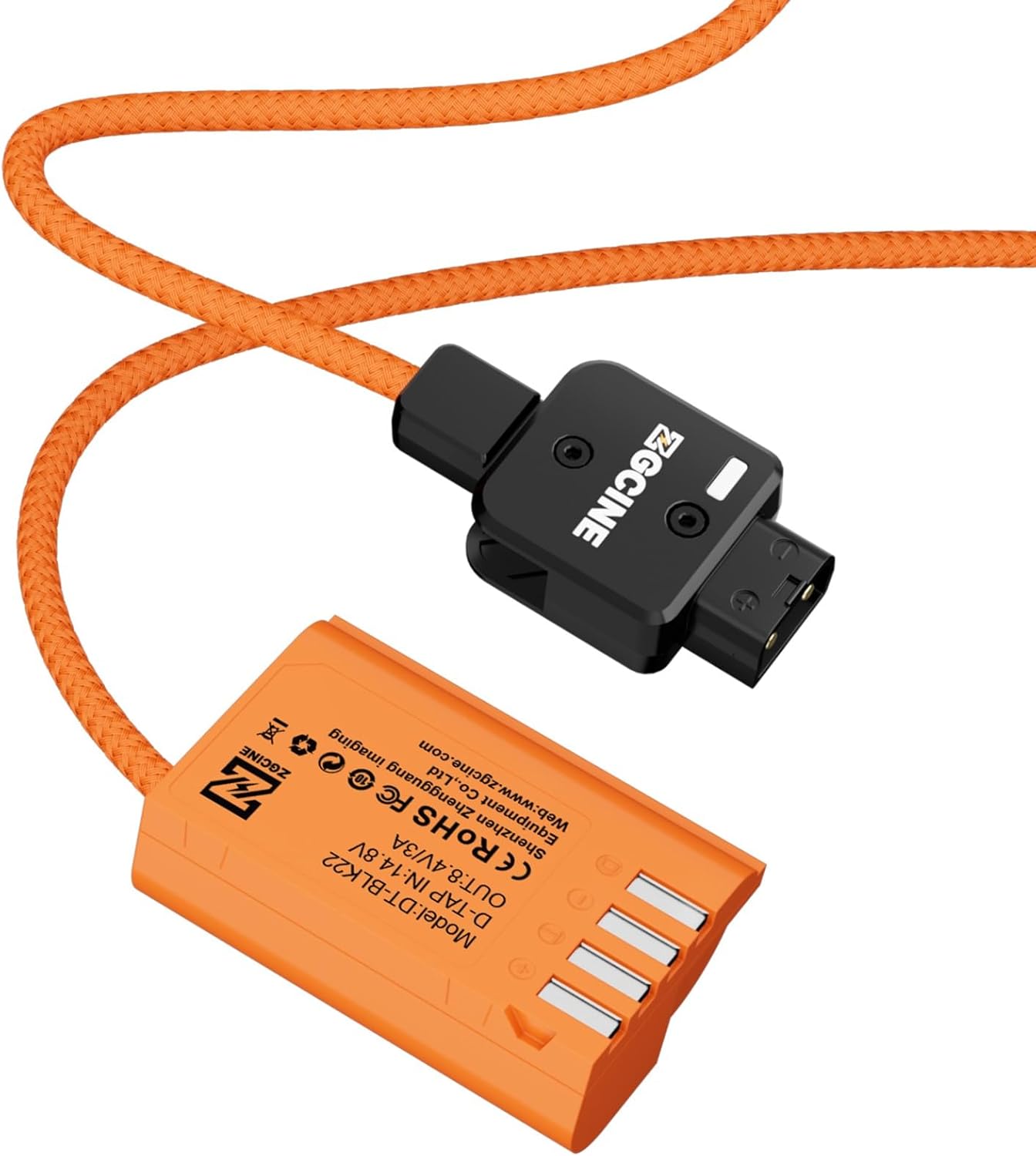
Image 3: Detailed view of the dummy battery with model and electrical specifications.
9. Warranty and Support
ZGCINE products are manufactured with high quality standards. For any questions regarding product operation, troubleshooting, or warranty claims, please contact ZGCINE customer support through the retailer's platform or the official ZGCINE website. Please retain your proof of purchase for warranty service.
For further assistance, you may visit the ZGCINE store on Amazon: ZGCINE Amazon Store


