
1. Introduction
Welcome to your BLANCO PushControl Eccentric drain control. This manual provides essential information for the proper installation, operation, and maintenance of your new product, ensuring its longevity and optimal performance.
2. Product Overview
The BLANCO 210669 PushControl Eccentric is designed for convenient control of your sink drain. It features a durable stainless steel construction and an elegant, flat design that integrates seamlessly with your kitchen or bathroom aesthetic.
Key Features
- Compatibility: Suitable for all BLANCO sinks equipped with the InFino drain system.
- Easy Push Operation: Convenient opening and closing of the drain with a simple push of a button.
- Space-Saving Design: Its flat profile ensures it is hardly noticeable on the worktop or sink edge.
- High-Quality Materials: Constructed from durable stainless steel for reliability and longevity.
- Easy to Clean: Designed for straightforward cleaning and maintenance.
- Simple Installation: Engineered for quick and easy assembly.
Components
The BLANCO PushControl Eccentric includes the control button mechanism and the necessary attachment components for secure installation.

Image Description: A top-down view of the BLANCO PushControl Eccentric in Satin Platinum, showcasing its sleek, circular design.
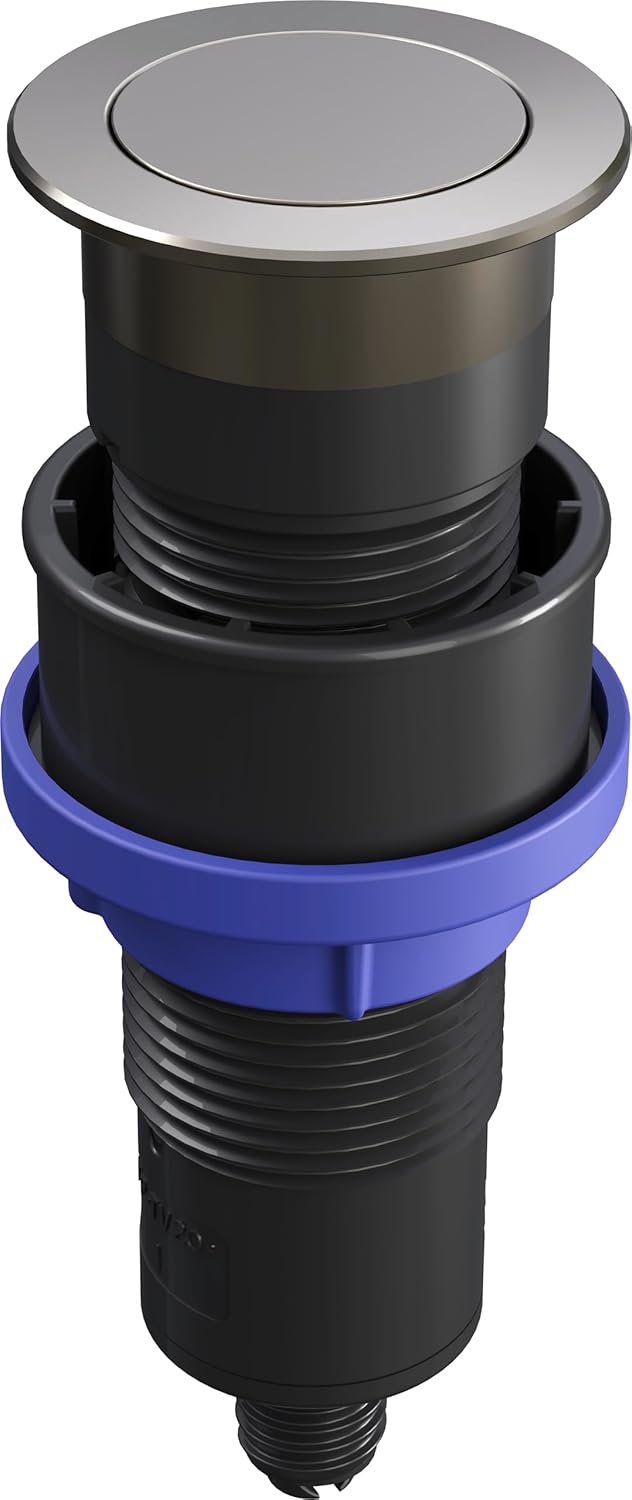
Image Description: A side view of the BLANCO PushControl Eccentric, illustrating the visible top button and the underlying mechanism that connects to the sink drain.
3. Installation Instructions
This section outlines the general steps for installing your BLANCO PushControl Eccentric. For detailed, model-specific instructions, please refer to the packaging or consult a professional plumber.
- Compatibility Check: Ensure your BLANCO sink is compatible with the InFino drain system.
- Prepare Opening: Identify the designated drilling diameter required for installation, which is 35mm. Ensure the opening is clean and free of debris.
- Position Unit: Carefully place the PushControl unit into the prepared opening on your countertop or sink edge.
- Secure Attachment: Secure the attachment components from underneath the sink according to the specific instructions provided with your sink and PushControl. Ensure all connections are tight but do not overtighten.
- Test Operation: Verify that the PushControl operates smoothly by pressing the button to open and close the drain.

Image Description: The BLANCO PushControl Eccentric integrated into a kitchen countertop next to a sink, demonstrating its low-profile and elegant appearance.
4. Operation
The BLANCO PushControl Eccentric offers intuitive operation for managing your sink drain. Its simple push-button mechanism allows for quick and easy control.
- To Close the Drain: Gently press down on the center of the PushControl button. The drain will seal, allowing the sink to fill with water.
- To Open the Drain: Press down on the center of the PushControl button again. The drain will open, allowing water to flow out.

Image Description: A hand demonstrating the operation of the BLANCO PushControl Eccentric by pressing the button on a countertop next to a sink.
5. Care and Maintenance
To ensure the longevity and optimal appearance of your BLANCO PushControl Eccentric, follow these simple maintenance guidelines:
- Cleaning: Regularly clean the surface with a soft cloth and a mild, non-abrasive cleaning agent. Avoid harsh chemicals, abrasive scrubbers, or scouring pads, which can damage the satin platinum finish.
- Drying: After cleaning, wipe the PushControl dry to prevent water spots and maintain its luster.
- Inspection: Periodically check for any debris around the button mechanism and remove it carefully to ensure smooth operation.
6. Troubleshooting
If you encounter issues with your BLANCO PushControl Eccentric, consider the following common solutions:
- Drain Not Sealing/Opening: Ensure no debris (e.g., food particles, hair) is obstructing the drain mechanism beneath the PushControl. Clean any visible blockages carefully.
- Stiff Operation: If the button feels stiff or difficult to press, ensure the area around the button is clean. Avoid forcing the mechanism, as this could cause damage.
- Leakage: If you observe any leakage around the PushControl or drain area, re-check the installation connections to ensure they are properly sealed. If the issue persists, it is recommended to contact a qualified plumber for inspection.
7. Product Specifications
| Feature | Detail |
|---|---|
| Manufacturer | Blanco |
| Part Number | 210669 |
| Item Weight | 3.98 ounces |
| Product Dimensions | 1.73 x 1.73 x 4.92 inches |
| Item Model Number | 210669 |
| Color | Satin Platinum |
| Style | PushControl |
| Material | Stainless steel |
| Shape | Circular |
| Item Package Quantity | 1 |
| Included Components | Push control and attachment |
| Batteries Required? | No |
8. Warranty and Customer Support
BLANCO products are manufactured to high-quality standards. For specific warranty information regarding your BLANCO 210669 PushControl Eccentric, please refer to the documentation included with your purchase or visit the official BLANCO website.
For further assistance, technical support, or to inquire about replacement parts, please contact BLANCO customer service through their official channels.
You can find more information and products from BLANCO at their official BLANCO Store.


