
1. Introduction
This manual provides detailed instructions for the installation, operation, and maintenance of your WALI Foldable Projector Wall Mount, Model 1330LM-PM. Please read this manual thoroughly before installation and retain it for future reference. This product is designed to securely hold most small projectors with standard 1/4-inch, M4, or M6 screw mounting holes, supporting a maximum weight of 22 lbs (9.9 kg).
2. Safety Information
WARNING: Failure to read and follow these instructions may result in personal injury or property damage.
- Ensure the mounting surface can safely support the combined weight of the mount and the projector.
- DO NOT install this mount on drywall alone. It must be mounted into a solid wood stud, concrete wall, or brick wall.
- Use only the hardware provided or specified in this manual.
- If you have any doubts about the installation process, consult a qualified professional.
- Keep children and pets away during installation.
- Periodically check that the mount and all connections are secure.
3. Package Contents
Verify that all components are present and undamaged before proceeding with installation.
- WALI Projector Mount (x1)
- Mounting Hardware Kit (screws, expansion pipes, washers)
- Instruction Manual (x1)
Note: Projector is NOT included.
4. Product Features
The WALI Foldable Projector Wall Mount offers versatile positioning and space-saving design.
- Universal Compatibility: Supports standard 1/4" (6mm/0.23-inch) screws, and is compatible with M4 and M6 screw sizes for various projectors.
- High Weight Capacity: Safely holds projectors up to 22 lbs (9.9 kg).
- Full Adjustability:
- Tilt: +/- 180 degrees (Universal head locks into grooves for max 90 degrees down and 30 degrees up tilt).
- Rotate: +/- 180 degrees.
- 360 Degree Rotation: Achieved via the gimbal ball head.
- Foldable Design: Allows the mount to be folded against the wall when not in use, saving space.
- Multi-Scenario Use: Can be configured for both wall and ceiling mounting setups.

Figure 1: Product dimensions and adjustment capabilities, including 360-degree rotation, 180-degree swivel, and tilt angles.
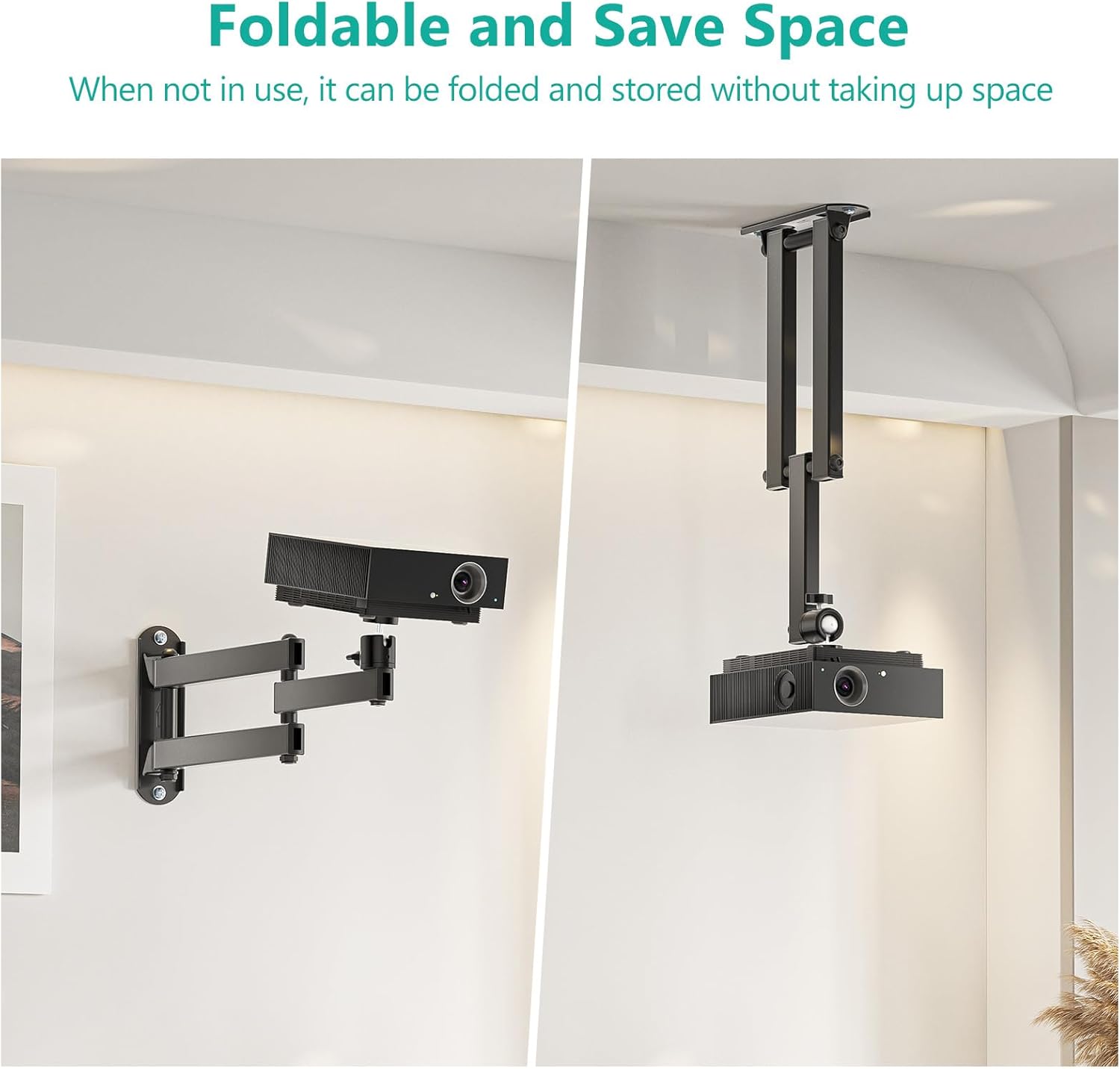
Figure 2: The mount's foldable design for space-saving storage in both wall and ceiling configurations.
5. Setup and Installation
Follow these steps carefully for secure installation.
- Choose Mounting Location: Select a sturdy wall location (wood stud, concrete, or brick) that can support the weight of the mount and projector. Avoid drywall only installations.
- Mark Drill Holes: Position the wall plate of the mount against the wall at the desired height and use a pencil to mark the two drill hole locations.
- Drill Holes: Drill two pilot holes at the marked locations. The drill bit size will depend on your wall type and the provided hardware (e.g., for wood studs, a smaller pilot hole; for concrete/brick, a larger hole for expansion pipes).
- Install Wall Plate: Insert the expansion pipes (C) into the drilled holes if mounting into concrete/brick. Align the wall plate with the holes and secure it to the wall using the Phillips screws (B) and washers (D). Ensure the screws are tightened firmly.
- Attach Universal Head: Secure the universal ball head to the front of the bracket. Ensure all screws are tightened firmly to prevent loosening.
- Mount Projector: Carefully attach your projector to the universal ball head using the appropriate screw (1/4", M4, or M6) that fits your projector's mounting hole. Ensure the projector is securely fastened.

Figure 3: Illustration of mounting hardware components (Phillips screw, expansion pipe, washer) and their placement during installation.

Figure 4: A projector mounted on the WALI wall mount in a room, highlighting the ball head connection.
6. Operating and Adjustment
Once installed, the mount allows for flexible positioning of your projector.
- Horizontal Swivel: The arm of the mount can swivel up to 180 degrees horizontally. Loosen the fixing knot slightly to adjust, then re-tighten to secure.
- 360 Degree Rotation: The universal ball head allows for a full 360-degree rotation of the projector. Loosen the ball-head screw, adjust the projector's orientation, and then tighten the screw firmly to lock it in place.
- Tilt Adjustment: The universal ball head also enables tilting the projector up to 90 degrees down and 30 degrees up. Loosen the ball-head screw, adjust the tilt angle, and then tighten the screw firmly. Note that the universal head needs to be locked into its grooves to achieve the maximum tilt angles.

Figure 5: Demonstrates the 180-degree horizontal swivel capability of the mount's arm.

Figure 6: Illustrates the 360-degree free rotation of the projector, with a close-up of the ball head mechanism.
7. Maintenance
Regular maintenance ensures the longevity and safe operation of your projector mount.
- Cleaning: Wipe the mount with a soft, dry cloth. Avoid abrasive cleaners or solvents that could damage the finish.
- Inspection: Periodically check all screws and connections to ensure they remain tight and secure. Re-tighten any loose fasteners.
- Weight Limit: Do not exceed the maximum weight capacity of 22 lbs (9.9 kg).
8. Troubleshooting
If you encounter issues with your WALI Projector Wall Mount, refer to the following common solutions.
- Projector is unstable or sags:
- Ensure the ball-head screw connecting the projector is tightened firmly.
- Verify that the projector's weight does not exceed the 22 lbs (9.9 kg) limit.
- Check that the universal head is properly seated and locked into its grooves for maximum stability, especially when tilting.
- Mount feels loose on the wall:
- Re-tighten the screws securing the wall plate to the wall.
- Confirm that the mount is installed into a solid wood stud, concrete, or brick, not just drywall.
- Difficulty adjusting angles:
- Loosen the relevant fixing knots or screws slightly before attempting to adjust, then re-tighten.
- Ensure no cables are obstructing movement.
9. Specifications
| Feature | Specification |
|---|---|
| Model Number | 1330LM-PM |
| Product Dimensions | 13.39 x 1.73 x 5.9 inches |
| Item Weight | 1.74 pounds |
| Max Weight Capacity | 22 lbs (9.9 kg) |
| Mounting Type | Wall Mount (also configurable for ceiling) |
| Compatible Screw Sizes | 1/4" (6mm/0.23-inch), M4, M6 |
| Tilt Adjustment | +/- 180 degrees (max 90 degrees down, 30 degrees up with universal head locked) |
| Rotation | 360 degrees |
| Horizontal Swivel | +/- 180 degrees |
| Color | Black |
| Special Features | Foldable |
10. Warranty and Support
WALI products are designed for quality and reliability. For warranty information or technical support, please refer to the contact information provided with your purchase or visit the official WALI website. Please have your model number (1330LM-PM) ready when contacting support.


