
Dkian X8100 / HD smart 365cam
Dkian Smart HD Indoor WiFi Magnet Night Vision Camera 365cam 1080P Wireless Smart Home Security Camera User Manual
Model: X8100 / HD smart 365cam
1. Introduction
The Dkian Smart HD Indoor WiFi Magnet Night Vision Camera 365cam 1080P is a versatile surveillance device designed for home security and various monitoring needs. It features a built-in strong magnet for flexible placement, a wide-angle lens, HD live video capabilities, and the ability to record without WiFi connectivity, making it suitable for diverse environments. This manual provides detailed instructions for setting up, operating, and maintaining your camera.
2. Product Features
- Model: HD Smart 365 Camera
- Type: Wi-Fi Security Camera
- Power: DC 5V 2A
- Operating Temperature: 20°C to 50°C (4°F to 122°F)
- Video Resolution: 1080p (1920x1080) at 20fps
- Field of View: 90° to 130° wide-angle lens
- Night Vision: Up to 30 feet (10 meters) with 12 infrared LEDs
- Audio: Two-Way Audio with 1W speaker and built-in microphone
- Network Connectivity: WiFi 2.4GHz (TCP/IP, HTTP, FTP, DHCP protocols)
- Wi-Fi Range: Up to 30 feet (10 meters)
- Storage: MicroSD Card Slot (up to 64GB, card not included) and optional Cloud Storage
- Motion Detection: Yes, with alert notifications (push notifications, email)
- Loop Recording: Automatically overwrites oldest footage when memory card is full.
- Built-in Battery: Provides 2 to 4 hours of recording time.
- Magnetic Body: Allows for easy and secure attachment to metallic surfaces.
- Flexible Semi-rigid USB Cable: For versatile camera placement.

Figure 2.1: Multiple ways to use the Dkian Smart Camera, highlighting its magnetic body, ability to record while charging, and built-in rechargeable battery.
3. Package Contents
Please check the box for the following items:
- Dkian Smart HD Indoor WiFi Magnet Night Vision Camera (1 unit)
- USB Data Cable (2 units)
- 360° Swivel Base (1 unit)
- User Manual (this document)
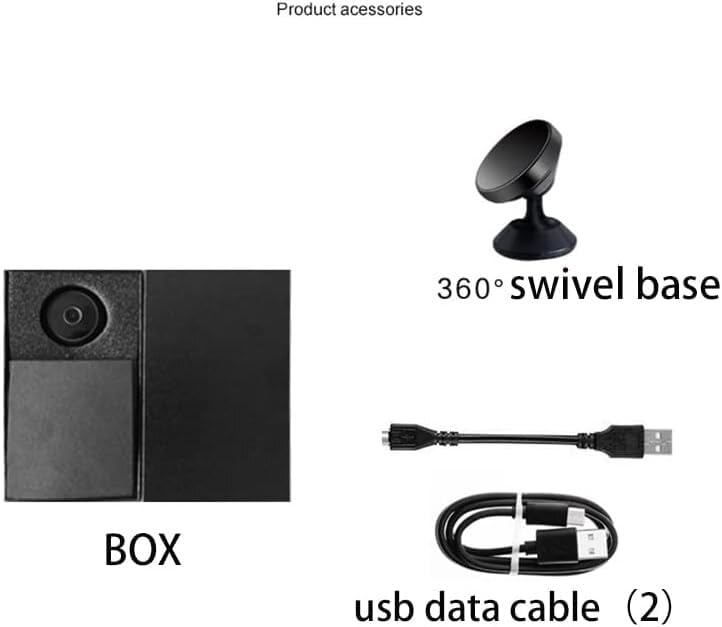
Figure 3.1: Contents of the Dkian Smart Camera package, including the camera box, swivel base, and USB cables.
4. Setup Guide
Follow these steps to set up your Dkian Smart Camera:
- Charge the Camera: Before initial use, fully charge the camera using the provided USB cable.
- Download the App: Scan the QR code below or visit the provided link to download the official application (e.g., HDMiniCam) to your smartphone.

Figure 4.1: Visual guide for setting up the camera, from app download to live video streaming.
Scan this QR code or visit: http://112.124.40.254:808/app_dwn/HDMiniCam.html
- Connect to Camera Hotspot: Turn on the camera. On your smartphone, go to WiFi settings and find the camera's unique WiFi hotspot (it may appear as a series of numbers or letters). Connect to this network.
- Configure WiFi Connection (Optional): Open the downloaded app. Follow the in-app instructions to connect the camera to your home or office WiFi network for remote viewing and advanced features.
- View Live Video: Once connected, you can view the live video feed from the camera on your smartphone through the app.
- Insert MicroSD Card (Optional): For local recording, insert a MicroSD card (up to 64GB, not included) into the designated slot on the camera. Ensure the camera is powered off before inserting or removing the card.
5. Operating Instructions
5.1 Basic Operation
- Power On/Off: Locate the ON/OFF switch on the camera. Slide it to the 'ON' position to power on and 'OFF' to power off.
- Mode Button: The 'MODE' button typically switches between different recording modes (e.g., continuous recording, motion detection recording). Refer to the app for detailed mode configurations.
- Indicator Lights: Observe the indicator lights on the camera for status (e.g., power, recording, WiFi connection). Consult the app's help section for specific light patterns.
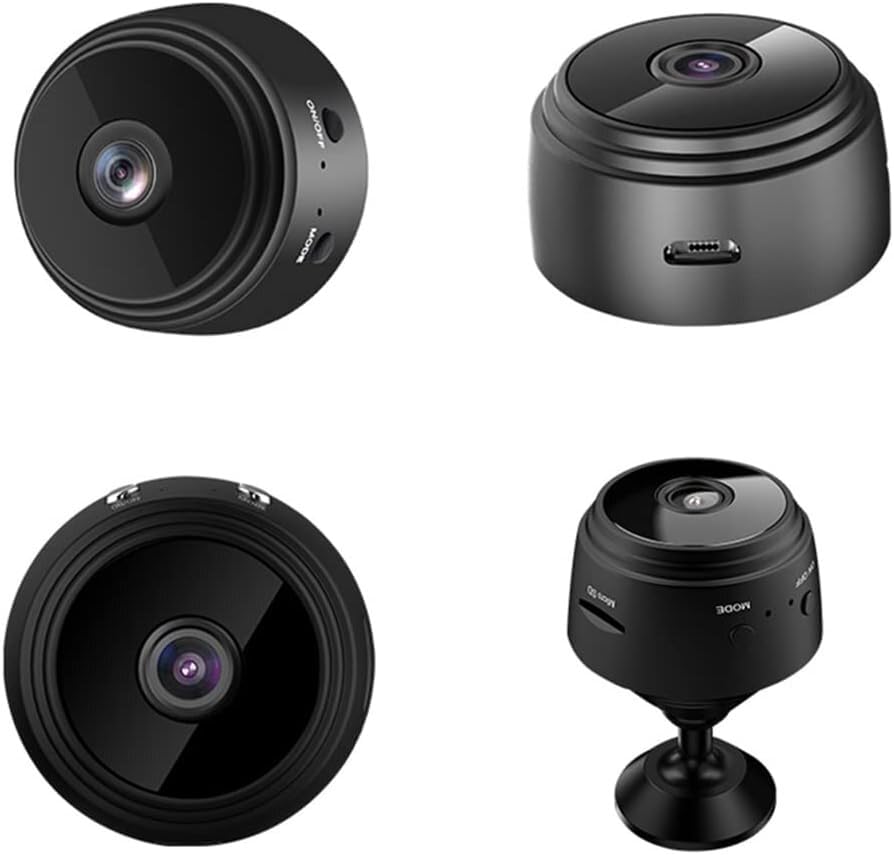
Figure 5.1: Different views of the Dkian Smart Camera, highlighting its controls and ports.
5.2 Recording and Storage
- Continuous Recording: When a MicroSD card is inserted, the camera will typically begin continuous recording automatically once powered on.
- Loop Recording: The camera supports loop recording, meaning when the MicroSD card is full, the oldest video files will be overwritten by new ones. This ensures continuous operation without manual deletion.
- Recording Without WiFi: The camera can record to a MicroSD card even without an active WiFi connection, making it suitable for areas with limited network access.
- Viewing Recordings: Recorded footage can be accessed via the mobile app (if connected to WiFi) or by removing the MicroSD card and viewing it on a computer.
5.3 Advanced Features via App
- Motion Detection Alerts: Configure motion detection sensitivity and set up alerts (push notifications, email) through the app to be notified of activity.
- Night Vision: The camera automatically switches to night vision mode in low-light conditions. This can usually be toggled manually within the app.
- Two-Way Audio: Use the app to communicate through the camera's built-in speaker and microphone.
- Remote Viewing: Once connected to your home WiFi, you can view the live feed and recorded footage remotely from anywhere with an internet connection.
- Cloud Storage: If available, subscribe to cloud storage services through the app for off-site backup of your recordings.
6. Maintenance
- Cleaning: Use a soft, dry cloth to clean the camera lens and body. Avoid using liquid cleaners or abrasive materials.
- Placement: Ensure the camera is placed in a stable location, away from direct sunlight, extreme temperatures, and moisture. The magnetic base provides secure attachment to suitable metallic surfaces.
- Firmware Updates: Periodically check the mobile app for any available firmware updates for your camera. Keeping the firmware updated ensures optimal performance and security.
- Battery Care: For optimal battery life, avoid fully discharging the camera frequently. If storing for extended periods, charge the battery to about 50%.
7. Troubleshooting
| Problem | Possible Solution |
|---|---|
| Camera not powering on. | Ensure the camera is fully charged. Check the ON/OFF switch is in the 'ON' position. |
| Cannot connect to camera's WiFi hotspot. | Ensure the camera is powered on and within range. Try restarting the camera and your phone. |
| No live video feed in the app. | Verify your phone is connected to the camera's hotspot or your home WiFi (if configured). Check internet connection if viewing remotely. |
| MicroSD card not recording. | Ensure the card is inserted correctly and is not full. Format the card via the app if necessary (this will erase all data). Use a compatible card (up to 64GB). |
| Poor night vision quality. | Ensure there are no obstructions in front of the lens. Clean the lens if dirty. |
| Motion detection alerts not received. | Check app settings for motion detection and notification preferences. Ensure the camera is connected to WiFi. |
8. Specifications
| Specification | Detail |
|---|---|
| Model Name | HD smart 365cam |
| Item Model Number | X8100 |
| Video Capture Resolution | 1080p (1920x1080) |
| Frame Rate | 20 frames per second |
| Viewing Angle | 130 Degrees |
| Night Vision Range | 10 Metres (30 feet) |
| Wireless Communication Technology | Wi-Fi (2.4GHz) |
| Connectivity Protocol | Cellular, Wi-Fi |
| Power Source | Battery Powered (DC 5V 2A) |
| Battery Power | 3.7 Volts (2-4 hours recording time) |
| Flash Memory Type | Micro SD |
| Flash Memory Supported Size Maximum | 64 GB (card not included) |
| Audio | Two-Way Audio (Built-in microphone, 1W speaker) |
| Alert Type | Motion Only |
| Control Method | App |
| Indoor/Outdoor Usage | Indoor |
| Form Factor | Dome |
| Material | Plastic |
| Colour | Black |
| Item Dimensions L x W x H | 6 x 4 x 6 Centimeters |
| Item Weight | 20 Grams |
| Water Resistance Level | Not Water Resistant |
| Country of Origin | China |
9. Warranty and Support
For any support problems or product inquiries, please contact our customer support.

Figure 9.1: Customer Support Contact Information.
Customer Support Number: 9819788091
Operating Hours: Monday to Friday, 12 PM to 8 PM
9.1 Extended Warranty Options
Extended warranty plans may be available for purchase to provide additional coverage beyond the standard manufacturer's warranty. Please refer to your purchase documentation or contact customer support for details on available plans.
- 1 Year Extended Warranty Plan: ₹99.00
- 1 Year Extended Warranty: ₹145.00
Ask a question about this manual
Ask about setup, troubleshooting, compatibility, parts, safety, or missing instructions. Manuals+ will review the question and use this page’s manual context to help answer it.