
1. Important Safety Information
Please read all instructions carefully before assembly and use. Keep this manual for future reference.
- Always follow the assembly instructions carefully.
- Be cautious of sharp edges during assembly.
- Keep small parts and hardware out of reach of children.
- Ensure the vanity desk is placed on a stable, level surface.
- Do not overload drawers or shelves to prevent tipping.
2. Product Overview
The HIROHRTV 3-in-1 Vanity Desk is designed for versatility and space-saving functionality, serving as a vanity, writing desk, and nightstand.
Key Features:
- Multifunctional 3-in-1 Design: Functions as a compact vanity desk with mirror, writing desk, and nightstand.
- Hidden Chair: A compact stool that tucks away seamlessly under the desk.
- Modern Glass Top: Allows visibility of cosmetics and accessories.
- Ample Storage: Features a flip-top design with multiple compartments and three sliding drawers.
- Integrated Lighting: Mirror includes adjustable LED lights for various settings.
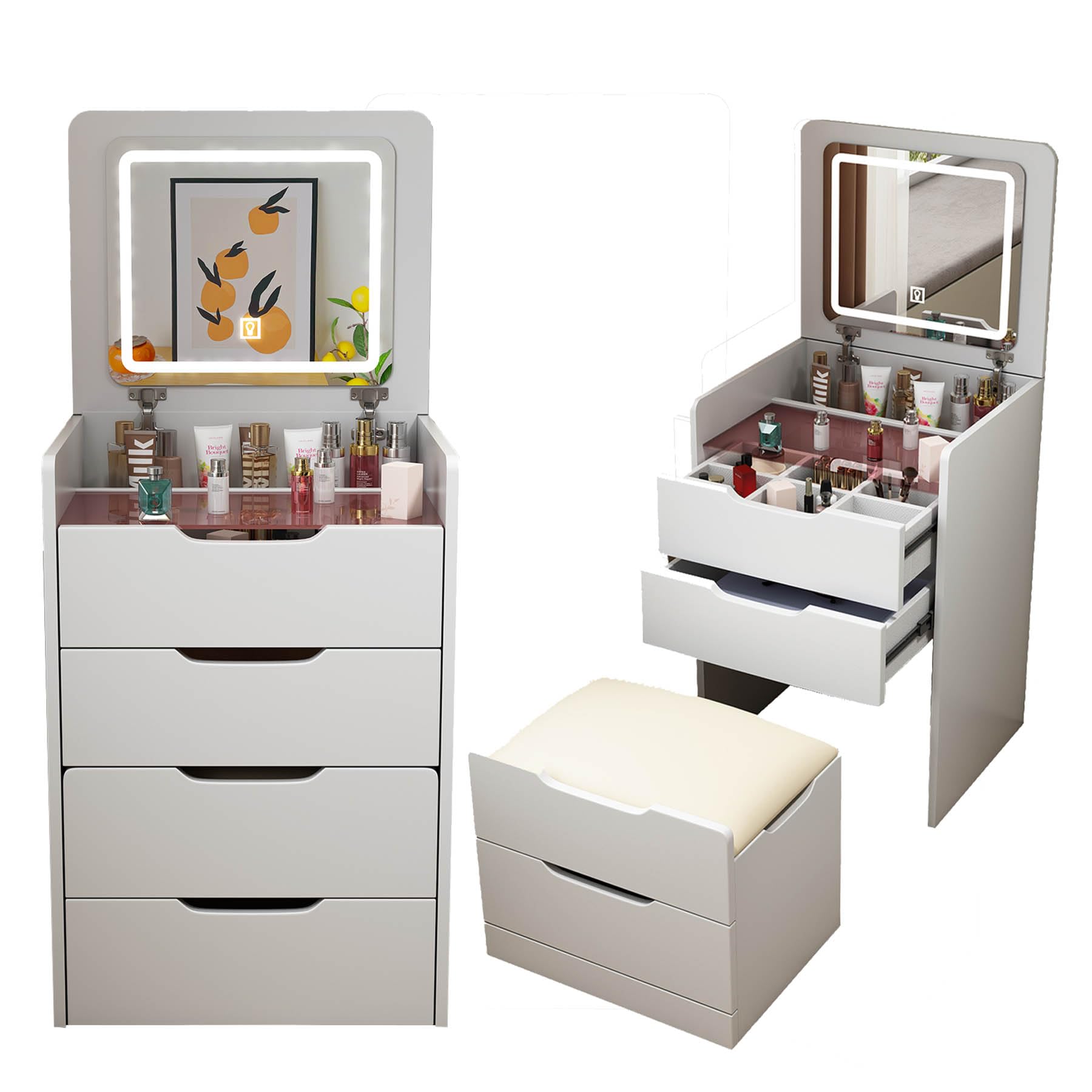
The HIROHRTV 3-in-1 Vanity Desk in its primary configuration with the mirror open and stool accessible.

Video demonstrating the multi-functional use of the vanity desk, transforming from a desk to a vanity and showing storage features.
3. Package Contents
Verify that all components are present before beginning assembly. If any parts are missing or damaged, please contact customer support.
- Vanity Desk Main Body
- Flip-up Mirror with LED Lights
- Stool Components
- Drawer Panels and Slides (3 sets)
- Hardware Pack (screws, dowels, cam locks, etc.)
- Assembly Instructions Manual
4. Assembly Instructions
Assembly is required. It is recommended to have two people for easier and safer assembly. Please follow the detailed diagrams and steps provided in the included assembly guide.
Before You Begin:
- Clear a spacious area for assembly.
- Lay out all components and hardware, matching them with the parts list.
- Tools required: Phillips head screwdriver (not included).
Step-by-Step Assembly:
- Assemble the main desk frame according to the provided diagrams. Ensure all connections are secure.
- Install the drawer slides onto the desk frame and the drawer panels.
- Assemble the three drawers and insert them into the desk frame.
- Attach the flip-up mirror mechanism to the top of the desk.
- Connect the LED light power cable as instructed.
- Assemble the stool components.

Diagram illustrating the overall dimensions of the vanity desk and its accompanying stool.

View of the vanity desk with all three drawers extended, showcasing the internal compartments and drawer slides.
5. Operating Instructions
Using the Flip-Up Mirror and Lights:
- To access the mirror, gently lift the top panel of the desk. The mirror will flip up and lock into place.
- To activate the LED lights, touch the power icon on the mirror surface.
- To change light color (white, natural, warm) or adjust brightness, press and hold the power icon.
- To close the mirror, gently push it down until the top panel is flush with the desk surface.

Close-up view of the flip-up mirror with integrated LED lights, demonstrating the three adjustable light settings: white, natural, and warm.
Utilizing Storage Drawers:
- The desk features three smooth-gliding drawers for organized storage.
- The top drawer includes dividers for smaller items like cosmetics, jewelry, or office supplies.
- The lower drawers provide ample space for larger items.

The top drawer of the vanity desk, featuring organized compartments ideal for storing cosmetics and small accessories.
Using the Hidden Stool:
- The compact stool is designed to slide neatly under the desk when not in use.
- To use, gently pull the stool out from beneath the desk.
- To store, push the stool back into its designated space under the desk.

The compact stool neatly stored beneath the vanity desk, demonstrating its space-saving design.
6. Maintenance and Care
Proper care will ensure the longevity and appearance of your vanity desk.
- Cleaning Surfaces: Wipe surfaces with a soft, damp cloth. Avoid harsh chemicals or abrasive cleaners.
- Mirror Care: Clean the mirror with a glass cleaner and a lint-free cloth. Do not spray cleaner directly onto the mirror to avoid liquid seeping into the light components.
- Drawer Maintenance: Periodically check drawer slides for smooth operation. If needed, clean any dust or debris from the tracks.
- Hardware: Occasionally check and tighten any loose screws to maintain stability.
7. Troubleshooting
If you encounter any issues, refer to the following common solutions:
Mirror Lights Not Working:
- Check Power Connection: Ensure the power cable for the lights is securely plugged into both the mirror unit and a working power outlet.
- Verify Power Source: Test the outlet with another device to confirm it is supplying power.
- Reset: Unplug the power cable, wait 30 seconds, and plug it back in.
Drawers Sticking or Not Closing Smoothly:
- Check for Obstructions: Remove all items from the drawer and inspect the drawer slides for any foreign objects.
- Verify Alignment: Ensure the drawer is correctly seated on its slides. Gently push and pull to realign if necessary.
- Tighten Screws: Check that all screws securing the drawer slides to both the drawer and the desk frame are tight.
8. Product Specifications
| Feature | Specification |
|---|---|
| Brand | HIROHRTV |
| Model Number | 3 in 1 vanity |
| Material | Wood |
| Number of Drawers | 3 |
| Product Dimensions | 23.6 x 15.7 x 47.2 inches |
| Item Weight | 58 pounds |
| Color | White |
| Style | Modern |
| UPC | 767176596286 |
9. Warranty and Customer Support
Warranty Information:
This product comes with a standard manufacturer's warranty. Please refer to your purchase documentation or contact the seller for specific warranty terms and conditions.
Contact Support:
For any questions, missing parts, or technical assistance, please contact the seller or manufacturer directly through your purchase platform. Provide your order number and product model for faster service.