
FREENOVE FNK0099A
Freenove ESP32-S3 ESP32 S3 Board Lite User Manual
Brand: FREENOVE | Model: FNK0099A
1. Product Overview
The Freenove ESP32-S3-WROOM is a compact and powerful microcontroller board featuring onboard wireless capabilities. This board is designed to facilitate learning and development with its comprehensive tutorial and project examples. It integrates a dual-core 32-bit microprocessor, making it suitable for a wide range of embedded applications.
2. Package Contents
Upon opening the package, you should find the following items:
- Freenove ESP32-S3 Board Lite
- USB-C Cable (for power and data transfer)
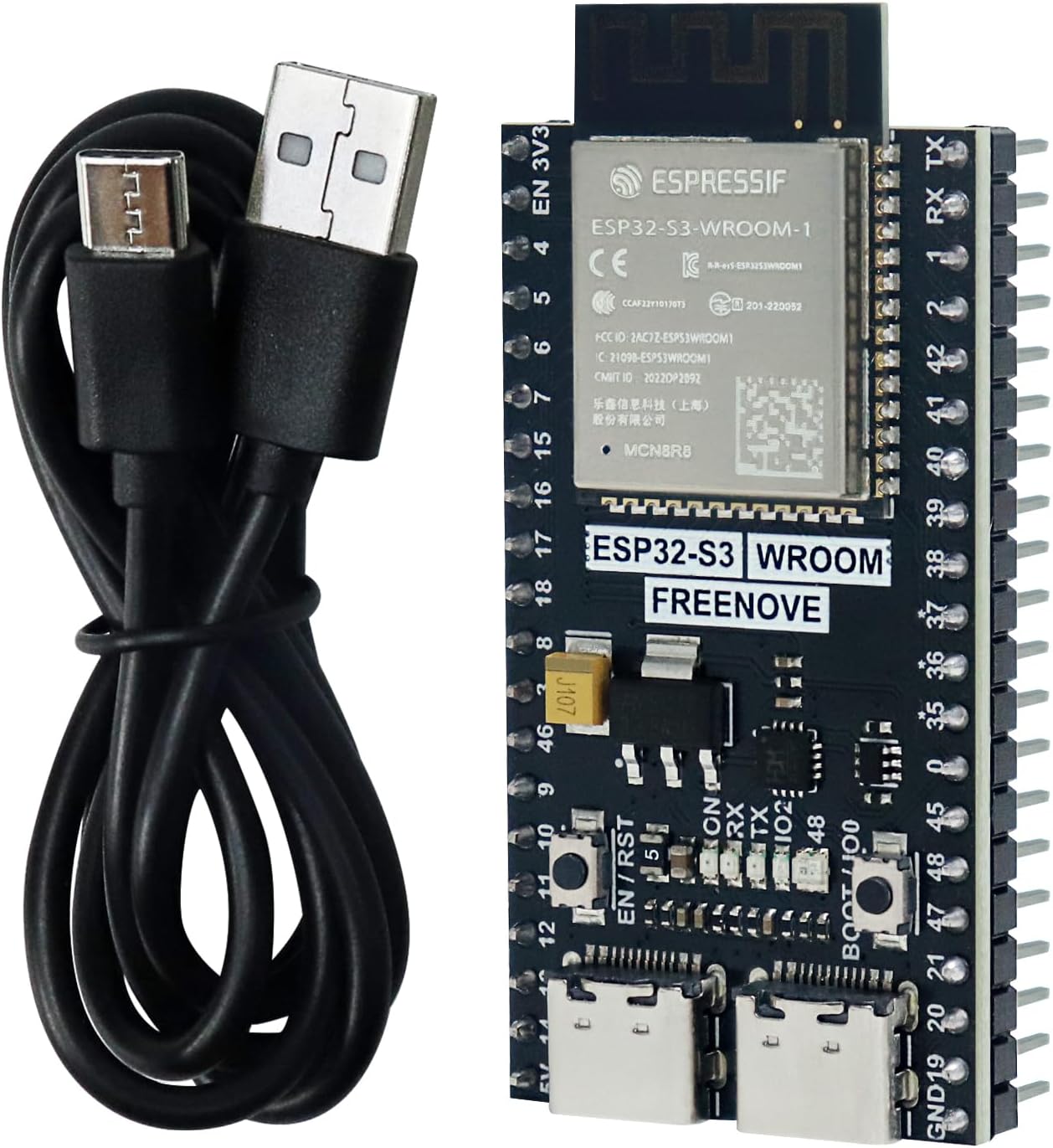
The Freenove ESP32-S3 Board Lite, a compact microcontroller, is shown alongside a USB-C cable for connectivity and power.

The ESP32-S3 board is shown next to its retail packaging, with dimensions indicated for both the board (5.7cm x 2.8cm) and the box (12.5cm x 8.0cm x 2.5cm).
3. Key Features
The Freenove ESP32-S3-WROOM board offers a robust set of features for embedded development:
- Microprocessor: Dual-core 32-bit microprocessor, operating up to 240 MHz.
- Memory: 8 MB Flash and 8 MB PSRAM.
- Wireless Connectivity: Integrated 2.4 GHz Wi-Fi and Bluetooth 5 (LE).
- Programming Support: Compatible with MicroPython and C programming languages.
- Development Environment: Compatible with Arduino IDE.
- Peripherals: Includes RGB LED, USB-OTG, onboard code uploader, and multiple GPIO pins.

A detailed diagram of the ESP32-S3-WROOM board, highlighting its key components and features including the dual-core 32-bit microprocessor, 8 MB Flash, 8 MB PSRAM, 2.4 GHz Wi-Fi, Bluetooth 5 (LE), RGB LED, USB-OTG, onboard code uploader, and GPIO pins. The board is compatible with Arduino IDE.
4. Getting Started
4.1. Connecting the Board
To begin using your Freenove ESP32-S3 board, connect it to your computer using the provided USB-C cable. Ensure that you have the necessary Integrated Development Environment (IDE) and drivers installed on your computer. This connection will provide power to the board and enable communication for programming.

This image illustrates the simplicity of connecting the ESP32-S3 board to a computer via USB for programming. Compatible programming languages like C and MicroPython are highlighted.
4.2. Programming Languages
The ESP32-S3 board supports two popular programming languages:
- MicroPython: A lean and efficient implementation of the Python 3 programming language optimized to run on microcontrollers.
- C: A widely used programming language for embedded systems, offering low-level control and high performance.
4.3. Tutorials and Project Examples
Freenove provides a detailed tutorial and several typical project examples to help you get started and explore the capabilities of the ESP32-S3 board. These resources include code examples and explanations for various functionalities.

A visual representation of the comprehensive step-by-step tutorials provided for the ESP32-S3 board, covering various projects and concepts.

This image displays the ESP32-S3 board wirelessly communicating, alongside a screenshot of a TCP/IP client/server application, illustrating potential project examples.
The download link for the tutorial and code can be found on the product box. Please note that no paper tutorial is included with the product.
5. Technical Specifications
| Processor | Dual-core 32-bit, up to 240 MHz |
| Flash Memory | 8 MB |
| PSRAM | 8 MB |
| Wireless Connectivity | 2.4 GHz Wi-Fi (802.11bgn), Bluetooth 5 (LE) |
| Operating System | Espressif |
| Item Model Number | FNK0099A |
| Item Weight | 2.08 ounces |
| Package Dimensions | 5 x 3.23 x 1.06 inches |
6. Support and Resources
For further assistance, detailed tutorials, and project code, please refer to the following resources:
- Tutorial Download: The download link for the comprehensive tutorial and code examples can be found on the product box.
- Technical Support: Freenove's technical support team is available to answer your questions. You can reach them via the email address provided on the product packaging.
- Official Website: Visit the Freenove website for additional information and resources.

The front of the product box, displaying the model number FNK0099A, a link to download the tutorial, and the support email address (support@freenove.com).

The back of the product box, providing manufacturer information, contact details, and the Freenove website (http://www.freenove.com).
7. Safety Guidelines
Please observe the following safety guidelines when handling and operating the Freenove ESP32-S3 board:
- This product is intended for development use only.
- Not suitable for children under 14 years. For use under adult supervision.
- Handle with care to avoid electrostatic discharge.
- Ensure proper power supply and connections to prevent damage to the board or connected components.
- Refer to the FCC Statement and IC Statement on the included Safety and User Guide for regulatory compliance information.

A folded document titled 'Safety and User Guide' from Freenove, containing important safety information and usage instructions in multiple languages.
Ask a question about this manual
Ask about setup, troubleshooting, compatibility, parts, safety, or missing instructions. Manuals+ will review the question and use this page’s manual context to help answer it.