
1. Product Overview
The Taygeer Vacuum Backpack is designed for efficient travel and organization, featuring a unique vacuum compression system, multiple compartments, and an expandable design. It includes a waterproof rain cover and a TSA-approved laptop compartment.
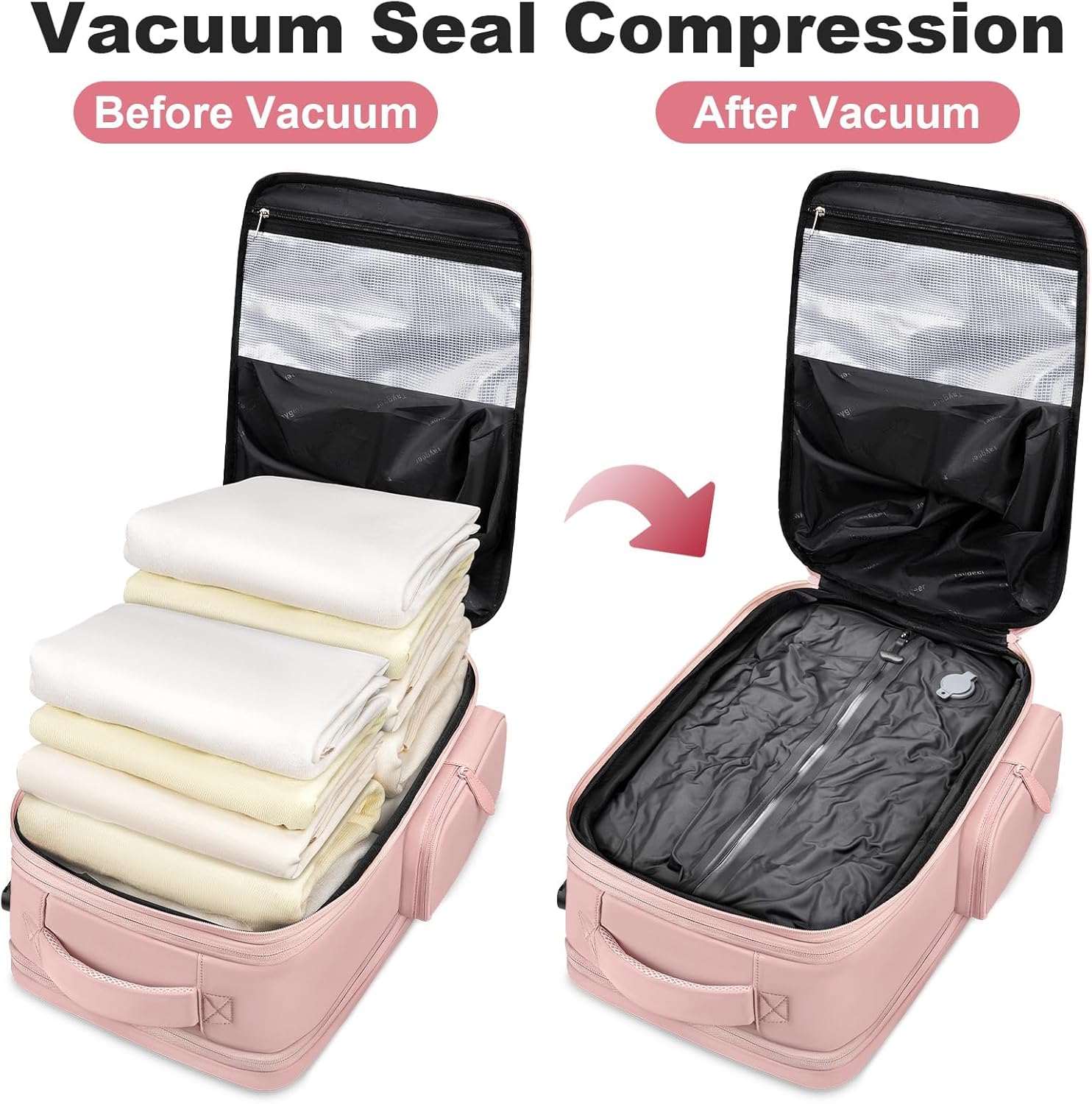
Image 1.1: Vacuum Compression System. This image illustrates the significant space saving achieved by using the vacuum compression feature, showing a stack of clothes before and after compression within the backpack's dedicated compartment.

Image 1.2: Expandable Capacity. The backpack's expandable design is shown, increasing its depth by 1.5 inches to accommodate more items, making it versatile for various travel needs.
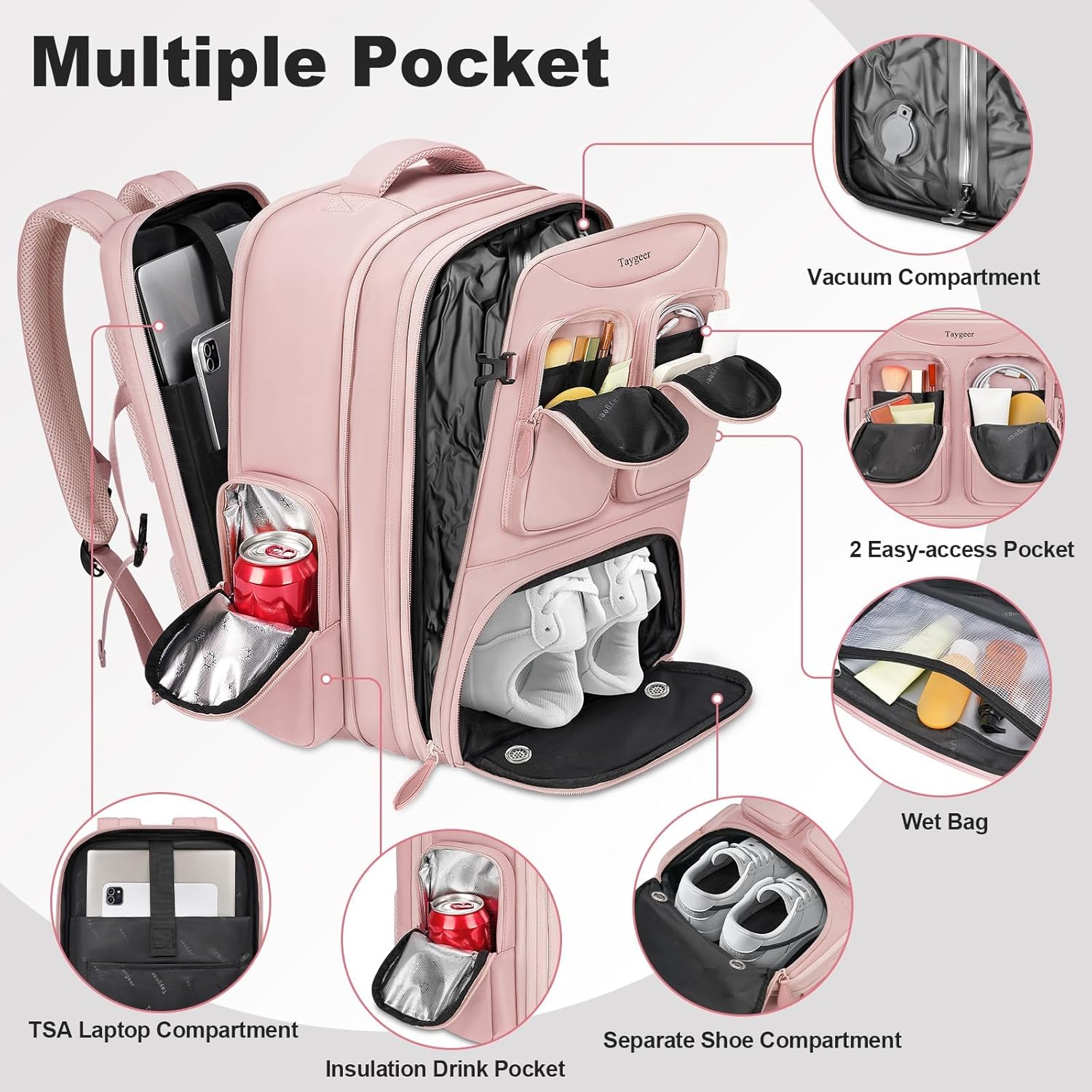
Image 1.3: Multiple Pockets. This image highlights the various compartments of the backpack, including the vacuum compartment, TSA laptop compartment, insulated drink pocket, separate shoe compartment, and two easy-access front pockets.
2. Setup and Initial Use
2.1 Using the Vacuum Compression System
- Prepare Items: Fold clothes neatly and place them inside the vacuum compression compartment.
- Seal the Bag: Align the zipper of the vacuum compartment. Hold the D-ring with one hand and firmly pull the zipper with the other, ensuring it is fully closed to cover the small circle at the bottom. This improves airtightness.
- Open Valve: Open the one-way valve on the vacuum compartment.
- Initial Air Release: Gently press down on the compartment to release most of the air manually.
- Vacuum with Pump: Tighten the manual pump (or an electric pump/dust collector, not included) onto the check valve. Use the pump continuously for approximately one minute to remove remaining air.
- Close Valve: Once air is fully released and the compartment is compressed, close the valve tightly to maintain compression.

Image 2.1: How to Use Vacuum Compression. This graphic provides a four-step visual guide on sealing the vacuum compartment, opening the valve, manually releasing air, and using a pump for full compression.
2.2 Expanding the Backpack
The backpack features an expandable layer. Locate the expansion zipper running along the perimeter of the main compartment. Unzip this section to increase the backpack's capacity by approximately 1.5 inches, providing additional storage space when needed.
2.3 Setting the Combination Lock
- The initial password is 000.
- Turn the dial to the initial password 000.
- Hold the unlock button to set a new password.
- While holding the button, set your desired 3-digit combination.
- Release the unlock button after setting your new password.

Image 2.2: How to Reset the Lock Password. This image provides a visual guide for setting or resetting the built-in combination lock on the backpack's laptop compartment.
3. Operating Instructions
3.1 Utilizing Compartments
- Vacuum Compression Compartment: Use for clothing to maximize space.
- TSA Laptop Compartment: Designed for laptops up to 17 inches, with padding for protection and quick screening at airports.
- Insulated Side Pocket: Ideal for keeping drinks or snacks cool.
- Anti-Theft Pocket: Located on the back panel, suitable for valuables like passports or wallets.
- Separate Shoe Compartment: Features two breathable vents to prevent odors and keep shoes isolated from other items.
- Easy-Access Front Pockets: Two external pockets for small items requiring quick retrieval.

Image 3.1: Detailed Compartment View. This image provides a comprehensive look at the backpack's internal and external compartments, illustrating their specific functions and locations.
3.2 USB Charging Port
The backpack includes an external USB charging port. Connect your power bank (not included) to the internal cable, and then use an external USB cable to charge your devices conveniently on the go.

Image 3.2: USB Charging Feature. This image demonstrates the integrated USB charging port, allowing users to connect a power bank inside and charge devices externally.
3.3 Attaching the Rain Cover
The backpack comes with a waterproof rain cover stored in a dedicated pocket. Pull out the rain cover and stretch it over the entire backpack to protect your belongings from rain, splashes, and dust.

Image 3.3: Waterproof Rain Cover. This image shows the rain cover being deployed and covering the backpack, providing protection against wet weather conditions.
4. Product Videos
4.1 Taygeer Vacuum Backpack Features Overview
This video provides a comprehensive overview of the Taygeer Vacuum Backpack, demonstrating its key features including the vacuum compression system, various compartments, expandable design, and waterproof rain cover. It highlights how these features contribute to efficient and organized travel.
4.2 Taygeer Vacuum Backpack in Action
This video showcases the Taygeer Vacuum Backpack during travel, illustrating its practical use and benefits. It demonstrates the ease of packing, the functionality of its compartments, and its suitability as a personal item for flights.
5. Maintenance
5.1 Cleaning Instructions
- Spot Cleaning: For minor stains, use a damp cloth with mild soap. Gently rub the affected area and then wipe with a clean, damp cloth.
- Hand Washing: For a more thorough clean, hand wash the backpack with cold water and mild detergent. Avoid harsh chemicals or bleach.
- Drying: Air dry the backpack completely in a well-ventilated area, away from direct sunlight or heat. Ensure all compartments are open to prevent mildew. Do not machine wash or tumble dry.
5.2 Storage
Store the backpack in a cool, dry place when not in use. Avoid storing heavy items on top of the backpack to maintain its shape and structural integrity.
6. Troubleshooting
- Vacuum Seal Not Holding:
- Ensure the vacuum compartment zipper is fully and securely closed, covering the small circle at the bottom.
- Check the one-way valve for any debris or obstructions that might prevent a proper seal. Clean if necessary.
- Verify that the manual pump (or electric pump) is correctly attached and creating a strong vacuum.
- Overfilling the compartment can stress the seal; ensure items are within capacity.
- Zipper Issues:
- If a zipper is stiff, apply a small amount of zipper lubricant or wax.
- Avoid overstuffing compartments, which can put excessive strain on zippers and lead to breakage.
- If a zipper is misaligned, gently try to realign it by moving the slider back and forth.
7. Specifications
| Feature | Detail |
|---|---|
| Product Dimensions | 17 x 11 x 7 inches (expands to 8 inches depth) |
| Item Weight | 2.64 pounds |
| Capacity Total | 35 Liters |
| Laptop Compatibility | Up to 17-inch laptops |
| Material | Water-resistant polyester |
| Model Number | 172700PUR |
8. Warranty and Support
For warranty information, product support, or to inquire about replacement parts, please contact Taygeer customer service directly. Refer to the product packaging or the official Taygeer website for the most current contact details.