
PWNAGE MAG-S-BLG
PWNAGE Stormbreaker Wireless Magnesium Gaming Mouse User Manual
Model: MAG-S-BLG
Introduction
The PWNAGE Stormbreaker Wireless Magnesium Gaming Mouse is engineered for professional gamers, offering unparalleled precision and a lightweight design. Featuring Pure Aim Technology with a Pixart 3395 optical sensor, it delivers up to 26,000 DPI for flawless tracking. Its premium magnesium construction ensures durability while maintaining an ultralight 50-gram weight for superior aim control. The ergonomic shape is designed for comfort during extended gaming sessions and productivity tasks. With a 4000Hz wireless polling rate and finely tuned firmware, this mouse provides ultra-low click latency and industry-leading motion latency.

Image: Top view of the PWNAGE Stormbreaker mouse, highlighting its distinctive gradient finish and lightweight perforated design.
Setup Guide
1. Charging the Mouse
Before first use, ensure the mouse is fully charged. Connect the included USB-C cable to the front port of the mouse and the other end to a powered USB port on your computer or a USB wall adapter. The mouse features a Lithium Ion battery (included). An indicator light will typically show charging status.

Image: Front view of the mouse, illustrating the USB-C port for charging and wired connection.
2. Wireless Connectivity (2.4GHz)
- Locate the 2.4GHz wireless dongle, usually stored in a compartment on the underside of the mouse or in the packaging.
- Plug the wireless dongle into an available USB port on your computer.
- Turn on the mouse using the power switch located on the underside.
- Your computer should automatically detect and install the necessary drivers. If not, visit the official PWNAGE website for driver downloads.
3. Software Installation (Optional)
For advanced customization of DPI settings, button remapping, macro creation, and polling rate adjustment (up to 4000Hz), download and install the official PWNAGE software from the manufacturer's website. This software allows you to unlock the full potential of your Stormbreaker mouse.
Operating Instructions
DPI Adjustment
The Stormbreaker mouse features a dedicated DPI button, typically located behind the scroll wheel. Press this button to cycle through pre-set DPI levels. You can customize these levels and add more steps using the PWNAGE software to match your preferred sensitivity, up to 26,000 DPI.
Polling Rate
The mouse supports a 4000Hz polling rate, which means it reports its position to your computer 4000 times per second, significantly reducing input lag. This setting can usually be adjusted within the PWNAGE software. Ensure your system can handle the higher polling rate for optimal performance.
Button Functions
- Left Click: Primary action.
- Right Click: Secondary action/context menu.
- Scroll Wheel: Scroll up/down, middle click.
- DPI Button: Cycles through DPI profiles.
- Side Buttons: Typically assigned to forward/backward navigation by default. Customizable via software.

Image: Angled view of the mouse, showcasing its ergonomic design and accessible side buttons.
Maintenance
Cleaning
To maintain optimal performance and appearance, regularly clean your mouse.
- Use a soft, lint-free cloth, slightly dampened with water or a mild cleaning solution, to wipe the surface of the mouse.
- For hard-to-reach areas or the perforated shell, use compressed air to remove dust and debris.
- Avoid using harsh chemicals, abrasive cleaners, or excessive moisture, as these can damage the mouse.
Storage
When not in use for extended periods, store the mouse in a dry, cool place away from direct sunlight and extreme temperatures.
Troubleshooting
| Problem | Possible Solution |
|---|---|
| Mouse not responding |
|
| Lag or erratic movement |
|
| Battery not holding charge |
|
Specifications
| Feature | Detail |
|---|---|
| Brand | PWNAGE |
| Model Number | MAG-S-BLG |
| Connectivity Technology | Lag Free 2.4GHz Wireless |
| Movement Detection Technology | Optical (Pixart 3395) |
| Maximum DPI | 26,000 DPI |
| Polling Rate | 4000Hz |
| Item Weight | 1.76 ounces (approx. 50 grams) |
| Material | Magnesium |
| Skates | 100% PTFE |
| Battery Type | 1 Lithium Ion battery (included) |
| Ergonomic Design | Yes |
| Color | Limited Edition (Gradient) |
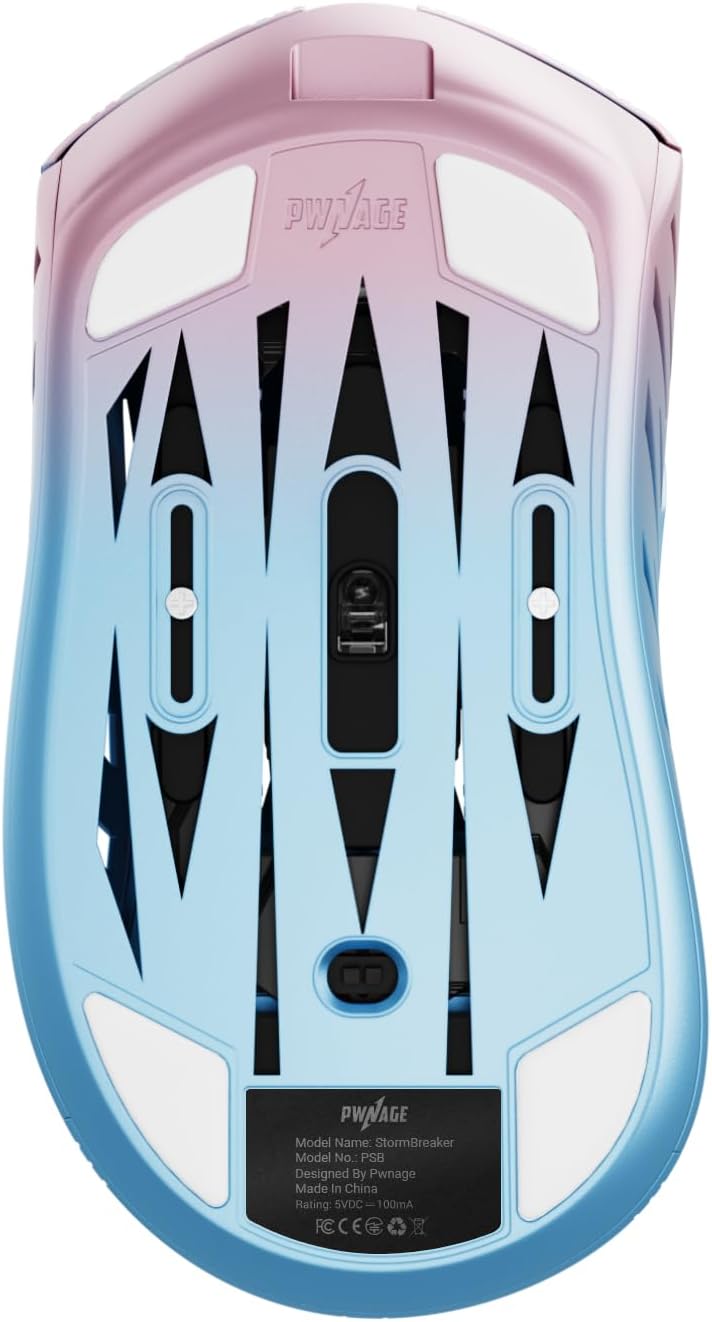
Image: Underside of the mouse, displaying the smooth PTFE skates and optical sensor.
Warranty and Support
For warranty information and technical support, please refer to the official PWNAGE website or contact their customer service directly. Keep your proof of purchase for any warranty claims.
Online Resources: Visit www.pwnage.com for drivers, software, FAQs, and support contact information.
Related documentsMAG-S-BLG


Ask a question about this manual
Ask about setup, troubleshooting, compatibility, parts, safety, or missing instructions. Manuals+ will review the question and use this page’s manual context to help answer it.