
Safety Information
Always follow proper electrical safety precautions when handling this product. This device operates with electricity and water, which can be a hazardous combination if not handled correctly.
- Keep the product dry and away from electrical hazards. Ensure the installation location is protected from direct water spray or submersion, unless specifically designed for such conditions.
- Do not use the product if the power cord or any part of the casing is damaged. Damaged components can expose live electrical parts.
- Always unplug the product from the power source before making any adjustments, performing maintenance, or attempting repairs. This prevents accidental electrical shock.
- Consult a qualified electrician if you are unsure about any electrical aspects of this product's installation or operation. Do not attempt electrical work beyond your skill level.
- Ensure all wiring connections are secure and comply with local electrical codes.
Introduction
The Krain Pro-LC WiFi Irrigation Controller (Model 3104W) is a 4-station irrigation management system designed for residential and light commercial lawn sprinkler applications. This controller offers advanced features for efficient water management and can be upgraded with an optional Wi-Fi module for smartphone or tablet control.
Key features include user-friendly programming, a large LCD display for clear status indication, compatibility with rain/freeze sensors, seasonal adjust for water conservation, and a built-in buried valve locator. The unit is designed for both indoor and outdoor installation.
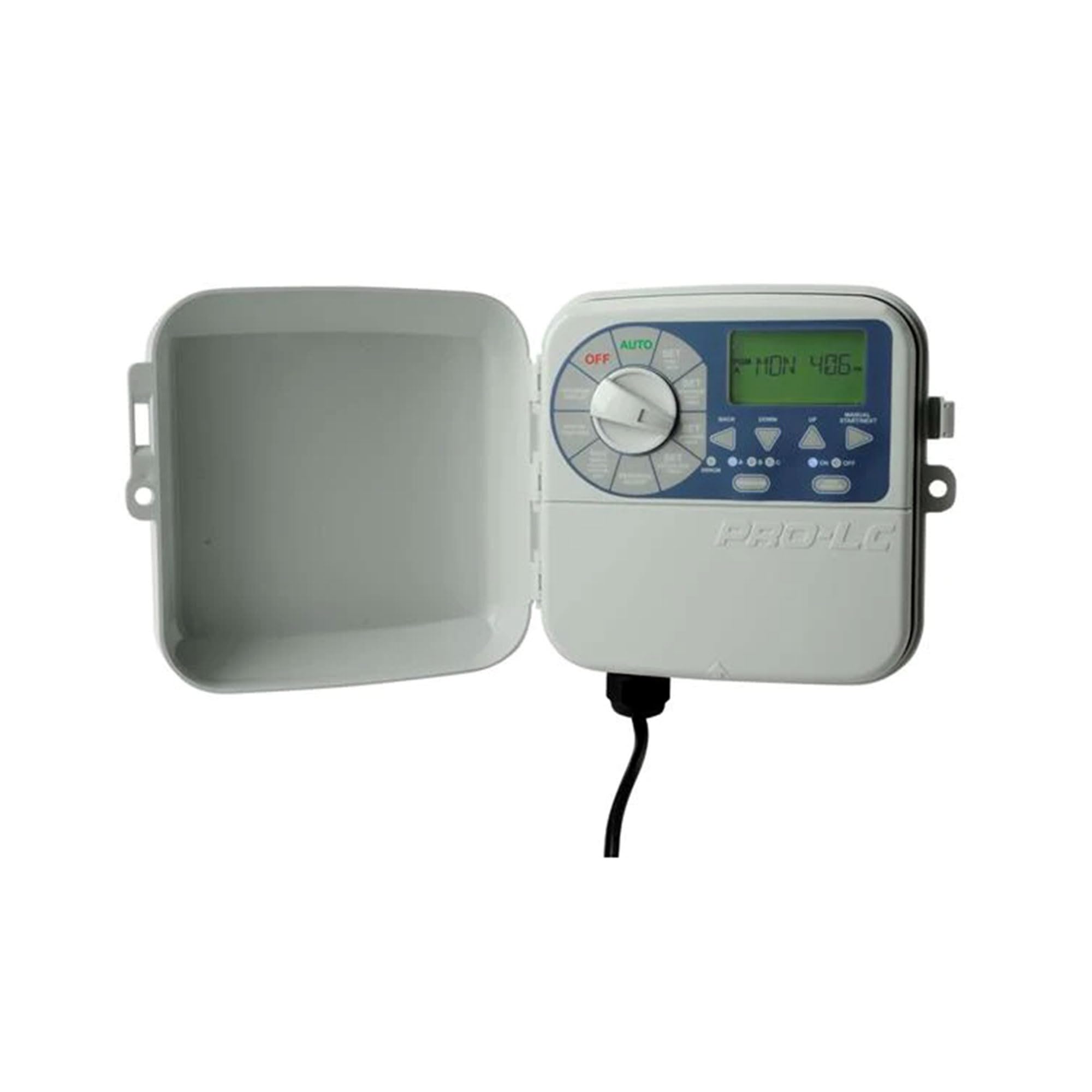
Figure 1: Front view of the Krain Pro-LC WiFi Irrigation Controller with its protective cover open, revealing the control panel and LCD screen. The power cord exits from the bottom.
Setup
1. Mounting the Controller
Select a suitable indoor or outdoor location that is protected from direct sunlight and extreme weather conditions. Ensure the location allows for easy access to power and irrigation wiring. Use appropriate screws to secure the controller to a wall or sturdy surface, utilizing the mounting holes provided on the unit's casing.
2. Electrical Connection
The 3104W model includes a pigtail for power connection. Connect the controller to a standard 120V AC outlet. Ensure the outlet is protected by a Ground Fault Circuit Interrupter (GFCI) if installed outdoors or in a damp location. Refer to local electrical codes for proper installation.
3. Wiring Irrigation Valves
Connect the common wire from your irrigation valves to the common terminal on the controller. Then, connect each individual zone valve wire to its corresponding station terminal (1, 2, 3, 4). Ensure all connections are secure to prevent intermittent operation.
4. Optional Wi-Fi Module Installation
If using the optional BRIDGE Wi-Fi Module (sold separately), follow the instructions provided with the module for installation. This typically involves plugging the module into the designated port on the controller and then configuring it via a smartphone application.
Operating the Controller
1. Setting Current Time and Date
Rotate the dial to the "SET TIME/DATE" position. Use the arrow buttons to adjust the current time and date. Press "NEXT" or "ENTER" to confirm each setting and move to the next field.
2. Programming Watering Schedules
The controller supports multiple programs (e.g., A, B, C). Rotate the dial to "PROGRAM A" (or B, C) to begin setting a schedule.
- Set Start Times: Use the arrow buttons to set up to four independent start times per program.
- Set Run Times: For each station (1-4), set the desired watering duration in minutes.
- Set Watering Days: Choose specific days of the week, odd/even days, or interval watering (e.g., every 3 days).
After programming, rotate the dial to the "AUTO" position for automatic operation.
3. Seasonal Adjust
The seasonal adjust feature allows you to increase or decrease watering durations for all active programs by a percentage. Rotate the dial to "SEASONAL ADJUST" and use the arrow buttons to set the desired percentage (e.g., 100% for normal, 50% for half, 150% for more).
4. Rain Sensor Operation
If a rain sensor is connected, the controller will automatically suspend watering cycles when sufficient rainfall is detected. Watering will resume once the sensor dries out. Ensure the sensor is properly wired and enabled in the controller settings.
5. Manual Operation
To manually operate a station or all stations, rotate the dial to "MANUAL" or "TEST" (depending on model specifics). Use the arrow buttons to select the desired station and set a run time. The controller will then run the selected station(s) for the specified duration.
Maintenance
The Krain Pro-LC controller is designed for minimal maintenance. Regular checks can ensure optimal performance.
- Cleanliness: Keep the controller's exterior clean and free of dust or debris. Use a soft, dry cloth. Do not use abrasive cleaners or solvents.
- Wiring Inspection: Periodically inspect all wiring connections for corrosion or loose terminals, especially in outdoor installations.
- Rain Sensor Check: If a rain sensor is installed, ensure it is clear of obstructions and functioning correctly, especially before the irrigation season.
- Winterization: In regions subject to freezing temperatures, disconnect the controller from power and drain all water from the irrigation system to prevent freeze damage to pipes and valves.
- Buried Valve Locator: The built-in buried valve locator feature can assist in locating solenoid valves in your irrigation system for maintenance or repair. Consult the controller's interface for instructions on activating this feature.
Troubleshooting
| Problem | Possible Cause | Solution |
|---|---|---|
| Controller display is blank. | No power, tripped breaker, faulty transformer. | Check power outlet, reset breaker, inspect transformer. |
| Stations do not water. | Rain sensor active, master valve off, wiring issue, faulty solenoid. | Check rain sensor status, ensure master valve is open, inspect wiring, test solenoid. |
| Specific station does not water. | Wiring issue to that station, faulty solenoid for that station. | Verify wiring connection at controller and valve, test solenoid. |
| Watering occurs at wrong times. | Incorrect program settings, incorrect current time/date. | Review and adjust program start times, run times, and watering days. Correct current time/date. |
Specifications
| Brand | CEROD (Manufacturer: K-Rain) |
| Model Number | 3104W |
| Number of Stations | 4 |
| Dimensions (L x W x H) | 7.25 x 6.75 x 7.25 inches |
| Color | Gray |
| Power Input | 120V AC (with pigtail) |
| Wi-Fi Capability | Wi-Fi Ready (requires optional BRIDGE Wi-Fi Module, sold separately) |
| Sensor Compatibility | Rain sensor and Rain/Freeze sensor ready |
| Additional Features | Large LCD display, Seasonal Adjust, Buried Valve Locator, Built-in Level |
Warranty
This Krain Pro-LC WiFi Irrigation Controller is covered by a manufacturer's warranty. Please refer to the warranty card included with your product or visit the official K-Rain website for detailed warranty terms and conditions. Keep your proof of purchase for warranty claims.
Support
For technical assistance, troubleshooting, or replacement parts, please contact K-Rain customer support. Contact information can typically be found on the manufacturer's website or on the product packaging.
Note: Always provide your product model number (3104W) and serial number (if applicable) when contacting support for faster service.