
1. Introduction
Thank you for choosing the BETUMODA Portable Level 1&2 EV Charger. This manual provides essential information for the safe and efficient operation of your new EV charger. Please read it thoroughly before use and retain it for future reference.
This portable EV charger is designed for convenient charging of electric vehicles and plug-in hybrids at home or on the go. It features adjustable current settings, a NEMA 14-50 plug for 240V power, and a 23-foot cable for extended reach.

Image 1.1: The BETUMODA EV Charger is compatible with a wide range of J1772 standard electric vehicles.

Image 1.2: The charger is designed for portability, easily fitting into a car trunk.
2. Safety Information
Your safety is paramount. This charger is equipped with multiple safety features and has passed FCC certification. Adhere to the following guidelines:
- The charger includes built-in over-voltage, over-current, and short-circuit protection. In case of an overload, the protection mechanism will automatically report errors and power off.
- The charger features an IP65 waterproof design, ensuring durability and safe operation in various weather conditions.
- Important Reminder: Only use the original adapter included with this charger. Using third-party or incompatible adapters may lead to overload, short circuits, or damage to your vehicle or the EV charger.
- Ensure the charging cable is not damaged before each use. Do not use if the cable or plug is compromised.
- Keep the charging unit and cable away from water sources, flammable materials, and extreme temperatures.

Image 2.1: The charger incorporates 10 intelligent safety protection mechanisms.

Image 2.2: The IP65 waterproof rating ensures protection against water and dust.

Image 2.3: The charger undergoes rigorous testing for water resistance, low temperature, compression, and high temperature.
3. Package Contents
Verify that all items are present in the package:
- EV Charger Unit with J1772 Connector and NEMA 14-50 Plug
- Fixed Nails (for mounting)
- User Manual (this document)
- Control Box Holder
- Portable Carry Bag
- NEMA 5-15 Plug (adapter)
Video 3.1: This video demonstrates the contents of the product package, including the EV charger, mounting accessories, and carry bag.
4. Setup Instructions
Follow these steps to set up your BETUMODA EV Charger:
- Identify Power Outlet: Ensure you have a NEMA 14-50 outlet (240V) available for Level 2 charging. For Level 1 charging, use the provided NEMA 5-15 adapter with a standard 5-15 outlet, ensuring the current does not exceed 16A.
- Plug into Power Source: Insert the NEMA 14-50 plug (or NEMA 5-15 adapter) firmly into the appropriate wall outlet.
- Connect to Vehicle: Plug the J1772 connector into your electric vehicle's charging port. Ensure a secure connection. Note: Tesla vehicles require an SAE J1772 adapter (not included) to use this charger.
- Verify Connection: The charger's LED display will illuminate, indicating a successful connection and readiness for charging.

Image 4.1: The charger is designed to plug into a NEMA 14-50 outlet for 240V charging.

Image 4.2: Illustration of the charger connected to a NEMA 14-50 outlet for Level 2 charging.
5. Operating Instructions
The BETUMODA EV Charger offers smart charging features for convenience and efficiency.
5.1. Adjustable Current Settings
The charger supports adjustable current settings to match your power supply and charging needs. Available settings are 32A, 24A, 16A, 13A, and 8A. To change the current:
- With the charger connected to power and your vehicle, long-press either button on the screen.
- The display will show the current options. Tap the button to cycle through the available current settings.
- Release the button when your desired current is selected. The charger will confirm the setting.
5.2. Charging Schedule
You can schedule your charging sessions to take advantage of off-peak electricity rates or for delayed starts:
- Long-press either button on the screen to access the scheduling options.
- Tap the button to set a delay time from 0 to 12 hours. For example, setting it to 2 hours means charging will begin after a 2-hour delay.
- Release the button to confirm the schedule. The charger will display the countdown until charging begins.
5.3. LED Display Monitoring
The 2.8-inch LED touch display provides real-time information:
- Real-time Monitoring: View charging current, voltage, and power.
- Status Indicators: Easily manage your charging status and history.
- Error Display: Any errors are swiftly displayed on the LED screen for rapid troubleshooting.
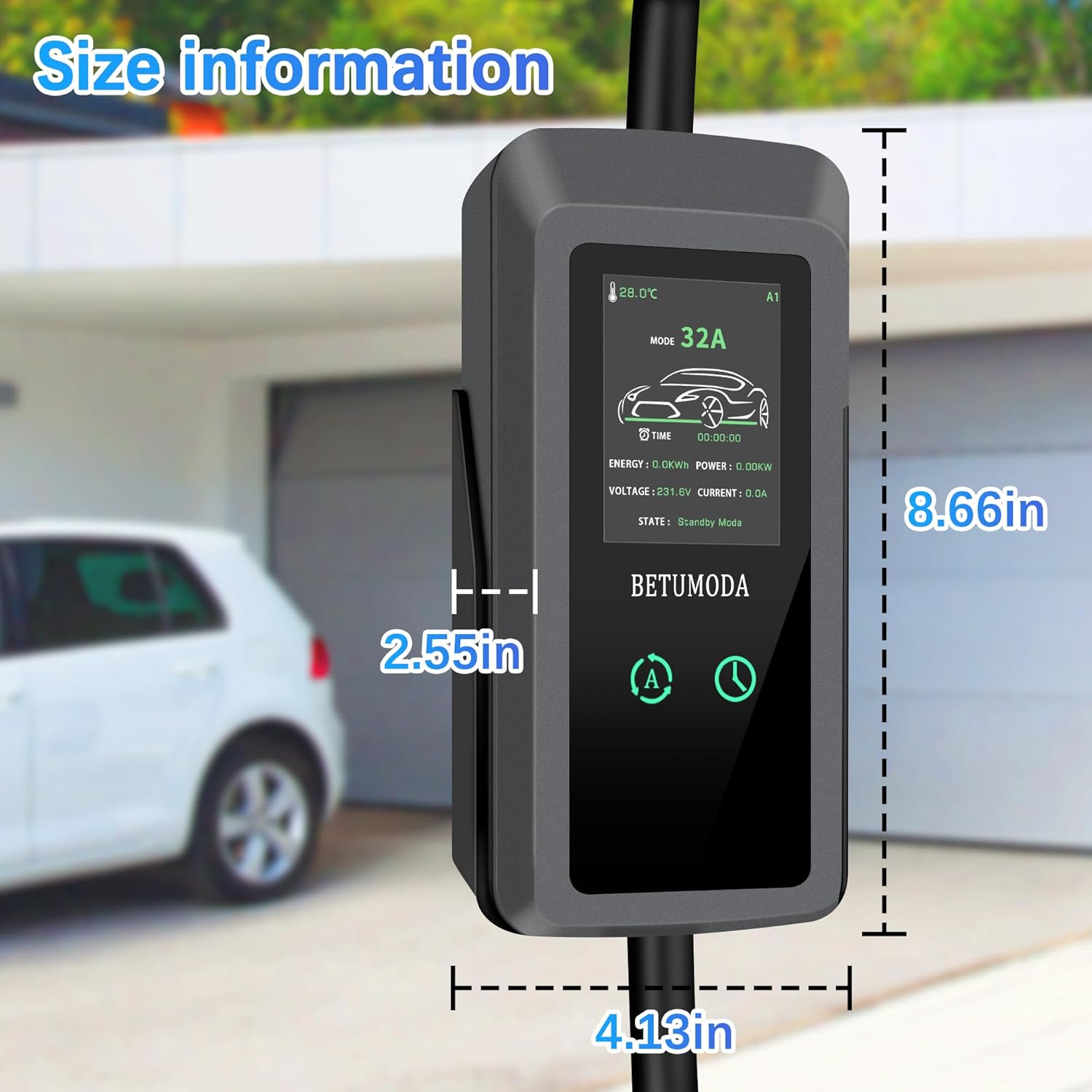
Image 5.1: The display allows for timed charging and adjustable current settings.

Image 5.2: Customize your charging experience by adjusting the schedule to minimize energy consumption.
Video 5.3: This video demonstrates the adjustable current feature of the EV charger.
6. Maintenance
Proper maintenance ensures the longevity and safe operation of your EV charger:
- Regular Cleaning: Wipe the charger unit and cable with a dry or slightly damp cloth to remove dust and dirt. Do not use harsh chemicals or abrasive cleaners.
- Cable Inspection: Periodically inspect the charging cable and connectors for any signs of wear, cuts, or damage. If any damage is found, discontinue use immediately and contact customer support.
- Storage: When not in use, store the charger in its portable carry bag in a dry, cool place, away from direct sunlight and extreme temperatures.
- Water Resistance: While the unit is IP65 waterproof, avoid submerging it in water or exposing it to high-pressure water jets.
7. Troubleshooting
If you encounter issues with your BETUMODA EV Charger, refer to the following common problems and solutions:
| Problem | Possible Cause | Solution |
|---|---|---|
| Charger display is off / No power | No power from outlet, loose connection, internal fault. | Check if the wall outlet has power. Ensure the NEMA 14-50 plug is fully inserted. Try a different outlet if available. If the issue persists, contact customer support. |
| Charging not starting | Loose connection to vehicle, charging schedule active, vehicle not ready to charge, incorrect current setting. | Ensure the J1772 connector is fully seated in the vehicle's port. Check the charger's display for an active charging schedule. Verify the vehicle's charging settings. Adjust current if necessary. |
| Error message on display | Overload, over-voltage, over-current, short-circuit, or other internal fault. | Note the error code displayed. Disconnect the charger from both the vehicle and power outlet, wait a few minutes, then reconnect. If the error persists, consult the manual for specific error codes (if available) or contact customer support. |
| Cable or plug feels excessively hot | Overload, faulty wiring, damaged cable, poor connection. | Immediately disconnect the charger. Reduce the charging current setting. Inspect the cable and plug for damage. Ensure the outlet is rated for the current being drawn. If the issue continues, discontinue use and contact a qualified electrician or customer support. |
For issues not listed here or if troubleshooting steps do not resolve the problem, please contact BETUMODA customer support.
8. Specifications
| Feature | Specification |
|---|---|
| Brand | BETUMODA |
| Model Number | 32A EV CHARGER |
| Output Voltage | 240 Volts (AC) |
| Input Voltage | 240 Volts |
| Current Rating | 32 Amps (Adjustable: 32A, 24A, 16A, 13A, 8A) |
| Connector Type | J1772 |
| Power Plug | NEMA 14-50 (with NEMA 5-15 adapter included) |
| Cable Length | 23 feet |
| Product Dimensions (Control Box) | Approx. 8.66" H x 4.13" W x 2.55" D |
| Waterproof Rating | IP65 |
| Display | 2.8-inch LED Touch Display |
| Certifications | FCC Certified |
| Compatible Devices | J1772 standard EVs (Nissan, Honda, Chevrolet, Volkswagen, Mercedes, Audi, BMW, Rivian, Hyundai, Kia, Toyota, Jeep, Ford, GMC). Tesla requires SAE J1772 adapter. |

Image 8.1: Size information for the BETUMODA EV Charger control unit.
9. Warranty and Support
9.1. Warranty Information
The BETUMODA Portable Level 1&2 EV Charger 32A comes with a 1-Year Manufacturer Warranty from the date of purchase. This warranty covers defects in materials and workmanship under normal use. It does not cover damage caused by misuse, accidents, unauthorized modifications, or improper installation.
9.2. Customer Support
If you have any questions, require technical assistance, or need to make a warranty claim, please contact BETUMODA customer support through the retailer where you purchased the product or visit the official BETUMODA website for contact information.
Please have your product model number (32A EV CHARGER) and proof of purchase ready when contacting support.