
1. Product Overview
The Vigosit White Dog Gaming Chair with Footrest is designed for comfort and ergonomic support during extended periods of sitting. It features a stylish design, adjustable components, and a sturdy construction.

Figure 1: Front view of the Vigosit White Dog Gaming Chair, showcasing its design and white color.

Figure 2: Side view of the Vigosit White Dog Gaming Chair, highlighting its profile and footrest mechanism.
2. Setup and Assembly
This chair is designed for easy assembly. All necessary tools and step-by-step instructions are included in the packaging. Please follow the instructions carefully to ensure proper and safe assembly.
2.1 Important Assembly Tips
- Ensure all components are present before beginning assembly.
- Always use washers with screws as indicated in the assembly guide to secure connections properly.
- When attaching the chair legs to the base, if you encounter difficulty locking them into place, you may need to apply firm, even pressure. Placing the base on the ground and using your body weight can assist in securing the legs.
- Do not overtighten screws, but ensure they are snug to prevent wobbling.

Figure 3: Chair dimensions and recommended user specifications for assembly planning.
3. Operating Instructions
Your Vigosit Gaming Chair offers multiple adjustments for personalized comfort.
3.1 Recline and Footrest Adjustment
The chair reclines smoothly from 90° (upright) to 155° (relaxed position). Use the recline lever located on the side of the chair to adjust the backrest angle. The retractable footrest can be pulled out for leg support and pushed back in when not needed.
3.2 Height Adjustment
Adjust the chair's height using the lever beneath the seat. The BIFMA-certified gas lift ensures smooth and safe height changes.
3.3 Lumbar Support and Headrest
The chair includes a supportive lumbar pillow and an adjustable headrest for enhanced ergonomic comfort. Position these to best support your lower back and neck.
3.4 Swivel Function
The chair features a 360° swivel function for easy movement and access around your workspace.
Video 1: Demonstration of the chair's recline function and retractable footrest, showcasing its adjustable features for user comfort.

Figure 4: Ergonomic features and specifications including tilt range, cushion thickness, sitting height adjustment, and maximum load capacity.
4. Maintenance
Proper care will extend the life and appearance of your Vigosit Gaming Chair.
4.1 Cleaning
- For the leather and suede surfaces, wipe regularly with a soft, damp cloth. Avoid harsh chemicals or abrasive cleaners.
- For spills, blot immediately with a clean, dry cloth.
- The removable ears and lumbar pillow can be spot cleaned as needed.
4.2 General Care
- Periodically check all screws and fasteners to ensure they are tight. Retighten if necessary.
- Keep the smooth-rolling wheels free of debris to maintain easy mobility.
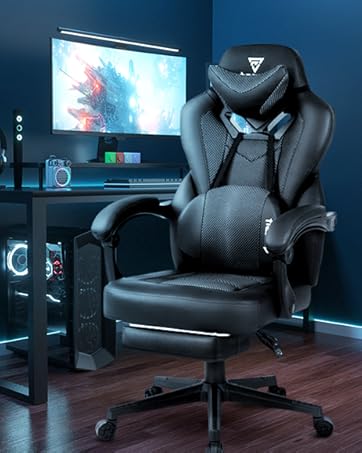
Figure 5: Detail of the chair's thick and full cotton filling, indicating comfortable and skin-friendly materials.
5. Troubleshooting
If you encounter any issues with your chair, please refer to the following common solutions.
5.1 Chair Wobbles or Feels Unstable
- Check all assembly screws and ensure they are securely tightened.
- Verify that the chair base is correctly attached to the gas lift and that the wheels are fully inserted.
5.2 Difficulty Adjusting Height or Recline
- Ensure no obstructions are blocking the levers or mechanisms.
- Check if the gas lift is functioning correctly. If the chair does not hold its height, the gas lift may need replacement.
5.3 Armrests Feel Loose
- Tighten the screws that secure the armrests to the chair frame. If the provided screws do not offer sufficient grip, contact customer support for assistance.
6. Specifications
| Feature | Detail |
|---|---|
| Brand | Vigosit |
| Model Number | Vigosit-XXX |
| Color | Dog White |
| Materials | Leather, Suede (upholstery), Sponge (fill), Steel (frame) |
| Product Dimensions (D x W x H) | 17.7"D x 18.9"W x 40"H |
| Seat Height | 21.2 Inches |
| Maximum Weight Capacity | 310 lbs (approx. 140 kg) |
| Recline Angle | 90° to 155° |
| Gas Lift Certification | BIFMA certified |
| Age Range | Teen |
| Usage Environment | Indoor |
| Additional Features | Adjustable Lumbar, Swivel, Tilting, Retractable Footrest, Removable Ears |
7. Warranty and Support
Vigosit is committed to providing quality products and excellent customer service.
7.1 Warranty Information
This product comes with a 1-year warranty on parts from the date of purchase. Additionally, a 1-month free replacement is offered for any manufacturing defects or issues upon receipt.
7.2 Customer Support
For any questions, concerns, or assistance with your Vigosit Gaming Chair, our 24/7 customer service team is available to help. Please refer to your purchase documentation for contact details or visit the official Vigosit website.

Figure 6: Vigosit offers fast customer support for any product inquiries or issues.