
JYX L7 Blue
Contents
JYX YH-FR-L7-Blue Portable Bluetooth Speaker User Manual
Model: L7 Blue
Introduction
This manual provides detailed instructions for the safe and efficient use of your JYX YH-FR-L7-Blue Portable Bluetooth Speaker. Please read this manual thoroughly before operating the device and retain it for future reference.

Image: The JYX YH-FR-L7-Blue Portable Bluetooth Speaker, showcasing its compact design and integrated handle.
Important Safety Information
- Do not expose the speaker to extreme temperatures, direct sunlight, or high humidity.
- Avoid dropping or subjecting the speaker to strong impacts.
- Do not disassemble, repair, or modify the speaker yourself. Contact qualified service personnel for any repairs.
- Keep the speaker away from water and other liquids to prevent electric shock or damage.
- Use only the specified charging cable and power adapter.
- Dispose of the battery and speaker according to local regulations.
Product Overview
Package Contents
- JYX YH-FR-L7-Blue Portable Bluetooth Speaker
- USB Type-C Charging Cable
- User Manual
Speaker Components and Controls
Familiarize yourself with the speaker's control panel and ports as illustrated below:

Image: Detailed view of the speaker's top control panel, showing buttons for power, play/pause, volume, and light mode.
- Light Mode Button: Press to cycle through different RGB light effects.
- Previous Song / Volume Down Button: Short press for previous track, long press to decrease volume.
- Power Mode Button: Press and hold to power on/off the speaker.
- Play/Pause / TWS Mode Button: Short press to play or pause audio. Long press to initiate True Wireless Stereo (TWS) pairing.
- Next Song / Volume Up Button: Short press for next track, long press to increase volume.

Image: The speaker displaying its compact dimensions (8.3 cm height, 9.5 cm width) and various input options including Bluetooth 5.3, TF Card slot, and Type-C charging port.
- Type-C Port: For charging the speaker.
- TF Card Slot: For playing audio directly from a TF (MicroSD) card.
Setup
Charging the Speaker
Before first use, fully charge the speaker. Connect the provided USB Type-C cable to the speaker's Type-C port and the other end to a compatible USB power adapter (not included) or a computer's USB port. The charging indicator will show the charging status. A full charge provides approximately 24 hours of playtime.

Image: The speaker next to a battery icon and a clock indicating 24 hours of playtime, highlighting its long battery life.
Powering On/Off
- To Power On: Press and hold the Power Mode button for approximately 3 seconds until you hear an audible prompt and the indicator light illuminates.
- To Power Off: Press and hold the Power Mode button for approximately 3 seconds until you hear an audible prompt and the indicator light turns off.
Bluetooth Pairing
- Ensure the speaker is powered on and in Bluetooth pairing mode (indicated by a flashing blue light).
- On your device (smartphone, tablet, etc.), enable Bluetooth and search for available devices.
- Select "JYX YH-FR-L7-Blue" from the list of devices.
- Once paired, the speaker will emit an audible confirmation, and the blue indicator light will remain solid.
True Wireless Stereo (TWS) Pairing
To achieve an immersive stereo sound experience, you can pair two JYX YH-FR-L7-Blue speakers together.

Image: Two JYX YH-FR-L7-Blue speakers positioned to demonstrate True Wireless Stereo pairing for an immersive audio experience.
- Ensure both speakers are powered on and not connected to any other Bluetooth device.
- On one of the speakers (this will be the primary speaker), long press the Play/Pause / TWS Mode button for approximately 3 seconds. The speaker will enter TWS pairing mode.
- The primary speaker will automatically search for the secondary speaker. Once connected, both speakers will emit an audible confirmation.
- Now, connect your device to the primary speaker via Bluetooth as described in the "Bluetooth Pairing" section. Audio will play through both speakers in stereo.
Operating Instructions
Audio Playback
- Play/Pause: Short press the Play/Pause button.
- Volume Up: Long press the Next Song / Volume Up button.
- Volume Down: Long press the Previous Song / Volume Down button.
- Next Track: Short press the Next Song / Volume Up button.
- Previous Track: Short press the Previous Song / Volume Down button.
Light Modes
The speaker features multiple RGB light modes. Press the Light Mode button to cycle through the available lighting effects.
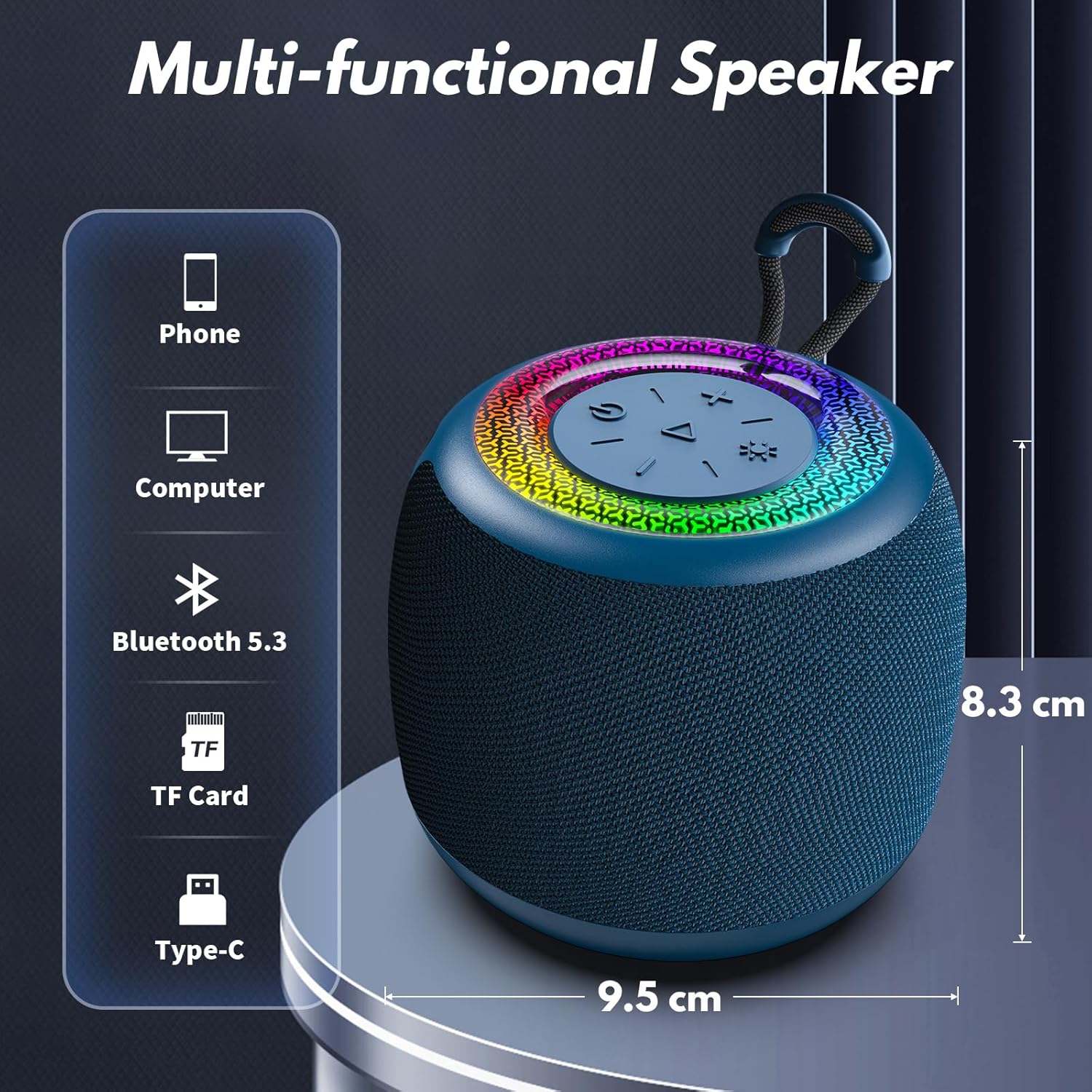
Image: Three JYX YH-FR-L7-Blue speakers showcasing their vibrant RGB light shows, illustrating the dynamic lighting effects.
TF Card Playback
Insert a TF (MicroSD) card with audio files into the TF card slot. The speaker will automatically switch to TF card mode and begin playing music. Use the playback controls as described above.
Maintenance
- Cleaning: Use a soft, dry cloth to clean the speaker's exterior. Do not use abrasive cleaners or solvents.
- Storage: When not in use for extended periods, store the speaker in a cool, dry place away from direct sunlight.
- Battery Care: To prolong battery life, avoid fully discharging the battery frequently. Charge the speaker regularly, even if not in use.
Troubleshooting
| Problem | Possible Solution |
|---|---|
| Speaker does not power on. | Ensure the battery is charged. Connect the speaker to a power source using the Type-C cable. |
| Cannot pair via Bluetooth. |
|
| No sound. |
|
| TWS pairing fails. |
|
Specifications
| Feature | Detail |
|---|---|
| Brand | JYX |
| Model Name | L7 Blue |
| Product Dimensions | 11.8 x 8.8 x 9.7 cm |
| Item Weight | 370 g |
| Connectivity Technology | Bluetooth 5.3 |
| Speaker Maximum Output Power | 15 Watts |
| Audio Output Mode | Stereo |
| Speaker Type | Outdoor |
| Special Features | LED Light, Lightweight, Portable |
| Mounting Type | Handlebar Mount |
| Batteries | 1 Lithium Polymer battery (included) |
| Recommended Uses | Business/Party/Home Theater/Gaming/Theater/Travel, For Music Players |
| Compatible Devices | Smartphone, Tablet |
Warranty and Support
JYX products are designed and manufactured to the highest quality standards. For information regarding warranty coverage, please refer to the warranty card included with your purchase or visit the official JYX website.
If you encounter any issues or have questions about your JYX YH-FR-L7-Blue speaker, please contact JYX customer support for assistance. Contact details can typically be found on the product packaging or the official JYX website.
Documents and downloads
Ask a question about this manual
Ask about setup, troubleshooting, compatibility, parts, safety, or missing instructions. Manuals+ will review the question and use this page’s manual context to help answer it.