
Azocek DW 220W inverter
Azocek 220W Power Inverter for Dewalt 20V Batteries User Manual
Model: DW 220W Inverter
Brand: Azocek
1. Introduction
This manual provides essential information for the safe and efficient operation of your Azocek 220W Power Inverter. This device converts 20V DC power from compatible Dewalt batteries into 110V-120V AC power, and offers multiple USB and Type-C charging ports, along with an integrated LED work light. Please read this manual thoroughly before use and retain it for future reference.
2. Safety Information
Observe all safety precautions to prevent injury or damage to the device. This inverter is designed for use with Dewalt 18V/20V batteries (e.g., DCB206, DCB205, DCB204). Ensure the battery is fully charged before use.
- Ventilation: The product has a built-in cooling fan. Ensure air vents are not covered during operation to prevent overheating.
- Usage: This product is for output use only and should not be used for battery charging.
- Disconnection: Disconnect the product from the battery when not in use.
- AC Port: The AC port provides 110V AC output. Do not insert any objects into the AC port or disassemble the product to avoid electric shock or damage.
- Environment: Use the product at room temperature. Avoid exposure to extreme temperatures, humidity, or flammable gases.
- Battery Compatibility: Use this product with official and genuine batteries.
- Overload Protection: The inverter provides comprehensive protection against short circuits, overcurrent, low voltage, overheating, overload, and over-discharge.

Figure 2.1: Multiple Safety Protections
3. Product Features
The Azocek 220W Power Inverter is a versatile tool designed for portable power needs.
- Battery Compatibility: Compatible with Dewalt 18V/20V batteries (battery not included).
- Power Output: Converts 20V DC to 110V-120V AC (220W rated, 250W peak).
- Charging Ports: Features one AC outlet, two 18W USB QC ports, and one 30W PD Type-C port for simultaneous rapid charging.
- LED Work Light: 400LM LED light with 3 adjustable brightness levels (35%, 70%, 100%) and a strobe function. The light head is 90-degree adjustable.
- Cooling System: Integrated cooling fan for effective heat dissipation.

Figure 3.1: Product Overview

Figure 3.2: LED Light Features
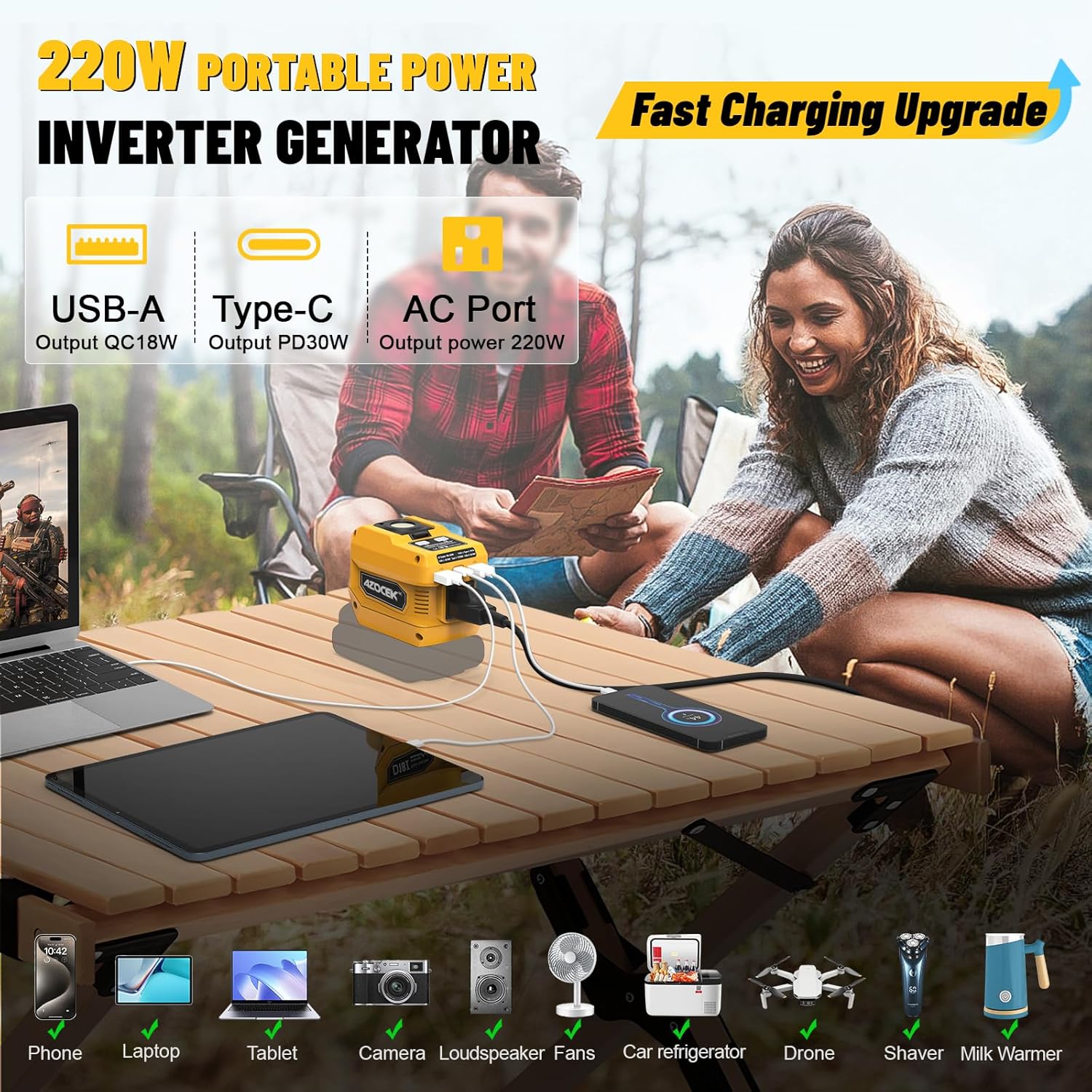
Figure 3.3: Charging Multiple Devices
4. Package Contents
- Azocek 220W Power Inverter
- User Manual
5. Specifications
| Feature | Specification |
|---|---|
| Brand | Azocek |
| Model Number | DW 220W inverter |
| Input Voltage | 20 Volts (DC) |
| Output Voltage | 110-120 Volts (AC) |
| Wattage | 220W (Rated) |
| AC Output Waveform | Modified Sine Wave |
| Frequency | 60Hz ± 3Hz |
| USB-L Output | QC18W |
| USB-R Output | QC18W |
| Type-C Output | PD30W |
| LED Lamp | Max 400LM |
| Operating Temperature | 14°F ~ 104°F (-10°C ~ 40°C) |
| Overload Protection | Approx. 250W |
| Under Voltage Protection | 16V ± 0.5V |
| Enclosure Material | Plastic |
6. Setup
To begin using your Azocek 220W Power Inverter, follow these steps:
- Prepare Battery: Ensure your compatible Dewalt 18V/20V battery (e.g., DCB206, DCB205, DCB204) is fully charged.
- Attach Inverter: Slide the Azocek Power Inverter onto the top of the charged battery until it clicks securely into place.
- Verify Connection: The inverter is now ready for operation.

Figure 6.1: Attaching the Inverter to a Battery
7. Operating Instructions
The inverter offers multiple functions for power conversion and illumination.
7.1 Power Output Modes
- USB Only Mode: Press the power button once. The blue LED indicator will light up, indicating that the USB-A and Type-C ports are active (discharge mode).
- AC and USB Mode: Press the power button a second time. The blue-green LED indicator will light up, indicating that the USB-A, Type-C, and AC outlet are all active (discharge mode).
- Turn Off: Press the power button a third time to turn off all power output. Remove the battery if not in use.

Figure 7.1: Power Output Modes and Operation
7.2 LED Light Operation
The integrated LED light has multiple brightness settings and a strobe function.
- Activate Light: Press the light button once to turn on the LED light at 35% brightness.
- Adjust Brightness: Subsequent presses will cycle through 70% brightness, 100% brightness, and strobe function.
- Turn Off Light: After the strobe function, the next press will turn off the LED light.
- Adjust Angle: The LED light head can be adjusted 90 degrees to direct illumination.

Figure 7.2: LED Light Modes
8. Battery Usage Time
The approximate usage time varies depending on the battery capacity and the device being powered. The table below provides estimates for different battery capacities.

Figure 8.1: Estimated Battery Usage Time
Note: These times are approximate and may vary based on device power requirements and battery health. Battery not included.
9. Maintenance
To ensure the longevity and optimal performance of your Azocek 220W Power Inverter, follow these maintenance guidelines:
- Cleaning: Wipe the exterior of the inverter with a dry, soft cloth. Do not use harsh chemicals or abrasive cleaners.
- Storage: Store the inverter in a cool, dry place away from direct sunlight and extreme temperatures. Disconnect the battery before storage.
- Ventilation: Regularly check that the cooling fan and air vents are free from dust and debris.
- Avoid Moisture: Do not expose the inverter to water or other liquids.
10. Troubleshooting
Refer to the table below for common issues and their solutions.
| Indicator Status | Inverter Status | Solutions |
|---|---|---|
| Red LED on steady | Overtemperature | High internal temperature. Stop use & check fan. |
| Purple LED flashes 10 times | Input overdischarge protection | Low battery voltage. Stop use and replace. |
| Yellow LED flashes 10 times | Output overload protection | The inverter output is too high. Stop using it. |
| Red LED flashes 10 times | Short-circuit protection | Output short-circuit. Stop use & check load for damage. |
| Yellow and red | Internal inverter failure | Stop use immediately. |
11. Warranty and Support
This Azocek product comes with a 1-YEAR warranty. For support or warranty claims, please visit the official Azocek store or contact customer service.
Official Azocek Store: Azocek Store on Amazon
12. Media Gallery
Product Images

Figure 12.1: Azocek 220W Power Inverter

Figure 12.2: Multi-function Inverter with Accessories

Figure 12.3: Versatile Applications
Official Product Videos
Video 12.1: Azocek 220W Power Inverter Compatible with 20V Battery. This video demonstrates the inverter's compatibility and charging capabilities.
Video 12.2: Azocek 220W Inverter for 20V battery. This video provides a detailed look at the inverter's features and functions.
Video 12.3: Azocek 220W Power Inverter Compatible with Dewalt 20V Battery. This video showcases the inverter's use with Dewalt batteries.
Video 12.4: Azocek power inverter. A brief overview of the Azocek power inverter.
Related Documents - DW 220W inverter
 |
Keystone SolarFlex Quickstart Guide: Setting Up Your RV Solar System A quickstart guide for Keystone RV's SolarFlex system, detailing setup for models like Protect 220, Discover 440i, Outlast 660i-L, and Outlast Extreme 1320i-L. Includes instructions for connecting Victron components and configuring batteries. |
 |
QR32F-1 Ice Maker: Specifications and Overview Discover the key specifications for the QR32F-1 Ice Maker, including its voltage, power consumption, refrigerant type (R290), dimensions, and weight. Essential information for this kitchen appliance. |
 |
EcoFlow 220W Bifacial Solar Panel: User Manual & Specifications Get detailed information on the EcoFlow 220W Bifacial Solar Panel, including setup instructions, how it works, performance optimization, technical specifications, and answers to frequently asked questions. Learn about its bifacial capabilities and compatibility. |
 |
Anker モバイルバッテリー取扱説明書 - 機能、設定、トラブルシューティング Anker モバイルバッテリーの包括的な取扱説明書。液晶画面ガイド、アプリ設定、充電モード、Bluetooth接続、トラブルシューティング、製品仕様を網羅しています。 |
 |
EcoFlow 220W Bifacial Solar Panel User Manual Comprehensive user manual for the EcoFlow 220W Bifacial Solar Panel, covering setup, operation, technical specifications, troubleshooting, and best practices for efficient portable solar power generation. |
 |
LEDVANCE HIGH BAY COMPACT IP65 GEN2 - Product Specifications and Installation Guide Detailed technical specifications, performance data, optional accessories, and installation instructions for the LEDVANCE HIGH BAY COMPACT IP65 GEN2 LED lighting fixture, available in 120W and 220W models. |
Ask a question about this manual
Ask about setup, troubleshooting, compatibility, parts, safety, or missing instructions. Manuals+ will review the question and use this page’s manual context to help answer it.