
AQQA AQ090
AQQA Aquarium LED Light User Manual
Model: AQ090 | Brand: AQQA
Introduction
Thank you for choosing the AQQA Aquarium LED Light. This high-quality lighting system is designed to enhance the aesthetic appeal of your aquarium and promote healthy plant growth with its full spectrum illumination and versatile operating modes. Please read this manual carefully before installation and operation to ensure proper use and longevity of your product.
Safety Instructions
- Always disconnect the power supply before performing any maintenance or cleaning on the light or aquarium.
- This product is designed for indoor use only. Do not expose to extreme temperatures or direct sunlight for prolonged periods.
- Ensure the power cord and plug are not damaged. Do not operate the light with a damaged cord or plug.
- Keep out of reach of children.
- Do not attempt to disassemble or modify the light. This will void the warranty and may cause damage or injury.
- The light is IP68 waterproof, allowing direct immersion in water. However, ensure the power adapter and controller are kept dry and away from water.
Package Contents
Please check the package to ensure all components are present:
- AQQA Aquarium LED Light Unit
- Extendable Brackets (2 pcs)
- External Controller with Power Cord
- User Manual (this document)
Setup
Attach Extendable Brackets:
Slide the adjustable extendable brackets onto both ends of the LED light unit. Ensure they are securely fitted.

Image: The AQQA Aquarium LED Light unit showing the adjustable extendable brackets attached to its ends. These brackets allow the light to fit various aquarium sizes.
Position the Light:
Place the light unit on top of your aquarium, adjusting the extendable brackets to fit the length of your tank (suitable for 100-120cm tanks for the 36W model). Ensure the light is stable and centered over the aquarium.
Connect the Controller:
Connect the LED light unit's cable to the external controller. Then, plug the controller's power cord into a suitable power outlet. Ensure the connection is secure.
Operating Instructions
The AQQA Aquarium LED Light features two main operating modes: DIY Mode and 24/7 Standard Mode, along with brightness and timer settings.
1. DIY Mode
DIY Mode allows you to customize the light color, brightness, and timer settings according to your preferences.
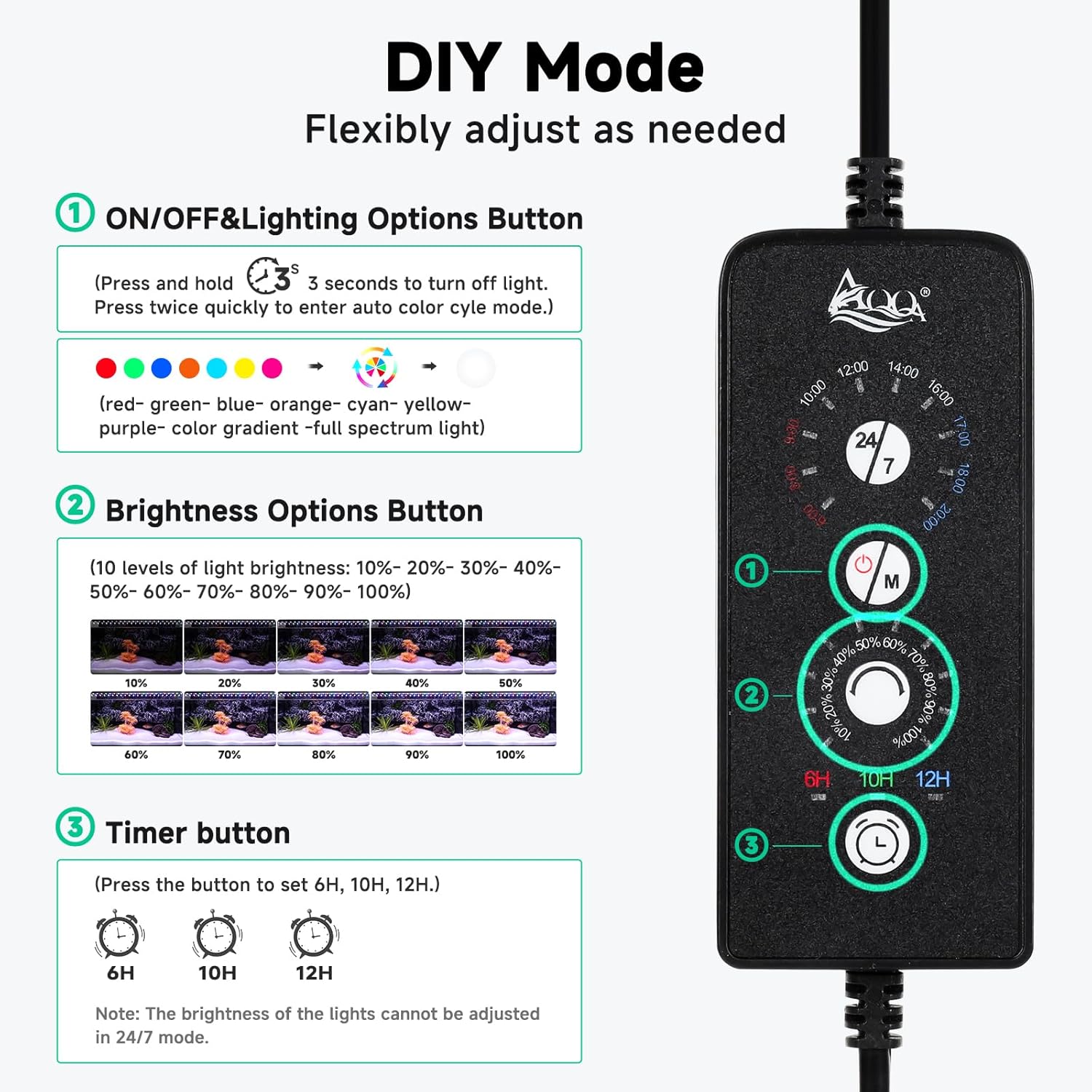
Image: The external controller for the AQQA LED light, illustrating the buttons for ON/OFF & Lighting Options, Brightness Options, and Timer settings, all part of the DIY Mode.
- 1. ON/OFF & Lighting Options Button:
- Press and hold for 3 seconds to turn the light OFF.
- Press twice quickly to enter the auto color cycle mode.
- Single press to cycle through 9 available colors: Red, Green, Blue, Orange, Cyan, Yellow, Purple, Color Gradient, and Full Spectrum Light.
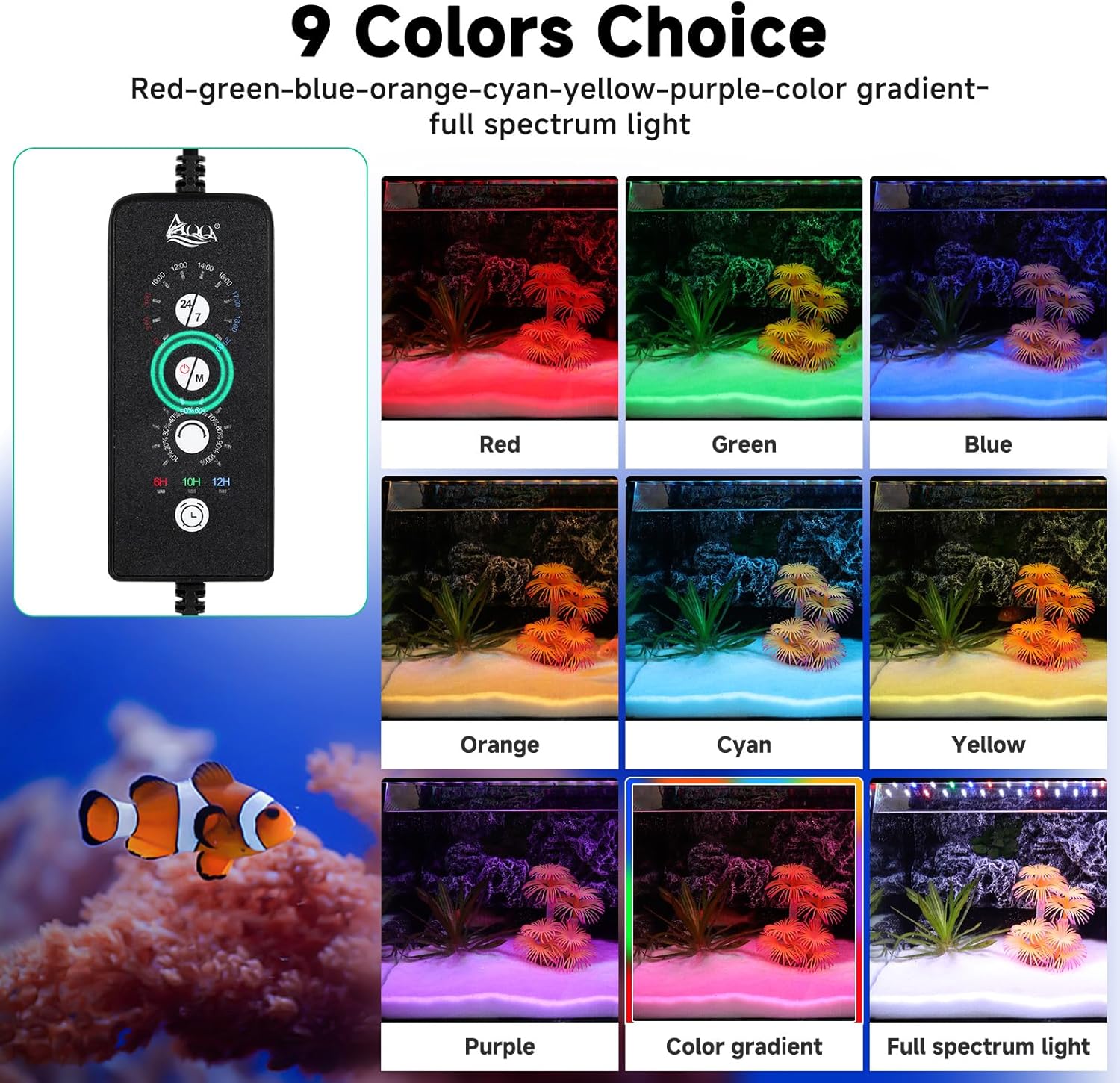
Image: Visual representation of the 9 distinct color options available for the AQQA LED light, including individual colors and gradient/full spectrum modes.
- 2. Brightness Options Button:
- Press to adjust the brightness level. There are 10 levels of brightness: 10%, 20%, 30%, 40%, 50%, 60%, 70%, 80%, 90%, and 100%.
- 3. Timer Button:
- Press to set the lighting duration. Available options are 6 hours, 10 hours, and 12 hours.
- Note: Brightness cannot be adjusted when in 24/7 mode.
2. 24/7 Standard Mode
This mode simulates a natural 24-hour sunrise and sunset pattern, promoting plant growth and providing a natural environment for your aquatic life.

Image: A visual timeline demonstrating the 24/7 mode, showing how the light intensity and color spectrum change from dawn (6:00) through midday (10:00-14:00) to dusk (18:00-20:00) and night, simulating a natural day-night cycle.
- The cycle begins with a warm orange light at dawn.
- Transitions to 100% brighter, full-spectrum light during the afternoon.
- Ends with a bright blue light at night.
- The standard lighting automatically turns ON at 6:00 AM and OFF at 11:00 PM.
- The automatic ON/OFF times can be shifted throughout the entire standard period.
Maintenance
Cleaning:
Before cleaning, always unplug the light from the power outlet. Wipe the light unit with a soft, damp cloth. Do not use abrasive cleaners or solvents. The aluminum casing is easy to clean.
Waterproof Feature:
The light unit itself is IP68 waterproof and can be directly soaked in water for use. However, ensure the controller and power adapter remain dry.
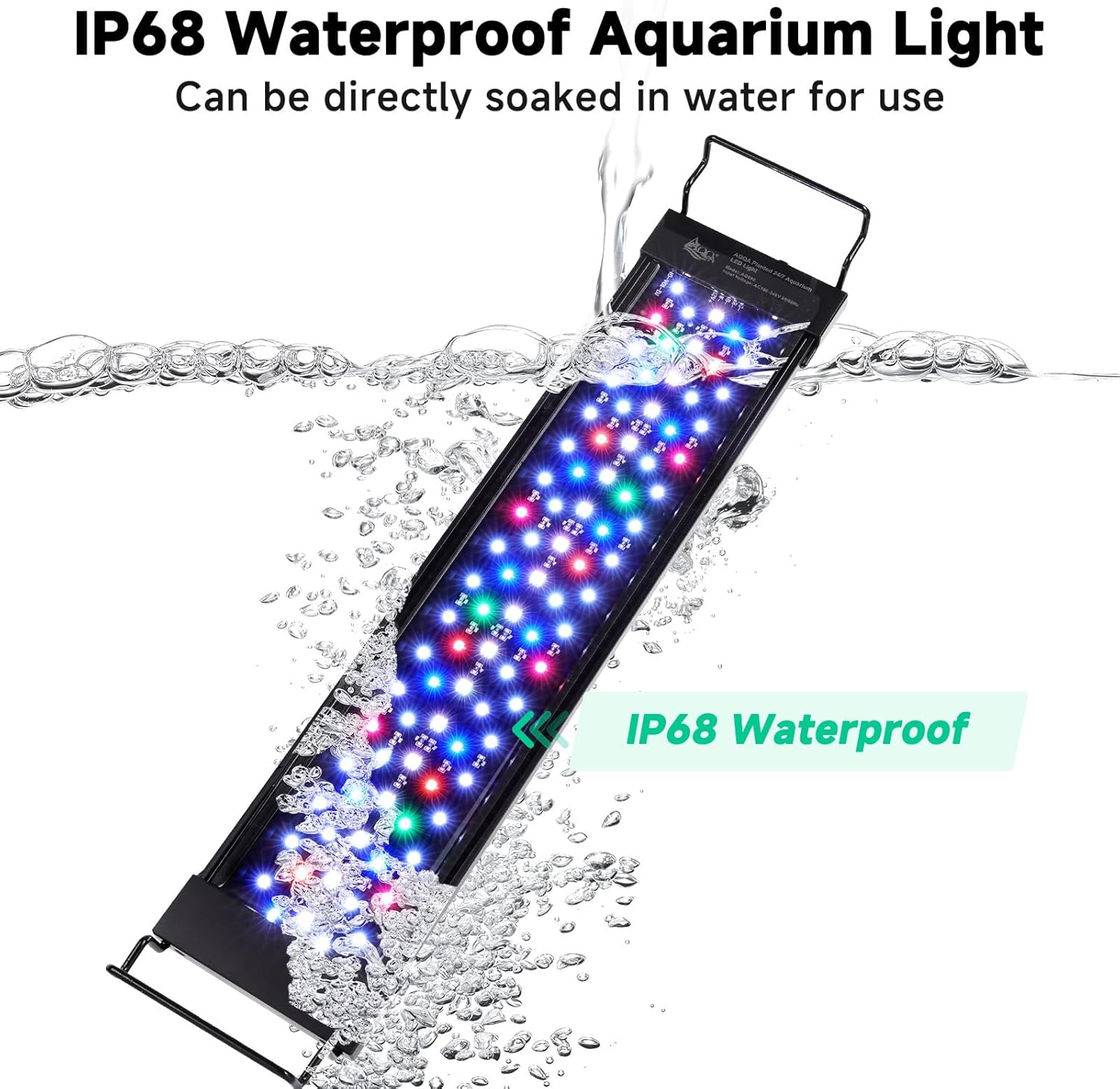
Image: The AQQA LED light unit shown submerged in water, highlighting its IP68 waterproof capability, which allows it to be directly placed in the aquarium.
Heat Dissipation:
The high-quality aluminum alloy housing provides excellent heat dissipation, ensuring the longevity of the LED chips. Keep the light free from obstructions to allow proper airflow.
Troubleshooting
| Problem | Possible Cause | Solution |
|---|---|---|
| Light does not turn on. | No power supply; Loose connection; Faulty controller. | Check if the power plug is securely inserted. Ensure the controller is properly connected to the light unit. Test the power outlet with another device. Contact customer support if the controller is suspected to be faulty. |
| Light flickers or dims unexpectedly. | Unstable power supply; Overheating; Controller malfunction. | Ensure a stable power source. Check for proper heat dissipation (ensure vents are not blocked). If the issue persists, contact customer support. |
| Cannot change color or brightness in 24/7 mode. | This is normal behavior for 24/7 mode. | The 24/7 mode operates on a pre-programmed cycle. To manually adjust color or brightness, switch to DIY Mode. |
| Timer function not working. | Incorrect setting; Power interruption. | Re-set the timer according to the operating instructions. Ensure continuous power supply. |
Specifications
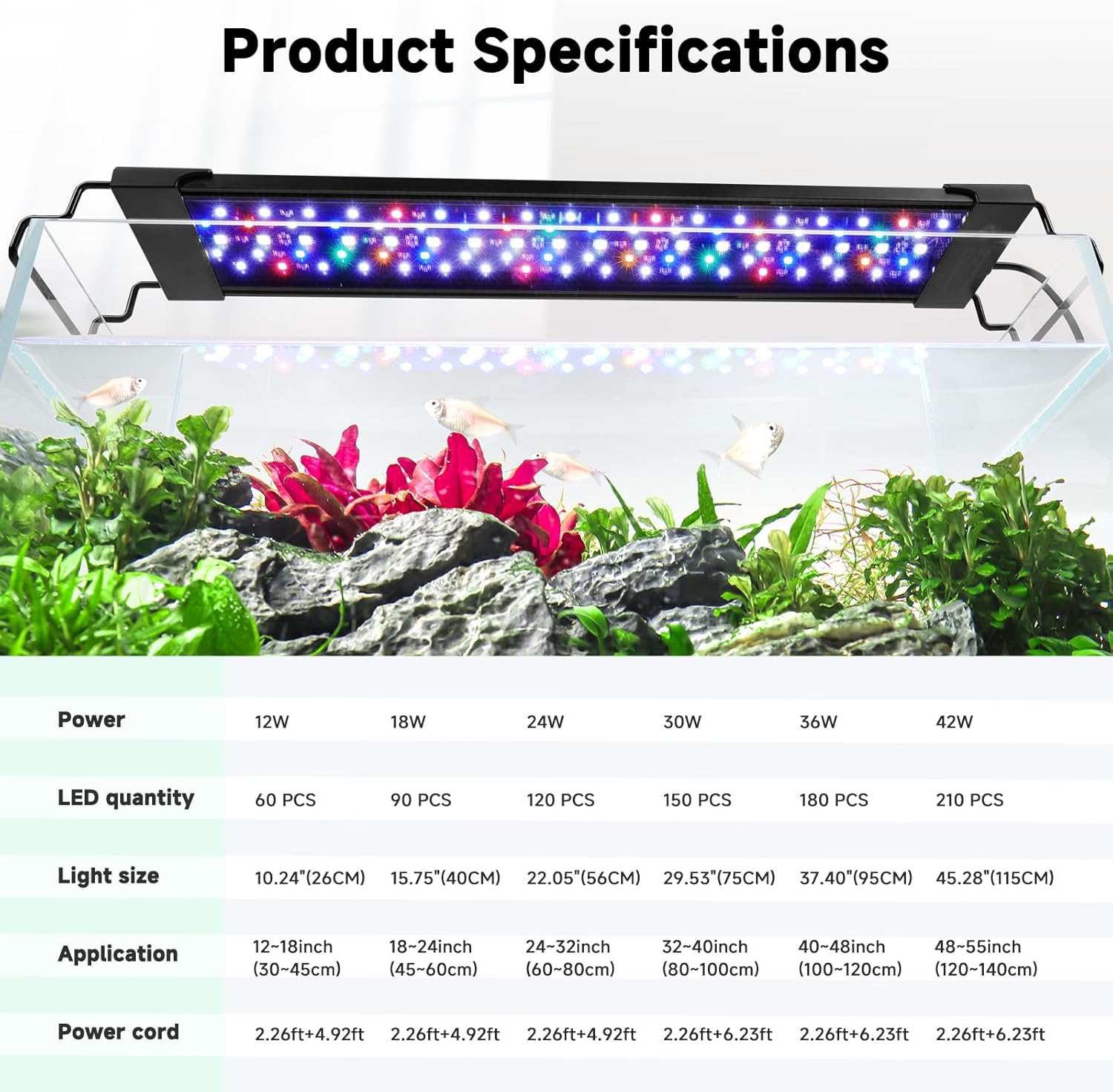
Image: A detailed table outlining the specifications for different wattage models of the AQQA LED light, including power, LED quantity, light size, application tank size, and power cord length.
| Feature | Detail |
|---|---|
| Brand | AQQA |
| Model Number | AQ090 |
| Power | 36 Watts |
| LED Quantity | 180 PCS (for 36W model) |
| Light Size | 37.40 inches (95 cm) (for 36W model) |
| Application Tank Size | 40-48 inches (100-120 cm) (for 36W model) |
| Product Dimensions (L x W x H) | 96 x 11 x 6.3 cm |
| Weight | 1.3 Kilograms |
| Material | Aluminum |
| Waterproof Rating | IP68 (light unit only) |
| Voltage | 12 Volts |
| Features | DIY Mode, 24/7 Standard Mode, Adjustable Brightness, Timer Function |
Warranty and Support
AQQA products are manufactured to the highest quality standards. This product comes with a standard manufacturer's warranty. For specific warranty details, please refer to the documentation included with your purchase or contact AQQA customer support.
If you encounter any issues or have questions regarding your AQQA Aquarium LED Light, please contact our customer support team for assistance. You can typically find contact information on the product packaging or the official AQQA website.
Seller: Aqqa
Return Policy: 30 days refund/replacement (as per Amazon Buy Box Winner information)
Related documentsAQ090


Ask a question about this manual
Ask about setup, troubleshooting, compatibility, parts, safety, or missing instructions. Manuals+ will review the question and use this page’s manual context to help answer it.