
NGTeco ZMD01
NGTeco LED Desk Lamp ZMD01 User Manual
Model: ZMD01
1. Introduction
Thank you for purchasing the NGTeco LED Desk Lamp ZMD01. This manual provides essential information for the safe and efficient operation of your new desk lamp. Please read this manual thoroughly before use and retain it for future reference.
The NGTeco LED Desk Lamp ZMD01 is designed to provide versatile and comfortable lighting for various tasks, including working, studying, drawing, and general desktop use. It features a multi-bar design, adjustable arm, and multiple control options to enhance your workspace.

Image 1.1: NGTeco LED Desk Lamp ZMD01 in a typical office environment, illuminating a multi-monitor desk setup. A remote control is visible in the foreground.
2. Safety Instructions
- Ensure the power supply voltage matches the lamp's requirements before connecting.
- Do not disassemble or modify the lamp. This may cause damage or electrical shock.
- Avoid exposing the lamp to water or high humidity.
- Keep the lamp away from heat sources and direct sunlight.
- Clean the lamp with a soft, dry cloth. Do not use abrasive cleaners or solvents.
- If the power cord is damaged, it must be replaced by the manufacturer, its service agent, or similarly qualified persons to avoid a hazard.
- This lamp is intended for indoor use only.
3. Package Contents
Please check the package for the following items:
- NGTeco LED Desk Lamp ZMD01 (Main Unit)
- Desk Clamp
- Power Adapter
- Wireless Remote Control
- User Manual (this document)
4. Product Overview and Features
The NGTeco LED Desk Lamp ZMD01 is designed with multiple features to provide optimal lighting for your workspace.
4.1. Multi-Bar Design
The lamp features a 2+1 light bar configuration, including two main top lamps and one auxiliary side lamp. This design provides a wide lighting area, extending up to 39.3 inches, suitable for illuminating multiple monitors or a large desktop surface.

Image 4.1: Illustration of the 2+1 light bar design, highlighting the individual adjustability of top and side lights. It also shows the 20 available light modes, combining 5 brightness levels (20%-100%) and 4 color temperatures (3000K-6000K).
4.2. Adjustable Swing Arm
The lamp's swing arm incorporates 5 horizontal axes and 3 vertical swivel joints, allowing for extensive rotation and positioning. This flexibility enables users to direct light precisely where needed for various tasks.

Image 4.2: Detailed diagram showing the various rotation points and angles of the lamp's arm and head, including 210°, 270°, 180°, and 360° rotation capabilities, along with the clamp mechanism.
4.3. Eye-Caring Illumination
Equipped with 272 energy-saving LED lamp beads, the lamp provides soft, flicker-free illumination with a high Color Rendering Index (CRI > 95). The 45° tilted design directs light onto the workspace, minimizing screen reflections and reducing eye strain.

Image 4.3: A close-up view of the 272 LED lamp beads and an illustration demonstrating the 45-degree angle design that focuses light on the desk area, promoting eye comfort.
4.4. Control Options
The lamp can be controlled via touch buttons located on the lamp head or through the included wireless multifunction remote control. The remote offers control from a distance of up to 32.8 ft (10 m).
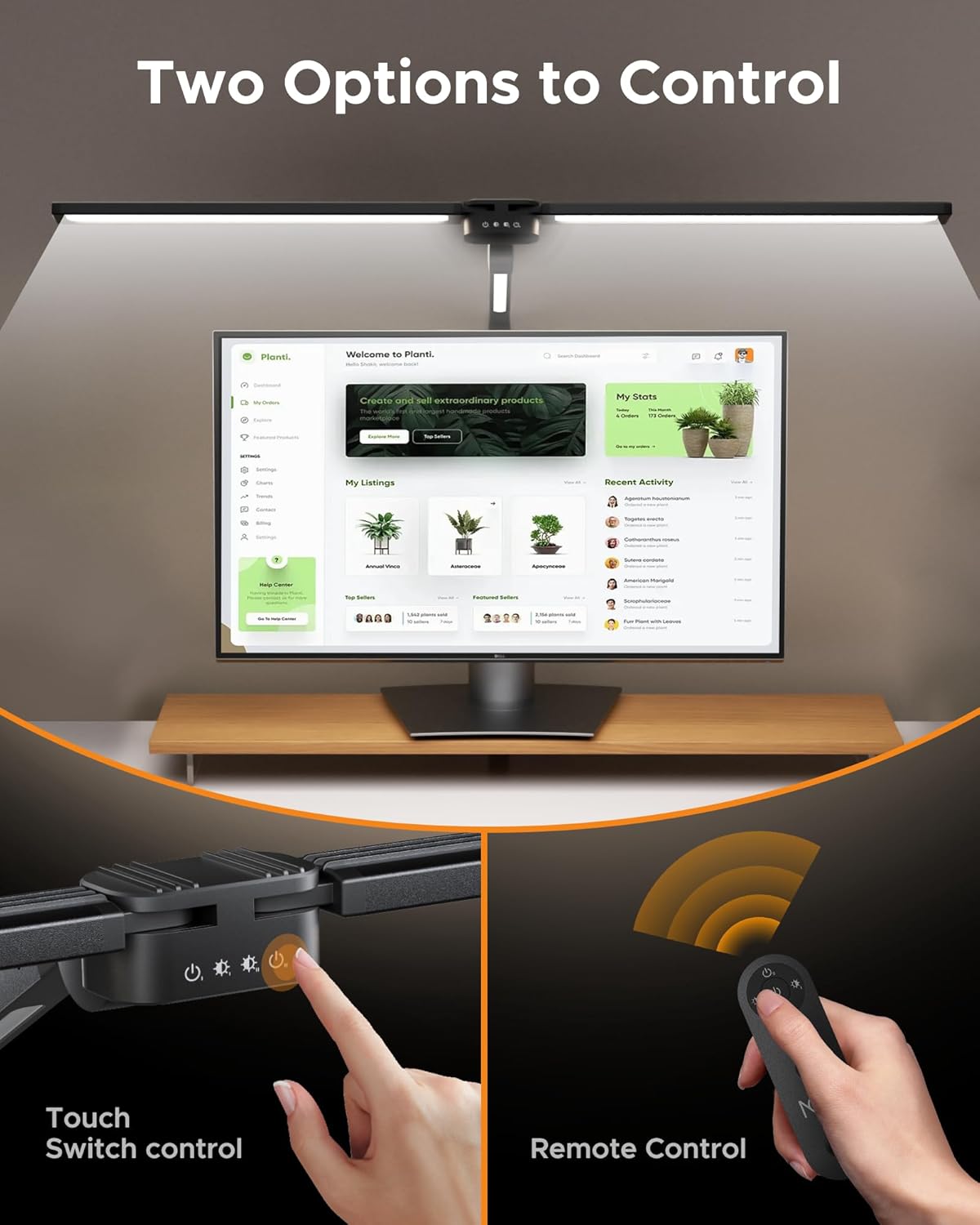
Image 4.4: Depiction of the two control methods: touch buttons on the lamp head and the wireless remote control, allowing for convenient adjustment of settings.
4.5. Lighting Modes and Timer
The lamp offers 5 dimmable brightness levels (20%-100%) and 4 color temperatures (3000K-6000K), providing 20 lighting combinations. It also includes an automatic shut-off timer with options for 0.5, 1, or 2 hours, and a memory function that recalls the last used lighting mode.
5. Setup and Installation
Follow these steps to set up your NGTeco LED Desk Lamp ZMD01:
- Attach the Clamp: Securely attach the desk clamp to the edge of your desk. Ensure the desk thickness is compatible with the clamp's maximum opening (typically up to 2.5 inches). Tighten the screw until the clamp is firm and stable.
- Insert the Lamp Base: Insert the base of the lamp arm into the opening of the clamp. Ensure it is fully seated and stable.
- Adjust the Arm: Carefully adjust the lamp's swing arm and head to your desired position. The multiple joints allow for extensive customization.
- Connect Power: Connect the power adapter to the lamp's power input port, then plug the adapter into a standard electrical outlet.

Image 5.1: Visual guide demonstrating correct and incorrect methods for installing the desk clamp, ensuring stability and proper fit on various desk edges.
6. Operation
The NGTeco LED Desk Lamp ZMD01 offers both touch control and remote control for ease of use.
6.1. Touch Control
The touch buttons are located on the lamp head. Functions typically include:
- Power On/Off: Tap the power button to turn the lamp on or off.
- Brightness Adjustment: Tap the brightness control button to cycle through 5 brightness levels.
- Color Temperature Adjustment: Tap the color temperature button to cycle through 4 color temperature settings.
- Auxiliary Lamp Control: Separate controls may be available for the auxiliary lamp.
6.2. Remote Control
The wireless remote control provides convenient access to all lamp functions from a distance.
- Power Button: Turns the lamp on or off.
- Brightness +/-: Adjusts the brightness levels (5 levels).
- Color Temperature Button: Cycles through 4 color temperature settings.
- Main Lamp Switch: Controls the main top light bars.
- Auxiliary Lamp Switch: Controls the side auxiliary lamp.
- Timer Settings: Activates the automatic shut-off timer (0.5h, 1h, 2h).

Image 6.1: An illustration detailing the functions of the remote control and the touch panel on the lamp, showing controls for main lamp switch, auxiliary lamp switch, main lamp brightness, and auxiliary lamp brightness, along with brightness levels and color temperature options.
7. Maintenance
Proper maintenance ensures the longevity and performance of your desk lamp.
- Cleaning: Disconnect the power before cleaning. Use a soft, dry, lint-free cloth to wipe the lamp's surface. Do not use liquid cleaners, sprays, or harsh chemicals.
- Storage: If storing the lamp for an extended period, ensure it is clean and dry. Store it in a cool, dry place away from direct sunlight.
- Bulb Replacement: The LED lamp beads are integrated and not user-replaceable. Do not attempt to replace them.
8. Troubleshooting
If you encounter issues with your NGTeco LED Desk Lamp ZMD01, refer to the following table for common problems and solutions.
| Problem | Possible Cause | Solution |
|---|---|---|
| Lamp does not turn on. | No power connection. | Check if the power adapter is securely plugged into the lamp and the wall outlet. Ensure the outlet is functional. |
| Remote control is not working. | Remote battery is low or depleted. Obstruction between remote and lamp. | Replace the remote control battery. Ensure there are no obstructions between the remote and the lamp's sensor. Move closer to the lamp. |
| Light flickers or is unstable. | Loose power connection. Power supply issue. | Ensure all power connections are secure. Try plugging the lamp into a different outlet. |
| Cannot adjust brightness/color temperature. | Incorrect button pressed. Remote control issue. | Refer to the operation section for correct button usage. If using the remote, check its battery. |
9. Specifications
| Feature | Specification |
|---|---|
| Model Number | ZMD01 |
| Power Consumption | 24W |
| Luminous Flux | 1500 Lumens |
| Light Source | 272 LED Lamp Beads |
| Color Temperature | 3000K-6000K (4 levels) |
| Brightness Levels | 5 levels (20%-100%) |
| Color Rendering Index (CRI) | >95 |
| Control Method | Touch Control, Wireless Remote Control |
| Timer Function | 0.5h, 1h, 2h Auto Shut-off |
| Material | Aluminum (Base), Acrylonitrile Butadiene Styrene (Shade) |
| Product Dimensions | 5.08 x 5.08 x 2.54 cm; 1.36 kg (approximate) |
| ASIN | B0DHGKF7VZ |
10. Warranty and Support
NGTeco provides customer support and technical assistance for its products.
- Warranty: Please refer to the warranty card included with your product for specific warranty terms and conditions.
- Customer Support: For any questions, technical support, or warranty claims, please contact NGTeco customer service. Contact information can typically be found on the product packaging or the official NGTeco website.
Ask a question about this manual
Ask about setup, troubleshooting, compatibility, parts, safety, or missing instructions. Manuals+ will review the question and use this page’s manual context to help answer it.