
Relado W1101L
Relado W1101L Wrist Blood Pressure Monitor User Manual
Comprehensive guide for safe and effective use of your Relado W1101L Blood Pressure Monitor.
1. Important Safety Information
Please read this instruction manual thoroughly before using the device. Keep this manual for future reference.
- This device is intended for adult use only.
- Do not use this device for diagnosis or treatment of any health problem or disease. Always consult your physician for diagnosis and treatment.
- Keep the device out of reach of infants and children.
- Avoid strong electromagnetic fields, such as those near mobile phones or microwave ovens, as they may interfere with the device's operation.
- Do not disassemble or attempt to repair the device yourself. Contact qualified service personnel for any repairs.
- Do not use the device in a moving vehicle.
2. Product Overview
2.1 Components
The Relado W1101L Blood Pressure Monitor package includes the following items:
- Relado W1101L Wrist Blood Pressure Monitor
- USB Charging Cable
- Instruction Manual
- Quick Guide
- Carrying Box

2.2 Features
The Relado W1101L Blood Pressure Monitor is designed with several key features for convenient and accurate home use:
- Accurate & Reliable Reading: Equipped with an advanced chip for validated accuracy within ±3 mmHg.
- Clear Digital Display: Features a large LED display with clear digits for easy reading in various lighting conditions.
- Voice Announcement: Provides an optional voice broadcast of measurement results, ideal for users with visual impairments. The voice function can be turned off.
- Dual User x 120 Reading Memory: Stores up to 120 measurements for two individual users, allowing for long-term tracking of blood pressure trends.
- Portable & Rechargeable: Compact design with a built-in rechargeable battery and included carrying case for easy portability and use without frequent battery replacement.


3. Setup
3.1 Charging the Device
Before first use, ensure the device is fully charged. Connect the provided USB charging cable to the monitor's charging port and a suitable USB power source (e.g., computer USB port, wall adapter). The battery indicator on the display will show charging status.

3.2 Applying the Wrist Cuff
- Remove any tight clothing from your wrist.
- Slide the monitor onto your left wrist with the display facing up. The cuff should be positioned approximately 1-2 cm (0.4-0.8 inches) from your palm.
- Fasten the cuff snugly around your wrist using the hook-and-loop closure. Ensure it is not too tight or too loose.


3.3 Proper Measurement Posture
For accurate readings, it is crucial to maintain the correct posture:
- Sit comfortably with your back supported and feet flat on the floor.
- Rest your arm on a table or flat surface, ensuring the monitor is at the same level as your heart.
- Remain still and silent during the measurement. Avoid talking or moving.

4. Operating Instructions
4.1 Taking a Measurement
- Ensure the cuff is correctly applied and you are in the proper measurement posture.
- Press the START/STOP button to turn on the device. The cuff will automatically inflate and begin the measurement.
- Remain still and relaxed. The measurement will take approximately 35 seconds.
- Once the measurement is complete, the systolic (SYS), diastolic (DIA), and pulse readings will be displayed on the screen. If the voice function is enabled, the results will be announced.
- The device will automatically power off after a period of inactivity to conserve battery. You can also press the START/STOP button to manually turn it off.

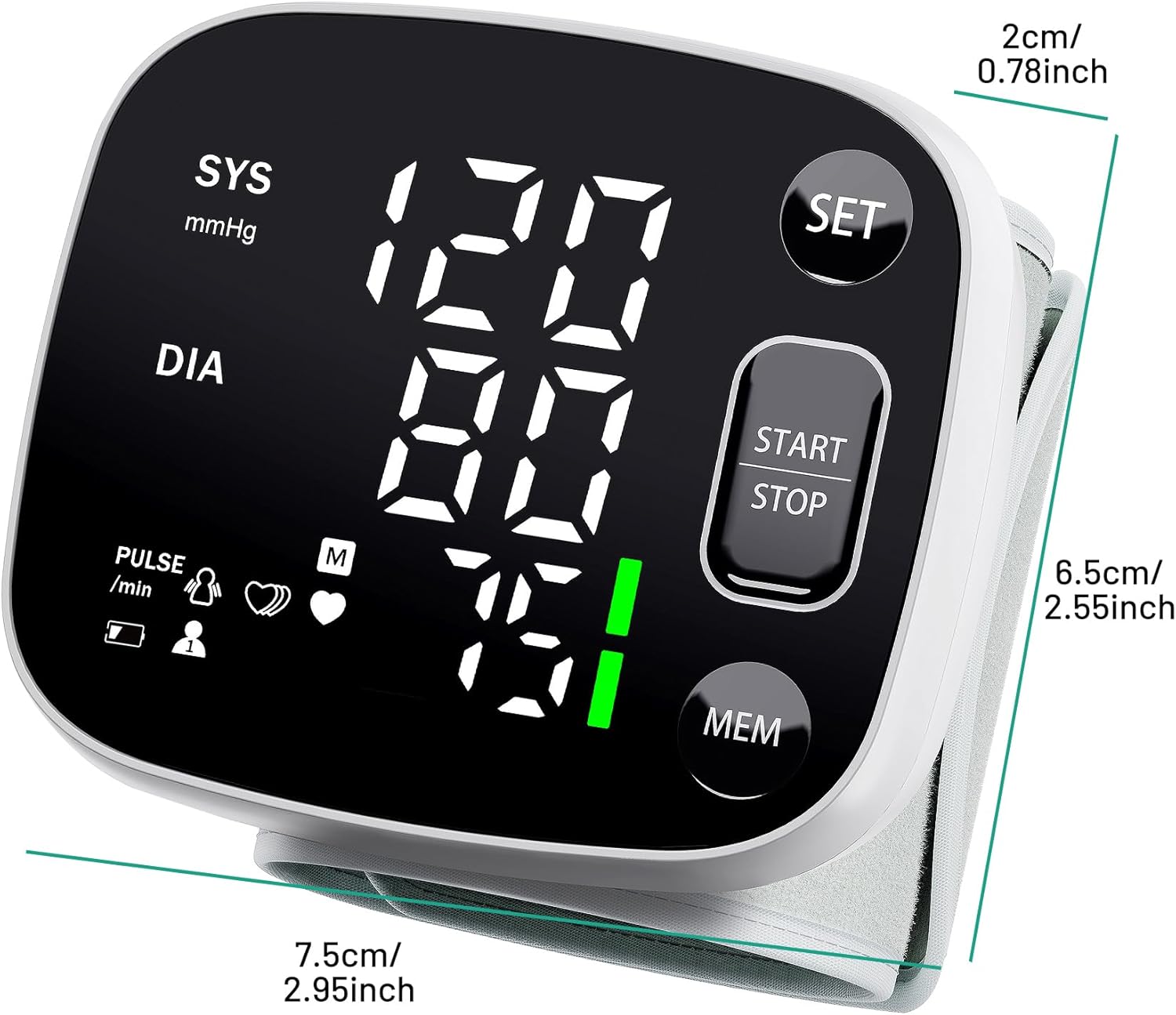
4.2 Understanding the Display
The large LED display provides clear readings:
- SYS (Systolic Blood Pressure): The top number, indicating the pressure in your arteries when your heart beats.
- DIA (Diastolic Blood Pressure): The bottom number, indicating the pressure in your arteries between beats.
- PULSE: Your heart rate in beats per minute.
- User Mode: Indicates whether User A or User B is selected.
- Memory Reading (M): Indicates that the displayed reading is from memory.
- WHO Warning Strip: A color-coded bar on the display that visually indicates your blood pressure category according to WHO guidelines.

4.3 Voice Broadcast Function
The device features a voice broadcast function for convenience. To adjust or turn off the voice, press and hold the START/STOP button during measurement or when the device is idle to cycle through voice volume levels or mute the sound.

4.4 Dual User Mode
The monitor supports two users (User A and User B), each with independent memory storage. To switch between users, press the SET button when the device is off. The user icon will change on the display.

5. Memory Function
The device automatically saves up to 120 readings for each user. To review past measurements:
- Ensure the correct user (A or B) is selected.
- Press the MEM button when the device is off. The most recent reading will be displayed.
- Press the MEM button repeatedly to scroll through older readings.
- Note: The memory function does not store timestamps for the readings.
5.1 Clearing Memory
To clear all stored readings for the currently selected user, press and hold the MEM button for approximately 5 seconds until the display shows "CLr" or similar, indicating memory clear.
6. Maintenance
6.1 Cleaning the Device
- Wipe the device and cuff gently with a soft, dry cloth.
- If necessary, use a cloth lightly dampened with water or a mild detergent. Do not use abrasive cleaners or immerse the device in water.
- Ensure no liquid enters the device casing.
6.2 Storage
- Store the device in its carrying case when not in use to protect it from dust and damage.
- Store in a cool, dry place, away from direct sunlight, extreme temperatures, and humidity.
- Avoid dropping the device or subjecting it to strong impacts.
6.3 Battery Care
- The device uses a built-in rechargeable Lithium Polymer battery.
- Recharge the battery when the low battery indicator appears on the display.
- If the device will not be used for an extended period, charge it periodically (e.g., every 3 months) to maintain battery health.
7. Troubleshooting
If you encounter issues with your blood pressure monitor, refer to the table below for common problems and solutions:
| Problem | Possible Cause | Solution |
|---|---|---|
| Device does not turn on. | Low battery or no charge. | Charge the device using the provided USB cable. |
| Error message (e.g., "Err") on display. | Improper cuff placement, movement during measurement, or irregular pulse. | Re-apply the cuff correctly, remain still and silent, or consult a physician if irregular pulse persists. |
| Inconsistent readings. | Incorrect posture, talking/moving during measurement, or recent physical activity. | Ensure correct posture, relax for 5 minutes before measurement, and avoid talking/moving. Take multiple readings and average them. |
| Voice function not working. | Voice function is muted or volume is too low. | Press and hold the START/STOP button to adjust the voice volume or unmute. |
If the problem persists after trying these solutions, please contact customer support.
8. Specifications
Technical specifications for the Relado W1101L Wrist Blood Pressure Monitor:
| Specification | Detail |
|---|---|
| Model Name | W1101L |
| Measurement Method | Oscillometric |
| Measurement Range | Pressure: 0-299 mmHg, Pulse: 40-199 beats/minute |
| Accuracy | Pressure: ±3 mmHg, Pulse: ±5% of reading |
| Memory Capacity | 2 users x 120 readings each |
| Cuff Size | Adjustable Wrist Cuff (4.92-8.46 inches / 12.5-21.5 cm) |
| Power Source | Built-in Rechargeable Lithium Polymer Battery |
| Charging Port | USB Type-C |
| Product Dimensions | 7.5L x 2W x 6.5Th Centimetres (approx.) |
| Item Weight | 230 g (approx.) |
| UPC | 762206394511 |
9. Warranty and Support
The Relado W1101L Wrist Blood Pressure Monitor comes with a limited warranty. Please refer to the warranty information provided in the packaging or contact the manufacturer for details regarding warranty coverage and duration.
For technical support, troubleshooting assistance, or any inquiries regarding your device, please contact Relado customer service through the contact information provided in your product packaging or on the official Relado website.
Related Documents - W1101L
 |
W1101L Wrist Blood Pressure Monitor Quick Start Guide Quick start guide for the W1101L Wrist Type Blood Pressure Monitor, covering setup, battery charging, user settings, voice options, and how to take a reading, with FAQs. |
 |
Oklar W1101L Wrist Blood Pressure Monitor Quick Start Guide Get started quickly with the Oklar W1101L Wrist Blood Pressure Monitor. This guide covers setup, battery charging, user settings, taking readings, and FAQs for accurate home blood pressure monitoring. |
 |
Wrist Type Blood Pressure Monitor W1101L Quick Start Guide Concise quick start guide for the Wrist Type Blood Pressure Monitor W1101L, covering setup, usage, and FAQs for accurate readings. |
 |
Jamr W1101L Wrist Blood Pressure Monitor User Manual Comprehensive user manual for the Jamr W1101L wrist blood pressure monitor, detailing its features, operation, measurement procedures, care, maintenance, troubleshooting, and technical specifications. |
 |
W1101L Wrist Type Blood Pressure Monitor User Manual User manual for the Shenzhen Jamr Technology W1101L Wrist Type Blood Pressure Monitor, detailing its features, operation, measurement procedures, care, and technical specifications. |
Ask a question about this manual
Ask about setup, troubleshooting, compatibility, parts, safety, or missing instructions. Manuals+ will review the question and use this page’s manual context to help answer it.