
1. Introduction
The BAKON BK602Pro is a versatile 2-in-1 soldering station designed for precision soldering, desoldering, and hot air rework applications. This unit integrates a C210 all-in-one heater core precision soldering iron and a hot air station into a single compact device. It features an LCD display for real-time information, temperature presets, and an auto-sleep function to enhance safety and prolong equipment life. This manual provides essential information for the safe and effective operation and maintenance of your BK602Pro soldering station.
2. Safety Information
Always observe the following safety precautions to prevent injury or damage to the equipment:
- Ensure the unit is connected to a grounded 110V power outlet.
- Do not operate the soldering station in damp or wet conditions.
- Always use appropriate personal protective equipment, including safety glasses and heat-resistant gloves.
- The soldering iron tip and hot air nozzle reach very high temperatures. Avoid direct contact with skin or flammable materials.
- Place the hot air gun in its holder when not in use to activate the auto-cooling function and prevent overheating.
- Ensure adequate ventilation in your workspace to dissipate fumes from soldering.
- Disconnect the power supply before performing any maintenance or changing components.
- Keep out of reach of children.
3. Product Features
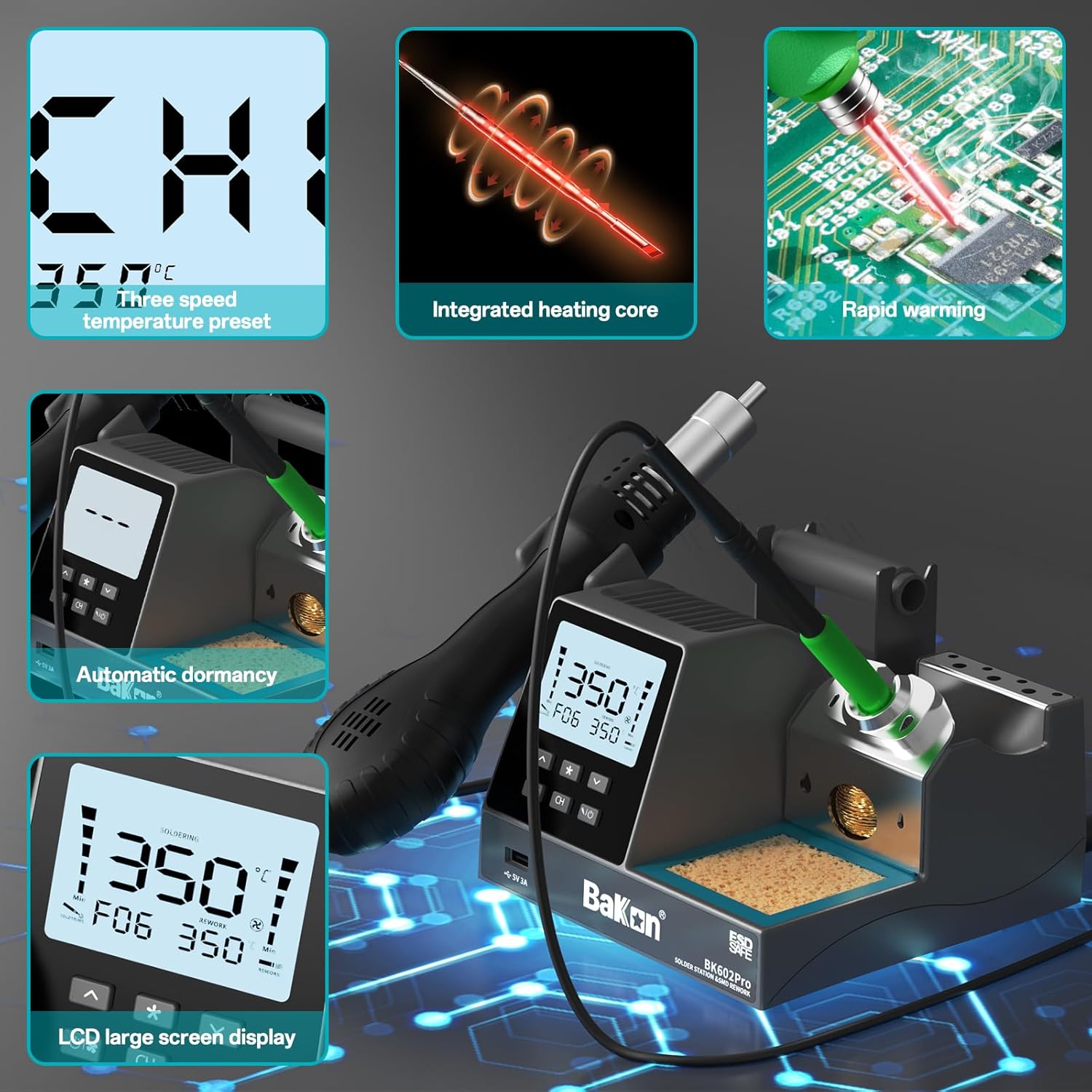
The BK602Pro features an LCD display, integrated heating core for rapid warming, and automatic dormancy for safety and energy saving.

Experience rapid heating and stable temperature control, reaching operational temperatures in approximately 3 seconds.
3.1. Integrated 2-in-1 Design
This unit combines a precision soldering iron and a hot air rework station, saving workspace and providing comprehensive functionality for various electronic repair tasks. The LCD display shows real-time power, actual and set temperatures for both soldering and hot air, airflow levels, temperature presets, and setup menus.
3.2. C210/C115/C245 Compatible Soldering Iron
The soldering iron features a one-piece heater core for fast heat-up and stable temperature. It is compatible with C210, C115, and C245 heater cores, allowing for easy and convenient replacement. The temperature range is 302°F-896°F (150°C-480°C), suitable for electronic repairs on small components as well as miniature and standard-sized components.
3.3. Hot Air Soldering Station

The hot air station utilizes PID temperature control for stable and precise heating, with adjustable air volume.
The hot air rework station has a maximum output power of 550W and a temperature range of 212°F-932°F (100°C-500°C). It incorporates an advanced PID temperature control system for rapid temperature rise and stability. Air volume is adjustable across 17 levels (F01-F17). When the hot air gun is placed in its holder, an auto-cooling function activates, preventing the heating element from overheating and extending the machine's lifespan.
3.4. Practical Functions
- Automatic Sleep Function: When the handle is placed in the bracket, the sleep mode activates, enhancing safety and conserving energy.
- Temperature Presets: Three programmable temperature presets (CH1, CH2, CH3) allow for quick switching between frequently used settings.
- °C - °F Conversion: Easily switch between Celsius and Fahrenheit temperature displays.
- Temperature Calibration: Allows for precise adjustment of temperature readings.

Clear LCD display for monitoring temperature and settings.

Easily convert between Celsius and Fahrenheit temperature units.

Quickly set and recall temperature presets using dedicated channel buttons.

The automatic sleep function activates after a set period of inactivity (0-99 seconds).
4. Setup
4.1. Unpacking and Inspection
Carefully remove all components from the packaging. Inspect the unit and accessories for any signs of damage. Ensure all listed accessories are present: solder sucker, tweezers, flux, one-piece heater core, 2 hot air nozzles, brass cleaner, and suction tape.
4.2. Connecting Components
- Connect the soldering iron handle to the designated port on the main unit.
- Connect the hot air gun handle to its designated port.
- Place the hot air gun in its holder.
- Ensure the power cord is securely connected to the unit and a 110V power outlet.
4.3. Installing the Heating Element / Soldering Tip

Ensure the heating element and soldering tip are installed correctly and fully inserted to the bottom for optimal performance and safety.
For proper operation and heat transfer, ensure the heating element and soldering tip are fully and correctly inserted into the soldering iron handle. An improperly installed tip may result in poor heating performance or damage to the unit.
5. Operating Instructions
5.1. Powering On/Off
Press and hold the power button for approximately 4 seconds to turn the unit on or off. The LCD display will illuminate upon startup.
5.2. Adjusting Soldering Iron Temperature
- Use the up/down arrow buttons to adjust the desired temperature for the soldering iron.
- The temperature range is 302°F-896°F (150°C-480°C).
- The display will show both the set temperature and the actual temperature of the tip.
5.3. Adjusting Hot Air Gun Temperature and Airflow
- Use the up/down arrow buttons to adjust the desired temperature for the hot air gun. The temperature range is 212°F-932°F (100°C-500°C).
- Use the dedicated airflow adjustment buttons to set the air volume from F01 (lowest) to F17 (highest).
- The display will show both the set temperature and the actual temperature, along with the current airflow level.
5.4. Using Temperature Presets (CH1, CH2, CH3)
- To save a temperature setting: Adjust the soldering iron or hot air gun to the desired temperature and airflow. Press and hold one of the CH1, CH2, or CH3 buttons until the setting is saved.
- To recall a temperature setting: Briefly press the corresponding CH1, CH2, or CH3 button. The unit will automatically adjust to the saved settings.
5.5. Celsius/Fahrenheit Conversion
Press the °C/°F button to toggle between Celsius and Fahrenheit temperature displays.
5.6. Automatic Sleep Function
When the soldering iron or hot air gun is placed in its respective holder, the unit will enter sleep mode after a user-defined period (0-99 seconds). This reduces tip oxidation and saves energy. Lifting the tool from the holder will automatically wake the unit and return it to the last active settings.
Video demonstrating the BAKON BK602Pro Soldering Rework Station in operation, including temperature adjustments and auto-sleep functionality.
Video showcasing the features and usage of the BAKON BK602Pro C210 Soldering Station, highlighting its integrated design and ease of use.
6. Maintenance
6.1. Soldering Tip Cleaning

The station includes a dedicated area for cleaning soldering tips using copper wire or a sponge.
Regularly clean the soldering iron tip using the provided brass cleaner or a damp sponge. This helps prevent oxidation and ensures efficient heat transfer. Always re-tin the tip with a small amount of solder after cleaning and before storage.
6.2. General Cleaning
Wipe the main unit and handles with a soft, dry cloth. Do not use abrasive cleaners or solvents. Ensure the unit is unplugged and cooled down before cleaning.
6.3. Hot Air Nozzle Replacement
Allow the hot air gun to cool completely before attempting to change nozzles. Securely attach the desired nozzle to the hot air gun.
7. Troubleshooting
- No Power: Check the power cord connection and the wall outlet. Ensure the power button is pressed and held for 4 seconds to turn on.
- Soldering Iron Not Heating: Verify the heating element/tip is correctly installed and fully inserted. Check the set temperature on the display.
- Hot Air Gun Not Heating/No Airflow: Check the set temperature and airflow levels. Ensure the hot air gun is not in its holder if it's set to sleep mode.
- Inaccurate Temperature Reading: Perform a temperature calibration as described in the operating instructions.
- Unit Enters Sleep Mode Unexpectedly: Adjust the automatic sleep timer setting if it is too short.
8. Specifications
| Feature | Specification |
|---|---|
| Brand | BAKON |
| Model Number | BK602Pro |
| Voltage | 110 volts |
| Wattage (Hot Air) | 550 watts |
| Display Type | LCD |
| Soldering Iron Temperature Range | 302°F - 896°F (150°C - 480°C) |
| Hot Air Temperature Range | 212°F - 932°F (100°C - 500°C) |
| Temperature Stability | ±3°C |
| Number of Channels | 1 (for presets) |
| Included Components | Solder sucker, tweezers, flux, one-piece heater core, 2 hot air nozzles, brass cleaner, suction tape |
9. Warranty and Support
BAKON provides 12 months of exclusive technical service for the BK602Pro soldering station. For any questions or assistance, please contact BAKON customer support. We offer 24/7 professional assistance.


