1. Introduction
This manual provides essential instructions for the safe and efficient operation of your JARXIOKE 5500W Power Inverter. This device converts 12V DC power from your battery into 110V/120V AC power, suitable for various applications including RVs, off-grid solar systems, and vehicles. Please read this manual thoroughly before installation and use.
2. Important Safety Instructions
Failure to follow these instructions may result in electric shock, fire, serious injury, or death.
- Do not open the inverter casing. There are no user-serviceable parts inside.
- Ensure proper ventilation around the inverter to prevent overheating.
- Connect the inverter only to a 12V DC power source. Do not connect to 24V or 48V systems.
- Always connect the inverter to the battery before connecting any AC loads.
- Ensure correct polarity when connecting battery cables: red to positive (+), black to negative (-). Reverse polarity can damage the inverter.
- Keep the inverter away from water, flammable materials, and corrosive chemicals.
- Do not overload the inverter beyond its rated 5500W capacity.
- Ensure all connections are tight and secure to prevent arcing and overheating.
- Ground the inverter properly using the earth wire connection.

Figure 2.1: Multiple Protection Features
The inverter is equipped with comprehensive safety features including overvoltage, low voltage, overload, short circuit, overheating, reverse polarity protection (fuse), automatic restart, and GND leakage protection.
3. Product Overview
The JARXIOKE 5500W Power Inverter is designed for reliable power conversion. It features multiple output ports, an LCD display for real-time monitoring, and a wireless remote control for convenient operation.
3.1 Front and Rear Panel Features

Figure 3.1: Front and Rear Panel Overview
- LED Display: Shows input voltage, output voltage, frequency, and power output.
- Type-C Port: For charging compatible devices.
- USB Ports (2x): For charging USB-powered devices.
- Power Switch: Main ON/OFF switch for the inverter.
- AC Outlets (4x): Standard 110V/120V AC outlets.
- AC Terminal Blocks: For heavy-duty AC connections (L, N, PE).
- Earth Wire Connection: For proper grounding of the inverter.
- Positive Pole (+): Red terminal for positive battery connection.
- Negative Pole (-): Black terminal for negative battery connection.
- Cooling Fans: Intelligent fans for heat dissipation.
3.2 Included Accessories
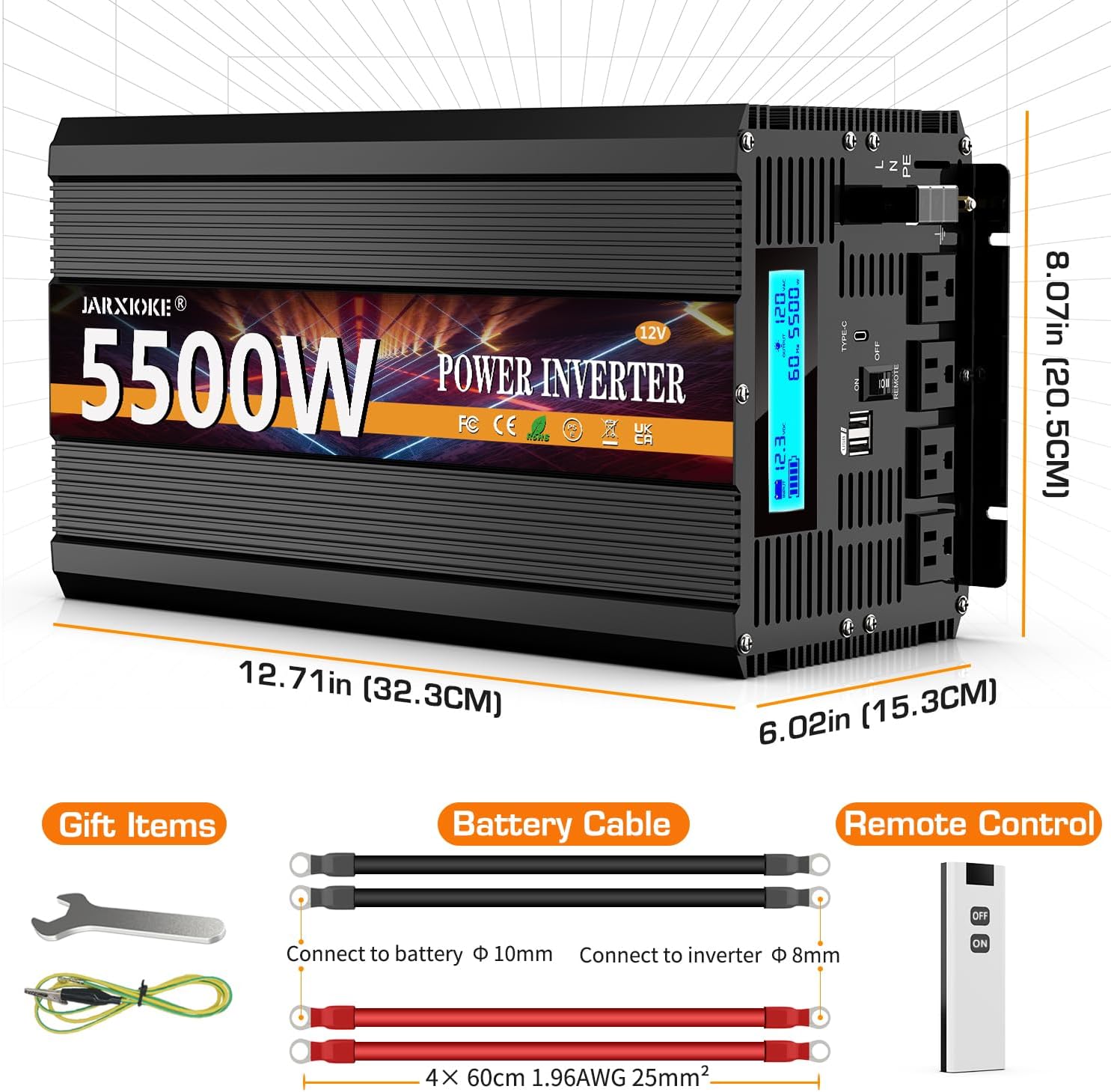
Figure 3.2: Inverter Dimensions and Accessories
The package includes:
- JARXIOKE 5500W 12V Power Inverter
- Battery Cables (Red for positive, Black for negative)
- Wireless Remote Control
- Wrench
- Earth Wire
4. Setup and Installation
Follow these steps for safe and correct installation of your power inverter.
4.1 Connecting to a 12V DC Battery
- Ensure the inverter's power switch is in the OFF position.
- Connect the red battery cable to the positive (+) terminal of the inverter. Secure tightly.
- Connect the other end of the red cable to the positive (+) terminal of your 12V battery. Secure tightly.
- Connect the black battery cable to the negative (-) terminal of the inverter. Secure tightly.
- Connect the other end of the black cable to the negative (-) terminal of your 12V battery. Secure tightly.
- Connect the earth wire to the designated grounding terminal on the inverter and to a proper ground point.
Video 4.1: Demonstrating the connection process for the JARXIOKE 5500W Power Inverter.
Note: Always ensure proper ventilation and keep connections secure. Incorrect wiring can cause damage or fire.
5. Operating Instructions
5.1 Powering On/Off
- After connecting the inverter to the battery, press the main power switch on the inverter to the ON position. The LCD display will illuminate.
- To turn off, press the main power switch to the OFF position.
5.2 Using the Wireless Remote Control
The wireless remote control allows you to conveniently turn the inverter ON or OFF from a distance of up to 100 meters.
- Ensure the inverter's main power switch is in the OFF position before using the remote control to power it on.
- Press the ON button on the remote to activate the inverter.
- Press the OFF button on the remote to deactivate the inverter.

Figure 5.1: Wireless Remote Control in Use
5.3 LCD Display Monitoring
The LCD display provides real-time information about the inverter's status and performance:
- Input Voltage: Displays the current DC voltage from the battery.
- Output Voltage: Shows the AC output voltage (110V/120V).
- Frequency: Indicates the AC output frequency (60Hz).
- Power Output: Displays the current wattage being drawn by connected devices.
- Battery Indicator: Visual representation of battery charge level.

Figure 5.2: LCD Display Features
6. Maintenance
- Regularly check all cable connections to ensure they are tight and free from corrosion.
- Keep the inverter clean and free from dust and debris. Use a dry cloth for cleaning.
- Ensure the cooling fans are unobstructed and functioning properly.
- Store the inverter in a cool, dry place when not in use.
7. Troubleshooting
| Problem | Possible Cause | Solution |
|---|---|---|
| No power output | Inverter switch OFF, low battery voltage, loose connections, blown fuse. | Turn ON inverter, check battery voltage, tighten connections, replace fuse if necessary. |
| Overload alarm | Connected appliance exceeds inverter's wattage. | Reduce load by disconnecting some appliances. |
| Overheating alarm | Poor ventilation, blocked cooling fans, excessive load. | Ensure adequate airflow, clear fan obstructions, reduce load. |
| Low voltage alarm | Battery voltage is too low. | Recharge or replace the battery. |
| Remote control not working | Inverter's main switch is ON, remote battery dead, out of range. | Ensure inverter's main switch is OFF, replace remote battery, operate within 100m range. |
For issues not listed here, please contact customer support.
8. Specifications
| Feature | Detail |
|---|---|
| Model Name | 5500 W |
| Wattage | 5500 watts |
| Input Voltage | 12 Volts (DC) |
| Output Voltage | 110V/120V (AC) |
| Power Source | Battery Powered |
| Item Weight | 17.64 pounds |
| Package Dimensions | 19.21 x 11.38 x 8.27 inches |
| Protection Features | Overvoltage, Low Voltage, Overload, Short Circuit, Overheating, Reverse Polarity, GND Leakage (Lightning Strike) |
| Additional Features | Type-C Ports, Dual USB Ports, LCD Display, Wireless Remote Control, Soft-start technology |
9. Warranty and Support
JARXIOKE offers a 24-month warranty on this product from the date of purchase. This warranty covers manufacturing defects and ensures reliable operation under normal use conditions.
For technical assistance, warranty claims, or any questions regarding your JARXIOKE 5500W Power Inverter, please contact our customer support team via email. Refer to your purchase documentation for specific contact details.
Product liability for this device rests with AIG.


