
1. Introduction
Thank you for purchasing the Memorex MX-BCCD50 Portable AM/FM Cassette CD Player. This versatile audio system combines a top-loading CD player, an auto-stop cassette deck, and an AM/FM stereo radio, offering multiple ways to enjoy your music. This manual provides essential information for setting up, operating, and maintaining your device to ensure optimal performance and longevity.
2. Safety Information
Please read all safety instructions carefully before using this product. Keep this manual for future reference.
- Power Source: Use only the specified power adapter or batteries. Ensure the voltage matches the requirements of the unit.
- Water and Moisture: Do not expose the unit to rain, moisture, or excessive humidity. Avoid placing objects filled with liquids, such as vases, on or near the unit.
- Ventilation: Ensure proper ventilation. Do not block any ventilation openings.
- Heat: Keep the unit away from heat sources such as radiators, heat registers, stoves, or other apparatus (including amplifiers) that produce heat.
- Cleaning: Clean only with a dry cloth. Do not use liquid cleaners or aerosol cleaners.
- Servicing: Do not attempt to service this product yourself. Refer all servicing to qualified service personnel.
- Batteries: When using batteries, ensure they are inserted with correct polarity. Do not mix old and new batteries, or different types of batteries. Remove batteries if the unit will not be used for an extended period.
3. Product Overview
Familiarize yourself with the components and controls of your Memorex MX-BCCD50.

Figure 3.1: Front view of the Memorex MX-BCCD50 Portable AM/FM Cassette CD Player, showcasing its compact design, integrated speakers, and control layout.
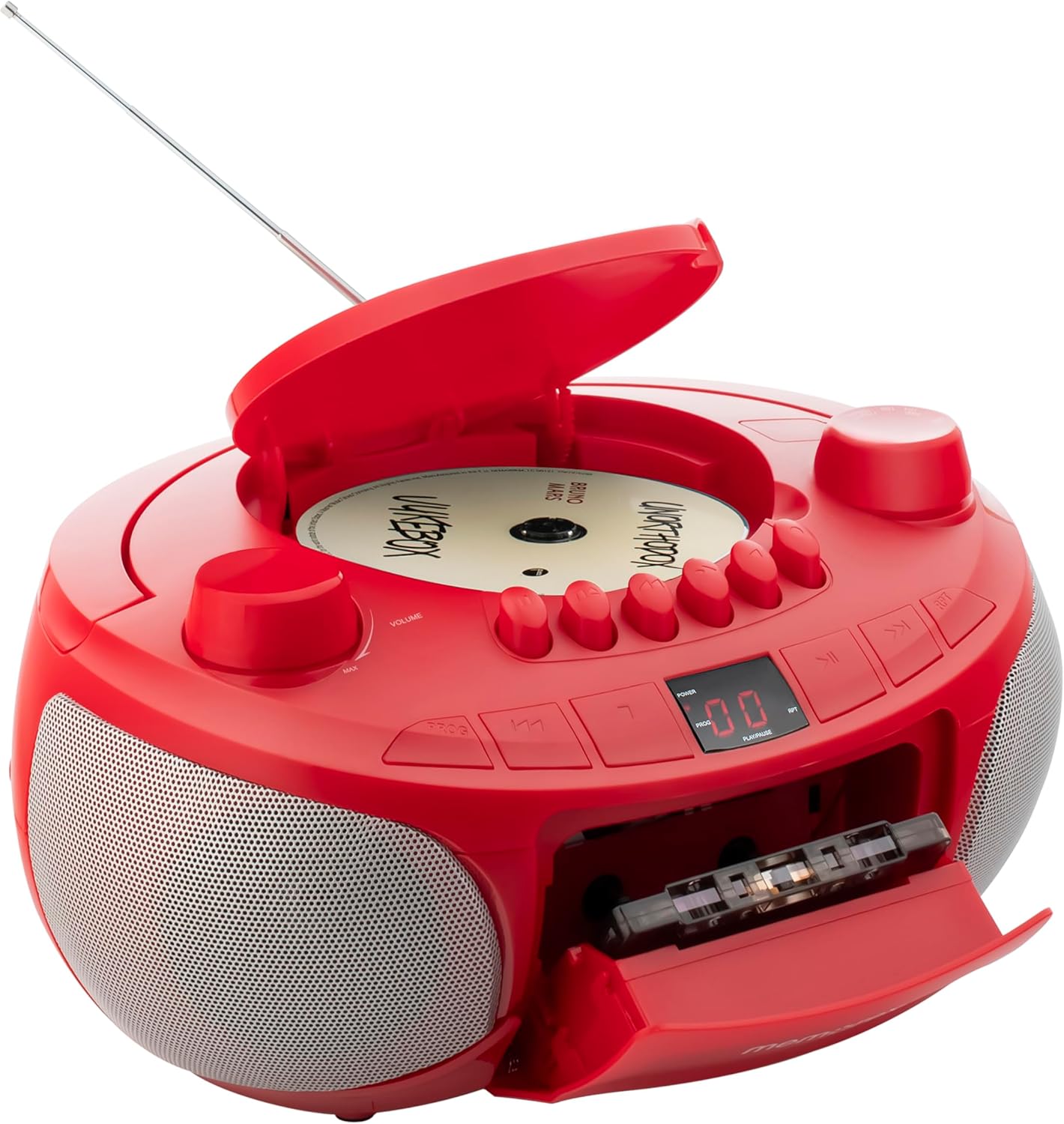
Figure 3.2: This image illustrates the open top-loading CD compartment and the front-loading cassette deck, ready for media insertion. Key controls for playback are visible.
Key Components:
- CD Compartment: Top-loading for compact discs.
- Cassette Deck: Front-loading with auto-stop function.
- AM/FM Tuner: For radio reception.
- Telescopic Antenna: For improved FM radio reception.
- Volume Control: Rotary knob to adjust audio output.
- Function Selector: Switch to select CD, TAPE (Cassette), RADIO, or AUX mode.
- Playback Controls: Buttons for Play, Pause, Stop, Fast Forward, Rewind, Skip/Search.
- LED Display: Shows CD track number or radio frequency.
- Auxiliary Input (AUX IN): 3.5mm jack for connecting external audio devices.
- Power Input: For AC adapter.
- Battery Compartment: For 6 'C' batteries (not included).
4. Setup
4.1 Powering the Unit
Your Memorex MX-BCCD50 can be powered by either AC power or batteries.

Figure 4.1: The rear view of the unit, detailing the AC power input and the battery compartment for portable use. The image also shows the telescopic antenna and the auxiliary input jack.
AC Power:
- Ensure the unit is turned off.
- Connect the supplied AC power cord to the AC input jack on the back of the unit.
- Plug the other end of the AC power cord into a standard wall outlet.
Battery Power:
- Ensure the unit is turned off and disconnected from AC power.
- Open the battery compartment cover on the bottom of the unit.
- Insert 6 'C' size batteries (not included), observing the correct polarity (+/-) as indicated inside the compartment.
- Close the battery compartment cover securely.
Note: When the unit is connected to AC power, battery power is automatically disconnected.
5. Operating Instructions
5.1 General Operation
- Turn the VOLUME knob to the MIN position before turning on the unit.
- Use the FUNCTION SELECTOR switch to choose between CD, TAPE (Cassette), RADIO, or AUX mode.
- Adjust the VOLUME knob to your desired listening level.
5.2 CD Playback
- Set the FUNCTION SELECTOR to CD mode.
- Open the CD compartment cover by gently lifting it.
- Place a CD (or CD-R/RW) onto the spindle with the label side facing up.
- Close the CD compartment cover securely.
- Press the PLAY/PAUSE button to start playback. The LED display will show the track number.
- To pause, press PLAY/PAUSE again. Press it once more to resume.
- To skip to the next track, press the SKIP/SEARCH FORWARD button (>>|).
- To go back to the beginning of the current track or previous track, press the SKIP/SEARCH BACKWARD button (|<<).
- To fast forward or rewind within a track, press and hold the SKIP/SEARCH FORWARD or SKIP/SEARCH BACKWARD button.
- To stop playback, press the STOP button.
Programmable CD Playback:
You can program up to 20 tracks to play in a specific order.
- In CD Stop mode, press the PROG button. The LED display will show '01'.
- Use the SKIP/SEARCH FORWARD or SKIP/SEARCH BACKWARD buttons to select your desired first track.
- Press PROG again to confirm the selection. The display will show '02'.
- Repeat steps 2 and 3 to program up to 20 tracks.
- After programming, press the PLAY/PAUSE button to start playing the programmed tracks.
- To clear the program, press the STOP button twice.
5.3 Cassette Playback
- Set the FUNCTION SELECTOR to TAPE mode.
- Press the STOP/EJECT button to open the cassette deck door.
- Insert a cassette tape with the open edge facing upwards and the desired side facing you.
- Close the cassette deck door firmly.
- Press the PLAY button to start playback.
- To fast forward, press the FAST FORWARD button.
- To rewind, press the REWIND button.
- To stop playback, press the STOP/EJECT button. The auto-stop feature will automatically stop the tape at the end of a side.
5.4 AM/FM Radio Operation
- Set the FUNCTION SELECTOR to RADIO mode.
- Extend the TELESCOPIC ANTENNA for optimal FM reception. For AM reception, the unit has a built-in antenna, so adjust the unit's position for best signal.
- Rotate the TUNING knob to select your desired AM or FM station.
- Adjust the VOLUME knob to your preferred listening level.
5.5 Auxiliary Input (AUX IN)
Connect an external audio device (e.g., smartphone, MP3 player) to the unit.
- Set the FUNCTION SELECTOR to AUX mode.
- Connect one end of a 3.5mm audio cable (not included) to the AUX IN jack on the unit.
- Connect the other end of the audio cable to the headphone jack or line-out jack of your external audio device.
- Start playback on your external device.
- Adjust the volume on both the external device and the Memorex MX-BCCD50 for optimal sound.
6. Maintenance
6.1 Cleaning the Unit
- Always unplug the unit from the power source before cleaning.
- Use a soft, dry cloth to clean the exterior surfaces. Do not use abrasive cleaners, waxes, or solvents.
- For the CD lens, use a specialized CD lens cleaner disc.
- For the cassette deck, periodically clean the tape heads and pinch rollers with a cotton swab lightly dampened with isopropyl alcohol.
6.2 Storage
If the unit will not be used for an extended period, remove the batteries and store the unit in a cool, dry place away from direct sunlight and extreme temperatures.
7. Troubleshooting
Review the following common issues and solutions before seeking professional service.
| Problem | Possible Cause | Solution |
|---|---|---|
| No power | AC cord not connected; Batteries depleted or incorrectly inserted. | Ensure AC cord is securely plugged in. Replace batteries or check polarity. |
| No sound | Volume too low; Incorrect function mode selected; Headphones connected (if applicable). | Increase volume. Select correct function (CD, TAPE, RADIO, AUX). Ensure no headphones are connected to the AUX IN jack if using speakers. |
| CD not playing | CD inserted incorrectly; CD dirty or scratched; CD compartment not closed; Unit in wrong mode. | Insert CD with label side up. Clean or replace CD. Close CD compartment firmly. Select CD mode. |
| Cassette not playing | Cassette inserted incorrectly; Tape tangled; Unit in wrong mode. | Insert cassette correctly. Check tape condition. Select TAPE mode. |
| Poor radio reception | Antenna not extended; Unit position; Local interference. | Fully extend FM telescopic antenna. Adjust unit's position for AM. Move away from electronic devices causing interference. |
| Buttons are hard to read/locate | Design characteristic. | Familiarize yourself with button layout. Use in well-lit conditions. |
8. Specifications
- Model: MX-BCCD50
- Power Source: AC 120V ~ 60Hz or 6 x 'C' size batteries (DC 9V)
- CD Compatibility: CD, CD-R/RW
- Radio Frequencies: AM/FM Stereo
- Auxiliary Input: 3.5mm stereo jack
- Dimensions (L x W x H): 10 x 10 x 6 inches (approximately)
- Weight: 2.14 pounds (approximately)
- Speaker Type: Stereo
Specifications are subject to change without notice.
9. Warranty and Support
For warranty information or technical support, please refer to the warranty card included with your product or contact Memorex customer service directly. Contact details can typically be found on the manufacturer's official website or on the product packaging.
Manufacturer: Memorex

