Jensen CAR140MW 10.1” LED Backlit Touchscreen Car Radio/AV Receiver User Manual
Model: CAR140MW
Introduction
This manual provides detailed instructions for the installation, operation, and maintenance of your Jensen CAR140MW 10.1” LED Backlit Touchscreen Car Radio/AV Receiver. Please read this manual thoroughly before using the product to ensure proper operation and to prevent damage.
Safety Information
Always observe the following safety precautions when installing and operating the unit:
- Do not operate the unit in a manner that distracts you from driving.
- Ensure all wiring is correctly connected to prevent short circuits and damage.
- Consult a qualified technician for installation if you are unsure about any steps.
- Do not expose the unit to moisture or extreme temperatures.
- Only use accessories specified by the manufacturer.
Package Contents
Verify that all items are present in the package:
- Jensen CAR140MW Receiver Unit
- Wiring Harness
- GPS Antenna
- External Microphone
- Mounting Hardware (screws, brackets)
- 2-DIN Bracket
- User Manual (this document)

Image: Various accessories including wiring harness, GPS antenna, external microphone, and mounting hardware.
Installation
Pre-Installation Checklist
- Disconnect the vehicle's negative battery terminal before starting installation.
- Ensure adequate space for the unit and wiring. The unit fits both 1-DIN and 2-DIN openings.
- Gather necessary tools (screwdrivers, wire strippers, crimpers, electrical tape).
Wiring Connections
Refer to the wiring diagram provided with the unit for specific connections. Key connections include:
- Power Wires: Constant 12V (Yellow), Accessory 12V (Red), Ground (Black).
- Speaker Wires: Front Left/Right, Rear Left/Right (typically color-coded).
- Auxiliary Inputs/Outputs: RCA connections for audio/video.
- Camera Inputs: Dedicated inputs for front and rear cameras.
- USB Ports: Front and rear USB connections for media and charging.
- Antenna: Radio antenna and GPS antenna connections.
- Steering Wheel Control: Input for optional steering wheel control adapter (adapter sold separately).

Image: Rear panel of the receiver displaying various ports for power, audio outputs, auxiliary inputs, camera inputs, and antenna connections.
Mounting the Unit
The CAR140MW can be installed in either a 1-DIN or 2-DIN opening. Use the included 2-DIN bracket for double-DIN installations.
- Secure the mounting sleeve or bracket into the vehicle's dashboard opening.
- Slide the receiver into the mounting sleeve until it locks into place.
- Connect all necessary wiring before fully securing the unit.
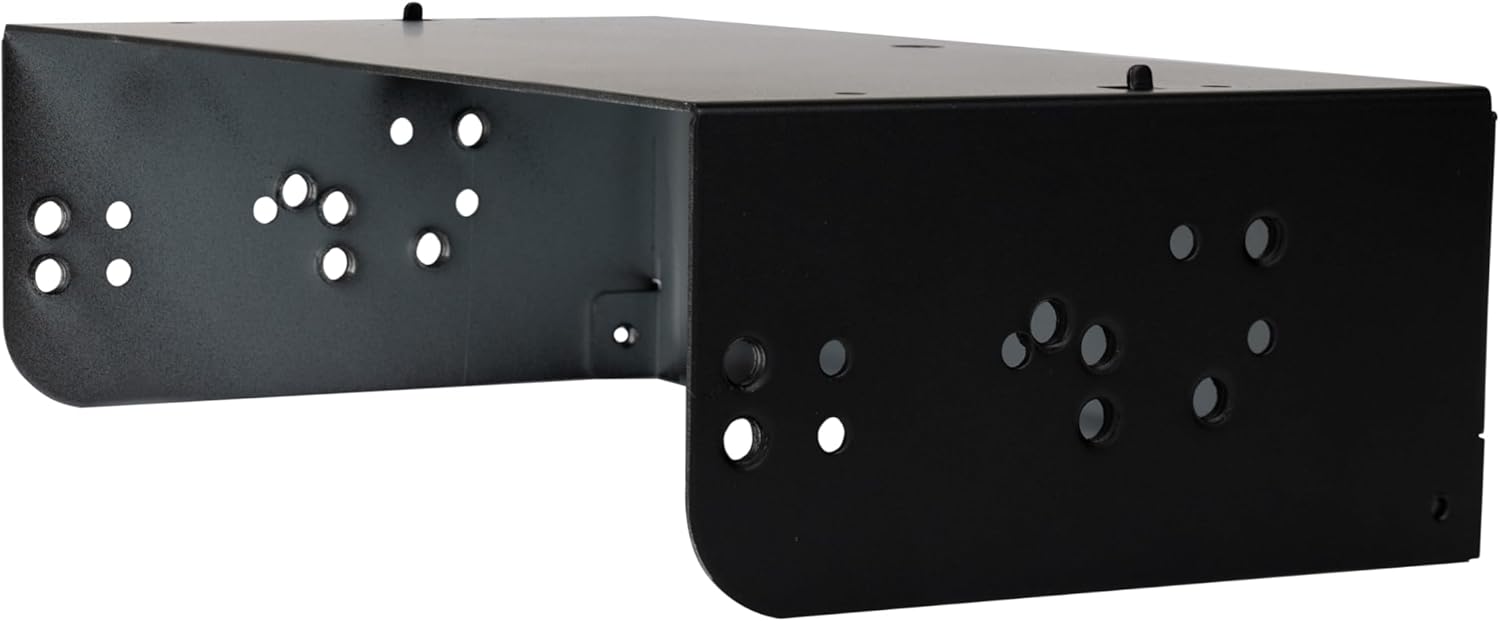
Image: A black metal 2-DIN mounting bracket, used to secure the receiver in a double-DIN dashboard opening.

Image: Side profile of the Jensen CAR140MW receiver, illustrating its depth and the mounting points on the chassis.
Setup
Initial Power-On
After installation, reconnect the vehicle's battery. The unit should power on. Follow the on-screen prompts for initial setup, which may include language selection and time zone settings.
Bluetooth Pairing
To pair your mobile device via Bluetooth:
- Go to the Bluetooth settings on the receiver.
- Enable Bluetooth on your mobile device and search for available devices.
- Select "CAR140MW" from the list on your phone.
- Confirm the pairing code on both devices if prompted.
- Once paired, you can make hands-free calls and stream audio.
Apple CarPlay & Android Auto Setup
The unit supports both wireless and wired Apple CarPlay and Android Auto.
- Wired Connection: Connect your smartphone to the unit's USB port using a certified USB cable.
- Wireless Connection: Ensure Bluetooth is paired, then follow the on-screen prompts on the receiver and your phone to establish the wireless CarPlay/Android Auto connection.
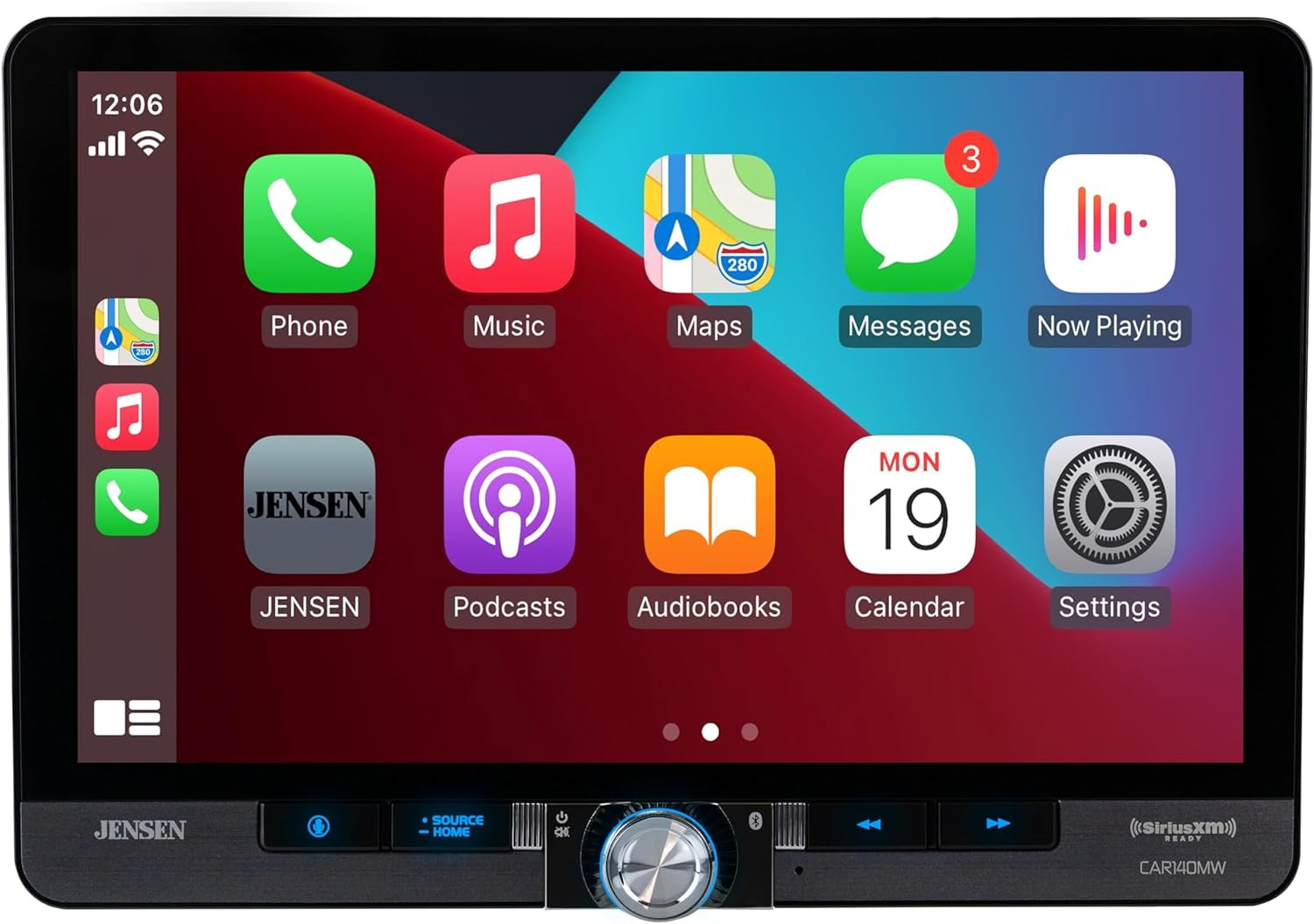
Image: The receiver's screen displaying the Apple CarPlay interface with various app icons like Phone, Music, Maps, and Messages.
Operating Instructions
Touchscreen Interface
The 10.1” LED backlit touchscreen provides intuitive control. Navigate through menus by tapping icons and swiping. The main screen typically displays current audio source, time, and quick access icons.

Image: The receiver's screen displaying a "Gauge" interface with various vehicle performance metrics like intake manifold pressure, coolant temperature, intake air temperature, and engine load.
Audio Controls
- Volume: Adjust using the physical knob or on-screen controls.
- Equalizer: Access sound settings to customize bass, treble, and other audio parameters.
- Subwoofer Control: Adjust subwoofer output and crossover settings.
- Source Selection: Switch between radio, Bluetooth, USB, AUX, CarPlay/Android Auto.
Radio Operation
Select the Radio source. Use the on-screen controls to tune to stations, save presets, and switch between AM/FM bands. The unit supports SiriusXM (tuner sold separately).
USB Playback
Insert a USB drive into the front or rear USB port. The unit supports FLAC and MP3 file playback. Navigate folders and select tracks using the touchscreen.
Camera Inputs
The unit has dedicated inputs for front and rear view cameras. When connected, the display will automatically switch to the camera view when the vehicle is in reverse (for rear camera) or when manually selected (for front camera).
Maintenance
Cleaning the Screen
Use a soft, lint-free cloth to gently wipe the touchscreen. For stubborn smudges, slightly dampen the cloth with water or a screen-safe cleaner. Do not use abrasive cleaners or solvents.
Software Updates
Periodically check the Jensen website for available software updates for your CAR140MW model. Updates can improve performance and add new features. Follow the instructions provided with the update file carefully.
Troubleshooting
| Problem | Possible Cause | Solution |
|---|---|---|
| No Power | Incorrect wiring; Blown fuse; Vehicle battery issue. | Check power and ground connections. Inspect vehicle's fuse box and the unit's inline fuse. Verify battery voltage. |
| No Sound | Speaker wires disconnected; Volume too low; Mute activated; Incorrect audio source. | Check speaker connections. Increase volume. Deactivate mute. Select correct audio source. |
| Bluetooth Not Connecting | Device not in pairing mode; Interference; Previously paired device connected. | Ensure unit is in pairing mode. Move closer to unit. Disconnect other Bluetooth devices. Try re-pairing. |
| CarPlay/Android Auto Not Launching | Incorrect USB cable; Phone settings; App not installed/updated. | Use a certified USB cable. Check phone's CarPlay/Android Auto settings. Ensure apps are updated. |
| Screen Unresponsive | Temporary software glitch. | Perform a soft reset (refer to the unit's specific reset procedure, usually a small reset button). If issue persists, disconnect battery for 5 minutes. |
Specifications
| Feature | Detail |
|---|---|
| Screen Size | 10.1 inches |
| Display Type | LED Backlit Touchscreen LCD |
| Resolution | 1024p x 600p |
| Peak Power Output | 240 Watts (60W x 4 MOSFET) |
| Phone Connectivity | Apple CarPlay (Wireless & Wired), Android Auto (Wireless & Wired), Bluetooth |
| Bluetooth Features | Audio Streaming, Hands-free Calling, Phonebook Support, External Microphone |
| Inputs | Front USB, 2x Rear USB, Front 3.5mm Aux, Rear Audio/Video, Front View Camera, Rear View Camera |
| File Playback | FLAC, MP3 |
| Amplifier Outputs | 3 Pair (Front + Rear + Sub) |
| Dimensions (Product) | 11.75 x 7 x 11 inches |
| Item Weight | 5.8 pounds |
Warranty and Support
Jensen products are designed and manufactured to the highest quality standards. For warranty information, please refer to the warranty card included with your product or visit the official Jensen website. For technical support or service inquiries, please contact Jensen customer service.
Note: Warranty terms and conditions may vary by region and retailer. Keep your proof of purchase for warranty claims.


