
EdenPURE A5752
EdenPURE GEN21 Infrared Heater and Cooling Fan User Manual
Model: A5752
1. Introduction
This manual provides essential instructions for the safe and efficient operation, maintenance, and troubleshooting of your EdenPURE GEN21 Infrared Heater and Cooling Fan. Please read this manual thoroughly before using the appliance and retain it for future reference.
The EdenPURE GEN21 combines an advanced PTC infrared heating element with a bladeless fan, offering both heating and cooling functionalities for year-round comfort. Its design ensures even air distribution from floor to ceiling.
2. Important Safety Instructions
WARNING: To reduce the risk of fire, electric shock, or injury, observe the following:
- Read all instructions before using this heater/fan.
- This appliance is hot when in use. To avoid burns, do not let bare skin touch hot surfaces.
- Always use the handle when moving this heater/fan.
- Keep combustible materials, such as furniture, pillows, bedding, papers, clothes, and curtains at least 3 feet (0.9 m) from the front of the heater/fan and keep them away from the sides and rear.
- Extreme caution is necessary when any heater/fan is used by or near children or invalids and whenever the heater/fan is left operating and unattended.
- Always unplug the heater/fan when not in use.
- Do not operate any heater/fan with a damaged cord or plug or after the heater/fan malfunctions, has been dropped or damaged in any manner. Return heater/fan to authorized service facility for examination, electrical or mechanical adjustment, or repair.
- Do not use outdoors.
- This heater/fan is not intended for use in bathrooms, laundry areas, and similar indoor locations. Never locate heater/fan where it may fall into a bathtub or other water container.
- Do not run cord under carpeting. Do not cover cord with throw rugs, runners, or similar coverings. Arrange cord away from traffic area and where it will not be tripped over.
- To disconnect the heater/fan, turn controls to off, then remove plug from outlet.
- Do not insert or allow foreign objects to enter any ventilation or exhaust opening as this may cause an electric shock or fire, or damage the heater/fan.
- To prevent a possible fire, do not block air intakes or exhaust in any manner. Do not use on soft surfaces, like a bed, where openings may become blocked.
- A heater/fan has hot and arcing or sparking parts inside. Do not use it in areas where gasoline, paint, or flammable liquids are used or stored.
- Use this heater/fan only as described in this manual. Any other use not recommended by the manufacturer may cause fire, electric shock, or injury to persons.
- Always plug heaters/fans directly into a wall outlet/receptacle. Never use with an extension cord or relocatable power tap (outlet/power strip).
- This heater/fan includes a tip-over safety switch and an overheat protection sensor for enhanced safety.
3. Product Overview
The EdenPURE GEN21 is designed for efficient heating and cooling of indoor spaces up to 1,000 sq. ft. Its compact, wall-hugger design allows for discreet placement while ensuring optimal air circulation.

Figure 3.1: Front view of the EdenPURE GEN21 unit, showcasing the control panel and air vents.

Figure 3.2: Side and front view of the EdenPURE GEN21 with dimensions: 22.25 inches height, 13.5 inches width, and 7.5 inches depth.
Key Features:
- All-Season Comfort: Provides both infrared heating and fan-only cooling modes.
- Efficient Heating: Utilizes a copper PTC heating element for consistent warmth and energy efficiency.
- Compact Design: "Wall-Hugger" design with a slim footprint for space-saving placement.
- Digital Controls: Features a digital touchscreen control panel and includes a remote control for convenience.
- Safety Features: Equipped with built-in tip-over protection and an overheat sensor.
- Quiet Operation: Designed for low-noise performance, suitable for various room types.
4. Setup and Placement
- Unpacking: Carefully remove the EdenPURE GEN21 from its packaging. Retain packaging for storage or future transport.
- Placement:
- Place the unit on a firm, level surface.
- Ensure there is at least 3 feet (0.9 m) of clear space around the front, sides, and rear of the unit to prevent obstruction of air intake and exhaust.
- Do not place the unit on soft surfaces like carpets or rugs that could block the floor-air intake.
- Avoid placing the unit near curtains, drapes, or other combustible materials.
- Power Connection: Plug the power cord directly into a 120V AC, 60Hz grounded wall outlet. Do not use extension cords, power strips, or surge protectors.
5. Operating Instructions
Control Panel:

Figure 5.1: Detailed view of the digital control panel with Power, Up/Down temperature, Mode, and Timer buttons.
Remote Control:
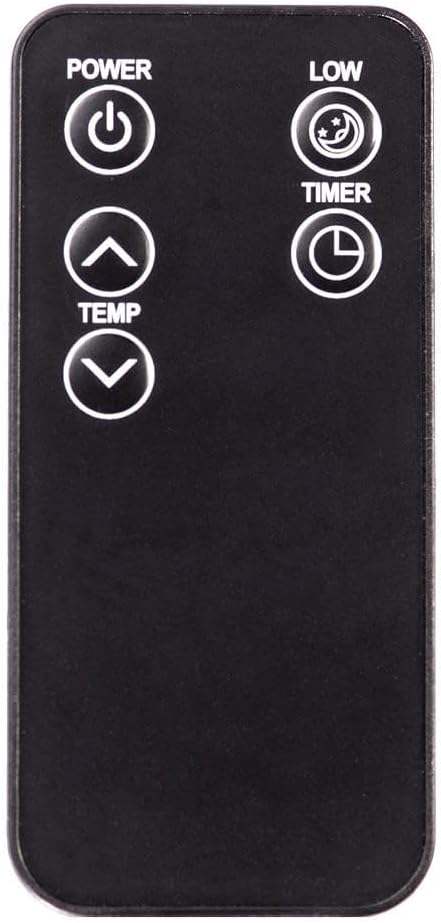
Figure 5.2: The remote control for the EdenPURE GEN21, featuring Power, Low (fan speed), Temp Up/Down, and Timer buttons.
Basic Operation:
- Power On/Off: Press the POWER button on the control panel or remote to turn the unit on or off. The digital display will illuminate.
- Setting Temperature (Heating Mode):
- When in heating mode, use the UP (▲) and DOWN (▼) arrows to adjust the desired temperature. The temperature range is typically 60°F to 90°F (15°C to 32°C).
- The unit will automatically cycle on and off to maintain the set temperature.
- Selecting Mode (Heating/Cooling Fan): Press the MODE button on the control panel to switch between heating and fan-only (cooling) modes. The display will indicate the active mode.
- Timer Function:
- Press the TIMER button to set an auto-off timer. Each press increases the timer by one hour, up to 12 hours.
- The display will show the remaining hours before the unit automatically turns off.
- Fan Speed (Cooling Mode): In fan-only mode, the remote control may offer a "LOW" button to adjust fan speed. The control panel typically adjusts fan speed automatically or has a single fan setting.
6. Maintenance and Cleaning
WARNING: Always unplug the unit from the power outlet and allow it to cool completely before performing any maintenance or cleaning.
Cleaning the Exterior:
- Wipe the exterior surfaces with a soft, damp cloth.
- Do not use abrasive cleaners, waxes, or polishes as these may damage the finish.
- Ensure no water enters the interior of the unit.
Cleaning the Air Filter:
Regular cleaning of the air filter is essential for optimal performance and air quality. The EdenPURE GEN21 features a removable air filter located at the bottom rear of the unit.

Figure 6.1: Image showing the removable air filter and its housing at the bottom rear of the unit.
- Locate the air filter cover at the bottom rear of the unit.
- Gently pull the filter cover outwards to remove it.
- Remove the filter from its housing.
- Clean the filter using a vacuum cleaner to remove dust and debris. For deeper cleaning, rinse the filter under warm running water.
- Allow the filter to air dry completely before reinserting it. Do not use heat to dry the filter.
- Reinsert the dry filter into its housing and replace the cover.
It is recommended to clean the air filter every two weeks or more frequently depending on usage and air quality.
Storage:
If storing the unit for an extended period, unplug it, clean it thoroughly, and store it in a cool, dry place, preferably in its original packaging.
7. Troubleshooting Guide
| Problem | Possible Cause | Solution |
|---|---|---|
| Unit does not turn on. |
|
|
| Unit is on but no heat/airflow. |
|
|
| Unit makes unusual noises. |
|
|
| Remote control not working. |
|
|
If the problem persists after attempting these solutions, contact customer support.
8. Specifications
| Model Number | A5752 |
| Brand | EdenPURE |
| Power Input | 127 Volts, 60Hz |
| Heating Element | PTC element (Copper PTC Infrared) |
| Heating Coverage | Up to 1,000 sq ft |
| Dimensions (D x W x H) | 13"D x 7"W x 22"H |
| Item Weight | 16 pounds |
| Special Features | All-season heater and cooler, Digital touchscreen controls, Remote included, Tip-over and overheat protection. |
| Indoor/Outdoor Usage | Indoor only |
| UPC | 827463003511 |
9. Warranty and Support
The EdenPURE GEN21 comes with a 1-year manufacturer's warranty from the date of purchase. This warranty covers defects in materials and workmanship under normal use.
For warranty claims, technical support, or service inquiries, please contact EdenPURE customer service. Please have your model number (A5752) and proof of purchase available when contacting support.
For more information on optional accessories, such as the air purification kit, please visit the official EdenPURE website.
Related documentsA5752


Ask a question about this manual
Ask about setup, troubleshooting, compatibility, parts, safety, or missing instructions. Manuals+ will review the question and use this page’s manual context to help answer it.