
MERACH MR-T21B1
MERACH Walking Pad User Manual
Model: MR-T21B1
Brand: MERACH
Introduction
The MERACH Walking Pad is a versatile 2-in-1 under desk treadmill designed for both home and office use. It offers a quiet operation with a maximum speed of 3.8 MPH (6 KM/H) and features remote control and APP connectivity for a comprehensive fitness experience. Its compact design allows for easy storage and portability.
This manual provides essential information for the safe and effective operation, maintenance, and troubleshooting of your MERACH Walking Pad.
Safety Information
Please read all safety instructions carefully before using the walking pad. Failure to follow these instructions may result in injury or damage to the product.
- Ensure the walking pad is placed on a flat, stable surface.
- Keep children and pets away from the walking pad during operation.
- Do not use the walking pad if you weigh more than 265 pounds (120 kg).
- Always wear appropriate athletic footwear.
- Do not operate the walking pad if it is damaged or malfunctioning.
- Unplug the walking pad from the power outlet when not in use or before cleaning.
- Consult a physician before starting any new exercise program.
Package Contents
Verify that all components are present in the package:
- MERACH Walking Pad (MR-T21B1)
- Power Cord
- Remote Control
- User Manual (this document)
Setup
The MERACH Walking Pad requires minimal assembly. Follow these steps for initial setup:
- Unpack: Carefully remove the walking pad and all accessories from the packaging.
- Placement: Place the walking pad on a firm, level surface, ensuring there is adequate space around it for safe operation. Avoid placing it on thick carpets that might obstruct ventilation.
- Power Connection: Connect the power cord to the walking pad's power input port and then plug it into a standard electrical outlet.
- Remote Control: Ensure the remote control has batteries installed (if not pre-installed). The product specifications indicate batteries are included.

Figure 1: MERACH Walking Pad in typical usage scenarios, demonstrating its versatility for walking and under-desk use. The image also highlights the remote control and app connectivity.
Operating Instructions
Powering On/Off
- To power on, press the power button on the walking pad or the remote control. The LED display will illuminate.
- To power off, press and hold the power button on the remote control or the walking pad until the display turns off.
Modes of Operation
The MERACH Walking Pad supports three primary modes, catering to different activity levels:

Figure 2: Illustration of the three operational modes: Working Mode (1.0-1.5 km/h), Walking Mode (1.5-3.0 km/h), and Running Mode (3.0-6.0 km/h), along with estimated calorie burn ranges for each.
- Working Mode: Ideal for use under a standing desk. Speed range: 1.0-1.5 km/h (approx. 0.6-0.9 MPH).
- Walking Mode: Suitable for light exercise. Speed range: 1.5-3.0 km/h (approx. 0.9-1.9 MPH).
- Running Mode: For more vigorous activity. Speed range: 3.0-6.0 km/h (approx. 1.9-3.8 MPH).
Using the Remote Control
The remote control allows you to start, stop, and adjust the speed of the walking pad. Refer to the remote control diagram (if available in packaging) for button functions.
- Press the Start/Stop button to begin or end a workout.
- Use the + and - buttons to increase or decrease the speed.
APP Connectivity and LED Display
The MERACH Walking Pad can connect to a dedicated mobile application via Bluetooth, allowing you to track your workout data and control the device. The integrated LED display provides real-time feedback.
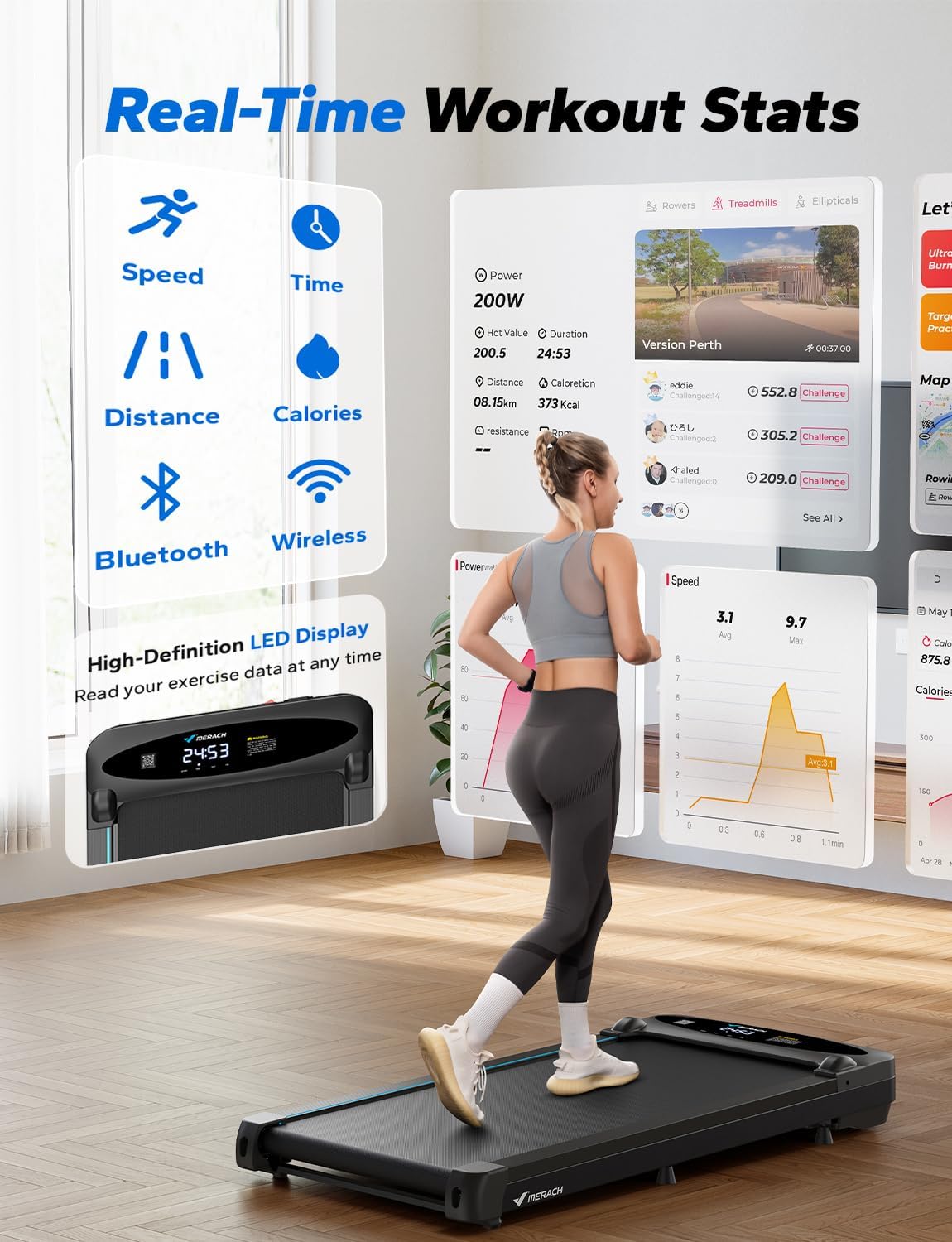
Figure 3: Real-time workout statistics are accessible via the MERACH mobile application and the high-definition LED display on the walking pad. Data includes speed, time, distance, and calories burned.
- Bluetooth Connection: Download the MERACH app from your device's app store (App Store or Google Play). Enable Bluetooth on your phone and open the app to pair with the walking pad.
- LED Display: The high-definition LED display shows current speed, time, distance, and calories burned.

Figure 4: Key features of the MERACH Walking Pad, including its quiet operation, speed range, weight capacity, shock absorption system, multi-layer running belt, powerful motor, and convenient remote storage.
Maintenance
Regular maintenance ensures the longevity and optimal performance of your MERACH Walking Pad.
- Cleaning: Wipe down the walking pad with a damp cloth after each use. Do not use abrasive cleaners or solvents.
- Belt Lubrication: The running belt may require lubrication periodically. Refer to the specific instructions in the full user manual for your model regarding lubrication frequency and type of lubricant.
- Belt Adjustment: If the running belt shifts to one side or slips, it may need adjustment. Consult the full user manual for detailed instructions on how to center and tension the belt.
- Storage: When not in use, store the walking pad in a dry, cool place. Its compact design allows it to be stored under furniture.

Figure 5: The compact design of the MERACH Walking Pad allows for easy storage, such as sliding it under a bed, saving valuable space.
Troubleshooting
If you encounter issues with your MERACH Walking Pad, refer to the following common problems and solutions:
| Problem | Possible Cause | Solution |
|---|---|---|
| Walking pad does not power on. | Power cord not properly connected; power outlet issue. | Ensure power cord is securely plugged in. Test the outlet with another device. |
| Belt slips or hesitates. | Belt needs lubrication or adjustment. | Lubricate the belt as per maintenance instructions. Adjust belt tension. |
| Remote control not responding. | Low or dead batteries; remote not paired. | Replace remote control batteries. Re-pair the remote if necessary (refer to full manual). |
| App not connecting via Bluetooth. | Bluetooth off; app issue; device not discoverable. | Ensure Bluetooth is enabled on your phone. Restart the app and the walking pad. Check app permissions. |
For issues not listed here, or if the problem persists, please contact MERACH customer support.
Specifications
Detailed technical specifications for the MERACH Walking Pad (Model: MR-T21B1):
- Model Number: MR-T21B1
- Color: Coal Black
- Material Type: Alloy Steel
- Maximum Speed: 3.8 Miles per Hour (6 KM/H)
- Maximum Weight Capacity: 265 Pounds (120 kg)
- Horsepower: 2.75 Horsepower
- Product Dimensions (D x W x H): 116 x 47.6 x 13 cm (45.7 x 18.7 x 5.1 inches)
- Item Weight: Approximately 21 kg
- Noise Level: <45 dB (as per product features)
- Shock Absorption: 6 Silicone Shock Absorbers
- Running Belt: 5-Layer Cushioned Non-Slip Running Belt
- Walking Platform: DiamondGrip
- Included Components: Power Cord, Remote Control, User Manual
- Batteries Included: Yes (for remote control)
- Assembly Required: No

Figure 6: Performance comparison highlighting the superior power, efficiency, noise reduction, and cooling of the MERACH-T26 Power Motor.
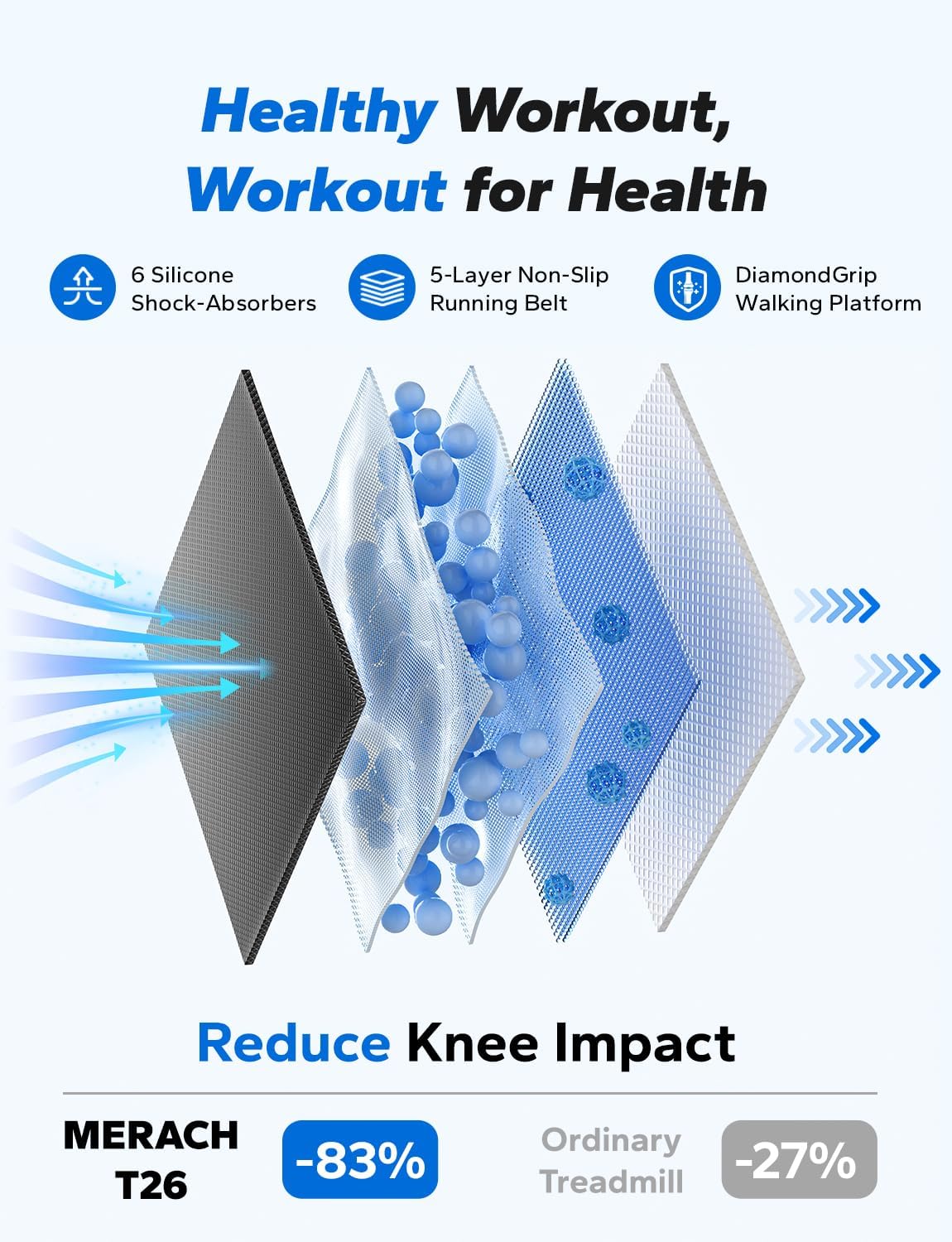
Figure 7: The advanced shock absorption system and multi-layer running belt designed to reduce knee impact during use.
Warranty and Support
MERACH products are designed for durability and performance. For warranty information, please refer to the warranty card included with your product or visit the official MERACH website.
For technical support, troubleshooting assistance, or to inquire about replacement parts, please contact MERACH customer service through the contact information provided on the official website or your purchase documentation.
Please have your model number (MR-T21B1) and purchase date ready when contacting support.
Related Documents - MR-T21B1
 |
Merach Treadmill MR-T21 User Manual Comprehensive user manual for the Merach MR-T21 treadmill. Includes safety instructions, technical specifications, assembly guide, and maintenance tips for your home fitness equipment. |
 |
MERACH Treadmill MR-T26 User Manual Comprehensive user manual for the MERACH Treadmill model MR-T26, including safety instructions, product specifications, assembly, operation, and maintenance guidelines. |
 |
MERACH MR-T25 Treadmill User Manual Comprehensive user manual for the MERACH MR-T25 treadmill, detailing safety instructions, specifications, parts list, operating procedures, display functions, remote control usage, various modes, app integration, warm-up exercises, troubleshooting guide, maintenance procedures, and warranty information. |
 |
MERACH MR-T26 Treadmill User Manual Comprehensive user manual for the MERACH MR-T26 treadmill, covering safety instructions, product specifications, operating procedures, maintenance, troubleshooting, app setup, warm-up exercises, and warranty information. |
 |
MERACH MR-T14 Treadmill User Manual | Safety, Setup, and Maintenance Comprehensive user manual for the MERACH MR-T14 treadmill, covering safety instructions, technical specifications, setup, operation, maintenance, troubleshooting, and warranty information. Includes detailed descriptions of features and usage. |
 |
MERACH MRK-T05 Portable Treadmill User Manual - Safety, Assembly, Usage Guide Comprehensive user manual for the MERACH MRK-T05 Portable Treadmill. Includes detailed instructions on safety, technical specifications, packing list, assembly, product usage, app connectivity (MERACH & Kinomap), warm-up exercises, troubleshooting, warranty information, and FCC compliance. |
Ask a question about this manual
Ask about setup, troubleshooting, compatibility, parts, safety, or missing instructions. Manuals+ will review the question and use this page’s manual context to help answer it.